
flink部署
参考:
https://ververica.cn/developers-resources/
#flink参数
https://blog.csdn.net/qq_35440040/article/details/84992796
spark使用批处理模拟流计算
flink使用流框架模拟批计算
https://ci.apache.org/projects/flink/flink-docs-release-1.8/
https://flink.apache.org/downloads.html#
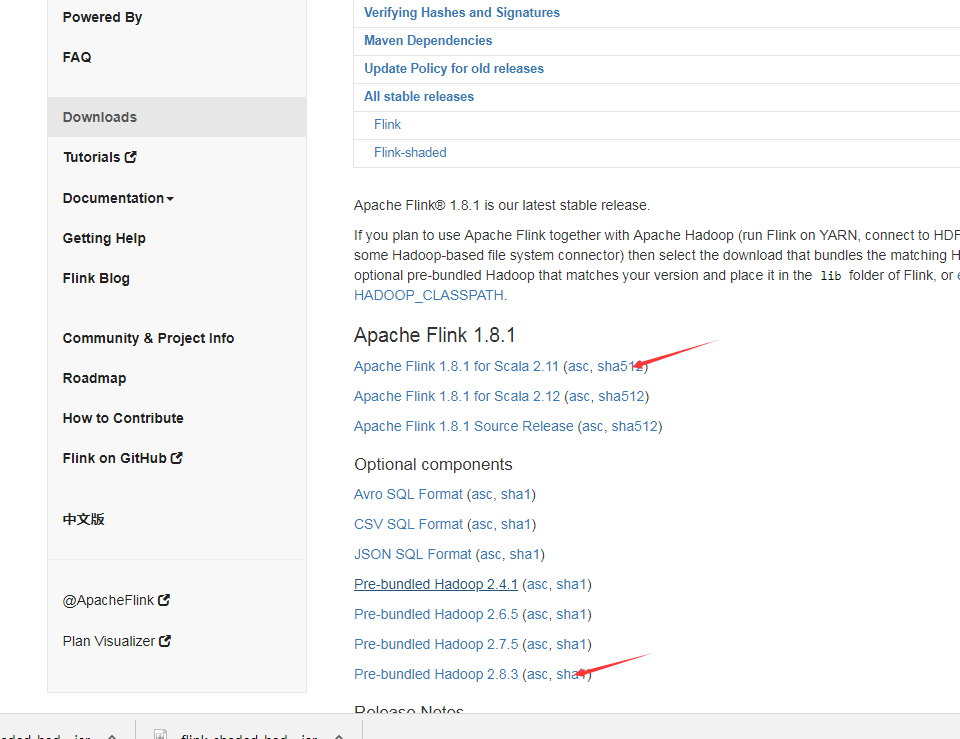
下载包:
https://flink.apache.org/downloads.html
tar -xzvf flink-1.8.0-bin-scala_2.11.tgz -C /opt/module/
vim /etc/profile
export FLINK_HOME=/opt/module/flink-1.8.0
export PATH=$PATH:$FLINK_HOME/bin
cd /opt/module/flink-1.8.0/conf
mv flink-conf.yaml flink-conf.yaml.bak
vim flink-conf.yaml
jobmanager.rpc.address: Fengfeng-dr-algo1
jobmanager.rpc.port: 6123
jobmanager.heap.size: 1024m
taskmanager.heap.size: 1024m
taskmanager.numberOfTaskSlots: 2
parallelism.default: 2
fs.default-scheme: hdfs://Fengfeng-dr-algo1:9820
#这个是在core-site.xml里配的hdfs集群地址,yarn集群模式主要配这个
vim masters
Fengfeng-dr-algo1
vim slaves
Fengfeng-dr-algo2
Fengfeng-dr-algo3
Fengfeng-dr-algo4
#配置完成后将文件同步到其他节点
scp /etc/profile Fengfeng-dr-algo2:/etc/profile
scp /etc/profile Fengfeng-dr-algo3:/etc/profile
scp /etc/profile Fengfeng-dr-algo4:/etc/profile
scp -r /opt/module/flink-1.8.0/ Fengfeng-dr-algo2:/opt/module
scp -r /opt/module/flink-1.8.0/ Fengfeng-dr-algo3:/opt/module
scp -r /opt/module/flink-1.8.0/ Fengfeng-dr-algo4:/opt/module
启动集群start-cluster.sh
检查TaskManagerRunner服务起来没有:
[root@Fengfeng-dr-algo1 conf]# ansible all -m shell -a 'jps'
Fengfeng-dr-algo3 | SUCCESS | rc=0 >>
20978 DataNode
22386 TaskManagerRunner
22490 Jps
21295 NodeManager
Fengfeng-dr-algo4 | SUCCESS | rc=0 >>
24625 NodeManager
26193 TaskManagerRunner
24180 DataNode
24292 SecondaryNameNode
26297 Jps
Fengfeng-dr-algo2 | SUCCESS | rc=0 >>
26753 Jps
24867 ResourceManager
24356 DataNode
25480 NodeManager
26650 TaskManagerRunner
Fengfeng-dr-algo1 | SUCCESS | rc=0 >>
27216 Jps
24641 NameNode
24789 DataNode
27048 StandaloneSessionClusterEntrypoint
25500 NodeManager
查看WebUI,端口为8081
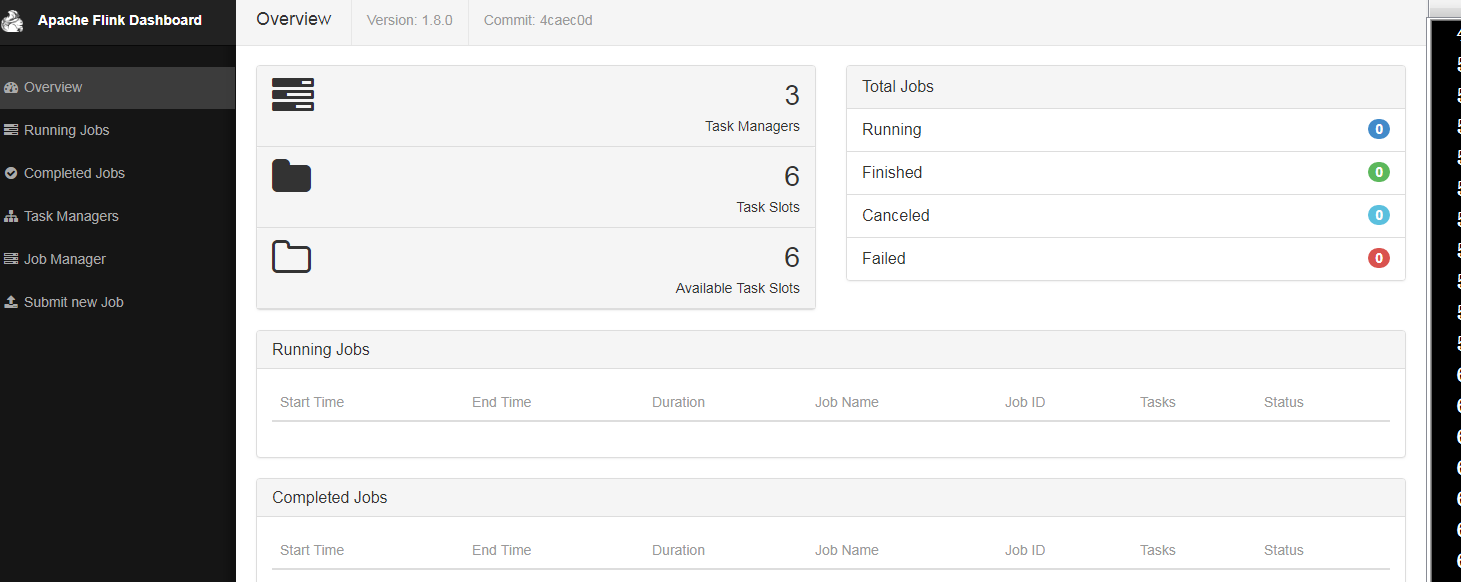
#运行flink测试,1.txt在hdfs上.
1/ 以standalone模式
flink run /opt/module/flink-1.8.0/examples/batch/WordCount.jar -c wordcount --input /1.txt
2/ 以yarn-cluster模式,需要停掉集群模式stop-cluster.sh
flink run -m yarn-cluster /opt/module/flink-1.8.0/examples/batch/WordCount.jar -c wordcount --input /1.txt
yarn-cluster跑得作业情况可在yarn的web8080端口看
附: flink yarn-cluster跑wordcount结果
[root@fengfeng-dr-algo1 hadoop]# flink run -m yarn-cluster /opt/module/flink-1.8.0/examples/batch/WordCount.jar -c wordcount --input /1.txt
2019-08-15 03:52:50,622 INFO org.apache.hadoop.yarn.client.RMProxy - Connecting to ResourceManager at oride-dr-algo2/172.28.20.168:8032
2019-08-15 03:52:50,755 INFO org.apache.flink.yarn.cli.FlinkYarnSessionCli - No path for the flink jar passed. Using the location of class org.apache.flink.yarn.YarnClusterDescriptor to locate the jar
2019-08-15 03:52:50,755 INFO org.apache.flink.yarn.cli.FlinkYarnSessionCli - No path for the flink jar passed. Using the location of class org.apache.flink.yarn.YarnClusterDescriptor to locate the jar
2019-08-15 03:52:50,922 WARN org.apache.flink.yarn.AbstractYarnClusterDescriptor - Neither the HADOOP_CONF_DIR nor the YARN_CONF_DIR environment variable is set. The Flink YARN Client needs one of these to be set to properly load the Hadoop configuration for accessing YARN.
2019-08-15 03:52:50,961 INFO org.apache.flink.yarn.AbstractYarnClusterDescriptor - Cluster specification: ClusterSpecification{masterMemoryMB=1024, taskManagerMemoryMB=1024, numberTaskManagers=1, slotsPerTaskManager=2}
2019-08-15 03:52:51,410 WARN org.apache.flink.yarn.AbstractYarnClusterDescriptor - The configuration directory ('/opt/module/flink-1.8.0/conf') contains both LOG4J and Logback configuration files. Please delete or rename one of them.
2019-08-15 03:52:52,456 INFO org.apache.flink.yarn.AbstractYarnClusterDescriptor - Submitting application master application_1565840709386_0002
2019-08-15 03:52:52,481 INFO org.apache.hadoop.yarn.client.api.impl.YarnClientImpl - Submitted application application_1565840709386_0002
2019-08-15 03:52:52,481 INFO org.apache.flink.yarn.AbstractYarnClusterDescriptor - Waiting for the cluster to be allocated
2019-08-15 03:52:52,484 INFO org.apache.flink.yarn.AbstractYarnClusterDescriptor - Deploying cluster, current state ACCEPTED
2019-08-15 03:52:56,776 INFO org.apache.flink.yarn.AbstractYarnClusterDescriptor - YARN application has been deployed successfully.
Starting execution of program
Printing result to stdout. Use --output to specify output path.
(abstractions,1)
(an,3)
(and,3)
(application,1)
(at,2)
(be,1)
(broadcast,2)
(called,1)
(can,1)
(deep,1)
(dive,1)
(dynamic,1)
(event,1)
(every,1)
(example,1)
(explain,1)
(exposed,1)
(flink,6)
(has,1)
(implementation,1)
(into,1)
(is,4)
(look,1)
(make,1)
(of,6)
(on,1)
(one,2)
(physical,1)
(runtime,1)
(s,3)
(stack,3)
(state,3)
(the,6)
(this,2)
(types,1)
(up,1)
(what,1)
(a,2)
(about,1)
(apache,3)
(applied,1)
(components,1)
(core,2)
(detail,1)
(evaluates,1)
(first,1)
(how,1)
(in,4)
(it,1)
(job,1)
(module,1)
(multiple,1)
(network,3)
(operator,1)
(operators,1)
(optimisations,1)
(patterns,1)
(post,2)
(posts,1)
(series,1)
(show,1)
(sitting,1)
(stream,2)
(that,2)
(their,1)
(to,2)
(various,1)
(we,2)
(which,2)
Program execution finished
Job with JobID 11307954aeb6a6356cd7b4068f0f2160 has finished.
Job Runtime: 8448 ms
Accumulator Results:
- f0f87f15adda6b1c2703a30e110db5ed (java.util.ArrayList) [69 elements]
公司:
flink run -p 2 -m yarn-cluster -yn 2 -yqu root.users.airflow -ynm opay-metrics -ys 1 -d -c com.opay.bd.opay.main.OpayOrderMetricsMain bd-flink-project-1.0.jar
flink run -p 2 -m yarn-cluster -yn 2 -yqu root.users.airflow -ynm oride-metrics -ys 1 -d -c com.opay.bd.oride.main.OrideOrderMetricsMain bd-flink-project-1.0.jar
-p,--parallelism <parallelism> 运行程序的并行度。 可以选择覆盖配置中指定的默认值
-yn 分配 YARN 容器的数量(=TaskManager 的数量)
-yqu,--yarnqueue <arg> 指定 YARN 队列
-ynm oride-metrics 给应用程序一个自定义的名字显示在 YARN 上
-ys,--yarnslots <arg> 每个 TaskManager 的槽位数量
-ys,--yarnslots <arg> 每个 TaskManager 的槽位数量
-c,--class <classname> 程序入口类
("main" 方法 或 "getPlan()" 方法)
-m yarn-cluster cluster模式
flink部署的更多相关文章
- Flink部署-standalone模式
Flink部署-standalone模式 2018年11月30日 00:07:41 Xlucas 阅读数:74 版权声明:本文为博主原创文章,未经博主允许不得转载. https://blog.cs ...
- Flink 部署文档
Flink 部署文档 1 先决条件 2 下载 Flink 二进制文件 3 配置 Flink 3.1 flink-conf.yaml 3.2 slaves 4 将配置好的 Flink 分发到其他节点 5 ...
- flink部署操作-flink standalone集群安装部署
flink集群安装部署 standalone集群模式 必须依赖 必须的软件 JAVA_HOME配置 flink安装 配置flink 启动flink 添加Jobmanager/taskmanager 实 ...
- Flink(二) —— 部署与任务提交
一.下载&启动 官网上下载安装包,执行下列命令即启动完成. ./bin/start-cluster.sh 效果图 Flink部署模式 Standalone模式 Yarn模式 k8s部署 二.配 ...
- 新一代大数据处理引擎 Apache Flink
https://www.ibm.com/developerworks/cn/opensource/os-cn-apache-flink/index.html 大数据计算引擎的发展 这几年大数据的飞速发 ...
- Flink的高可用集群环境
Flink的高可用集群环境 Flink简介 Flink核心是一个流式的数据流执行引擎,其针对数据流的分布式计算提供了数据分布,数据通信以及容错机制等功能. 因现在主要Flink这一块做先关方面的学习, ...
- 大数据框架对比:Hadoop、Storm、Samza、Spark和Flink
转自:https://www.cnblogs.com/reed/p/7730329.html 今天看到一篇讲得比较清晰的框架对比,这几个框架的选择对于初学分布式运算的人来说确实有点迷茫,相信看完这篇文 ...
- Apache Flink系列(1)-概述
一.设计思想及介绍 基本思想:“一切数据都是流,批是流的特例” 1.Micro Batching 模式 在Micro-Batching模式的架构实现上就有一个自然流数据流入系统进行攒批的过程,这在一定 ...
- Flink运行在yarn上
在一个企业中,为了最大化的利用集群资源,一般都会在一个集群中同时运行多种类型的 Workload.因此 Flink 也支持在 Yarn 上面运行: flink on yarn的前提是:hdfs.yar ...
随机推荐
- 下载Americanlife 语音材料
下载剧本 下载后会在给定目录生成多pdf文件,文件名为每一节的名称 #!/usr/bin/env python3.5 # -*- coding: utf-8 -*- # @Time : 2019/11 ...
- poj 2976 Dropping tests (最大化平均值:二分查找)
#include<iostream> #include<algorithm> #include<stdio.h> #include<math.h> #d ...
- JavaScript:固定table的表头
当表格数据很多,以致于容器块元素出现滚动条.而在滚动滚动条的时候,数据行会被块元素遮挡.若要保持表格的head部分始终在可视范围内,我们需要对表头进行特殊的样式设置.下面的jsp代码可以实现表头固定, ...
- flask入门第一篇
一. Python 现阶段三大主流Web框架 Django Tornado Flask 对比 1.Django 主要特点是大而全,集成了很多组件,例如: Models Admin Form 等等, 不 ...
- 8 Linux 文件类型
Linux 系统中的文件是没有扩展名的. 1.通过 ls -l 文件名,看第一个字符判断文件类型: - 普通文件(文本文件.二进制文件.压缩文件.电影.图片等) d 目录文件 b 设备文件(块设 ...
- 认识HTML语言(CodePen)
认识HTML语言 1.一个网页的加载过程 2.Web技术全览 3.HTML语法 HTML语法(一):标签 HTML语法(四):网页结构 4.HTML常用元素 展示元素 (1)块级元素div (2)内联 ...
- 批量删除.svn文件夹、.svn文件
使用svn进行版本控制,每个文件夹下都有.svn文件夹,有些项目在脱离svn版本控制之后,想删除项目中所有的.svn文件夹,可用下面的方法进行快速删除: 1.打开要删除.svn文件的最外层文件夹, ...
- CentOS 7下使用Apache2部署Django项目,解决文件名中含有中文报错的问题
系统版本: CentOS 7.3Apache 2.4 Django 1.11 问题描述 Django项目涉及上传操作,上传文件名称含有中文,若使用runserver启动服务,没有问题!若将Django ...
- koa 基础(十一)koa 中 koa-bodyparser 中间件获取表单提交的数据
1.app.js /** * koa 中 koa-bodyparser 中间件获取表单提交的数据 * 1.npm install --save koa-bodyparser * 2.引入 const ...
- leetcode334 递增的三元子序列
class Solution { public: bool increasingTriplet(vector<int>& nums) { //使用双指针: int len=nums ...