
Flutter移动电商实战 --(15)商品推荐区域制作
1、推荐商品类的编写
这个类接收一个List参数,就是推荐商品的列表,这个列表是可以左右滚动的。
/*商品推荐*/

class Recommend extends StatelessWidget {

  final List  recommendList;

  Recommend({Key key, this.recommendList}) : super(key: key);

}
2、推荐标题内部方法的编写
实际开发中,要尽量减少嵌套,我们需要把复杂的组件,单独拿出一个方法进行编写。这里就把商品推荐标题单独拿出一个方法进行编写。
/*推荐商品标题*/

Widget _titleWidget(){

 return Container(

   alignment: Alignment.centerLeft,

   padding: EdgeInsets.fromLTRB(10.0, 2.0, 0,5.0),

   decoration: BoxDecoration(

     color:Colors.white,

     border: Border(

       bottom: BorderSide(width:0.5,color:Colors.black12)

     )

   ),

   child:Text(

     '商品推荐',

     style:TextStyle(color:Colors.pink)

     )

 );

}
3、推荐商品单独项编写
把推荐商品的每一个子项我们也分离出来。每一个子项都使用InkWell,这样为以后的页面导航作准备。里边使用了Column,把内容分成三行。
先不充关于InkWel的使用
InkWell有的叫溅墨效果,有的叫水波纹效果。使用场景是给一些无点击事件的部件添加点击事件时使用(也支持长按、双击等事件),同时你也可以去修改它的颜色和形状。
InkWell(

  borderRadius: BorderRadius.circular(8.0), /*圆角*/

  splashColor: Colors.transparent, /*溅墨色(波纹色)*/

  highlightColor: Colors.transparent, /*点击时的背景色(高亮色)*/

  onTap: () {},/*点击事件*/

  child: Container(),

);
再回访推荐商品的编写
Widget _item(index){

    return InkWell(

      onTap: (){},

      child: Container(

        height: ScreenUtil().setHeight(330),

        width: ScreenUtil().setWidth(250),

        padding: EdgeInsets.all(8.0),

        decoration:BoxDecoration(

          color:Colors.white,

          border:Border(

            left: BorderSide(width:0.5,color:Colors.black12)

          )

        ),

        child: Column(

          children: <Widget>[

            Image.network(recommendList[index]['image']),

            Text('¥${recommendList[index]['mallPrice']}'),

            Text(

              '¥${recommendList[index]['price']}',

              style: TextStyle(

                decoration: TextDecoration.lineThrough,

                color:Colors.grey

              ),

            )

          ],

        ),

      ),

    );

}
4、横向列表组件的编写
横向列表组件也进行单独编写,以减少嵌套,这样我们就把每一个重要的部分都进行了分离。
Widget _recommedList(){

  return Container(

    height: ScreenUtil().setHeight(330),

    child: ListView.builder(

      scrollDirection: Axis.horizontal,

      itemCount: recommendList.length,

      itemBuilder: (context,index){

        return _item(index);

      },

    ),

  );

}
有了这三个基本组件,最后我们在build方法里进行组合,形成商品推荐区域。
@override

Widget build(BuildContext context) {

return Container(

   height: ScreenUtil().setHeight(380),

   margin: EdgeInsets.only(top: 10.0),

   child: Column(

     children: <Widget>[

       _titleWidget(),

       _recommedList()

     ],

   ),

);

}
5、整个组件的类代码如下
// 商品推荐

class Recommend extends StatelessWidget {

  final List  recommendList;

  Recommend({Key key, this.recommendList}) : super(key: key);

  @override

  Widget build(BuildContext context) {

    return Container(

       height: ScreenUtil().setHeight(380),

       margin: EdgeInsets.only(top: 10.0),

       child: Column(

         children: <Widget>[

           _titleWidget(),

           _recommedList()

         ],

       ),

    );

  }

// 推荐商品标题

  Widget _titleWidget(){

     return Container(

       alignment: Alignment.centerLeft,

       padding: EdgeInsets.fromLTRB(10.0, 2.0, 0,5.0),

       decoration: BoxDecoration(

         color:Colors.white,

         border: Border(

           bottom: BorderSide(width:0.5,color:Colors.black12)

         )

       ),

       child:Text(

         '商品推荐',

         style:TextStyle(color:Colors.pink)

         )

     );

  }

  Widget _recommedList(){

      return Container(

        height: ScreenUtil().setHeight(330),

        child: ListView.builder(

          scrollDirection: Axis.horizontal,

          itemCount: recommendList.length,

          itemBuilder: (context,index){

            return _item(index);

          },

        ),

      );

  }

  Widget _item(index){

    return InkWell(

      onTap: (){},

      child: Container(

        height: ScreenUtil().setHeight(330),

        width: ScreenUtil().setWidth(250),

        padding: EdgeInsets.all(8.0),

        decoration:BoxDecoration(

          color:Colors.white,

          border:Border(

            left: BorderSide(width:0.5,color:Colors.black12)

          )

        ),

        child: Column(

          children: <Widget>[

            Image.network(recommendList[index]['image']),

            Text('¥${recommendList[index]['mallPrice']}'),

            Text(

              '¥${recommendList[index]['price']}',

              style: TextStyle(

                decoration: TextDecoration.lineThrough,

                color:Colors.grey

              ),

            )

          ],

        ),

      ),

    );

  }

}
6、准备数据并进行调用
在 HomePage build 中继续添加:
List<Map> recommendList = (data['data']['recommend'] as List).cast();

 Recommend(recommendList:recommendList),
效果图:
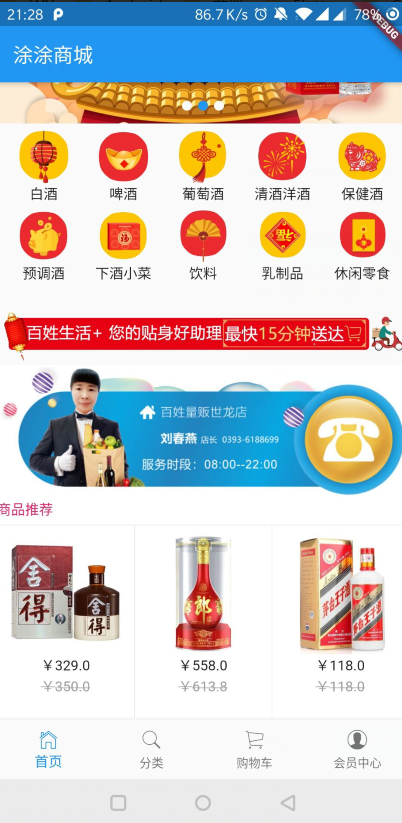
Flutter移动电商实战 --(15)商品推荐区域制作的更多相关文章
- 15-Flutter移动电商实战-商品推荐区域制作
1.推荐商品类的编写 这个类接收一个List参数,就是推荐商品的列表,这个列表是可以左右滚动的. /*商品推荐*/class Recommend extends StatelessWidget { ...
- Flutter移动电商实战 --(1)项目学习记录
1.项目相关截图 2.项目知识点梳理图 Dio2.0: Dio是一个强大的 Dart Http 请求库,支持 Restful API.FormData.拦截器.请求取消等操作. Swiper: Swi ...
- Flutter移动电商实战 --(43)详细页_补充首页跳转到详细页
首页轮播点击到详细页 修改我们轮播这里的代码:SwiperDiy这个类这里的代码 return InkWell( onTap: (){ Application.router.navigateTo(co ...
- Flutter移动电商实战 --(40)路由_Fluro的全局注入和使用方法
路由注册到顶层,使每个页面都可以使用,注册到顶层就需要在main.dart中 main.dart注册路由 注入 onGenerateRoute是MaterialApp自带的路由配置项, 首页跳转到详细 ...
- Flutter移动电商实战 --(51)购物车_Provide中添加商品
新加provide的cart.dart页面 引入三个文件.开始写provide类.provide需要用with 进行混入 从prefs里面获取到数据,判断有没有数据,如果有数据就返转正List< ...
- Flutter移动电商实战 --(37)路由_Fluro引入和商品详细页建立
https://github.com/theyakka/fluro pages/details_page.dart新建页面 使用路由 先添加路由插件的引用 fluro: ^1.4.0 如果网络上下载不 ...
- Flutter移动电商实战 --(33)列表页_子类和商品列表交互效果
主要实现点击小类下面的列表跟着切换 获取右侧下面的列表信息,即要传递大类的id也要传递小类的,所以需要把左侧的大类的id也要Provide化 可以看下网站上的接口说明: https://jspang. ...
- Flutter移动电商实战 --(28)列表页_商品列表后台接口调试
主要调试商品列表页的接口 这个接口是最难的因为有大类.小类还有上拉加载 先配置接口 config/service_url.dart //const serviceUrl='http://test.ba ...
- Flutter移动电商实战 --(53)购物车_商品列表UI框架布局
cart_page.dart 清空原来写的持久化的代码; 添加对应的引用,stless生成一个静态的类.建议始终静态的类,防止重复渲染 纠正个错误,上图的CartPage单词拼错了,这里改过来防止后面 ...
随机推荐
- 用js原生加jquery实现下拉跳转至商品详情页,上拉回到商品简介
在做一个商城的项目时,做到商品详情页的时候需要实现这种下拉跳转到商品详情页加载许多图片,上拉回到商品简介的效果,并且需要用户在滑动时有一种费力的感觉.最初是通过iscroll插件实现的,但这个插件在使 ...
- 解决window 12 service 不能调用excel ,报"System.Runtime.InteropServices.COMException (0x800A03EC)
Step1: 运行comexp.msc -32 注意因为excel 是32 位的,所以这里用的32位的操作, 如用64位的操作命令:dcomcnfg.exe,将找不到excel com 进入compo ...
- 什么是mvvm设计模式
目前比较流行的几个框架,例如vue.js.react.js.avalon.angular.js等,给自己的定位都是属于mvvm类型框架,那么什么是mvvm框架呢?mvvm是什么意思呢? 聊到mvvm就 ...
- EventBus使用教程
如图准备工作: 父子(子父)组件触发 EventBus.$emit('sub') EventBus.$on('sub',()=>{ console.log(1111222232211122) } ...
- js 实现复制功能的四种方式的优劣对比
今日网上浏览别人项目,看到有人用了document.execCommand这个属性,于是想起之前我选用Clipboard.js 来实现.对于这种不常用的属性还是不太放心,于是随手查了下关于复制的资料, ...
- PHP通过iconv将字符串从GBK转换为UTF8字符集
PHP通过iconv将字符串从GBK转换为UTF8字符集的方法,需要的朋友可以参考下. 1. iconv()介绍 iconv函数可以将一种已知的字符集文件转换成另一种已知的字符集文件.例如:从GB23 ...
- PAT Basic 1080 MOOC期终成绩 (25 分)
对于在中国大学MOOC(http://www.icourse163.org/ )学习“数据结构”课程的学生,想要获得一张合格证书,必须首先获得不少于200分的在线编程作业分,然后总评获得不少于60分( ...
- string的 insert
// inserting into a string #include <iostream> #include <string> int main () { std::stri ...
- 【H5】 经纬度位置获取navigator.geolocation.getCurrentPosition
navigator.geolocation.getCurrentPosition(function(){})经度 : coords.longitude 纬度 : coords.latitude 准确度 ...
- Springboot AOP写操作日志 GET POST
pom.xml <dependency> <groupId>org.springframework.boot</groupId> <artifactId> ...