
MyBatis学习(五)
Spring和MyBaits整合
1、整合思路
- 需要spring通过单例方式管理SqlSessionFactory。
- spring和mybatis整合生成代理对象,使用SqlSessionFactory创建SqlSession。(spring和mybatis整合自动完成)
- 持久层的mapper都需要由spring进行管理。
2、整合环境
- mybatis-3.4.6的jar包,下载地址:https://github.com/mybatis/mybatis-3/releases
- spring-4.3.9的jar包,下载链接:https://files.cnblogs.com/files/AmyZheng/lib.rar
- mybatis和spring的整合包mybatis-spring-1.3.2.jar:早期ibatis和spring整合是由spring官方提供,mybatis和spring整合由mybatis提供。下载地址:http://mvnrepository.com/artifact/org.mybatis/mybatis-spring
3、SqlSessionFactory
- 在applicationContext.xml配置sqlSessionFactory和数据源
- sqlSessionFactory在mybatis和spring的整合包下。
<?xml version="1.0" encoding="UTF-8"?>

<beans xmlns="http://www.springframework.org/schema/beans"

    xmlns:xsi="http://www.w3.org/2001/XMLSchema-instance"

    xmlns:util="http://www.springframework.org/schema/util"

    xmlns:context="http://www.springframework.org/schema/context"

    xsi:schemaLocation="http://www.springframework.org/schema/beans http://www.springframework.org/schema/beans/spring-beans-4.3.xsd

        http://www.springframework.org/schema/context http://www.springframework.org/schema/context/spring-context-4.3.xsd

        http://www.springframework.org/schema/util http://www.springframework.org/schema/util/spring-util-4.3.xsd">

    <!-- 加载配置文件 -->

    <context:property-placeholder location="classpath:jdbc.properties" />

    <!-- 数据源 -->

    <bean id="dataSource" class="org.springframework.jdbc.datasource.DriverManagerDataSource">

        <property name="driverClassName" value="${jdbc.driver}" />

        <property name="url" value="${jdbc.url}" />

        <property name="username" value="${jdbc.user}" />

        <property name="password" value="${jdbc.password}" />

    </bean>

    <!-- sqlSessinFactory -->

    <bean id="sqlSessionFactory" class="org.mybatis.spring.SqlSessionFactoryBean">

        <!-- 加载mybatis的配置文件 -->

        <property name="configLocation" value="ecut/spring/mybaits-config.xml" />

        <!-- 数据源 -->

        <property name="dataSource" ref="dataSource" />

    </bean>

</beans>
4、原始dao开发(和spring整合后)
- 映射文件RoleMapper.xml
<?xml version="1.0" encoding="UTF-8"?>
<!DOCTYPE mapper
PUBLIC "-//mybatis.org//DTD Mapper 3.0//EN"
"http://mybatis.org/dtd/mybatis-3-mapper.dtd"> <!-- namespace命名空间,作用就是对sql进行分类化管理,理解sql隔离 注意:使用mapper代理方法开发,namespace有特殊重要的作用 -->
<mapper namespace="ecut.spring.mapper.RoleMapper"> <select id="getRole" parameterType="java.lang.Integer"
resultType="Role">
SELECT id , role_name as roleName , note FROM t_role WHERE id = #{value}
</select> </mapper> - 配置文件mybaits-config.xml
<?xml version="1.0" encoding="UTF-8"?> <!DOCTYPE configuration
PUBLIC "-//mybatis.org//DTD Config 3.0//EN"
"http://mybatis.org/dtd/mybatis-3-config.dtd"> <configuration>
<!-- 别名定义 -->
<typeAliases>
<typeAlias type="ecut.spring.po.Role" alias="Role"/>
</typeAliases>
<!-- 加载 映射文件 -->
<mappers> <!--通过resource方法一次加载一个映射文件 -->
<mapper resource="ecut/spring/mapper/Role.xml"/>
</mappers> </configuration> - 接口dao
package ecut.spring.dao; import ecut.spring.po.Role; public interface RoleDao { //根据id获取角色
public Role getRole(Integer id) throws Exception ; } - 接口dao实现类(继承SqlSessionDaoSupport)
package ecut.spring.dao;

import org.apache.ibatis.session.SqlSession;

import org.mybatis.spring.support.SqlSessionDaoSupport;

import ecut.spring.po.Role;

public class RoleDaoImpl extends SqlSessionDaoSupport implements RoleDao{

    //  SqlSessionDaoSupport有方法setSqlSessionFactory

    @Override

    public Role getRole(Integer id) throws Exception {

        //继承SqlSessionDaoSupport,通过this.getSqlSession()得到sqlSessoin

        SqlSession session =this.getSqlSession();

        //执行查询操作

        Role role = session.selectOne("test.getRole", id);

        // Spring 管理资源,使用完会自动关闭,释放资源

        return role;

    }

}
让RoleDaoImpl实现类继承SqlSessionDaoSupport,因为 SqlSessionDaoSupport有方法setSqlSessionFactory()方法,因此在applicationContext中使用提供setter方法进行注入,setter方法依赖于无参构造和setter方法,且在创建factory时候只需读取配置文件,因此在bean中需要配置configLocation属性。SqlSessionFactory通过Spring的配置文件注入,再由spring和mybatis整合自动完成SqlSessionFactory创建SqlSession。在接口实现类中通过this.getSqlSession()的方法获取到session完成操作。
<!-- sqlSessinFactory -->

    <bean id="sqlSessionFactory" class="org.mybatis.spring.SqlSessionFactoryBean">

        <!-- 加载mybatis的配置文件 -->

        <property name="configLocation" value="ecut/spring/mybaits-config.xml" />

        <!-- 数据源 -->

        <property name="dataSource" ref="dataSource" />

</bean> - 配置dao
    <!-- 原始dao接口 -->

    <bean id="roleDao" class="ecut.spring.dao.RoleDaoImpl">

        <property name="sqlSessionFactory" ref="sqlSessionFactory"/>

    </bean>
在applicationContext.xml中配置dao。dao接口实现类需要注入SqlSessoinFactory,通过spring进行注入。
- 测试类
package ecut.spring.test;

import java.io.IOException;

import org.junit.After;

import org.junit.Before;

import org.junit.Test;

import org.springframework.context.support.AbstractApplicationContext;

import org.springframework.context.support.ClassPathXmlApplicationContext;

import ecut.spring.dao.RoleDao;

import ecut.spring.po.Role;

public class RoleDaoImplTest {

    private AbstractApplicationContext container;

    private RoleDao roleDao;

    @Before

    public  void init() throws IOException {

        // 指定configuration metadata配置元数据

        String configLocations = "classpath:ecut/**/spring/applicationContext.xml";

        // 创建spring IOC容器

        container = new ClassPathXmlApplicationContext(configLocations);

        roleDao = (RoleDao) container.getBean("roleDao", RoleDao.class);

    }

    @Test

    public void testGetRole() throws Exception {

        // 从容器中获取的bean实例中获取属性值

        Role role = roleDao.getRole(1);

        System.out.println(role);

    }

    @After

    public void destroy(){

        // 关闭spring的IOC容器

        container.close();

    }

}
5、mapper代理开发
- mapper类
package ecut.spring.mapper; import ecut.spring.po.Role; public interface RoleMapper { //根据id获取角色
public Role getRole(Integer id) throws Exception ; } - mapper配置文件
<?xml version="1.0" encoding="UTF-8"?>
<!DOCTYPE mapper
PUBLIC "-//mybatis.org//DTD Mapper 3.0//EN"
"http://mybatis.org/dtd/mybatis-3-mapper.dtd"> <!-- namespace命名空间,作用就是对sql进行分类化管理,理解sql隔离 注意:使用mapper代理方法开发,namespace有特殊重要的作用 -->
<mapper namespace="ecut.spring.mapper.RoleMapper"> <select id="getRole" parameterType="java.lang.Integer"
resultType="Role">
SELECT id , role_name as roleName , note FROM t_role WHERE id = #{value}
</select> </mapper> - 通过MapperFactoryBean创建代理对象
   <!-- mapper配置

    MapperFactoryBean:根据mapper接口生成代理对象

    -->

    <bean id="roleMapper" class="org.mybatis.spring.mapper.MapperFactoryBean">

        <!-- mapperInterface指定mapper接口 -->

        <property name="mapperInterface" value=" ecut.spring.mapper.RoleMapper"/>

        <property name="sqlSessionFactory" ref="sqlSessionFactory"/>

    </bean>
不整合之前是要通过session去创建RoleMapper对象,再由mybaits自动生成的mapper代理对象
SqlSession session = factory.openSession();

//创建RoleMapper对象,mybaits自动生成的mapper代理对象

RoleMapper roleMapper = session.getMapper(RoleMapper.class);
通过MapperFactoryBean创建代理对象存在的问题:需要针对每个mapper进行配置,麻烦。
- 通过MapperScannerConfigurer进行mapper扫描(建议使用)
    <!-- mapper批量扫描,从mapper包中扫描出mapper接口,自动创建代理对象并且在spring容器中注册

    遵循规范:将mapper.java和mapper.xml映射文件名称保持一致,且在一个目录 中

    自动扫描出来的mapper的bean的id为mapper类名(首字母小写)

    -->

    <bean class="org.mybatis.spring.mapper.MapperScannerConfigurer">

        <!-- 指定扫描的包名

        如果扫描多个包,每个包中间使用半角逗号分隔 -->

        <property name="basePackage" value="ecut.spring.mapper"/>

        <!-- 不能使用  name="sqlSessionFactory" 会使数据源配置后执行-->

        <property name="sqlSessionFactoryBeanName" value="sqlSessionFactory"/>

    </bean>
若mapper 的名称是TRoleMapper自动扫描出来的mapper的bean的id为TRoleMapper而不是首字母小写tRoleMapper。可以根据日志来确定bean的id是多少,如RoleMapper的日志为DEBUG [main] - Creating shared instance of singleton bean 'roleMapper',则可以知道RoleMapper的id是roleMapper。
- 测试类
package ecut.spring.test;

import java.io.IOException;

import org.junit.After;

import org.junit.Before;

import org.junit.Test;

import org.springframework.context.support.AbstractApplicationContext;

import org.springframework.context.support.ClassPathXmlApplicationContext;

import ecut.spring.mapper.RoleMapper;

import ecut.spring.po.Role;

public class RoleMapperTest {

    private AbstractApplicationContext container;

    private RoleMapper roleMapper;

    @Before

    public  void init() throws IOException {

        // 指定configuration metadata配置元数据

        String configLocations = "classpath:ecut/**/spring/applicationContext.xml";

        // 创建spring IOC容器

        container = new ClassPathXmlApplicationContext(configLocations);

        roleMapper = (RoleMapper) container.getBean("roleMapper", RoleMapper.class);

    }

    @Test

    public void testGetRole() throws Exception {

        // 从容器中获取的bean实例中获取属性值

        Role role = roleMapper.getRole(1);

        System.out.println(role);

    }

    @After

    public void destroy(){

        // 关闭spring的IOC容器

        container.close();

    }

}
逆向工程
1、什么是逆向工程
- mybaits需要程序员自己编写sql语句,mybatis官方提供逆向工程 可以针对单表自动生成mybatis执行所需要的代码(mapper.java,mapper.xml、po..)
- 企业实际开发中,常用的逆向工程方式:由于数据库的表生成java代码。
2、环境配置
jar包下载地址:http://mvnrepository.com/artifact/org.mybatis.generator/mybatis-generator-core/1.3.7
3、使用方法
- 运行逆向工程

建议使用java程序方式,不依赖开发工具。
- 生成代码的配置文件
<?xml version="1.0" encoding="UTF-8"?>

<!DOCTYPE generatorConfiguration

  PUBLIC "-//mybatis.org//DTD MyBatis Generator Configuration 1.0//EN"

  "http://mybatis.org/dtd/mybatis-generator-config_1_0.dtd">

<generatorConfiguration>

    <context id="testTables" targetRuntime="MyBatis3">

        <commentGenerator>

            <!-- 是否去除自动生成的注释 true:是 : false:否 -->

            <property name="suppressAllComments" value="true" />

        </commentGenerator>

        <!--数据库连接的信息:驱动类、连接地址、用户名、密码 -->

        <jdbcConnection driverClass="com.mysql.jdbc.Driver"

            connectionURL="jdbc:mysql://localhost:3306/test" userId="root"

            password="123456">

        </jdbcConnection>

        <!-- 默认false,把JDBC DECIMAL 和 NUMERIC 类型解析为 Integer,为 true时把JDBC DECIMAL 和

            NUMERIC 类型解析为java.math.BigDecimal -->

        <javaTypeResolver>

            <property name="forceBigDecimals" value="false" />

        </javaTypeResolver>

        <!-- targetProject:生成PO类的位置 -->

        <javaModelGenerator targetPackage="ecut.reverse.po"

            targetProject=".\src">

            <!-- enableSubPackages:是否让schema作为包的后缀 -->

            <property name="enableSubPackages" value="false" />

            <!-- 从数据库返回的值被清理前后的空格 -->

            <property name="trimStrings" value="true" />

        </javaModelGenerator>

        <!-- targetProject:mapper映射文件生成的位置 -->

        <sqlMapGenerator targetPackage="ecut.reverse.mapper"

            targetProject=".\src">

            <!-- enableSubPackages:是否让schema作为包的后缀 -->

            <property name="enableSubPackages" value="false" />

        </sqlMapGenerator>

        <!-- targetPackage:mapper接口生成的位置 -->

        <javaClientGenerator type="XMLMAPPER"

            targetPackage="ecut.reverse.mapper"

            targetProject=".\src">

            <!-- enableSubPackages:是否让schema作为包的后缀 -->

            <property name="enableSubPackages" value="false" />

        </javaClientGenerator>

        <!-- 指定数据库表 -->

        <table tableName="t_dubber"></table>

        <table tableName="t_comic"></table>

        <table tableName="t_role"></table>

        <!-- 有些表的字段需要指定java类型

         <table schema="" tableName="">

            <columnOverride column="" javaType="" />

        </table> -->

    </context>

</generatorConfiguration>参照地址http://www.mybatis.org/generator/configreference/xmlconfig.html进行逆向工程配置文件配置
- 执行生成程序
package ecut.reverse; import java.io.File;
import java.util.ArrayList;
import java.util.List; import org.mybatis.generator.api.MyBatisGenerator;
import org.mybatis.generator.config.Configuration;
import org.mybatis.generator.config.xml.ConfigurationParser;
import org.mybatis.generator.internal.DefaultShellCallback; public class GeneratorSqlmap { public void generator() throws Exception{ List<String> warnings = new ArrayList<String>();
boolean overwrite = true;
//指定 逆向工程配置文件
File configFile = new File("./src/generatorConfig.xml");
ConfigurationParser cp = new ConfigurationParser(warnings);
Configuration config = cp.parseConfiguration(configFile);
DefaultShellCallback callback = new DefaultShellCallback(overwrite);
MyBatisGenerator myBatisGenerator = new MyBatisGenerator(config,
callback, warnings);
myBatisGenerator.generate(null); }
public static void main(String[] args) throws Exception {
try {
GeneratorSqlmap generatorSqlmap = new GeneratorSqlmap();
generatorSqlmap.generator();
} catch (Exception e) {
e.printStackTrace();
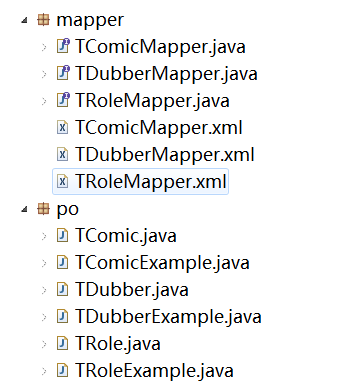
} } }参照地址http://www.mybatis.org/generator/configreference/xmlconfig.html,运行后生成代码如下
测试类
package ecut.reverse.test;

import java.io.IOException;

import java.util.List;

import org.junit.After;

import org.junit.Before;

import org.junit.Test;

import org.springframework.context.support.AbstractApplicationContext;

import org.springframework.context.support.ClassPathXmlApplicationContext;

import ecut.reverse.mapper.TRoleMapper;

import ecut.reverse.po.TRole;

import ecut.reverse.po.TRoleExample;

public class RoleTest {

    private AbstractApplicationContext container;

    private TRoleMapper roleMapper;

    @Before

    public  void init() throws IOException {

        // 指定configuration metadata配置元数据

        String configLocations = "classpath:ecut/**/reverse/applicationContext.xml";

        // 创建spring IOC容器

        container = new ClassPathXmlApplicationContext(configLocations);

        // 从容器中获取的bean实例中获取属性值

        roleMapper = (TRoleMapper) container.getBean("TRoleMapper", TRoleMapper.class);

    }

    //根据主键删除

    @Test

    public void testDeleteByPrimaryKey() {

        roleMapper.deleteByPrimaryKey(8);

    }

    //插入

    @Test

    public void testInsert() {

        //构造 角色对象

        TRole role = new TRole();

        role.setRoleName("路飞");

        role.setNote("海贼王");

        role.setComicId(2);

        roleMapper.insert(role);

    }

    //自定义条件查询

    @Test

    public void testSelectByExample() {

        TRoleExample roleExample = new TRoleExample();

        //通过criteria构造查询条件

        TRoleExample.Criteria criteria = roleExample.createCriteria();

        criteria.andComicIdEqualTo(2);

        criteria.andIdGreaterThanOrEqualTo(2);

        //可能返回多条记录

        List<TRole> list = roleMapper.selectByExample(roleExample);

        for(TRole r:list){

            System.out.println("id="+r.getId()+",roleName="+r.getRoleName()+",note="+r.getNote()+",comicId="+r.getComicId());

        }

    }

    //根据主键查询

    @Test

    public void testSelectByPrimaryKey() {

        TRole role = roleMapper.selectByPrimaryKey(1);

        System.out.println("id="+role.getId()+",roleName="+role.getRoleName()+",note="+role.getNote()+",comicId="+role.getComicId());

    }

    //更新数据

    @Test

    public void testUpdateByPrimaryKey() {

        //对所有字段进行更新,需要先查询出来再更新

        TRole role = roleMapper.selectByPrimaryKey(8);

        role.setComicId(3);;

        //没有非空判断

        roleMapper.updateByPrimaryKey(role);

        //如果传入字段不空为才更新,在批量更新中使用此方法,不需要先查询再更新

        //roleMapper.updateByPrimaryKeySelective(record);

    }

    @After

    public void destroy(){

        // 关闭spring的IOC容器

        container.close();

    }

}
mapper 的名称是TRoleMapper自动扫描出来的mapper的bean的id为TRoleMapper而不是首字母小写tRoleMapper。可以根据日志来确定bean的id是多少,如TRoleMapper的日志为DEBUG [main] - Creating shared instance of singleton bean 'TRoleMapper',则可以知道TRoleMapper的id是TRoleMapper。
MyBaits视频及资料
转载请于明显处标明出处
https://www.cnblogs.com/AmyZheng/p/9385887.html
MyBatis学习(五)的更多相关文章
- mybatis 学习五 二级缓存不推荐使用
mybatis 二级缓存不推荐使用 一 mybatis的缓存使用. 大体就是首先根据你的sqlid,参数的信息自己算出一个key值,然后你查询的时候,会先把这个key值去缓存中找看有没有value,如 ...
- mybatis学习五 log4j
1. log4j(log for java)由 apache 推出的开源免费日志处理的类库.2. 为什么需要日志: 2.1 在项目中编写 System.out.println();输出到控制台,当项 ...
- mybatis 学习五 动态SQL语句
3.1 selectKey 标签 在insert语句中,在Oracle经常使用序列.在MySQL中使用函数来自动生成插入表的主键,而且需要方法能返回这个生成主键.使用myBatis的selectKey ...
- mybatis学习 (五) POJO的映射文件
Mapper.xml映射文件中定义了操作数据库的sql,每个sql是一个statement,映射文件是mybatis的核心. 1.parameterType(输入类型) 通过parameterType ...
- mybatis学习笔记(五):mybatis 逆向工程
mybatis学习笔记(五):mybatis 逆向工程 在日常开发中,如果数据库中存在多张表,自己手动创建 多个pojo 类和编写 SQL 语法配置文件,未免太过繁琐,mybatis 也提供了一键式生 ...
- (转)MyBatis框架的学习(五)——一对一关联映射和一对多关联映射
http://blog.csdn.net/yerenyuan_pku/article/details/71894172 在实际开发中我们不可能只是对单表进行操作,必然要操作多表,本文就来讲解多表操作中 ...
- mybatis学习笔记(五) -- maven+spring+mybatis从零开始搭建整合详细过程(附demo和搭建过程遇到的问题解决方法)
文章介绍结构一览 一.使用maven创建web项目 1.新建maven项目 2.修改jre版本 3.修改Project Facts,生成WebContent文件夾 4.将WebContent下的两个文 ...
- (原创)mybatis学习二,spring和mybatis的融合
mybatis学习一夯实基础 上文介绍了mybatis的相关知识,这一节主要来介绍mybaits和spring的融合 一,环境搭建 1,jar包下载,下载路径为jar包 2,将包导入到java工程中 ...
- 【MyBatis学习笔记】
[MyBatis学习笔记]系列之预备篇一:ant的下载与安装 [MyBatis学习笔记]系列之预备篇二:ant入门示例 [MyBatis学习笔记]系列之一:MyBatis入门示例 [MyBatis学习 ...
- Mybatis学习笔记二
本篇内容,紧接上一篇内容Mybatis学习笔记一 输入映射和输出映射 传递简单类型和pojo类型上篇已介绍过,下面介绍一下包装类型. 传递pojo包装对象 开发中通过可以使用pojo传递查询条件.查询 ...
随机推荐
- 牛客多校第二场H Second Large Rectangle 单调栈or悬线法
Second Large Rectangle 题意 给出n*m的01矩阵,问由1组成的第二大的矩阵的大小是多少? 分析 单调栈(or 悬线法)入门题 单调栈 预处理出每一个点的最大高度,然后单调栈每一 ...
- 每天进步一点点------SOPC的uC/OS-II应用(一)
uC/OS-II(又名Micro C/OS)是基于嵌入式系统的完整的,可移植.可固化.可裁剪的可剥夺型实时内核,其已经广泛应用在航空飞行器.医疗设备.工业控制等可靠性和稳定性要求较高的场合.该内核的代 ...
- 【c++】零基础的自修课 01-开发工具的安装(code::blocks)
1/开发工具的下载地址: ·(选用 visual studio开发工具,有区分mac和windows版本)https://visualstudio.microsoft.com/zh-hans/down ...
- vue工程 使用滚动组件 vue2-better-scroll 实现上拉加载 下拉刷新
vue2-better-scroll 关于具体安装&使用过程 请移步api文档 已经很详细了 而且超清晰明了. https://cnpmjs.org/package/vue2-better-s ...
- MP4转mp3
python实现: 依赖: glob,pydub "Couldn't find ffmpeg or avconv - defaulting to ffmpeg, but may not wo ...
- 题解 P1453 【城市环路】
P1453 城市环路 感觉基环树(or环套树)的题目一般都是找到树上的环,断掉一条边再进行树上的操作(如noip2018P5022 旅行) 双倍经验:P2607 [ZJOI2008]骑士 P1453和 ...
- Python 字符串格式化操作 - format方法
建议使用format()方法 字符串操作 对于 %, 官方以及给出这种格式化操作已经过时,在 Python 的未来版本中可能会消失. 在新代码中使用新的字符串格式.因此推荐大家使用format()来替 ...
- 【网易官方】极客战记(codecombat)攻略-地牢-Kithmaze 二度历险
关卡连接: https://codecombat.163.com/play/level/the-second-kithmaze 很多人试过,但只有少数人能穿过此迷宫. 简介: 记住,你只需 一个 wh ...
- tarsgo初探
参考:https://mp.weixin.qq.com/s/aO8ybUiu5htqcoGAwxwc5Q?utm_source=tuicool&utm_medium=referral 1.Go ...
- MSYS2与mingw32和mingw64的安装
由于编译OpenBLAS接触到MSYS2. 下载MSYS:https://mirror.tuna.tsinghua.edu.cn/help/msys2/ 安装,并按照下面的配置,然后可以安装mingw ...