
NX二次开发-测量投影距离
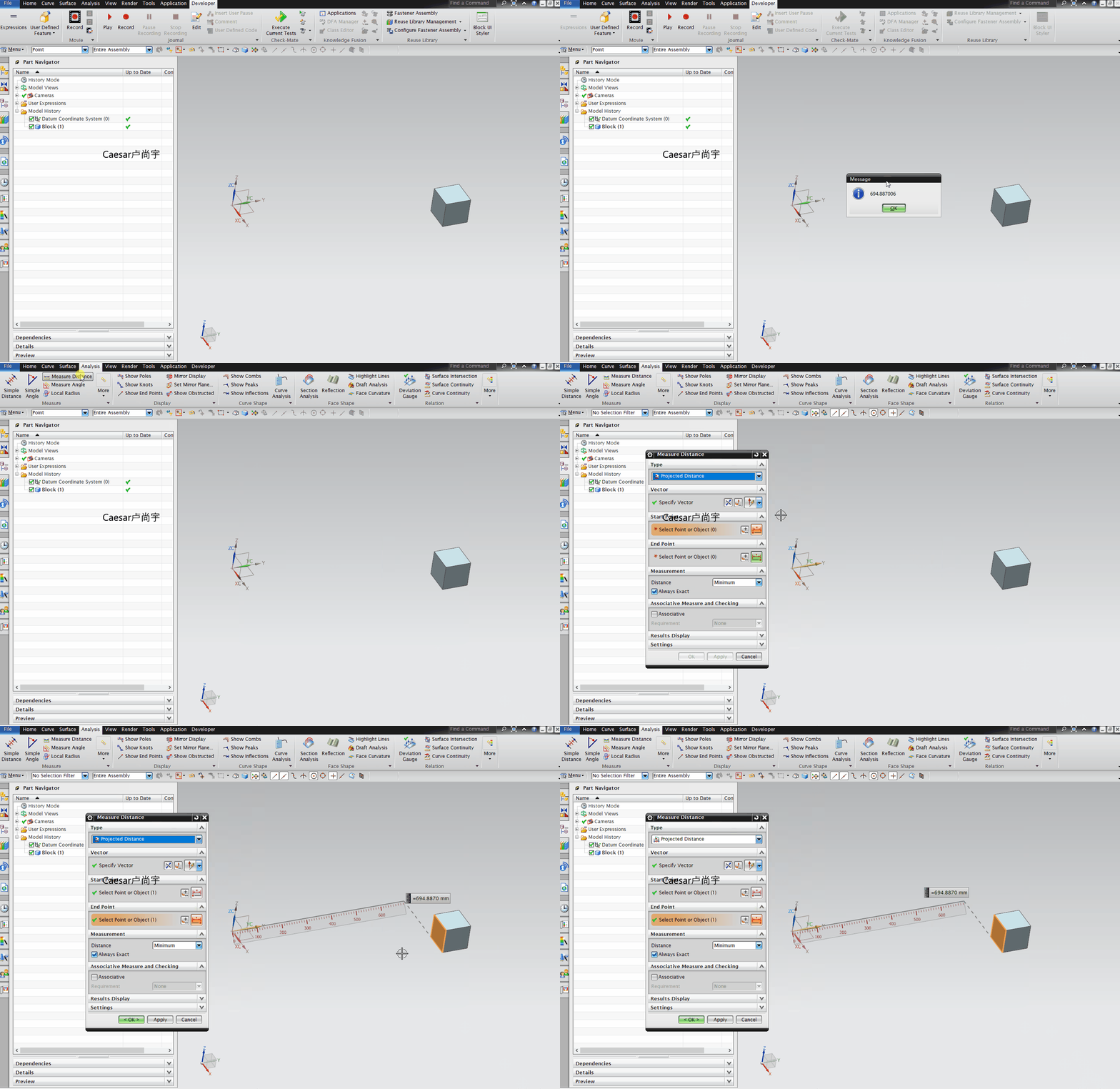
NXOPEN方法,直接录制测量投影距离命令
 NX9+VS2012

 #include <NXOpen/Annotations.hxx>

 #include <NXOpen/Assemblies_Component.hxx>

 #include <NXOpen/Assemblies_ComponentAssembly.hxx>

 #include <NXOpen/Body.hxx>

 #include <NXOpen/BodyCollection.hxx>

 #include <NXOpen/Face.hxx>

 #include <NXOpen/Line.hxx>

 #include <NXOpen/NXException.hxx>

 #include <NXOpen/Part.hxx>

 #include <NXOpen/PartCollection.hxx>

 #include <NXOpen/DirectionCollection.hxx>

 #include <NXOpen/MeasureBuilder.hxx>

 #include <NXOpen/MeasureDistance.hxx>

 #include <NXOpen/MeasureDistanceBuilder.hxx>

 #include <NXOpen/MeasureManager.hxx>

 #include <NXOpen/Point.hxx>

 #include <NXOpen/PointCollection.hxx>

 #include <NXOpen/ScCollector.hxx>

 #include <NXOpen/SelectDisplayableObject.hxx>

 #include <NXOpen/NXObjectManager.hxx>

 #include <uf_obj.h>

 #include <uf_part.h>

 #include <uf_ui.h>

 UF_initialize();

 //找名字得到面的tag

 tag_t FaceTag = NULL_TAG;

 UF_OBJ_cycle_by_name("MYFACE", &FaceTag);

 //以下为NXOPEN录制

 NXObject *nullNXObject(NULL);

 MeasureDistanceBuilder *measureDistanceBuilder1;

 measureDistanceBuilder1 = workPart->MeasureManager()->CreateMeasureDistanceBuilder(nullNXObject);

 Point3d origin1(0.0, 0.0, 0.0);

 Vector3d vector1(0.0, 1.0, 0.0);//设置矢量方向

 Direction *direction1;

 direction1 = workPart->Directions()->CreateDirection(origin1, vector1, SmartObject::UpdateOptionAfterModeling);

 measureDistanceBuilder1->SetProjectionVector(direction1);//设置投影

 //创建点

 NXOpen::Point3d Point1XYZ(,,);

 //Point3d转Point

 NXOpen::Point *Point1 = workPart->Points()->CreatePoint(Point1XYZ);

 //设置第一个对象

 measureDistanceBuilder1->Object1()->SetValue(Point1);

 //设置第二个对象

 Face *face1(dynamic_cast<Face *>(NXOpen::NXObjectManager::Get(FaceTag)));

 measureDistanceBuilder1->Object2()->SetValue(face1);

 //创建,类型为投影距离

 MeasureDistance *measureDistance1;

 measureDistance1 = workPart->MeasureManager()->NewDistance(NULL, Point1, face1, direction1, MeasureManager::ProjectionTypeMinimum);

 //获得距离

 double Distance = measureDistance1->Value();

 //打印

 char msg[];

 sprintf_s(msg, "%f", Distance);

 uc1601(msg, );

 //销毁删除

 delete measureDistance1;

 UF_terminate();

 Caesar卢尚宇

 2019年7月26日
UFUN写的算法
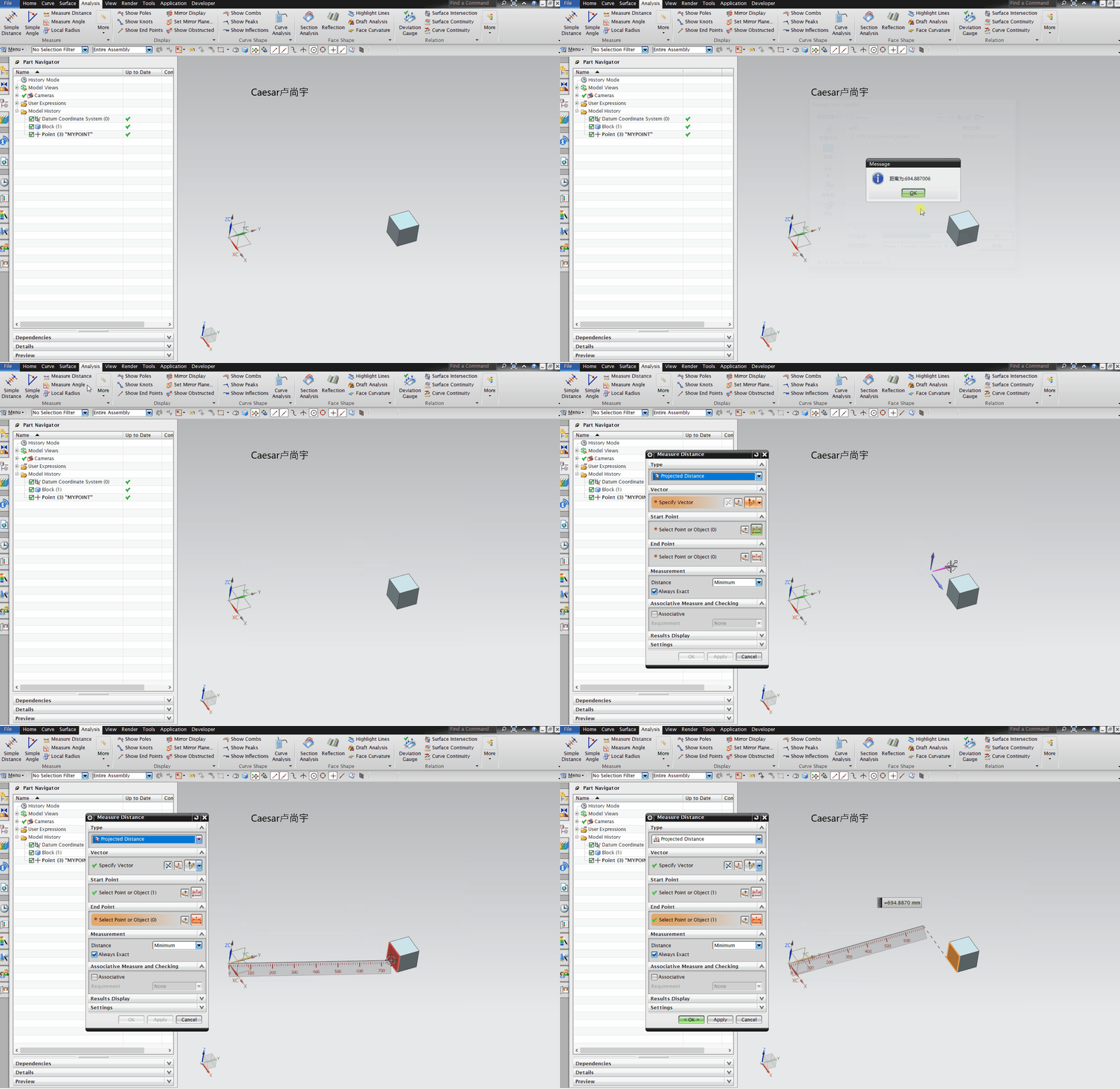
思路:自己指定原点和矢量方向,从原点沿着矢量方向作一条无限长的直线,在对选择的面获取面的原点和向量方向,创建一个基准平面(基准平面是无限大的),最后求直线和基准平面的交点到原点距离,就是投影距离。
 NX9+VS2012

 #include <uf.h>

 #include <uf_ui.h>

 #include <uf_csys.h>

 #include <uf_curve.h>

 #include <uf_obj.h>

 #include <uf_mtx.h>

 #include <uf_modl.h>

 UF_initialize();

 //找名字得到点的tag

 tag_t PointTag = NULL_TAG;

 UF_OBJ_cycle_by_name("MYPOINT", &PointTag);

 //找名字得到面的tag

 tag_t FaceTag = NULL_TAG;

 UF_OBJ_cycle_by_name("MYFACE", &FaceTag);

 //由点出发创建直线

 //创建向量方向

 double Vec[] = { 0.0, 0.0, 1.0 };

 //3*3矩阵,输入Z向量,得到矩阵

 double Mtx[];

 UF_MTX3_initialize_z(Vec, Mtx);

 //创建矩阵

 tag_t MatrixTag = NULL_TAG;

 UF_CSYS_create_matrix(Mtx, &MatrixTag);

 //创建临时坐标系

 double P1[] = { 0.0, 0.0, 0.0 };//直线起点

 tag_t CsysTag = NULL_TAG;

 UF_CSYS_create_temp_csys(P1, MatrixTag, &CsysTag);

 //设置WCS

 UF_CSYS_set_wcs(CsysTag);

 //创建直线终点

 double P2[] = { P1[], P1[] + , P1[] };

 //从当前工作坐标系转换到绝对坐标系

 int InputCsys = UF_CSYS_ROOT_WCS_COORDS;

 int OutputCsys = UF_CSYS_ROOT_COORDS;

 double OutputPoint[];

 UF_CSYS_map_point(InputCsys, P2, OutputCsys, OutputPoint);

 //创建直线

 UF_CURVE_line_t LineCoods;

 LineCoods.start_point[] = P1[];

 LineCoods.start_point[] = P1[];

 LineCoods.start_point[] = P1[];

 LineCoods.end_point[] = OutputPoint[];

 LineCoods.end_point[] = OutputPoint[];

 LineCoods.end_point[] = OutputPoint[];

 tag_t LineTag = NULL_TAG;

 UF_CURVE_create_line(&LineCoods, &LineTag);

 //获得面的原点和向量方向

 int Type;

 double Point[];

 double Dir[];

 double Box[];

 double Radius[];

 double RadData[];

 int NormDir;

 UF_MODL_ask_face_data(FaceTag, &Type, Point, Dir, Box, Radius, RadData, &NormDir);

 //创建基准平面

 tag_t Plane_Tag = NULL_TAG;

 UF_MODL_create_fixed_dplane(Point, Dir, &Plane_Tag);

 //求直线与基准平面的交点

 int IntersectionsNum;

 UF_MODL_intersect_info_p_t * Intersections;

 UF_MODL_intersect_objects(LineTag, Plane_Tag, 0.01, &IntersectionsNum, &Intersections);//输入两个对象tag,找交点

 double IntersectionsPoint[];//交点坐标

 for (int i = ; i < IntersectionsNum; i++)

 {

     int type = Intersections[i]->intersect_type;

     if (type == UF_MODL_INTERSECT_POINT)

     {

         IntersectionsPoint[] = Intersections[i]->intersect.point.coords[];

         IntersectionsPoint[] = Intersections[i]->intersect.point.coords[];

         IntersectionsPoint[] = Intersections[i]->intersect.point.coords[];

     }

 }

 //删除直线和基准平面

 UF_OBJ_delete_object(LineTag);

 UF_OBJ_delete_object(Plane_Tag);

 //打印

 char msg[];

 sprintf_s(msg, "距离为:%f", IntersectionsPoint[]);

 uc1601(msg,);

 //释放内存

 UF_free(Intersections);

 UF_terminate();

 caesar卢尚宇

 2019年7月26日
NX二次开发-测量投影距离的更多相关文章
- NX二次开发-UDO用户自定义对象(UFUN)【持续完善】
每当提起UDO总是会让我想起大专毕业那会失业找工作,后来有个宝贵机会去了软件公司上班,拿到了我人生中的第一个NX二次开发项目,一个关于测量汽车前后左右摄像头的项目.当时那个项目就用到了UDO,对于只看 ...
- NX二次开发-Block UI C++界面关于 在Block UI中UF_initialize();和UF_terminate();的使用
关于 在Block UI中UF_initialize();和UF_terminate();的使用 用Block UI作NX二次开发的时候,不需要在使用UFUN函数的时候加UF_initialize() ...
- NX二次开发-基于MFC界面的NX对Excel读写操作(OLE方式(COM组件))
NX二次开发API里没有对EXCAL读写操作的相关函数,市面上有很多种方法去实现,比如UFUN调KF,ODBC,OLE(COM组件)等等.这里我是用的OLE(COM组件)方式去做的,这种在VC上创建的 ...
- NX二次开发-基于NX开发向导模板的NX对Excel读写操作(OLE方式(COM组件))
在看这个博客前,请读者先去完整看完:NX二次开发-基于MFC界面的NX对Excel读写操作(OLE方式(COM组件))https://ufun-nxopen.blog.csdn.net/article ...
- NX二次开发-基于MFC界面对话框与NX交互的开发
打开VS2013 点击新建,选择MFC DLL 点击确定 点下一步 什么都不改,直接点完成 进来之后先编译一下,看是否编译成功 打开项目属性,更改这几处 $(UGII_BASE_DIR)\ugopen ...
- NX二次开发-BlockUI对话框嵌套MFC对话框制作进度条
半年前在一些QQ群看到有大神NX二次开发做出了进度条,那个时候我还不会弄,也不知道怎么弄得,后来断断续续得研究了一下,直到今天我把它做出来了.内心还是很喜悦的!回想自己这两年当初从没公司肯给我做NX二 ...
- NX二次开发-UFUN计算两点距离UF_VEC3_distance
NX11+VS2013 #include <uf.h> #include <uf_curve.h> #include <uf_vec.h> UF_initializ ...
- NX二次开发-UFUN拉伸函数UF_MODL_create_extruded
NX9+VS2012 //NX二次开发中常用拉伸函数为UF_MODL_create_extruded2,但是此函数不能拉伸片体, //想要拉伸片体用函数UF_MODL_create_extruded. ...
- NX二次开发-UFUN拉伸函数UF_MODL_create_extruded2
NX9+VS2012 //NX二次开发中常用拉伸函数为UF_MODL_create_extruded2,但是此函数不能拉伸片体, //想要拉伸片体用函数UF_MODL_create_extruded. ...
随机推荐
- Unity 调用jar闪退 解决方案
{ https://www.cnblogs.com/YZFHKMS-X/p/11864496.html }
- auth 模块使用篇
from django.cintrib import auth #登录模块 只要用auth模块一旦登录 就可以在项目的任意地方用request.user 拿到当前的用户对象 再通过 request ...
- js和php语法区别
参考 : https://www.wangjingxian.cn/php/51.html
- C#网页数据采集(三)HttpWebRequest
<span style="font-family: Arial, Helvetica, sans-serif; background-color: rgb(255, 255, 255) ...
- jmter 5.1 中文
一.jmeter5.0下载解压后,默认的界面是英文版的,许多人觉得不方便,想要汉化,jmeter是不需要安装汉化包的,通过修改配置文件即可:1.找到jmeter解压后的文件夹,例如我是安装在D:\De ...
- 4.2.1 Vector bit-select and part-select addressing
Frm:IEEE Std 1364™-2001, IEEE Standard Verilog® Hardware Description Language Bit-selects extract a ...
- Redis和SpringBoot整合RedisUtils类
一.引入依赖 <dependency> <groupId>org.springframework.boot</groupId> <artifactId> ...
- Spring 学习笔记 数据绑定,校验,BeanWrapper 与属性编辑器
Spring 数据绑定,校验,BeanWrapper,与属性编辑器 Data Binding 数据绑定(Data binding)非常有用,它可以动态把用户输入与应用程序的域模型(或者你用于处理用户输 ...
- 去除字符串中的HTML标签
背景:Kindeditor内容保存在数据库中的类型是text,包含文字和HTML标签. 需求:显示内容的前50个字(纯文字内容) 方法:将字段查出去除标签,截取前50 import java.util ...
- git 强制取消本地修改
本地的项目中修改不做保存操作,可以用到Git pull的强制覆盖,具体代码如下: git fetch --allgit reset --hard origin/master git fetch 指令是 ...