
TCP加速方式
使用windows scaling
TCP Extensions for High Performance, RFC1323,https://www.ietf.org/rfc/rfc1323.txt
这里说win7上默认是打开的,如何设置呢
https://www.sourcedaddy.com/windows-7/tcp-receive-window-scaling.html
The ability to increase the receive window would be meaningless without window scaling. On its own, TCP allows a window size of only 64 KB. Operating systems back through Windows XP use this as their default value on fast links. The window scaling option is a way for window sizes to scale to megabytes and beyond. Starting with Windows Vista, window scaling is used by default.
During connection establishment, use of the window scaling option is negotiated with the remote host. If supported by the remote side, window scaling is enabled on the connection. Windows Vista and Windows 7 use a scale factor of 8, which means that the advertised receive window value should be multiplied by 256. Therefore, Receive Window Auto-Tuning uses a maximum receive window size of 16 MB.
win10设置为experimental,即14,2**14=16384,默认是nomal,即8,,2**8=256,256*64K=16M
netsh int tcp set global autotuninglevel=experimental
一端下载ftp文件,实际发现最后使用的仍然是65536大小的窗口
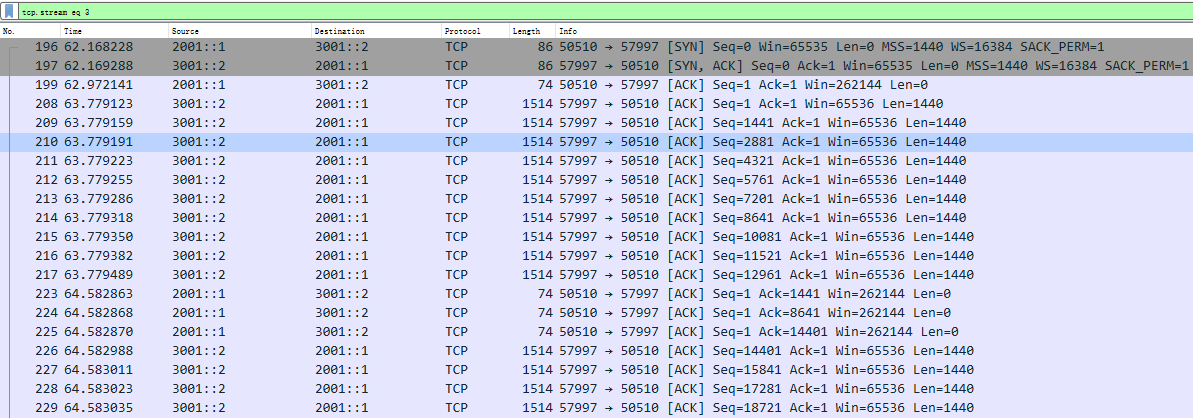
196,SYN,win=65535,WS(window scaling)=16384
197,SYN ACK,win=65535,WS(window scaling)=16384
199,ACK,win=16,WS(window scaling)=16384,win=262144
208,发送数据,win=4,WS(window scaling)=16384,win=65536,这里为什么win会变为4呢?如果这个可以这么小,窗口放大就没有意义了。
发送数据包只能发送到217,此时seq=12961,然后,就停止发送了,为什么呢?即使win=65535,也没有到win的一半啊?
然后,等了800ms,等到了对方发过来的ACK,223,224,225。
然后,又继续发送。
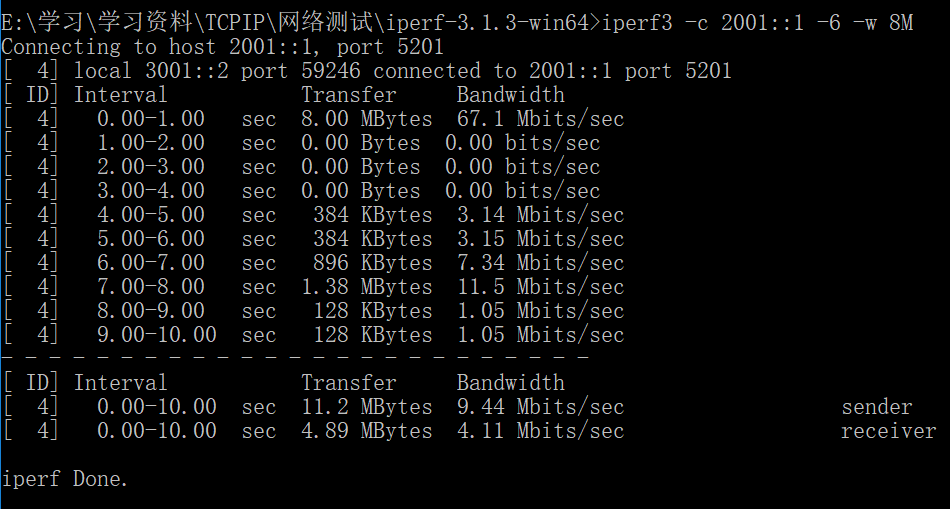
使用iperf,发现可以设置窗口大小,
| -w, --window n[KM] | Sets the socket buffer sizes to the specified value. For TCP, this sets the TCP window size. (this gets sent to the server and used on that side too) |
设置完之后,发现iperf会设置win和WS两个参数,设置更大的窗口
设置窗口大小为8MB后,可以使吞吐量达到4.11Mbps。
FTP应用如何增大窗口呢
可以设置自动调参为experimental,但WS虽然设置为最大,但win仍然很小,最终窗口大小仍然不大,如何设置win也很大呢?
关闭wireshark对于tcp的相对序列号
如果想要关闭相对序列号/确认号,可以选择Wireshark菜单栏中的 Edit -> Preferences ->protocols ->TCP,去掉Relative sequence number后面勾选框中的√即可
https://blog.csdn.net/a19881029/article/details/38091243
TCP欺骗方式
两种方式:
1、对称方式,在两端都增加加速器。缺点:两端都需要,一般都是私有知识产权;优点:可以使用压缩、缓存等手段进一步提高性能。
2、非对称方式,只在一端,比如服务器端增加加速器。
COTS产品——国外:
1、海事卫星的BGAN TCP Accelerator,这个好像需要与海事的BGAN配合完成,不知能否单独使用,而且,是加速发送方向。
https://www.inmarsat.com/support/bgan-firmware/bgan-tcp-accelerator/
2、WANOS,软件和硬件单卖,采用对称方式
http://wanos.co/wan-optimization/tcp-acceleration-pep/
COTS产品——国内:
1、北京蓝卫通科技有限公司
http://intronetworks.cs.luc.edu/current/html/newtcps.html#highspeed-tcp
https://www.sourcedaddy.com/windows-7/tcp-receive-window-scaling.html
TCP加速方式的更多相关文章
- TCP加速锐速SS(ServerSpeeder)破解版一键安装
速(serverspeeder),是一款TCP加速程序,能够增强VPS/服务器连接的稳定性,且有效的提高服务器的带宽利用率,进而提高访问速度.老左经常看到论坛.群里有用户提到锐速这款软件可以提高VPS ...
- TCP加速机制是如何加速的?
一.什么是TCP加速? TCP加速就是在高时延链路提高吞吐量的一系列解决方案. 二.为什么需要对TCP进行加速? 1.传统的TCP拥塞控制算法并不适用于高时延.高误码的链路. 2.随着we ...
- C#调用斑马打印机打印条码标签(支持COM、LPT、USB、TCP连接方式和ZPL、EPL、CPCL指令)【转】
原文地址:http://blog.csdn.net/ldljlq/article/details/7338772 在批量打印商品标签时一般都要加上条码或图片,而这类应用大多是使用斑马打印机,所以我也遇 ...
- Socket 通信原理(Android客户端和服务器以TCP&&UDP方式互通)
转载地址:http://blog.csdn.net/mad1989/article/details/9147661 ZERO.前言 有关通信原理内容是在网上或百科整理得到,代码部分为本人所写,如果不当 ...
- H3C FTP双TCP连接方式
- nginx和php-fpm通信的两种方式 unix socket和TCP
nginx和fastcgi的通信方式有两种,一种是TCP 一种是unix socket TCP使用的是 127.0.0.1:9000端口,将fastcgi_pass参数修改为127.0.0.1:900 ...
- 转 RTSP客户端模拟器(TCP方式,Python实现)
转自: http://www.cnblogs.com/MikeZhang/archive/2012/10/29/rtspTcpClient_DSS_20121029.html 由于某种需求,工作中需要 ...
- .NET 高性能WEB架构-比较容易改造方式 - .NET架构
下面列出的一些,是我们常见而且比较容易去优化的方式,当然细节方面非常多,仅供参考: 1.数据库依然选择SQL Server数据库(最新的sqlserver功能是很强大的)和使用订阅发布进行单写多读的读 ...
- 安装 Google BBR 加速VPS网络
Google BBR就是谷歌公司提出的一个开源TCP拥塞控制的算法.详情可以看这儿:https://lwn.net/Articles/701165.https://blog.sometimesnaiv ...
随机推荐
- php5.6.39 源码安装
1 安装依赖库 yum install -y autoconf libjpeg libjpeg-devel libpng libpng-devel freetype freetype-devel li ...
- 小程序中组件公用属性和data-的使用
属性名 类型 描述 注解 hidden Boo ...
- RTC时间设置
1.命令行输入date,查看系统时间. 2.命令行输入 date -s "2019-01-21 16:03:00" 修改系统时间. 3.命令行输入 hwclock -w 将修改后的 ...
- Excel大数据排查重复行内容方法,三步搞定!
首先第一步,我们找到一个空白列D输入公式“=A1&B1&C1”: 然后第二步,再选择下一空白列输入公式“=IF(COUNTIF(D:D,D1)>1,"重复", ...
- Oracle GoldenGate for DB2
--Enable logdb2 update db cfg using LOGARCHMETH1 DISK:/home/db2inst1/arclogs--Rebootdb2 terminatedb2 ...
- 高通量计算框架HTCondor(二)——环境配置
目录 1. 概述 2. 安装 3. 结果 4. 相关 1. 概述 HTCondor是开源跨平台的分布式计算框架,在其官网上直接提供了源代码和Windows.Linux以及MacOS的安装包.因为平台限 ...
- xlwings excel(一)
python操作Excel的模块,网上提到的模块大致有:xlwings.xlrd.xlwt.openpyxl.pyxll等,他们提供的功能归纳起来有两种:一.用python读写Excel文件,实际上就 ...
- STM8 ADC 多个通道连续扫描缓冲区数据带中断模式的正确写法
近日调试了STM8S的ADC采集多通道数据的程序,按照之前的立即,将ADC1设置为:扫描模式,连续采集,数据缓存模式,中断使能后应该可以在中断后读取到数值了,可是无论怎样都只能读取到第一个缓冲器的数据 ...
- linux之samba使用
工作中,很多时候,我导出文件,或者上传文件的时候经常失败,报samba fail,但我并不知道samba是干什么用的,也老是听同事说什么samba没有挂载,但我基本上不知道什么是samba,更不要说什 ...
- Nutz框架-- Cnd条件使用原生sql
案例 今天接到一个临时的业务需求,做一个简单的过滤作为临时业务需要使用一两天,于是想到在原有的Cnd条件上加上一个Not like 进行过滤,但是发现现有Cnd条件查询好像满足不了 解决方案 使用Nu ...