
.net core 根据环境变量区分正式、测试 配置文件
新建测试、正式环境下所用的 配置信息文件
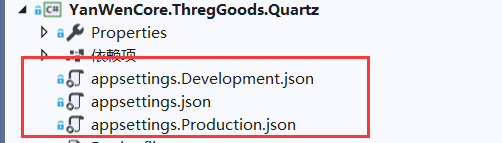
appsettings.Development.json 文件信息:
{

  "Logging": {

    "LogLevel": {

      "Default": "Warning"

    }

  },

  "AllowedHosts": "*",

  "db": {

    "mysql": {

      "conStr": "xxxxxxxxxxxxxxxxx", //测试

      "providerName": "MySql.Data.MySqlClient"

    },

    "redis": {

      "conStr": "xxxxxxxxxxxxxxxxx", //测试

      "dbId": "3"

    }

  },

  "ThOcUrl": "xxxxxxxxxxxxxxxxx", //测试

  "ThSftpInfo": "xxxxxxxxxxxxxxxxx", //测试

  "ThFileUrl": "xxxxxxxxxxxxxxxxx" //测试

}
加入相关nuget引用

添加获取配置信息帮助类
using Microsoft.AspNetCore.Hosting;

using Microsoft.Extensions.Configuration;

using System;

using System.IO;

using Microsoft.Extensions.DependencyInjection;

namespace YanWenCore.ThregGoods.Common

{

    public static class MyServiceProvider

    {

        public static IServiceProvider ServiceProvider

        {

            get; set;

        }

    }

    public class AppSettingHelper

    {
        //根据环境变量配置获取json文件的名称

        private static readonly string AppSettingName = String.Format("appsettings.{0}.json", MyServiceProvider.ServiceProvider.GetRequiredService<IHostingEnvironment>().EnvironmentName);

        private static IConfigurationRoot configR;

        static AppSettingHelper()

        {

            var builder = new ConfigurationBuilder().SetBasePath(Directory.GetCurrentDirectory()).AddJsonFile(AppSettingName);

            configR = builder.Build();

        }

        public static IConfigurationRoot GetRotConfig()

        {

            if (configR == null)

            {

                configR = new ConfigurationBuilder().SetBasePath(Directory.GetCurrentDirectory()).AddJsonFile(AppSettingName).Build();

            }

            return configR;

        }

        //Mysql连接

        public static string MysqlConnectionStringSettings

        {

            get

            {

                return GetRotConfig().GetSection("db").GetSection("mysql").GetSection("conStr").Value;

            }

        }

        //Redis连接信息

        public static string RedisConnectionStringSettings

        {

            get

            {

                return GetRotConfig().GetSection("db").GetSection("redis").GetSection("conStr").Value;

            }

        }

        //OC平台接口地址

        public static string GetbatteryCertUrl

        {

            get

            {

                return GetRotConfig().GetSection("ThOcUrl").Value;

            }

        }

        //sftp服务器信息

        public static string ThSftpInfo

        {

            get

            {

                return GetRotConfig().GetSection("ThSftpInfo").Value;

            }

        }

        //文件服务器地址

        public static string ThFileUrl

        {

            get

            {

                return GetRotConfig().GetSection("ThFileUrl").Value;

            }

        }

    }

}
应用程序期间提供初始化提供服务容器的对象
 public void Configure(IApplicationBuilder app, IHostingEnvironment env)

        {

            if (env.IsDevelopment())

            {

                app.UseDeveloperExceptionPage();

            }

            else

            {

                app.UseExceptionHandler("/Error");

            }

            MyServiceProvider.ServiceProvider = app.ApplicationServices;

        }
执行docker run 之前,设置环境变量
set ASPNETCORE_ENVIRONMENT= Development
.net core 根据环境变量区分正式、测试 配置文件的更多相关文章
- JAVA_SE基础——2.环境变量的配置&测试JDK
哈喽,利用晚上的空余时间再写篇心的~~~ 谢谢大家 前一篇文章 JAVA_SE基础--JDK&JRE下载及安装http://blog.csdn.net/thescript_j/article ...
- ASP.NET Core使用环境变量
前言 通常在应用程序开发到正式上线,在这个过程中我们会分为多个阶段,通常会有 开发.测试.以及正式环境等.每个环境的参数配置我们会使用不同的参数,因此呢,在ASP.NET Core中就提供了相关的环境 ...
- 在ASP.NET Core配置环境变量和启动设置
在这一部分内容中,我们来讨论ASP.NET Core中的一个新功能:环境变量和启动设置,它将开发过程中的调试和测试变的更加简单.我们只需要简单的修改配置文件,就可以实现开发.预演.生产环境的切换. A ...
- ASP .NET CORE 根据环境变量支持多个 appsettings.json
0.背景 在开发项目的过程当中,生产环境与调试环境的配置肯定是不一样的.拿个最简单的例子来说,比如连接字符串这种东西,调试环境肯定是不能连接生产数据库的.在之前的话,这种情况只能说是你 COPY 两个 ...
- ASP.NET Core配置环境变量和启动设置
在这一部分内容中,我们来讨论ASP.NET Core中的一个新功能:环境变量和启动设置,它将开发过程中的调试和测试变的更加简单.我们只需要简单的修改配置文件,就可以实现开发.预演.生产环境的切换. A ...
- [转]ASP.NET Core配置环境变量和启动设置
本文转自:https://www.cnblogs.com/tdfblog/p/Environments-LaunchSettings-in-Asp-Net-Core.html 在这一部分内容中,我们来 ...
- .net core 中环境变量的配置
配置文件: Properties目录下的launchSettings.json IISExpress配置 "ASPNET_ENV": "EnvironmentOne&qu ...
- Web开发之tomcat配置及使用(环境变量设置及测试,一个简单的web应用实例)
Tomcat的配置及测试: 第一步:下载tomcat,然后解压到任意盘符 第二步:配置系统环境变量 tomcat解压到的D盘 (路径为: D:\tomcat), 配置环境变量: 启动tomcat需要两 ...
- [.net core] 12.环境变量
异常给开发人员提供了很大好的排错功能. 但是其背后的技术细节很复杂,会损耗性能,也会使.net core web app更容易被反派攻击. 于是我们要学会使用环境变量, 通过环境变量,控制一些逻辑 当 ...
随机推荐
- 类的私有private构造函数 ,为什么要这样做
通常我们都将构造函数的声明置于public区段,假如我们将其放入private区段中会发生什么样的后果?没错,我也知道这将会使构造函数成为私有的,这意味着什么? 我们知道,当我们在程序中声明一个对象时 ...
- JPA 派生标识符的两种实现方式
方法一:@Entity@IdClass(ModuleId.class)public class Module { @Id private Integer index; @Id @ManyToOne p ...
- node js 函数和对象
1.函数 1.1匿名函数 函数声明 function fn(){ } 函数表达式 var fun=function(){ } 函数名称和函数名称()的区别 fun/fn fun()/fn() ...
- 标准模板库(STL)学习探究之Multimap容器
C++ Multimaps和maps很相似,但是MultiMaps允许重复的元素.(具体用法请参考map容器) 函数列表: begin() 返回指向第一个元素的迭代器 cle ...
- 初探Remoting双向通信(四)
原 初探Remoting双向通信(四) 2013年06月26日 11:11:32 喜欢特别冷的冬天下着雪 阅读数 2632 版权声明:本文为博主原创文章,未经博主允许不得转载. https://blo ...
- 使用Hbuilder 报错The keyword 'export' is reserved
右击文件 > 验证本文档语法(V)后报错 解决: 项目右键->”属性”->”语法&框架”界面中配置项目的javaScript版本,将ECMAScript5.1 修改为6.
- 2018-8-29-Roslyn-静态分析
title author date CreateTime categories Roslyn 静态分析 lindexi 2018-08-29 09:10:19 +0800 2018-03-13 14: ...
- KiCAD原理图导出PDF方法
KiCAD原理图导出为PDF 1.文件->绘制 2.按照下图选择保存目录和输出格式后,选择绘制当前页或者所有页
- docker 部署 mysql8 的 docker-compose 文件编写
version: '3.4' services: mysql: container_name: platform.mysql. deploy: resources: limits: memory: 3 ...
- 【JavaWeb项目】一个众筹网站的开发(九)邮件开发
Java官方支持邮件开发,Javax-mail jdk中默认没有,需要另外下载 apache的基于Javax-mail开发了commons-mail,更加简单高效,推荐使用 一.电子邮件接收和发送协议 ...