
php实现简易留言板效果
首先是Index页面效果图
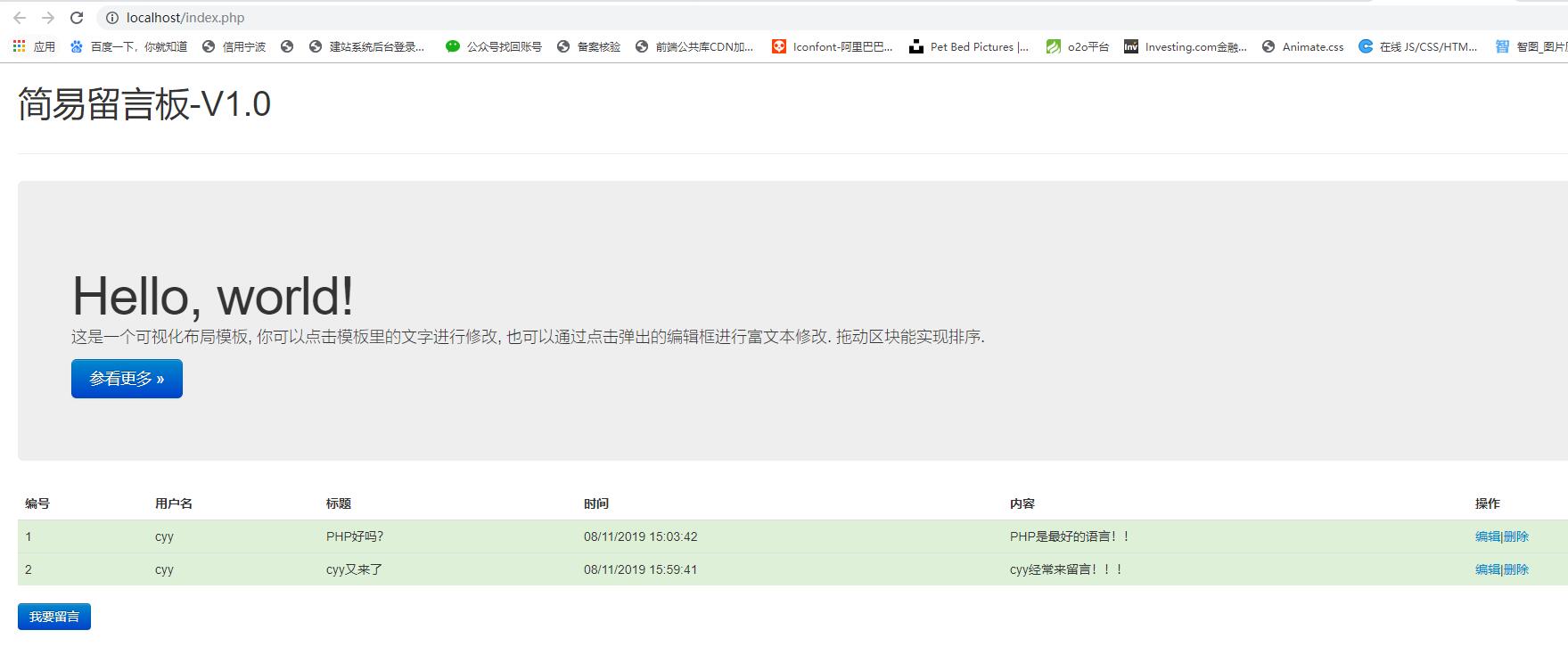
index.php
<?php

header('content-type:text/html;charset=utf-8');

date_default_timezone_set('PRC');

$filename="msg.txt";

$msgs=[];

//检测文件是否存在

if(file_exists($filename)){

  //读取文件中的内容

  $string=file_get_contents($filename);

  if(strlen($string)>0){

    $msgs=unserialize($string);

  }

}

?>

<!DOCTYPE html>

<html lang="en">

<head>

<script type="text/javascript" src="http://www.francescomalagrino.com/BootstrapPageGenerator/3/js/jquery-2.0.0.min.js"></script>

<script type="text/javascript" src="http://www.francescomalagrino.com/BootstrapPageGenerator/3/js/jquery-ui"></script>

<link href="http://www.francescomalagrino.com/BootstrapPageGenerator/3/css/bootstrap-combined.min.css" rel="stylesheet" media="screen">

<script type="text/javascript" src="http://www.francescomalagrino.com/BootstrapPageGenerator/3/js/bootstrap.min.js"></script>

</head>

<body>

<div class="container-fluid">

    <div class="row-fluid">

        <div class="span12">

            <div class="page-header">

                <h1>

                    简易留言板-<span>V1.0</span>

                </h1>

            </div>

            <div class="hero-unit">

                <h1>

                    Hello, world!

                </h1>

                <p>

                    这是一个可视化布局模板, 你可以点击模板里的文字进行修改, 也可以通过点击弹出的编辑框进行富文本修改. 拖动区块能实现排序.

                </p>

                <p>

                    <a rel="nofollow" class="btn btn-primary btn-large" href="#">参看更多 »</a>

                </p>

            </div>

             <?php if(is_array($msgs)&&count($msgs)>0):?>

            <table class="table">

                <thead>

                    <tr>

                        <th>

                            编号

                        </th>

                        <th>

                            用户名

                        </th>

                        <th>

                            标题

                        </th>

                        <th>

                            时间

                        </th>

                        <th>

                            内容

                        </th>

                        <th>

                            操作

                        </th>

                    </tr>

                </thead>

                <tbody>

                <?php $i=1;foreach($msgs as $key=>$val):?>

              <tr class="success">

              <td>

                <?php echo $i++;?>

              </td>

              <td>

                <?php echo $val['username'];?>

              </td>

              <td>

                <?php echo $val['title'];?>

              </td>

              <td>

                <?php echo date("m/d/Y H:i:s",$val['time']);?>

              </td>

              <td>

                <?php echo $val['content'];?>

              </td>

              <td>

                <a href="edit.php?id=<?php echo $key;?>">编辑</a>|<a href="#" onclick="show_confirm(<?php echo $key;?>)">删除</a>

              </td>

            </tr>

            <?php endforeach;?>

                </tbody>

            </table>

            <?php endif;?>

            <input type="button" class="btn btn-primary btn-lg" name="pubMsg" value="我要留言" onclick="window.location.href='add.php'"/>

        </div>

    </div>

</div>

<script type="text/javascript">

    function show_confirm(key){

        var r=confirm("确定删除吗?");

        if (r==true){

              location.href='delete.php?id='+key;

        }

    }

    </script>

</body>

</html>
然后是新增留言页面效果图
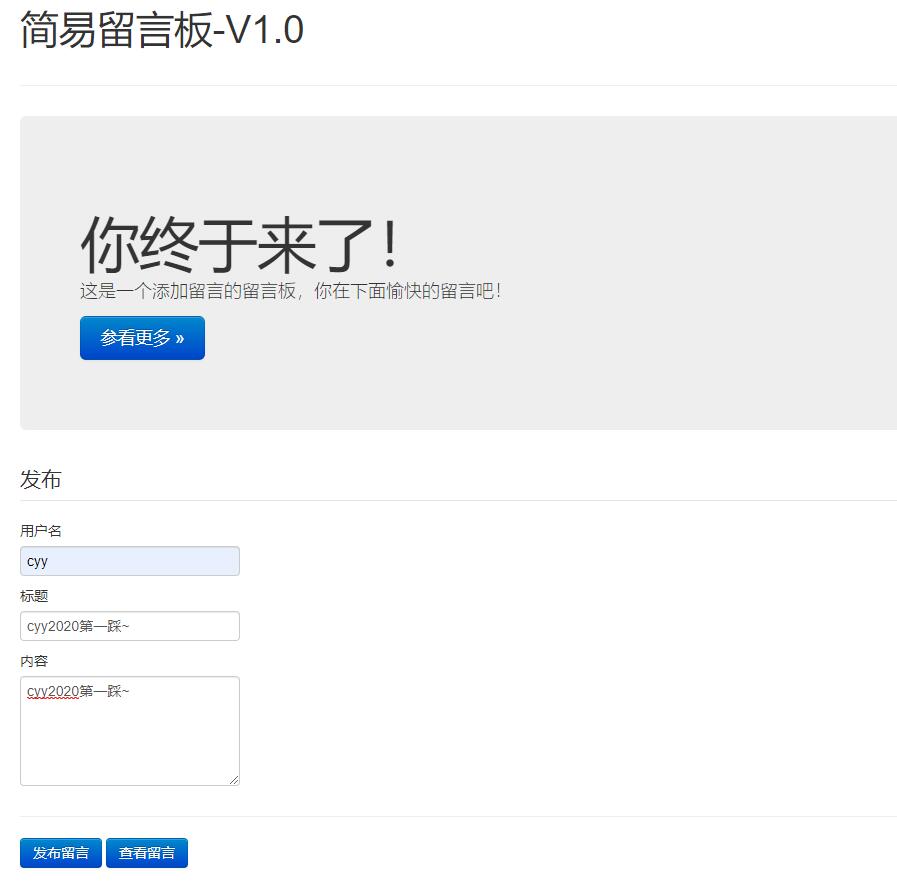
add.php
<?php

header('content-type:text/html;charset=utf-8');

date_default_timezone_set('PRC');

$filename="msg.txt";

$msgs=[];

//检测文件是否存在

if(file_exists($filename)){

  //读取文件中的内容

  $string=file_get_contents($filename);

  if(strlen($string)>0){

    $msgs=unserialize($string);

  }

}

//检测用户是否点击了提交按钮

if(isset($_POST['addMsg'])){

  $username=$_POST['username'];

  $title=strip_tags($_POST['title']);

  $content=strip_tags($_POST['content']);

  $time=time();

  //将其组成关联数组

  $data=compact('username','title','content','time');

  array_push($msgs,$data);

  $msgs=serialize($msgs);

  if(file_put_contents($filename,$msgs)){

    echo "<script>alert('留言成功!');location.href='index.php';</script>";

  }else{

    echo "<script>alert('留言失败!');location.href='index.php';</script>";

  }

}

?>

<!DOCTYPE html>

<html lang="en">

<head>

<script type="text/javascript" src="http://www.francescomalagrino.com/BootstrapPageGenerator/3/js/jquery-2.0.0.min.js"></script>

<script type="text/javascript" src="http://www.francescomalagrino.com/BootstrapPageGenerator/3/js/jquery-ui"></script>

<link href="http://www.francescomalagrino.com/BootstrapPageGenerator/3/css/bootstrap-combined.min.css" rel="stylesheet" media="screen">

<script type="text/javascript" src="http://www.francescomalagrino.com/BootstrapPageGenerator/3/js/bootstrap.min.js"></script>

</head>

<body>

<div class="container-fluid">

    <div class="row-fluid">

        <div class="span12">

            <div class="page-header">

                <h1>

                    简易留言板-<span>V1.0</span>

                </h1>

            </div>

            <div class="hero-unit">

                <h1>

                    你终于来了!

                </h1>

                <p>

                    这是一个添加留言的留言板,你在下面愉快的留言吧!

                </p>

                <p>

                    <a rel="nofollow" class="btn btn-primary btn-large" href="#">参看更多 »</a>

                </p>

            </div>

            <form action="#" method="post">

                <fieldset>

                    <legend>发布</legend>

                       <label>用户名</label><input type="text" name="username" required />

                       <label>标题</label><input type="text" name="title" required />

                       <label>内容</label><textarea name="content" rows="5" cols="30" required></textarea>

                       <hr>

                       <input type="submit" class="btn btn-primary btn-lg" name="addMsg" value="发布留言"/>

                       <input type="button" class="btn btn-primary btn-lg" value="查看留言" onclick="window.location.href='index.php'"/>

                </fieldset>

            </form>

        </div>

    </div>

</div>

</body>

</html>
编辑留言页面
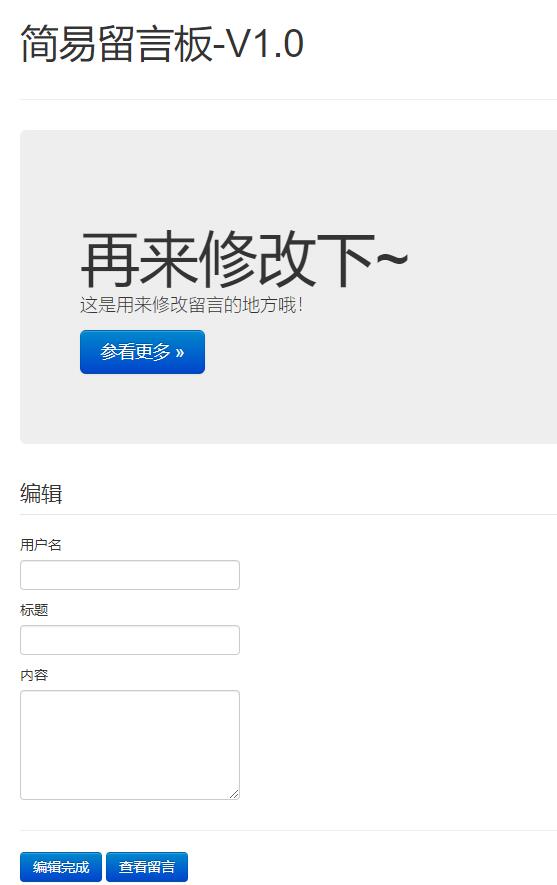
edit.php
<?php

header('content-type:text/html;charset=utf-8');

date_default_timezone_set('PRC');

$filename="msg.txt";

$msgs=[];

$id=$_GET['id'];//获取id

//检测文件是否存在

if(file_exists($filename)){

  //读取文件中的内容

  $string=file_get_contents($filename);

  if(strlen($string)>0){

    $msgs=unserialize($string);

  }

}

//获取已有的留言信息

$username=$msgs[$id]['username'];

$title=strip_tags($msgs[$id]['title']);

$content=strip_tags($msgs[$id]['content']);

$time=$msgs[$id]['time'];

//检测用户是否点击了编辑按钮

if(isset($_POST['editMsg'])){

  //将修改后的留言写入文档

  $msgs[$id]['username']=$_POST['username'];

  $msgs[$id]['title']=strip_tags($_POST['title']);

  $msgs[$id]['content']=strip_tags($_POST['content']);

  $msgs[$id]['time']=time();

  $msgs=serialize($msgs);

  if(file_put_contents($filename,$msgs)){

    echo "<script>alert('编辑成功!');location.href='index.php';</script>";

  }else{

    echo "<script>alert('编辑失败!');location.href='index.php';</script>";

  }

}

?>

<!DOCTYPE html>

<html lang="en">

<head>

<script type="text/javascript" src="http://www.francescomalagrino.com/BootstrapPageGenerator/3/js/jquery-2.0.0.min.js"></script>

<script type="text/javascript" src="http://www.francescomalagrino.com/BootstrapPageGenerator/3/js/jquery-ui"></script>

<link href="http://www.francescomalagrino.com/BootstrapPageGenerator/3/css/bootstrap-combined.min.css" rel="stylesheet" media="screen">

<script type="text/javascript" src="http://www.francescomalagrino.com/BootstrapPageGenerator/3/js/bootstrap.min.js"></script>

</head>

<body>

<div class="container-fluid">

    <div class="row-fluid">

        <div class="span12">

            <div class="page-header">

                <h1>

                    简易留言板-<span>V1.0</span>

                </h1>

            </div>

            <div class="hero-unit">

                <h1>

                    再来修改下~

                </h1>

                <p>

                    这是用来修改留言的地方哦!

                </p>

                <p>

                    <a rel="nofollow" class="btn btn-primary btn-large" href="#">参看更多 »</a>

                </p>

            </div>

            <form action="#" method="post">

                <fieldset>

                    <legend>编辑</legend>

                       <label>用户名</label><input type="text" name="username" value="<?php echo $username;?>" required />

                       <label>标题</label><input type="text" name="title"  value="<?php echo $title;?>" required />

                       <label>内容</label><textarea name="content" rows="5" cols="30" required><?php echo $content;?></textarea>

                       <hr>

                       <input type="submit" class="btn btn-primary btn-lg" name="editMsg" value="编辑完成"/>

                       <input type="button" class="btn btn-primary btn-lg" value="查看留言" onclick="window.location.href='index.php'"/>

                </fieldset>

            </form>

        </div>

    </div>

</div>

</body>

</html>
此时储存的留言信息:msg.txt
a:2:{i:3;a:4:{s:8:"username";s:3:"cyy";s:5:"title";s:12:"cyy又来了";s:7:"content";s:27:"cyy经常来留言!!!";s:4:"time";i:1565510381;}i:4;a:4:{s:8:"username";s:3:"cyy";s:5:"title";s:17:"cyy2020第一踩~";s:7:"content";s:17:"cyy2020第一踩~";s:4:"time";i:1578723602;}}
php实现简易留言板效果的更多相关文章
- DOM操作相关案例 模态对话框,简易留言板,js模拟选择器hover,tab选项卡,购物车案例
1.模态框案例 需求: 打开网页时有一个普通的按钮,点击当前按钮显示一个背景图,中心并弹出一个弹出框,点击X的时候会关闭当前的模态框 代码如下: <!DOCTYPE html> <h ...
- JSP简易留言板
写在前面 在上篇博文JSP内置对象中介绍JSP的9个内置对象的含义和常用方法,但都是比较理论的知识.今天为大家带来一个小应用,用application制作的简易留言板. 包括三个功能模块:留言提交.留 ...
- 原生node实现简易留言板
原生node实现简易留言板 学习node,实现一个简单的留言板小demo 1. 使用模块 http模块 创建服务 fs模块 操作读取文件 url模块 便于path操作并读取表单提交数据 art-tem ...
- Flask学习之旅--简易留言板
一.写在前面 正所谓“纸上得来终觉浅,方知此事要躬行”,在看文档和视频之余,我觉得还是要动手做点什么东西才能更好地学习吧,毕竟有些东西光看文档真的难以理解,于是就试着使用Flask框架做了一个简易留言 ...
- 微信小程序实现简易留言板
微信小程序现在很火,于是也就玩玩,做了一个简易的留言板,让大家看看,你们会说no picture you say a j8 a,好吧先上图. 样子就是的,功能一目了然,下面我们就贴实现的代码,首先是H ...
- 用js做一个简单的留言板效果
html部分: 1: <!DOCTYPE> 2: <html lang="zh-en"> 3: <head> 4: <title>j ...
- vue实现简易留言板
首先引入vue.js <script src="vue.js"></script> 布局 <div id="div"> &l ...
- js简易留言板
<!DOCTYPE html> <html lang="en"> <head> <meta charset="U ...
- js 实现简易留言板功能
<!DOCTYPE html PUBLIC "-//W3C//DTD XHTML 1.0 Transitional//EN" "http://www.w3.org/ ...
随机推荐
- apache 负载均衡
此次使用mod_proxy的方式来实现的,因为在Apache2以上的版本中已经集成了,因此不需要再另行安装和配置了. 只需要把注释去掉即可,去掉以下模块的注释: LoadModule proxy_mo ...
- mysql 启动,停止,重启
启动mysql: 方式一:sudo /etc/init.d/mysql start 方式二:sudo start mysql 方式三:sudo service mysql start sudo ./ ...
- Cobalt Strike生成后门
Cobalt Strike生成后门 1.Payload概念 Payload在渗透测试之中大家可以简单地理解为一段漏洞利用/植入后门的代码或程序. 2.Cobalt Strike生成后门 攻击--> ...
- javascript30--day01--Drum kit
相关视频链接:https://www.bilibili.com/video/av8481988/?p=3 Drum kit 做题思路(1)监听键盘事件 addEventListener(‘事件名’,执 ...
- linux中的链接命令
ln 解释 命令名称:ln 命令英文原意:link 命令所在路径:/bin/ln 执行权限:所有用户 功能描述:生成链接文件 语法 ln -s [源文件] [目标文件] -s 创建软链接 示例 # 创 ...
- Shiro -- (三) 自定义Realm
简介: Realm:域,Shiro 从从 Realm 获取安全数据(如用户.角色.权限),就是说 SecurityManager 要验证用户身份,那么它需要从 Realm 获取相应的用户进行比较以确定 ...
- 使用vscode对threejs的本地调试
始终坚信阅读和调试结合的方式,才是学习开源的高效方法 一.老版本调试 遥想当年的threejs(使用版本为r75)还没有CommonJS,对于我这个小白可以拿起大刀大杀四方......(咳.咳. 就是 ...
- go微服务框架kratos学习笔记九(kratos 全链路追踪 zipkin)
目录 go微服务框架kratos学习笔记九(kratos 全链路追踪 zipkin) zipkin使用demo 数据持久化 go微服务框架kratos学习笔记九(kratos 全链路追踪 zipkin ...
- MySQL数据库root密码忘记丢失重置方法
对于DBA来说,丢失超管用户root的密码是致命的, 可以通过添加--ship-grant-tables参数来跳过权限表. 1.忘记root密码,进不去数据库: 这个时候需要强制停库,先查看MySQL ...
- day 17 初始递归
递归函数 了解什么是递归 : 在函数中调用自身函数 最大递归深度默认是997/998 —— 是python从内存角度出发做的限制 能看懂递归 能知道递归的应用场景 初识递归 —— 算法 —— 二分查找 ...