
spring boot 中事物的使用
一、什么是事务?
事务,通俗的说就是,同时做多个事,要么全做,要么不做,也是其特性。举个例子来说,好比你在某宝、某东、某多上购物,在你提交订单的时候,库存也会相应减少,不可能是钱付了,库存不减少,或者库存减少了,钱没扣,不是尴尬了。
二、事务场景实例
没描述清楚?那好,我们结合实例,通过代码实现,我想往数据库加两个学生,如果增加一个失败了,便不再增加,要么就都增加。
ps:此处沿用上篇文章的代码,还请各位同学注意。
1、创建一个service
创建一个名为StudentService的类,用来添加两个学生,示例代码如下:
package com.rongrong.springboot.demo.student;

import org.springframework.beans.factory.annotation.Autowired;

import org.springframework.stereotype.Service;

/**

 * @author rongrong

 * @version 1.0

 * @description:

 * @date 2020/1/1 22:21

 */

@Service

public class StudentService {

    @Autowired

    StudentResponstory studentResponstory;

    public void insertTwoStudent(){

        Student student1 = new Student();

        student1.setName("Amily");

        student1.setAge(17);

        student1.setSex("girl");

        student1.setEmail("Amily@qq.com");

        studentResponstory.save(student1);

        Student student2 = new Student();

        student2.setName("Jone");

        student2.setAge(19);

        student2.setSex("boy");

        student2.setEmail("Jone@qq.com");

        studentResponstory.save(student2);

    }

}
2、编写接口服务
接口实现增加两个学生,示例代码如下:
    @Autowired

    StudentService studentService;

    /**

     * 插入两个学生信息

     */

    @PostMapping("/student/insertTwo")

    public void insertTwo() {

        studentService.insertTwoStudent();

    }
启动服务,用postman,调用接口服务,去数据库查看新增学生信息存在,证明接口实现成功,如下图:

三、模拟添加数据失败
接着我们来模拟,数据添加失败情况,修改新增两个学生的方法,将student2的名字改成500字符,代码示例如下:
package com.rongrong.springboot.demo.student;

import org.springframework.beans.factory.annotation.Autowired;

import org.springframework.stereotype.Service;

/**

 * @author rongrong

 * @version 1.0

 * @description:

 * @date 2020/1/1 22:21

 */

@Service

public class StudentService {

    @Autowired

    StudentResponstory studentResponstory;

    public void insertTwoStudent(){

        Student student1 = new Student();

        student1.setName("Amily");

        student1.setAge(17);

        student1.setSex("girl");

        student1.setEmail("Amily@qq.com");

        studentResponstory.save(student1);

        Student student2 = new Student();

        student2.setName("JoneJoneJoneJoneJoneJoneJoneJoneJoneJoneJoneJoneJoneJoneJoneJoneJoneJoneJoneJoneJoneJoneJoneJoneJoneJoneJoneJoneJoneJoneJoneJoneJoneJoneJoneJoneJoneJoneJoneJoneJoneJoneJoneJoneJoneJoneJoneJoneJoneJoneJoneJoneJoneJoneJoneJoneJoneJoneJoneJoneJoneJoneJoneJoneJoneJoneJoneJoneJoneJoneJoneJoneJoneJoneJoneJoneJoneJoneJoneJoneJoneJoneJoneJoneJoneJoneJoneJoneJoneJoneJoneJoneJoneJoneJoneJoneJoneJoneJoneJoneJoneJoneJoneJoneJoneJoneJoneJoneJoneJoneJoneJoneJoneJoneJoneJoneJoneJoneJoneJoneJoneJoneJoneJoneJoneJoneJoneJoneJoneJoneJoneJoneJoneJone");

        student2.setAge(19);

        student2.setSex("boy");

        student2.setEmail("Jone@qq.com");

        studentResponstory.save(student2);

    }

}
启动项目,再次调用接口,这次真的报错了,先看控制台结果如下图:
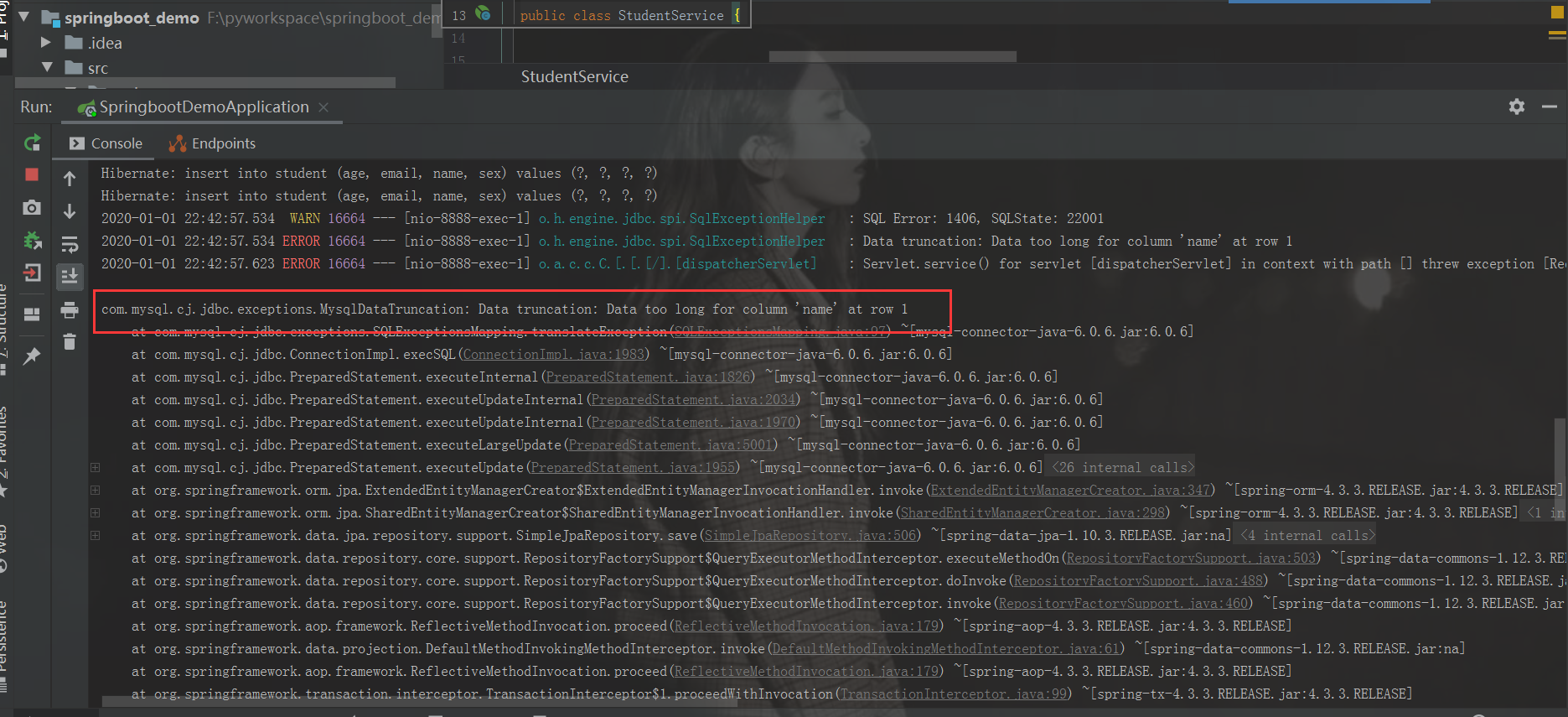
因为name字段传入值太长,导致报错,再来看我们的数据库,是否插入数据了呢,
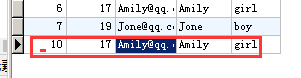
student1成功插入数据了,但是student2并没有,这好比说,你把东西拿到手了,卖方没收到钱,或者你付了钱,没收到货,显然两种情况在现实中都是不允许的,那么我们该怎么解决这样的情况呢
我们请出事务大神。来搞定这个事,具体修改代码示例如下:
package com.rongrong.springboot.demo.student;

import org.springframework.beans.factory.annotation.Autowired;

import org.springframework.stereotype.Service;

import org.springframework.transaction.annotation.Transactional;

/**

 * @author rongrong

 * @version 1.0

 * @description:

 * @date 2020/1/1 22:21

 */

@Service

public class StudentService {

    @Autowired

    StudentResponstory studentResponstory;

    @Transactional

    public void insertTwoStudent(){

        Student student1 = new Student();

        student1.setName("Amily");

        student1.setAge(17);

        student1.setSex("girl");

        student1.setEmail("Amily@qq.com");

        studentResponstory.save(student1);

        Student student2 = new Student();

        student2.setName("JoneJoneJoneJoneJoneJoneJoneJoneJoneJoneJoneJoneJoneJoneJoneJoneJoneJoneJoneJoneJoneJoneJoneJoneJoneJoneJoneJoneJoneJoneJoneJoneJoneJoneJoneJoneJoneJoneJoneJoneJoneJoneJoneJoneJoneJoneJoneJoneJoneJoneJoneJoneJoneJoneJoneJoneJoneJoneJoneJoneJoneJoneJoneJoneJoneJoneJoneJoneJoneJoneJoneJoneJoneJoneJoneJoneJoneJoneJoneJoneJoneJoneJoneJoneJoneJoneJoneJoneJoneJoneJoneJoneJoneJoneJoneJoneJoneJoneJoneJoneJoneJoneJoneJoneJoneJoneJoneJoneJoneJoneJoneJoneJoneJoneJoneJoneJoneJoneJoneJoneJoneJoneJoneJoneJoneJoneJoneJoneJoneJoneJoneJoneJoneJone");

        student2.setAge(19);

        student2.setSex("boy");

        student2.setEmail("Jone@qq.com");

        studentResponstory.save(student2);

    }

}
再次启动项目,调用接口服务,我们再看数据库,会看到没数据插入,控制台还会报刚才的错,这就很好的实现了事务的特性,要么做,要么不做
到此,关于事务的介绍和使用介绍完毕,有兴趣的同学可以自行尝试!
spring boot 中事物的使用的更多相关文章
- springboot(十一):Spring boot中mongodb的使用
mongodb是最早热门非关系数据库的之一,使用也比较普遍,一般会用做离线数据分析来使用,放到内网的居多.由于很多公司使用了云服务,服务器默认都开放了外网地址,导致前一阵子大批 MongoDB 因配置 ...
- (转)Spring Boot(十一):Spring Boot 中 MongoDB 的使用
http://www.ityouknow.com/springboot/2017/05/08/spring-boot-mongodb.html MongoDB 是最早热门非关系数据库的之一,使用也比较 ...
- Spring Boot(十一):Spring Boot 中 MongoDB 的使用
MongoDB 是最早热门非关系数据库的之一,使用也比较普遍,一般会用做离线数据分析来使用,放到内网的居多.由于很多公司使用了云服务,服务器默认都开放了外网地址,导致前一阵子大批 MongoDB 因配 ...
- SpringBoot(十一):Spring boot 中 mongodb 的使用
原文出处: 纯洁的微笑 mongodb是最早热门非关系数据库的之一,使用也比较普遍,一般会用做离线数据分析来使用,放到内网的居多.由于很多公司使用了云服务,服务器默认都开放了外网地址,导致前一阵子大批 ...
- springboot:Spring boot中mongodb的使用(山东数漫江湖)
mongodb是最早热门非关系数据库的之一,使用也比较普遍,一般会用做离线数据分析来使用,放到内网的居多.由于很多公司使用了云服务,服务器默认都开放了外网地址,导致前一阵子大批 MongoDB 因配置 ...
- spring boot @Transactional事物处理
spring boot 添加事物使用 @Transactional注解 简单使用 在启动类上方添加 @EnableTransactionManagement注解 使用时直接在类或者方法上使用 @Tra ...
- 如何在Spring Boot 中动态设定与执行定时任务
本篇文章的目的是记录并实现在Spring Boot中,动态设定与执行定时任务. 我的开发项目是 Maven 项目,所以首先需要在 pom.xml 文件中加入相关的依赖.依赖代码如下所示: <de ...
- Spring Boot中的事务是如何实现的
本文首发于微信公众号[猿灯塔],转载引用请说明出处 今天呢!灯塔君跟大家讲: Spring Boot中的事务是如何实现的 1. 概述 一直在用SpringBoot中的@Transactional来做事 ...
- spring boot(三):Spring Boot中Redis的使用
spring boot对常用的数据库支持外,对nosql 数据库也进行了封装自动化. redis介绍 Redis是目前业界使用最广泛的内存数据存储.相比memcached,Redis支持更丰富的数据结 ...
随机推荐
- nodeJs学习-02 fs模块(文件操作)
读文件: const fs = require('fs'); //读文件(异步) readFile(文件名,回调函数) fs.readFile('section03/testData/aaa.txt' ...
- 什么是实例化? 标签: vb 2015-02-08 20:26 1026人阅读 评论(30) 收藏
为什么要写这个博客呢?可能是因为自己的基础太差,昨天敲三层的注册,各层都敲完了以后,死活报错,无奈之下只能找晓婵求救,她只改了三个地方,犯了同一个错误,我的源码是这样写的:Dim uA As Ent ...
- css属性overflow:hidden在IE6、7下失效解决方案
当父元素的直接子元素或者下级子元素的样式拥有position:relative属性时,父元素的overflow:hidden属性就会失效.我们在IE 6 7内发现子元素会超出父元素设定的高度,即使父元 ...
- C#面向对象基础--类与对象
1.类与对象 类是面向对象编程的基本单元:类造出来的变量叫对象. 一个类包含俩种成员:字段与方法. 字段即变量,方法即函数. 面向对象思想:教给我们如何合理的运用类的规则去编写代码. 2.类的字段 字 ...
- jq 监听返回事件
<script> $(document).ready(function(e) { var counter = 0; if (window.hi ...
- HSV转换
HSV中H为色调(Hue).S为饱和度(Saturation).V为亮度(Value)三个分量构成 RGB和HSV颜色空间中进行图像处理的案例,HSV颜色空间分离图像中每一个像素的值或V分量.这个分量 ...
- 08查找满足条件的n个数
第一节.寻找和为定值的两个数 题目:输入一个数组和一个数字,在数组中查找两个数,使得它们的和正好是输入的那个数字.要求时间复杂度是O(n).如果有多对数字的和等于输入的数字,输出任意一对即可. 例如输 ...
- H3C 命令级别
- better-scroll在移动端绑定click事件失效
在做一个列表的时候需要点击列表将列表信息输出,给<li>加个一个很简单的@click,可是没有反应. 原因是使用了better-scroll,默认它会阻止touch事件.所以在配置中需要加 ...
- setTimeout 传参
一般setTimeout中的参数为 setTimeout(f,time)但是如果我想要给f函数传入一个参数怎么办 setTimeout(f(arguments),time) 如果我这样写的话,那么ti ...