
jSon和Ajax登录功能,ajax数据交互案例
ajax实例,检测用户与注册
检测用户名是否被占用:
在用户填写完用户名之后,ajax会异步向服务器发送请求,判断用户名是否存在
首先写好静态页面:
index.html
<!DOCTYPE html>

<html lang="en">

<head>

    <meta charset="UTF-8">

    <title>index</title>

    <style>

        *{

            margin:0;

            padding:0;

        }

        body{

            background-color: #333;

        }

        a{

            text-decoration: none;

        }

        .box{

            width:300px;

            height:270px;

            margin:80px auto;

            background-color: #abcdef;

            border-radius: 5px;

            padding:15px 30px;

        }

        .box .title{

            height:15px;

            margin-bottom:20px;

        }

        .box .title span{

            font-size:16px;

            color:#333;

            margin-right:15px;

        }

        .box .title span.current{

            color:red;

        }

        .box div{

            width:280px;

            height:30px;

            margin-bottom:25px;

            padding:8px 10px;

            background-color: #fff;

            border-radius: 5px;

            color:#666;

            position: relative;

        }

        .box div span{

            display: inline-block;

            padding-top:4px;

            padding-right:6px;

        }

        .box div input{

            border:none;

            outline:none;

            font-size:16px;

            color:#666;

            margin-top:5px;

        }

        .box div i{

            width:16px;

            height:16px;

            position: absolute;

            top:14px;

            right:12px;

        }

        .box div i.ok{

            background:url(icon.png) no-repeat 0 -67px;

        }

        .box div i.no{

            background:url(icon.png) no-repeat -17px -67px;

        }

        .box div .info{

            color:red;

            margin-top:16px;

            padding-left:2px;

        }

        .button{

            margin-top:7px;

        }

        .button a{

            display: block;

            text-align: center;

            height:45px;

            line-height:45px;

            background-color: #f20d0d;

            border-radius:20px;

            color:#fff;

            font-size:16px;

        }

    </style>

</head>

<body>

    <div class="box">

        <p class="title">

            <span>登 录</span>

            <span class="current">注 册</span>

        </p>

        <div>

            <span>+86</span>

            <input type="text" name="user" id="user" placeholder="请输入注册手机号" autocomplete="off">

            <i class="ok"></i>

            <p class="info">该手机号已注册</p>

        </div>

        <div>

            <input type="password" name="pwd" id="pwd" placeholder="请设置密码" autocomplete="off">

            <i class="no"></i>

            <p class="info"></p>

        </div>

        <p class="button">

            <a href="javascript:void(0)" id="btn" class="btn">注册</a>

        </p>

    </div>

    <script src="ajax.js"></script>

</body>

</html>
效果图
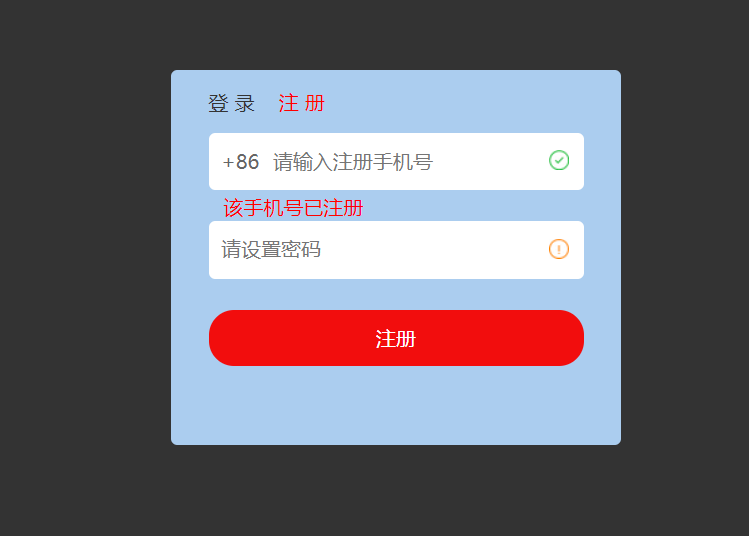
然后是仿照jquery的$.ajax(),使用js封装了一个ajax方法(只是为了熟悉运行原理,实际项目可以直接用jquery封装好的)
ajax.js
//仿写jquery的ajax方法

var $={

    ajax:function(options){

        var xhr=null;//XMLHttpRequest对象

        var url=options.url,//必填

            type=options.type || "get",

            async=typeof(options.async)==="undefined"?true:options.async,

            data=options.data || null,

            params="",//传递的参数

            callback=options.success,//成功的回调

            error=options.error;//失败的回调

        //post传参的转换,将对象字面量形式转为字符串形式

        // data:{user:"13200000000",pwd:"123456"}

        // xhr.send("user=13200000000&pwd=123456")

        if(data){

            for(var i in data){

                params+=i+"="+data[i]+"&";

            }

            params=params.replace(/&$/,"");//正则替换,以&结尾的将&转为空

        }

        //根据type值修改传参

        if(type==="get"){

            url+="?"+params;

        }

        console.log(url);

        //IE7+,其他浏览器

        if(typeof XMLHttpRequest!="undefined"){

            xhr=new XMLHttpRequest();//返回xhr对象的实例

        }else if(typeof ActiveXObject!="undefined"){

            //IE7及以下

            //所有可能出现的ActiveXObject版本

            var arr=["Microsoft.XMLHTTP","MSXML2.XMLHTTP.6.0","MSXML2.XMLHTTP.5.0","MSXML2.XMLHTTP.4.0","MSXML2.XMLHTTP.3.0","MSXML2.XMLHTTP.2.0"];

            //循环

            for(var i=0,len=arr.length;i<len;i++){

                try{

                    xhr=new ActiveXObject(arr[i]);//任意一个版本支持,即可退出循环

                    break;

                }catch(e){

                }

            }

        }else{

            //都不支持

            throw new Error("您的浏览器不支持XHR对象!");

        }

        //响应状态变化的函数

        xhr.onreadystatechange=function(){

            if(xhr.readyState===4){

                if((xhr.status>=200&&xhr.status<300) || xhr.status===304){

                    callback&&callback(JSON.parse(xhr.responseText));//如果存在回调则执行回调

                }else{

                    error&&error();

                }

            }

        }

        //创建HTTP请求

        xhr.open(type,url,async);

        //设置HTTP头

        xhr.setRequestHeader("Content-type","application/x-www-form-urlencoded");

        //发送请求

        xhr.send(params);

    },
  jsonp:function(){

  }

}
下面放出所有代码:
index.html
<!DOCTYPE html>

<html lang="en">

<head>

    <meta charset="UTF-8">

    <title>index</title>

    <style>

        *{

            margin:0;

            padding:0;

        }

        body{

            background-color: #333;

        }

        a{

            text-decoration: none;

        }

        .box{

            width:300px;

            height:270px;

            margin:80px auto;

            background-color: #abcdef;

            border-radius: 5px;

            padding:15px 30px;

        }

        .box .title{

            height:15px;

            margin-bottom:20px;

        }

        .box .title span{

            font-size:16px;

            color:#333;

            margin-right:15px;

            cursor:pointer;

        }

        .box .title span.current{

            color:red;

        }

        .box div{

            width:280px;

            height:30px;

            margin-bottom:25px;

            padding:8px 10px;

            background-color: #fff;

            border-radius: 5px;

            color:#666;

            position: relative;

        }

        .box div span{

            display: inline-block;

            padding-top:4px;

            padding-right:6px;

        }

        .box div input{

            border:none;

            outline:none;

            font-size:16px;

            color:#666;

            margin-top:5px;

        }

        .box div i{

            width:16px;

            height:16px;

            position: absolute;

            top:14px;

            right:12px;

        }

        .box div i.ok{

            background:url(icon.png) no-repeat 0 -67px;

        }

        .box div i.no{

            background:url(icon.png) no-repeat -17px -67px;

        }

        .box div .info{

            color:red;

            margin-top:16px;

            padding-left:2px;

        }

        .button{

            margin-top:7px;

        }

        .button a{

            display: none;

            text-align: center;

            height:45px;

            line-height:45px;

            background-color: #f20d0d;

            border-radius:20px;

            color:#fff;

            font-size:16px;

        }

        .button a.show{

            display: block;

        }

    </style>

</head>

<body>

    <div class="box">

        <p class="title" id="title">

            <span>登 录</span>

            <span class="current">注 册</span>

        </p>

        <div>

            <span>+86</span>

            <input type="text" name="user" id="user" placeholder="请输入注册手机号" autocomplete="off" data-check="reg">

            <i id="userIco"></i>

            <p class="info" id="userInfo"></p>

        </div>

        <div>

            <input type="password" name="pwd" id="pwd" placeholder="请设置密码" autocomplete="off">

            <i id="pwdIco"></i>

            <p class="info" id="pwdInfo"></p>

        </div>

        <p class="button">

            <a href="javascript:void(0)" id="btn" class="btn show">注册</a>

            <a href="javascript:void(0)" id="btn2" class="btn">登录</a>

        </p>

    </div>

    <script src="ajax.js"></script>

    <script>

        var user=document.getElementById("user"),

            userIco=document.getElementById("userIco"),

            userInfo=document.getElementById("userInfo"),

            pwd=document.getElementById("pwd"),

            pwdIco=document.getElementById("pwdIco"),

            pwdInfo=document.getElementById("pwdInfo"),

            btn=document.getElementById("btn"),

            btn2=document.getElementById("btn2"),

            title=document.getElementById("title").getElementsByTagName("span"),

            userPattern=/^[1]\d{10}$/,//手机号格式的正则,

            pwdPattern=/^\w{5,10}$/,

            isRepeat=false;//默认不重复

        //绑定检测手机号事件

        user.addEventListener("blur",checkUser,false);

        //绑定检测密码事件

        pwd.addEventListener("blur",checkPwd,false);

        //绑定注册事件

        btn.addEventListener("click",regFn,false);

        // 切换登录绑定

        title[0].addEventListener("click",showLogin,false);

        // 切换注册绑定

        title[1].addEventListener("click",showReg,false);

        //检测手机号方法

        function checkUser(){

            var userVal=user.value;

            if(!userPattern.test(userVal)){

                userInfo.innerHTML="手机号格式有误";

                userIco.className="no";

            }else{

                //格式正确时

                userInfo.innerHTML="";

                userIco.className="";

                //发起ajax请求

                $.ajax({

                    url:"http://localhost/reg/server/isUserRepeat.php",//get传参

                    type:"post",

                    async:true,

                    data:{username:userVal},

                    success:function(data){

                        console.log(data);

                        if(data.code===1){

                            userIco.className="ok";

                            isRepeat=false;

                        }else if(data.code===0){

                            userInfo.innerHTML=data.msg;

                            userIco.className="no";

                            isRepeat=true;//手机号重复

                        }else{

                            userInfo.innerHTML="检测失败,请重试";

                        }

                    }

                })

            }

        }

        //检测密码的方法

        function checkPwd(){

            var pwdVal=pwd.value;

            if(!pwdPattern.test(pwdVal)){

                pwdInfo.innerHTML="密码格式有误";

                pwdIco.className="no";

            }else{

                //格式正确时

                pwdInfo.innerHTML="";

                pwdIco.className="ok";

            }

        }

        //注册的方法

        function regFn(){

            var user_val=user.value,

                pwd_val=pwd.value;

            //再次检测用户名和密码是否合法

            if(userPattern.test(user_val) && pwdPattern.test(pwd_val) && !isRepeat){

                //发起ajax请求

                $.ajax({

                    url:"http://localhost/reg/server/register.php",

                    type:"post",

                    data:{username:user_val,userpwd:pwd_val},

                    success:function(data){

                        alert("注册成功~");

                        //切换登录页面

                        showLogin();

                        user.value="";

                        pwd.value="";

                    },

                    error:function(){

                        pwdInfo.innerHTML="注册失败,请重试!";

                    }

                })

            }else{

                //不合法

            }

        }

        // 切换登录

        function showLogin(){

            //切换到登录页面

            title[0].className="current";

            title[1].className="";

            btn2.className="btn show";

            btn.className="btn";

        }

        // 切换注册

        function showReg(){

            //切换到登录页面

            title[1].className="current";

            title[0].className="";

            btn2.className="btn";

            btn.className="btn show";

        }

    </script>

</body>

</html>
ajax.js上面已经贴过了
接下来是模拟服务器端的三个文件:
isUserRepeat.php
<?php

header('Content-Type:application/json');

$isUsername = array_key_exists('username',$_REQUEST);

$username = $isUsername ? $_REQUEST['username'] : '';

if(!$username){

    $msg = printMsg('参数有误',2);

    echo json_encode($msg);

    exit();

}

function printMsg($msg,$code){

    return array('msg'=>$msg,'code'=>$code);

}

// 记录存储用户的文件路径

$fileStr = __DIR__.'/user.json';

// 读取现存的用户名和密码

$fileStream = fopen($fileStr,'r');

$fileContent = fread($fileStream,filesize($fileStr));

$fileContent_array = $fileContent ? json_decode($fileContent,true) : array();

fclose($fileStream);

// 判断用户名是否有重复的

$isrepeat = false;

foreach($fileContent_array as $key=>$val){

    if($val['username'] === $username){

        $isrepeat = true;

        break;

    }

}

if($isrepeat){

    $msg = printMsg('用户名重复',0);

    echo json_encode($msg);

    exit();

}

$msg = printMsg('用户名可用',1);

echo json_encode($msg);

?>
register.php
<?php

header('Content-Type:application/json');

// 获取前端传递的注册信息 字段为   username   userpwd

$isUsername = array_key_exists('username',$_REQUEST);

$isUserpwd = array_key_exists('userpwd',$_REQUEST);

$username = $isUsername ? $_REQUEST['username'] : '';

$userpwd = $isUserpwd ? $_REQUEST['userpwd'] : '';

function printMsg($msg,$code){

    return array('msg'=>$msg,'code'=>$code);

}

if(!$username || !$userpwd){

    $msg = printMsg('参数有误',0);

    echo json_encode($msg);

    exit();

}

// 记录存储用户的文件路径

$fileStr = __DIR__.'/user.json';

// 读取现存的用户名和密码

$fileStream = fopen($fileStr,'r');

$fileContent = fread($fileStream,filesize($fileStr));

$fileContent_array = $fileContent ? json_decode($fileContent,true) : array();

fclose($fileStream);

// 判断用户名是否有重复的

$isrepeat = false;

foreach($fileContent_array as $key=>$val){

    if($val['username'] === $username){

        $isrepeat = true;

        break;

    }

}

if($isrepeat){

    $msg = printMsg('用户名重复',0);

    echo json_encode($msg);

    exit();

}

array_push($fileContent_array,array('username'=>$username,'userpwd'=>$userpwd));

// 将存储的用户名密码写入

$fileStream = fopen($fileStr,'w');

fwrite($fileStream,json_encode($fileContent_array));

fclose($fileStream);

echo json_encode(printMsg('注册成功',1));

?>
user.json
[{"username":"zhangsan","userpwd":"zhangsan"},{"username":"lisi","userpwd":"lisi"},{"username":"134","userpwd":"sdfsdf"},{"username":"135","userpwd":"dsff"},{"username":"136","userpwd":"dsff"},{"username":"13521554677","userpwd":"sdfsdf"},{"username":"13521557890","userpwd":"sdfsdf"},{"username":"13521557891","userpwd":"sdfsdf"},{"username":"13810701234","userpwd":"sdfsdf"},{"username":"13810709999","userpwd":"shitou051031"},{"username":"13810709998","userpwd":"sdfsdfdsf"},{"username":"13412345678","userpwd":"shitou"},{"username":"13211111111","userpwd":"111111"},{"username":"13212222222","userpwd":"111111"},{"username":"13244444444","userpwd":"444444"}]
效果图

跳转到登录页面
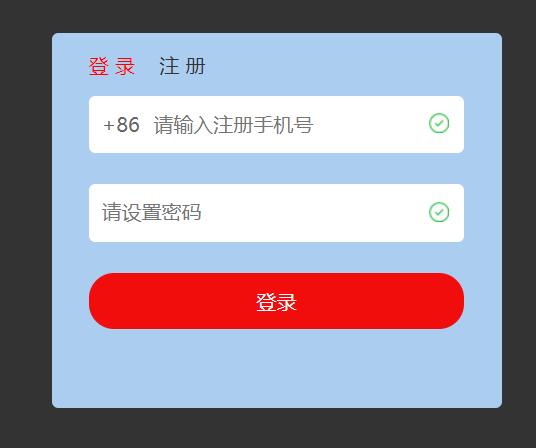
补充:登录页面时不需要检测用户名是否重复,可以在手机号的输入框中添加 data-check 属性,如果是reg,则为注册效果;如果是login,则为登录效果
待完成……
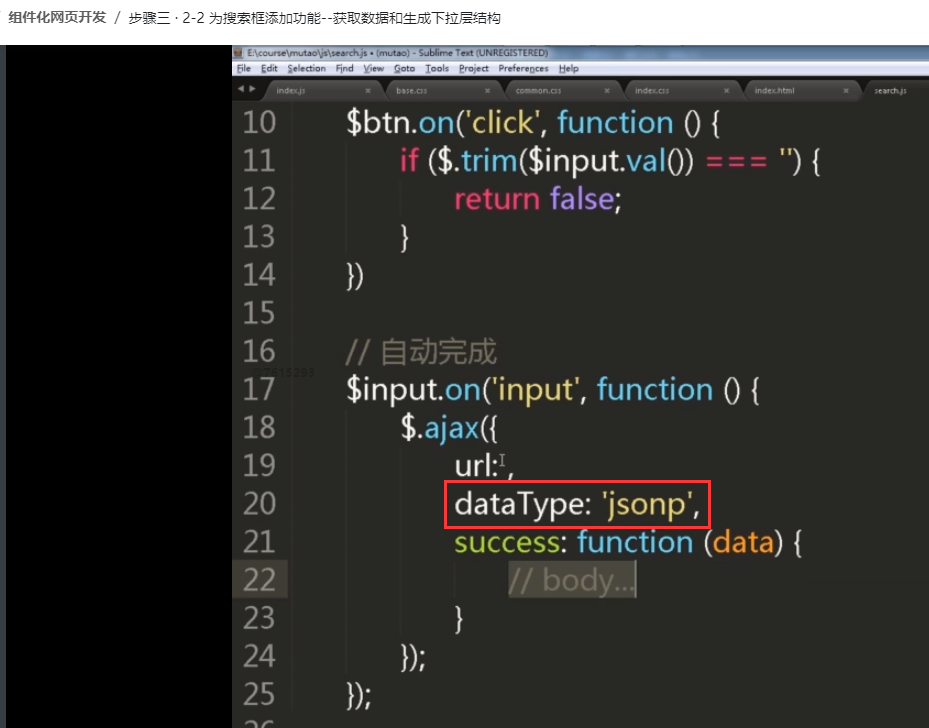
还有jquery的跨域实现,jsonp如何实现:
把dataType属性设置为jsonp就可以
jSon和Ajax登录功能,ajax数据交互案例的更多相关文章
- 项目:jSon和Ajax登录功能
组件化网页开发 / 步骤二 · 项目:jSon和Ajax登录功能 要熟练编写封装的$.ajax({........})
- ASP.Net WebAPI与Ajax进行跨域数据交互时Cookies数据的传递
前言 最近公司项目进行架构调整,由原来的三层架构改进升级到微服务架构(准确的说是服务化,还没完全做到微的程度,颗粒度没那么细),遵循RESTFull规范,使前后端完全分离,实现大前端思想.由于是初次尝 ...
- ASP.Net中关于WebAPI与Ajax进行跨域数据交互时Cookies数据的传递
本文主要介绍了ASP.Net WebAPI与Ajax进行跨域数据交互时Cookies数据传递的相关知识.具有很好的参考价值.下面跟着小编一起来看下吧 前言 最近公司项目进行架构调整,由原来的三层架构改 ...
- EChats+Ajax之柱状图的数据交互
原文链接:https://blog.csdn.net/qq_37936542/article/details/79723710 一:下载 echarts.min.js 选择完整版进行下载,精简版和常用 ...
- AJAX请求.net controller数据交互过程
AJAX发出请求 $.ajax({ url: "/Common/CancelTaskDeal", //CommonController下的CancelTaskDeal方法 type ...
- C# 网络通信功能 同步数据交互开发
前言 本文将使用一个Nuget公开的组件技术来实现一对多的数据通信功能,提供了一些简单的API,来方便的向服务器进行数据请求. 在visual studio 中的Nuget管理器中可以下载安装,也可以 ...
- jquery ajax 后台和前台数据交互 C#
<input type="button" id="updateInfo" value="更改货载重量" /> <div i ...
- 前端和后端的数据交互(jquery ajax+python flask+mysql)
上web课的时候老师布置的一个实验,要求省市连动,基本要求如下: 1.用select选中一个省份. 2.省份数据传送到服务器,服务器从数据库中搜索对应城市信息. 3.将城市信息返回客户,客户用sele ...
- Ajax实现xml文件数据插入数据库(一)--- 构建解析xml文件的js库
Ajax实现将xml文件数据插入数据库的过程所涉及到的内容比较多,所以对于该过程的讲解本人打算根据交互的过程将其分为三个部分,第一部分为构建解析xml文件的javascript库,第二部分为ajax与 ...
随机推荐
- 【STACK】Several待填的坑
待学的习: https://www.cnblogs.com/xiao-ju-ruo-xjr/p/9149792.html 待写的题: loj#3184:「CEOI2018」斐波那契表示法 luoguP ...
- python GUI测试自动化
#! /usr/bin/env python#coding=GB18030'''GUI测试自动化 语言:python模块:pywinauto环境:windows7中文.python-2.6_32bit ...
- 链接拼接的方法(用于解决同一个脚本返回两种不同的url链接的问题)
实例一: 上图所示 爬虫返回的链接有一部分带有http前缀,有一部分没有,且也不知道具体哪些链接会出现没有前缀的情况 后面如果通过返回链接进行再次访问,那么肯定会出现报错的问题 思路: 判断 返回值内 ...
- Map梳理
Map梳理 类型介绍 通用Map:用于在应用程序中管理映射,通常在 java.util 程序包中实现 HashMap.Hashtable.Properties.LinkedHashMap.Identi ...
- Centos 7 最小化部署svn版本控制(http协议)
1.关闭selinux sh-4.2# sed -i 's/enforcing/disabled/' /etc/selinux/config sh-4.2# reboot 2.卸载防火墙 sh-4.2 ...
- alert弹出窗口,点击确认后关闭页面
alert("点击确认后,关闭页面"); window.opener=null;window.top.open('','_self','');window.close(this);
- 探究HashMap1.8的扩容
扩容前 扩容后 机制 else { // preserve order Node<K,V> loHead = null, loTail = null;//低指针 Node<K,V&g ...
- 如何在网页读取用户IP,操作系统版本等数据demo
我们浏览网页的时候,会不经意间看到,有些地方(如个人的签名档)显示出了个人的IP,操作系统等数据.借助第三方API和请求报头useragent是很容易实现的. <html> <hea ...
- GetWindowRect与GetClientRect 的区别
GetWindowRect 函数功能:该函数返回指定窗口的边框矩形的尺寸.该尺寸以相对于屏幕坐标左上角的屏幕坐标给出. 函数原型:BOOL GetWindowRect(HWND hWnd,LPRECT ...
- 每日一练_PAT_B_真题
A+B和C (15) 时间限制 1000 ms 内存限制 32768 KB 代码长度限制 100 KB 判断程序 Standard (来自 小小) 题目描述 给定区间[-2的31次方, 2的31次方] ...