
CAS (13) —— CAS 使用Maven Profile支持多环境编译
CAS (13) —— CAS 使用Maven Profile支持多环境编译
摘要
CAS 使用Maven Profile支持多环境编译
版本
tomcat版本: tomcat-8.0.29
jdk版本: jdk1.8.0_65
cas版本: 4.1.3
**cas4.1.3 (4.x还在开发过程中不是很稳定,迭代比较快,也会有些bug) **
cas-client-3.4.1
maven版本: 3.3.9
主要内容
准备
以项目github上CAS项目为例进行扩充
- 参考文章
CAS (1) —— Mac下配置CAS到Tomcat(服务端)
配置
扩充不同环境下需要定制配置文件目录
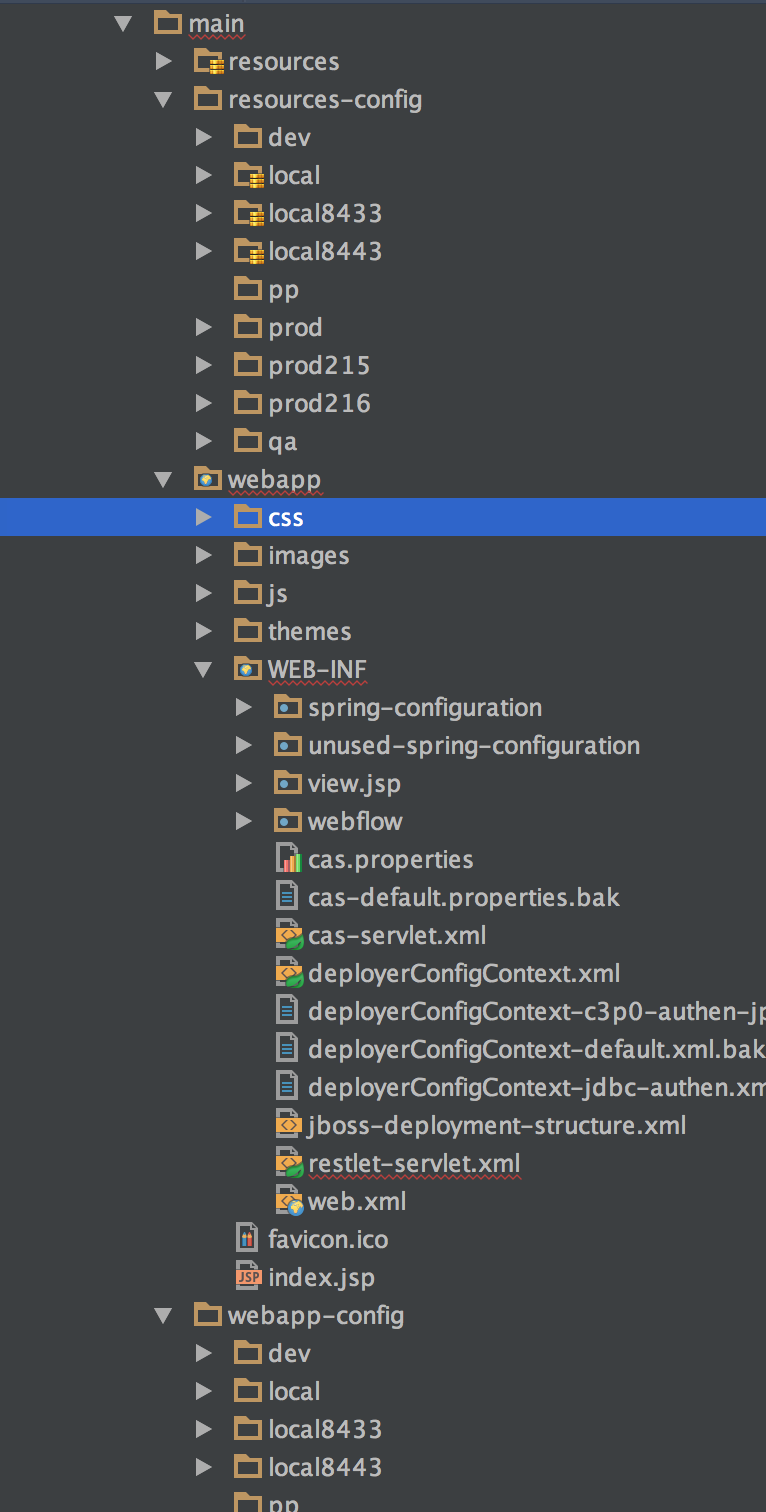
Profile使用
<profiles>

      <profile>

          <id>local8433</id>

          <properties>

              <env>local8433</env>

          </properties>

          <activation>

              <activeByDefault>true</activeByDefault>

          </activation>

          <build>

              <resources>

                  <resource>

                      <directory>src/main/resources</directory>

                      <excludes>

                          <exclude>*.bak</exclude>

                      </excludes>

                  </resource>

                  <resource>

                      <directory>src/main/resources-config/local8433</directory>

                  </resource>

              </resources>

          </build>

      </profile>

      <profile>

          <id>local8443</id>

          <properties>

              <env>local8443</env>

          </properties>

          <activation>

              <activeByDefault>true</activeByDefault>

          </activation>

          <build>

              <resources>

                  <resource>

                      <directory>src/main/resources</directory>

                      <excludes>

                          <exclude>*.bak</exclude>

                      </excludes>

                  </resource>

                  <resource>

                      <directory>src/main/resources-config/local8443</directory>

                  </resource>

              </resources>

          </build>

      </profile>

      <profile>

          <id>local</id>

          <properties>

              <env>local</env>

          </properties>

          <activation>

              <activeByDefault>true</activeByDefault>

          </activation>

          <build>

              <resources>

                  <resource>

                      <directory>src/main/resources</directory>

                      <excludes>

                          <exclude>*.bak</exclude>

                      </excludes>

                  </resource>

                  <resource>

                      <directory>src/main/resources-config/local</directory>

                  </resource>

              </resources>

          </build>

      </profile>

    <profile>

      <id>dev</id>

      <properties>

        <env>dev</env>

      </properties>

      <build>

        <resources>

          <resource>

            <directory>src/main/resources</directory>

            <excludes>

              <exclude>*.bak</exclude>

            </excludes>

          </resource>

          <resource>

            <directory>src/main/resources-config/dev</directory>

          </resource>

        </resources>

      </build>

    </profile>

    <profile>

      <id>qa</id>

      <properties>

        <env>qa</env>

      </properties>

      <build>

        <resources>

          <resource>

            <directory>src/main/resources</directory>

            <excludes>

              <exclude>*.bak</exclude>

            </excludes>

          </resource>

          <resource>

            <directory>src/main/resources-config/qa</directory>

          </resource>

        </resources>

      </build>

    </profile>

    <profile>

      <id>prod</id>

      <properties>

        <env>prod</env>

      </properties>

      <build>

        <resources>

          <resource>

            <directory>src/main/resources</directory>

            <excludes>

              <exclude>*.bak</exclude>

            </excludes>

          </resource>

          <resource>

            <directory>src/main/resources-config/prod</directory>

          </resource>

        </resources>

      </build>

    </profile>

      <profile>

          <id>prod215</id>

          <properties>

              <env>prod215</env>

          </properties>

          <build>

              <resources>

                  <resource>

                      <directory>src/main/resources</directory>

                      <excludes>

                          <exclude>*.bak</exclude>

                      </excludes>

                  </resource>

                  <resource>

                      <directory>src/main/resources-config/prod215</directory>

                  </resource>

              </resources>

          </build>

      </profile>

      <profile>

          <id>prod216</id>

          <properties>

              <env>prod216</env>

          </properties>

          <build>

              <resources>

                  <resource>

                      <directory>src/main/resources</directory>

                      <excludes>

                          <exclude>*.bak</exclude>

                      </excludes>

                  </resource>

                  <resource>

                      <directory>src/main/resources-config/prod216</directory>

                  </resource>

              </resources>

          </build>

      </profile>

  </profiles>
Filter使用
<build>

    <filters>

        <filter>${basedir}/src/main/webapp-config/${env}/filters/cas.properties</filter>

        <!--<filter>${basedir}/src/main/webapp-config/${env}/filters/spring-configuration/ticketRegistryDataSource.xml</filter>-->

        <!--<filter>${basedir}/src/main/webapp-config/${env}/filters/spring-configuration/authenticationDataSource.xml</filter>-->

        <filter>${basedir}/src/main/webapp-config/${env}/filters/spring-configuration/authenticationEncoder.xml</filter>

    </filters>

    <plugins>

      <plugin>

        <groupId>org.apache.maven.plugins</groupId>

        <artifactId>maven-war-plugin</artifactId>

        <configuration>

          <warName>cas</warName>

          <webResources>

            <resource>

              <directory>${basedir}/src/main/webapp/WEB-INF</directory>

              <filtering>true</filtering>

              <targetPath>WEB-INF</targetPath>

              <includes>

                <include>**/web.xml</include>

              </includes>

              <excludes>

                <exclude>**.bak</exclude>

              </excludes>

            </resource>

              <resource>

                  <directory>${basedir}/src/main/webapp-config/${env}/filters</directory>

                  <filtering>true</filtering>

                  <targetPath>WEB-INF</targetPath>

                  <includes>

                      <include>*.properties</include>

                      <include>**.xml</include>

                  </includes>

              </resource>

              <resource>

                  <directory>${basedir}/src/main/webapp-config/${env}/filters/spring-configuration</directory>

                  <filtering>true</filtering>

                  <targetPath>WEB-INF/spring-configuration</targetPath>

                  <includes>

                      <include>*.properties</include>

                      <include>**.xml</include>

                  </includes>

              </resource>

          </webResources>

        </configuration>

      </plugin>

      <plugin>

        <groupId>org.eclipse.jetty</groupId>

        <artifactId>jetty-maven-plugin</artifactId>

        <version>${maven-jetty-plugin.version}</version>

        <configuration>

          <webApp>

            <contextPath>/cas</contextPath>

          </webApp>

        </configuration>

      </plugin>

  </build>
参考
Introduction to Build Profiles
CAS (7) —— Mac下配置CAS 4.x集群及JPATicketRegistry
结束
CAS (13) —— CAS 使用Maven Profile支持多环境编译的更多相关文章
- 使用maven profile实现多环境可移植构建(转自CSDN)
使用maven profile实现多环境可移植构建 标签: maven profilemaven自动构建maven自动部署maven可移植构建持续集成 2014-04-25 23:37 26905人阅 ...
- 使用Maven Profile实现多环境构建
在开发过程中,我们的软件会面对不同的运行环境,比如开发环境.测试环境.生产环境,而我们的软件在不同的环境中,有的配置可能会不一样,比如数据源配置.日志文件配置.以及一些软件运行过程中的基本配置,那每次 ...
- 使用maven profile实现多环境可移植构建
mvn clean package -Pproduction即构建出生产环境需要的war包 mvn tomcat:redeploy -Ptest 即发布到测试环境 在开发过程中,我们的软件会面对不同的 ...
- maven profile实现多环境打包
快速解决: 项目目录 1.pom文件中添加profile <profiles> <profile> <!-- 本地开发环境 --> <id>dev< ...
- 通过maven profile 打包指定环境配置
背景 最近换了个新公司接手了一个老项目,然后比较坑的是这个公司的项目都没有没有做多环境打包配置,每次发布一个环境都要手动的去修改配置文件.今天正好有空就来配置下. 解决这个问题的方式有很多,我这里挑选 ...
- maven profile实现多环境配置
每次项目部署上线都需要手动去修改配置文件(比如数据库配置,或者一个自定义的配置)然后才能打包,很麻烦,网上找到 maven profile可以完成这个工作,记录如下: 环境:eclipse + spr ...
- Maven profile 打包分环境加载不同的资源文件
在实际开发项目中,常常有几种环境,一般情况下最少有三种环境:开发.测试.正式. 各个环境之间的参数各不相同,比如mysql.等不同环境的host不一样,若每个环境都手动替换环境很容易出错,这里我们利用 ...
- 【转】maven profile实现多环境打包
作为一名程序员,在开发的过程中,经常需要面对不同的运行环境(开发环境.测试环境.生产环境.内网环境.外网环境等等),在不同的环境中,相关的配置一般不一样,比如数据源配置.日志文件配置.以及一些软件运行 ...
- maven profile切换正式环境和测试环境
有时候,我们在开发和部署的时候,有很多配置文件数据是不一样的,比如连接mysql,连接redis,一些properties文件等等 每次部署或者开发都要改配置文件太麻烦了,这个时候,就需要用到mave ...
随机推荐
- Spring Boot修改内置Tomcat端口号
spring Boot 内置Tomcat默认端口号为8080,在开发多个应用调试时很不方便,本文介绍了修改 Spring Boot内置Tomcat端口号的方法. 一.EmbeddedServletCo ...
- SharePoint 2010、2013多个域之间互信(Domain Trust)的设计与实施
在现实的业务场景中,有时为了更好的管理域用户和服务.我们往往会创建多个分散式的域,每个域的Administrator专注于维护特定域中的用户和资源,Administrator也可以定义安全策略,比如账 ...
- dpkg卸载deb包
一.背景: 一个脚本安装mysql,结果提示缺少依赖库,安装失败. 二.查询: 此时查询deb文件已经安装的情况,得到这个结果: root@debian:~# dpkg -l |grep mysql- ...
- git clone 问题 fatal: unable to access
git clone 遇到问题 Cloning into 'warp-ctc'...fatal: unable to access 'https://github.com/SeanNaren/warp- ...
- [svc]linux启动过程及级别
Unix目录结构的来历 Linux 的启动流程 Linux 引导过程内幕 嵌入式系统 Boot Loader 技术内幕 centos6使用chkconfig治理服务和其原理 centos7的服务治理- ...
- MinGW环境libssh2安装
由于实习工作中要用到基于sftp协议开发一个网络程序,同时要实现运行在Windows平台上,找来找去就这个libssh2库好用,在网络上算是有那么一点点的文档可以看.这个库还不是现成的,还要进行源代码 ...
- jira 跟工时有关的配置文件
./atlassian-jira/WEB-INF/classes/jpm.xml 关建字:jira.timetracking.hours.per.day <property> <ke ...
- [AWS vs Azure] 云计算里AWS和Azure的探究(3)
云计算里AWS和Azure的探究(3) ——Amazon EC2 和 Windows Azure Virtual Machine 今天我来比较一下AWS EC2和Azure VM的具体流程上的异同.以 ...
- 【qt】QT 的信号与槽机制
QT 是一个跨平台的 C++ GUI 应用构架,它提供了丰富的窗口部件集,具有面向对象.易于扩展.真正的组件编程等特点,更为引人注目的是目前 Linux 上最为流行的 KDE 桌面环境就是建立在 QT ...
- 转:linux下配置JDK提示tools.jar/dt.jar权限不够
原文:http://lkf009.iteye.com/blog/1327912 提示权限不够的原因:CLASSPATH=.;$JAVA_HOME/lib/tools.jar;$JAVA_HOME/li ...