
Maven profile 打包分环境加载不同的资源文件
在实际开发项目中,常常有几种环境,一般情况下最少有三种环境:开发、测试、正式。
各个环境之间的参数各不相同,比如mysql、等不同环境的host不一样,若每个环境都手动替换环境很容易出错,这里我们利用maven的profile功能切换环境。
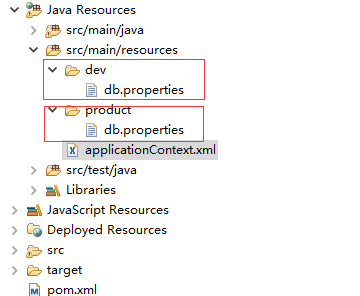
项目结构如下
“dev” ---------------> 开发环境
“product”----------->生产环境 开发和生产加载不同的数据库配置文件 db.properties
pom.xml 如下
<project xmlns="http://maven.apache.org/POM/4.0.0" xmlns:xsi="http://www.w3.org/2001/XMLSchema-instance"

    xsi:schemaLocation="http://maven.apache.org/POM/4.0.0

http://maven.apache.org/maven-v4_0_0.xsd">

<profiles>

        <profile>

            <id>dev</id>

            <properties>

                <env>dev</env>

            </properties>

            <activation>

                <activeByDefault>true</activeByDefault>    <!-- 默认加载开发环境的配置文件-->

            </activation>

        </profile>

        <profile>

            <id>product</id>

            <properties>

                <env>product</env>

            </properties>

        </profile>

        <profile>

            <id>sandbox</id>

            <properties>

                <env>sandbox</env>

            </properties>

        </profile>

</profiles>

。。。。。。。。。。。。。。

<build>

        <finalName>ROOT</finalName>

        <resources>

            <resource>

                <directory>src/main/resources</directory>

                <filtering>true</filtering>

            </resource>

        </resources>

    <plugins>

      <plugin>

                <groupId>org.apache.maven.plugins</groupId>

                <artifactId>maven-war-plugin</artifactId>

                <version>2.6</version>

                <configuration>

                    <resourceEncoding>${project.encoding}</resourceEncoding>

                </configuration>

        </plugin>

。。。。。。。。。。。。

    </plugins>

  </build>
applicationContext.xml 配置如下
${env} -----> 打包时传入对应的profiles id 就会加载对应的配置文件。
<context:property-placeholder ignore-resource-not-found="false" location="classpath:${env}/db.properties"/>
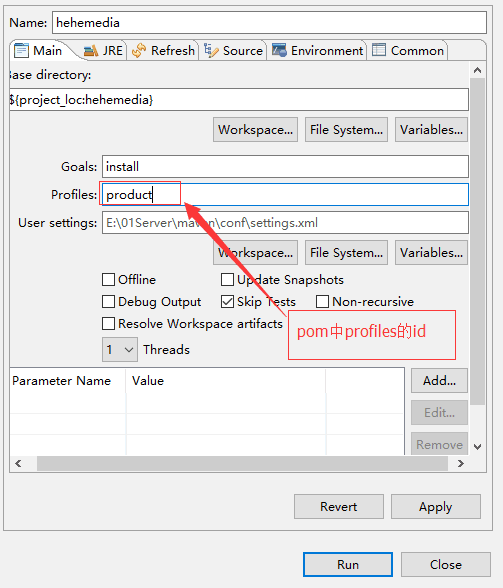
通过eclipse 打包, Profiles 输入product ,就会加载 product下的配置文件,默认的是开发环境(在pom的profiles中配置)
使用maven 命令
域名购买.com 后缀好域名
https://mi.aliyun.com/shop/38040
Maven profile 打包分环境加载不同的资源文件的更多相关文章
- maven工程,java代码加载resources下面资源文件的路径
1 通过类加载器加载器, 1. URL resource = TestMain.class.getResource("/18500228040.txt");File file = ...
- JAVA加载Properties配置资源文件
JAVA加载Properties配置资源文件 制作人:全心全意 配置文件(资源文件):以properties作为拓展名的文件 Java代码是如何加载properties文件的? 必须使用Propert ...
- 在IIS上新发布的网站,样式与js资源文件加载不到(资源文件和网页同一个域名下)
在IIS上新发布的网站,网站能打开,但样式与js资源文件加载不到(资源文件和网页是同一个域名下,例如:网页www.xxx.com/index.aspx,图片www.xxx.com/pic.png). ...
- 通过maven profile 打包指定环境配置
背景 最近换了个新公司接手了一个老项目,然后比较坑的是这个公司的项目都没有没有做多环境打包配置,每次发布一个环境都要手动的去修改配置文件.今天正好有空就来配置下. 解决这个问题的方式有很多,我这里挑选 ...
- idea 设置加载多个资源文件,显示本地图片
idea 经常只会设置一个资源路径,这个路径就是项目的路径.但是当要加载的文件处于其他位置时,则需要增加虚拟路径的配置. 如图:第一个是项目路径 第二个是图片路径
- maven 不同环境加载不同的properties 文件
http://haohaoxuexi.iteye.com/blog/1900568 //参考文章 实际项目中pom配置如下 <profiles> <profile> <i ...
- Laravel 不同环境加载不同的.env文件
假设有4个.env文件.分别为 .env.local .env.dev .env.test .env.prd 方式一 第一步:bootstrap\app.php 加入代码 $envs = ['loca ...
- spring-boot 加载本地静态资源文件路径配置
1.spring boot默认加载文件的路径是 /META-INF/resources/ /resources/ /static/ /public/ 这些目录下面, 当然我们也可以从spring bo ...
- spring 加载多个资源文件
<bean id="propertyConfigurer" class="org.springframework.beans.factory.config.Prop ...
随机推荐
- Html各组件MIME类型
扩展名 类型/子类型 * application/octet-stream 323 text/h323 acx application/internet-property-stream ai appl ...
- 问题:bower git is not installed or not in the path
用bower install jquery安装jquery,bower提示错误bower git is not installed or not in the path. 根据错误信息的知道出现错误两 ...
- mysql 数据操作 多表查询 子查询 带IN关键字的子查询
1 带IN关键字的子查询 #查询平均年龄在25岁以上的部门名关键点部门名 以查询员工表的dep_id的结果 当作另外一条sql语句查询条件使用 in (sql语句) mysql ; +-------- ...
- Ubuntu Kylin 14.04 安装配置 jdk、eclipse、tomcat 通用
版权声明:本文为博主原创文章,未经博主同意不得转载. https://blog.csdn.net/qq1053781225/article/details/24810107 一.安装jdk ...
- android 网络监测
public class NetWorkStateReceiver extends BroadcastReceiver { @Override public void onReceive(Contex ...
- 【深入理解javascript】this的用法
引用:this的用法 在函数中this到底取何值,是在函数真正被调用执行的时候确定的,函数定义的时候确定不了 情况1:构造函数 函数作为构造函数用,那么其中的this就代表它即将new出来的对象.另外 ...
- [LeetCode] 1. Two Sum_Easy tag: Hash Table
Given an array of integers, return indices of the two numbers such that they add up to a specific ta ...
- boost--smart_ptr库
C++没有类似Java.C#等语言的垃圾回收机制,内存管理是最为头痛的工作. new.delete以及指针的不恰当运用是C++中造成资源获取/释放问题的根源. 智能指针是解决这些问题的一种方案,boo ...
- jmeter 正则表达式提取器的使用(提取第一个匹配结果)
原文地址https://www.cnblogs.com/xueli/p/7405258.html?utm_source=itdadao&utm_medium=referral 正则表达式的用处 ...
- python爬虫对于gb2312
对于刚刚接触python爬虫的人,常常会碰到一个比较烦的问题, 如果网页是GB2312编码格式,我们直接decode(’GB2312‘)一般python都会报错: GB2312不能编码该页面. 这就比 ...