
spring boot学习(1) hello world
第一节:SpringBoot 简介
主要是简化开发;
1. 创建独立的Spring应用程序
2. 嵌入的Tomcat,无需部署WAR文件
3. 简化Maven配置
4. 自动配置Spring
5. 提供生产就绪型功能,如指标,健康检查和外部配置
6. 绝对没有代码生成和对XML没有要求配置
第二节:STS 插件安装
注意:StS插件运行必须是JDK1.8 否则会出现安装失败的情况;
Eclipse 菜单栏 Help -> Eclipse Marketplace...Popular,下载sts(spring tool suite),安装完之后重启生效;
安装参考:http://blog.java1234.com/blog/articles/330.html
第三节:SpringBoot HelloWorld 实现
插件安装完毕,然后我们来新建一个SpringBoot项目
新建 选择 Spring->Spring Starter Project
到了 配置依赖的界面,我们这里暂时不需要用到其他的,仅选择一个Web依赖即可;
生成的项目结构:
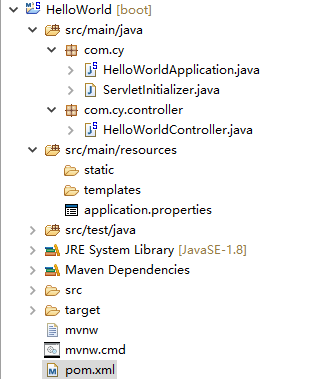
查看自动创建的文件:
pom.xml:
<?xml version="1.0" encoding="UTF-8"?>

<project xmlns="http://maven.apache.org/POM/4.0.0" xmlns:xsi="http://www.w3.org/2001/XMLSchema-instance"

    xsi:schemaLocation="http://maven.apache.org/POM/4.0.0 http://maven.apache.org/xsd/maven-4.0.0.xsd">

    <modelVersion>4.0.0</modelVersion>

    <groupId>com.cy</groupId>

    <artifactId>HelloWorld</artifactId>

    <version>0.0.1-SNAPSHOT</version>

    <packaging>war</packaging>

    <name>HelloWorld</name>

    <description>Demo project for Spring Boot</description>

    <parent>

        <groupId>org.springframework.boot</groupId>

        <artifactId>spring-boot-starter-parent</artifactId>

        <version>2.0.0.RELEASE</version>

        <relativePath/> <!-- lookup parent from repository -->

    </parent>

    <properties>

        <project.build.sourceEncoding>UTF-8</project.build.sourceEncoding>

        <project.reporting.outputEncoding>UTF-8</project.reporting.outputEncoding>

        <java.version>1.8</java.version>

    </properties>

    <dependencies>

        <dependency>

            <groupId>org.springframework.boot</groupId>

            <artifactId>spring-boot-starter-web</artifactId>

        </dependency>

        <dependency>

            <groupId>org.springframework.boot</groupId>

            <artifactId>spring-boot-starter-tomcat</artifactId>

            <scope>provided</scope>

        </dependency>

        <dependency>

            <groupId>org.springframework.boot</groupId>

            <artifactId>spring-boot-starter-test</artifactId>

            <scope>test</scope>

        </dependency>

    </dependencies>

    <build>

        <plugins>

            <plugin>

                <groupId>org.springframework.boot</groupId>

                <artifactId>spring-boot-maven-plugin</artifactId>

            </plugin>

        </plugins>

    </build>

</project>
com.cy.HelloWorldApplication.java:--启动类;
package com.cy;

import org.springframework.boot.SpringApplication;

import org.springframework.boot.autoconfigure.SpringBootApplication;

@SpringBootApplication

public class HelloWorldApplication {

    public static void main(String[] args) {

        SpringApplication.run(HelloWorldApplication.class, args);

    }

}
HelloWorldApplication是启动类,我们右击Run As 选择 Spring Boot app
这里我们不需要Tomcat 因为SpringBoot把Tomcat集成了,默认端口8080
浏览器输入:http://localhost:8080/
出现
Whitelabel Error Page
说明项目启动成功;
写一个helloworld请求:
com.cy.controller.HelloWorldController.java:
package com.cy.controller;

import org.springframework.web.bind.annotation.RequestMapping;

import org.springframework.web.bind.annotation.RestController;

@RestController

public class HelloWorldController {

    @RequestMapping("/helloWorld")

    public String say(){

        return "spring boot你好";

    }

}
重启项目,浏览器输入http://localhost:8080/helloWorld
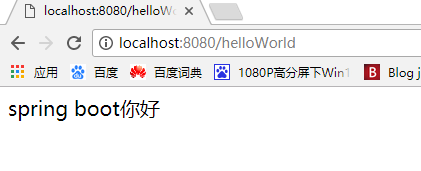
说明:
1.@RestController相当于之前的@Controller和@ResponseBody;
2.这里相当于返回一个json,类似于ajax请求,返回的是一个字符串;
-------
spring boot学习(1) hello world的更多相关文章
- Spring Boot学习大全(入门)
Spring Boot学习(入门) 1.了解Spring boot Spring boot的官网(https://spring.io),我们需要的一些jar包,配置文件都可以在下载.添置书签后,我自己 ...
- Spring Boot学习记录(二)--thymeleaf模板 - CSDN博客
==他的博客应该不错,没有细看 Spring Boot学习记录(二)--thymeleaf模板 - CSDN博客 http://blog.csdn.net/u012706811/article/det ...
- Spring boot学习1 构建微服务:Spring boot 入门篇
Spring boot学习1 构建微服务:Spring boot 入门篇 Spring Boot是由Pivotal团队提供的全新框架,其设计目的是用来简化新Spring应用的初始搭建以及开发过程.该框 ...
- spring boot 学习资料
spring boot 学习资料: 学习资料 网址 Spring Boot Cookbook-极客学院 http://wiki.jikexueyuan.com/project/spring-boot- ...
- Spring Boot学习笔记2——基本使用之最佳实践[z]
前言 在上一篇文章Spring Boot 学习笔记1——初体验之3分钟启动你的Web应用已经对Spring Boot的基本体系与基本使用进行了学习,本文主要目的是更加进一步的来说明对于Spring B ...
- spring boot 学习(十四)SpringBoot+Redis+SpringSession缓存之实战
SpringBoot + Redis +SpringSession 缓存之实战 前言 前几天,从师兄那儿了解到EhCache是进程内的缓存框架,虽然它已经提供了集群环境下的缓存同步策略,这种同步仍然需 ...
- 转载:spring boot学习
Spring Boot学习 Spring Boot是为了简化Spring应用的创建.运行.调试.部署等而出现的,使用它可以做到专注于Spring应用的开发,而无需过多关注XML的配置. 简单来说,它提 ...
- Spring Boot学习路线
Spring Boot 学习路线,本文计划根据作者近几年的工作.学习经验,来分析和制定一个学习使用 Spring Boot技术的步骤路线图. SpringBoot是伴随着Spring4.0诞生的: S ...
- 我的Spring Boot学习记录(二):Tomcat Server以及Spring MVC的上下文问题
Spring Boot版本: 2.0.0.RELEASE 这里需要引入依赖 spring-boot-starter-web 这里有可能有个人的误解,请抱着怀疑态度看. 建议: 感觉自己也会被绕晕,所以 ...
- 15 个优秀开源的 Spring Boot 学习项目,一网打尽!
Spring Boot 算是目前 Java 领域最火的技术栈了,松哥年初出版的 <Spring Boot + Vue 全栈开发实战>迄今为止已经加印了 8 次,Spring Boot 的受 ...
随机推荐
- 【转载】Android Bug分析系列:第三方平台安装app启动后,home键回到桌面后点击app启动时会再次启动入口类bug的原因剖析
前言 前些天,测试MM发现了一个比较奇怪的bug. 具体表现是: 1.将app包通过电脑QQ传送到手机QQ上面,点击安装,安装后选择打开app (此间的应用逻辑应该是要触发 [闪屏页Activity] ...
- bzoj1607
题解: 帅选法 把相同的放在一起 代码: #include<bits/stdc++.h> using namespace std; ; int n,a[N],s[N],M,ss[N]; i ...
- 搜索评价指标——NDCG
◆版权声明:本文出自胖喵~的博客,转载必须注明出处. 转载请注明出处:https://www.cnblogs.com/by-dream/p/9403984.html 概念 NDCG,Normali ...
- Java虚拟机运行时数据区
运行时数据区程序计数器Java虚拟机栈本地方法栈Java堆(GC堆)方法区运行时常量池 运行时数据区 Java虚拟机在运行Java程序时,会将它所管理的内存划分为若干个内存区域.这些数据区域有各自的用 ...
- L1-007 念数字
输入一个整数,输出每个数字对应的拼音.当整数为负数时,先输出fu字.十个数字对应的拼音如下: 0: ling 1: yi 2: er 3: san 4: si 5: wu 6: liu 7: qi 8 ...
- 详细介绍C++STL:unordered_map
不得不提一下,hash_map未加入在C++11标准中. 在VC中编译: #include <hash_map> using namespace stdext; hash_map<i ...
- button确定取消事件
对于前端这边,我们往往有这样的需求,即触发某一事件后(例如单击事件)想要根据用户的主管选择来进行下一个操作,例如停止监控事件,往往希望点击提示中的“确定”按钮再真正的去停止,否则不会,一般会用到Dia ...
- P2S、P2P、P2SP之对比
P2S.P2P.P2SP之对比 一.下载原理分析 1.服务端下载技术(P2S):P2S下载方式分为HTTP与FTP两种类型,它们分别是Hyper Text Transportation Protoco ...
- SVN 将主干的代码合并到分支上
来源:http://blog.csdn.net/u012701023/article/details/50978154 问题:开发有了项目主干,再次基础上起了一个分支,开发新的功能:因为业务需要,在上 ...
- Linux下常用的ftp操作命令
Linux下常用的ftp操作命令 =========== 完美的分割线 ============= 1.登陆ftp服务器 ftp [IP] [PORT] # 登陆ftp服务器,本机登陆可以不写IP 实 ...