
iOS plist文件的读写
原帖:http://blog.csdn.net/totogo2010/article/details/7634185
在做iOS开发时,经常用到到plist文件, 那plist文件是什么呢? 它全名是:Property List,属性列表文件,它是一种用来存储串行化后的对象的文件。属性列表文件的扩展名为.plist ,因此通常被称为 plist文件。文件是xml格式的。
Plist文件通常用于储存用户设置,也可以用于存储捆绑的信息
我们创建一个项目来学习plist文件的读写。
1、创建项目Plistdemo
项目创建之后可以找到项目对应的plist文件,打开如下图所示:
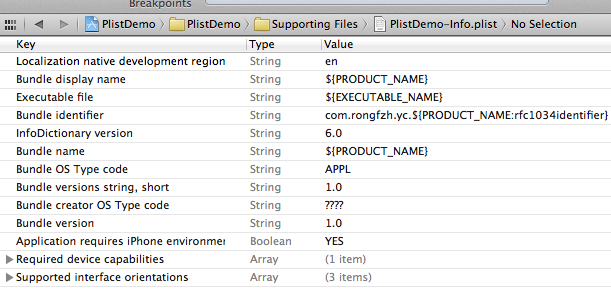
在编辑器中显示类似与表格的形式,可以在plist上右键,用源码方式打开,就能看到plist文件的xml格式了。
2、创建plist文件。
按command +N快捷键创建,或者File —> New —> New File,选择Mac OS X下的Property List
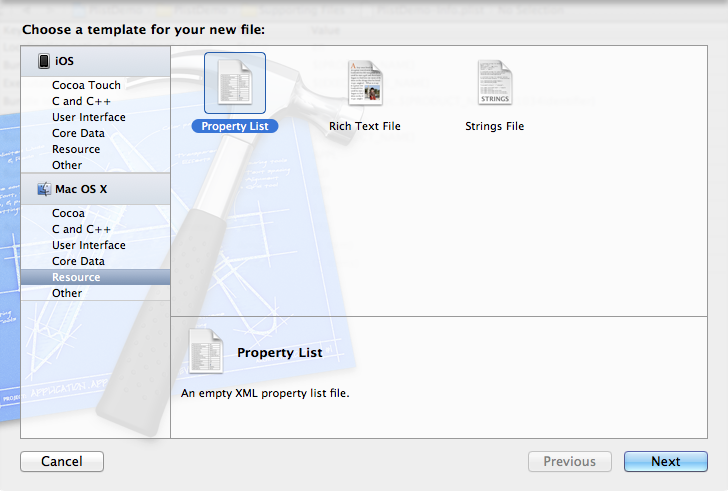
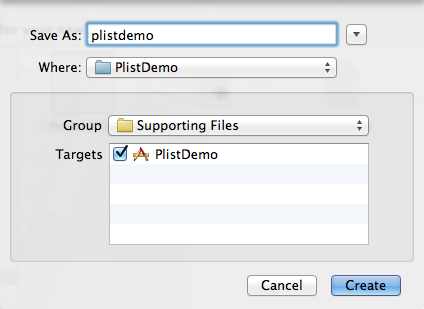
创建plist文件名为plistdemo。
打开plistdemo文件,在空白出右键,右键选择Add row 添加数据,添加成功一条数据后,在这条数据上右键看到 value Type选择Dictionary。点加号添加这个Dictionary下的数据
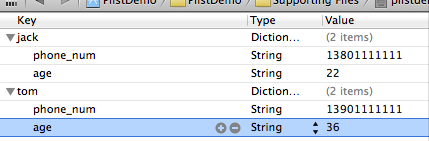
添加完key之后在后面添加Value的值,添加手机号和年龄
创建完成之后用source code(右键plist文件)查看到plist文件是这样的:
- <?xml version="1.0" encoding="UTF-8"?>
- <!DOCTYPE plist PUBLIC "-//Apple//DTD PLIST 1.0//EN" "http://www.apple.com/DTDs/PropertyList-1.0.dtd">
- <plist version="1.0">
- <dict>
- <key>jack</key>
- <dict>
- <key>phone_num</key>
- <string>13801111111</string>
- <key>age</key>
- <string>22</string>
- </dict>
- <key>tom</key>
- <dict>
- <key>phone_num</key>
- <string>13901111111</string>
- <key>age</key>
- <string>36</string>
- </dict>
- </dict>
- </plist>
3、读取plist文件的数据
- - (void)viewDidLoad
- {
- [super viewDidLoad];
- //读取plist
- NSString *plistPath = [[NSBundle mainBundle] pathForResource:@"plistdemo" ofType:@"plist"];
- NSMutableDictionary *data = [[NSMutableDictionary alloc] initWithContentsOfFile:plistPath];
- NSLog(@"%@", data);//直接打印数据。
- }
- PlistDemo[6822:f803] {
- jack = {
- age = 22;
- "phone_num" = 13801111111;
- };
- tom = {
- age = 36;
- "phone_num" = 13901111111;
- };
- }
这样就把数据读取出来了。
4、创建和写入plist文件
在开发过程中,有时候需要把程序的一些配置保存下来,或者游戏数据等等。 这时候需要写入Plist数据。
写入的plist文件会生成在对应程序的沙盒目录里。
接着上面读取plist数据的代码,加入了写入数据的代码,
- <strong>- (void)viewDidLoad
- {
- [super viewDidLoad];
- //读取plist
- NSString *plistPath = [[NSBundle mainBundle] pathForResource:@"plistdemo" ofType:@"plist"];
- NSMutableDictionary *data = [[NSMutableDictionary alloc] initWithContentsOfFile:plistPath];
- NSLog(@"%@", data);
- //添加一项内容
- [data setObject:@"add some content" forKey:@"c_key"];
- //获取应用程序沙盒的Documents目录
- NSArray *paths=NSSearchPathForDirectoriesInDomains(NSDocumentDirectory,NSUserDomainMask,YES);
- NSString *plistPath1 = [paths objectAtIndex:0];
- //得到完整的文件名
- NSString *filename=[plistPath1 stringByAppendingPathComponent:@"test.plist"];
- //输入写入
- [data writeToFile:filename atomically:YES];
- //那怎么证明我的数据写入了呢?读出来看看
- NSMutableDictionary *data1 = [[NSMutableDictionary alloc] initWithContentsOfFile:filename];
- NSLog(@"%@", data1);
- // Do any additional setup after loading the view, typically from a nib.
- }
- </strong>
在获取到自己手工创建的plistdemo.plist数据后,在这些数据后面加了一项内容,证明输入写入了。
怎么证明添加的内容写入了呢?下面是打印结果:
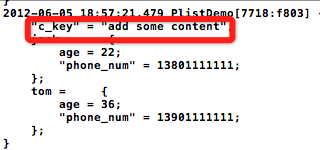
代码地址:https://github.com/schelling/YcDemo/tree/master/PlistDemo
iOS plist文件的读写的更多相关文章
- (转)iOS学习之 plist文件的读写
在做iOS开发时,经常用到到plist文件, 那plist文件是什么呢? 它全名是:Property List,属性列表文件,它是一种用来存储串行化后的对象的文件.属性列表文件的扩展名为.plist ...
- iOS学习之 plist文件的读写
在做iOS开发时,经经常使用到到plist文件, 那plist文件是什么呢? 它全名是:Property List,属性列表文件,它是一种用来存储串行化后的对象的文件.属性列表文件的扩展名为.pli ...
- iOS Plist 文件的 增 删 改
一:Plist 文件的创建 Plist 文件作为我们IOS开发的一种数据存储文件,还是经常会用到的.在看<X-code江湖录>的时候,看到了这一点.自己就写了一下,把写的东西分享出来!先看 ...
- iOS,plist文件、pct文件,工程设置
1.使用pch文件 2.在info.plist中配置URL Schemes 3.plist配置拍照界面,复制,粘贴等菜单的显示语言 显示中文 4.使用非ARC库/ARC库 5.链接选项-Objc &a ...
- iOS Plist文件,增删改查
今天早上,9点开始弄Plist,然后一直写,一直写(中午取出40分钟吃饭时间),写到1点,写完了,交给头,头说,不是这个意思.我是每个用户创建了一个文件夹,在这个用户的文件夹里面,分别根据应用创建了文 ...
- IOS plist文件
转自:http://www.cnblogs.com/geraldzhang/archive/2011/08/24/2152121.html 在Mac OS X 的Cocoa ,NeXTSTEP 和GN ...
- plist文件的读写
参考资料 http://blog.csdn.net/totogo2010/article/details/7634185
- plist文件Boolean类型读写方法
http://blog.csdn.net/a6472953/article/details/7659505 转 1.读取plist文件中的Boolean类型的字段值时,要先把它转为NSNumber ...
- Plist文件介绍
开发IOS遇到数据,这里专门做frame sprite数据说明 plist plist是property list的缩写.plist中包括一些命名值和使用Core Foundation类型创建的值的 ...
随机推荐
- 返回json格式数据乱码
本文为博主原创,未经允许不得转载: 原本返回json格式数据的代码: @ResponseBody @RequestMapping(value = "getListByTime", ...
- 【Coursera】SecondWeek(1)
全球互联网的始祖 APRANET APRANET 是 DARPA(美国国防部高级研究计划局) 开发的世界上第一个运营PacketSwitching(分包交换)的网络. 鉴于二战后世界格局两极化的历史背 ...
- UVa 11729 突击战
https://vjudge.net/problem/UVA-11729 题意:有n个部下,每个部下需要完成一项任务.第i个部下需要你话B分钟交代任务,然后立刻执行J分钟完成任务.安排交代任务顺序并计 ...
- const 学习笔记
#include<stdlib.h> #include<iostream> using namespace std; int main(){ // const 仅仅起到是否为常 ...
- unity中实现静态的3D对象对其他对象的跟随
using UnityEngine; public class FollowPosition : MonoBehaviour { public Transform targetTrans; publi ...
- 【Android】查看包名和首启动activity
工具:aapt 位置:$ANDROID_HOME/build-tools/版本号/aapt 需要配置环境变量才能使用 aapt dump badging XXXapk 输出信息中重要的有: packa ...
- English trip -- VC(情景课) 6 A Time
Words eleven 十一 twelve 十二 thirteen 十三 fourteen fifteen sixteen seventeen eighteen nineteen twenty ...
- 20170728xlVba SSC_LastTwoDays
Public Sub SSCLastTwoDays() Dim strText As String Dim Reg As Object, Mh As Object, OneMh As Object D ...
- PHP函数笔记
一.函数(Function) 1.什么是函数:封装的,可以重复使用的 完成特定功能的代码段. 2.分类 (1)系统函数 (2)自定义函数 3.自定义函数 ...
- Perfect Groups CodeForces - 980D
链接 题目大意: 定义一个问题: 求集合$S$的最小划分数,使得每个划分内任意两个元素积均为完全平方数. 给定$n$元素序列$a$, 对$a$的所有子区间, 求出上述问题的结果, 最后要求输出所有结果 ...