
【python-opencv】15-图像阈值
【微语】立志要如山,行道要如水。不如山,不能坚定,不如水,不能曲达
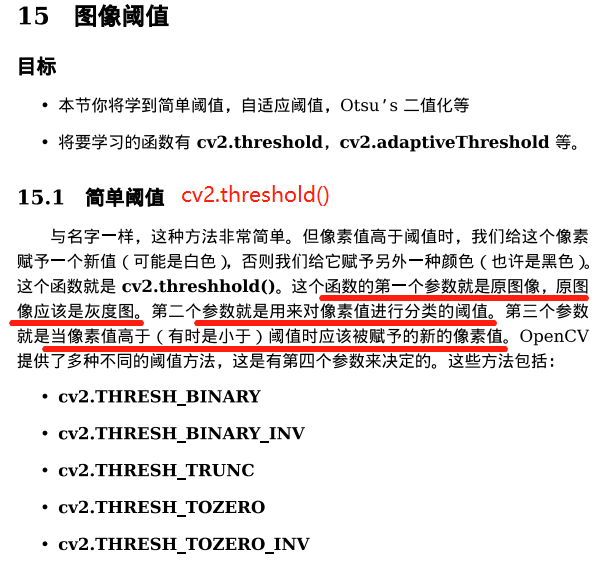
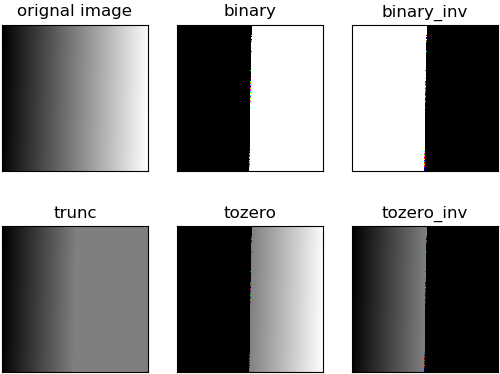
 import cv2 as cv

 import numpy as np

 from matplotlib import pyplot as plt

 img = cv.imread(r'pictures\gradient.png')

 h , w ,ch = img.shape

 ret , thresh1 = cv.threshold(img,127,255,cv.THRESH_BINARY)

 ret , thresh2 = cv.threshold(img,127,255,cv.THRESH_BINARY_INV)

 ret , thresh3 = cv.threshold(img,127,255,cv.THRESH_TRUNC)

 ret , thresh4 = cv.threshold(img,127,255,cv.THRESH_TOZERO)

 ret , thresh5 = cv.threshold(img,127,255,cv.THRESH_TOZERO_INV)

 titles = ['orignal image','binary','binary_inv','trunc','tozero','tozero_inv']

 images = [img,thresh1,thresh2,thresh3,thresh4,thresh5]

 for i in range(len(images)):

     plt.subplot(2,3,i+1),plt.imshow(images[i])

     plt.title(titles[i])

     plt.xticks(())

     plt.yticks(())      #隐藏y轴

 plt.show()
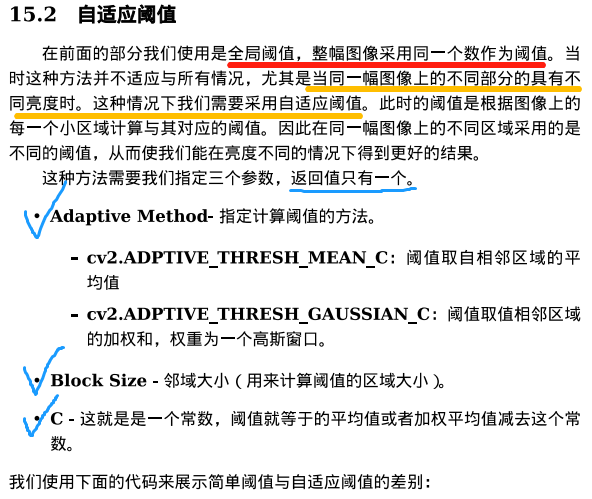
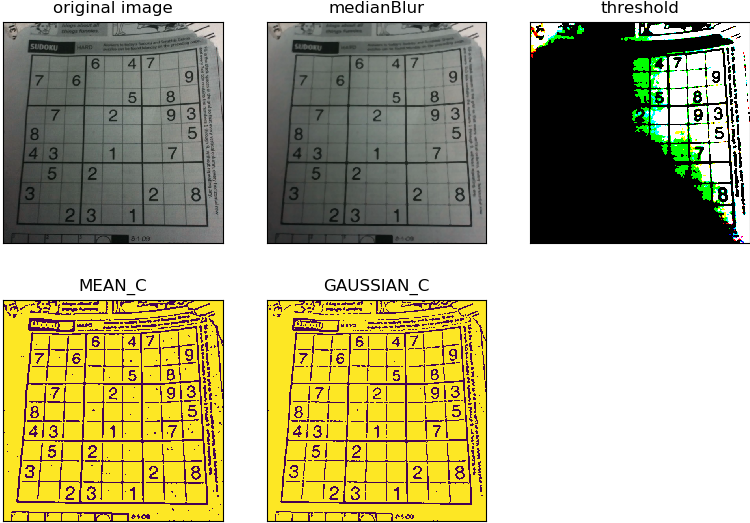

import cv2 as cv

import numpy as np

from matplotlib import pyplot as plt

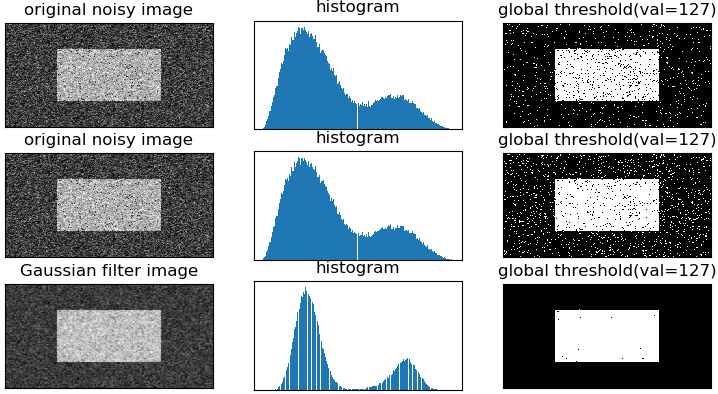
img = cv.imread(r'pictures\noisy2.png')

gray = cv.cvtColor(img,cv.COLOR_BGR2GRAY)

#global thresholding

ret1,binary1 = cv.threshold(gray,127,255,cv.THRESH_BINARY)

#Otsu's thresholding

ret2,binary2 = cv.threshold(gray,0,255,cv.THRESH_BINARY+cv.THRESH_OTSU)

#Otsu's thresholding after Gaussian filtering

blur = cv.GaussianBlur(gray,(5,5),0)

ret3,binary3 = cv.threshold(blur,0,255,cv.THRESH_BINARY+cv.THRESH_OTSU)

# cv.imshow('binary1',binary1)

# cv.imshow('binary2',binary2)

# cv.imshow('blur',blur)

# cv.imshow('binary3',binary3)

#Plot all the images and their histograms

images = [img,0,binary1,

          img,0,binary2,

          blur,0,binary3]

titles = ['original noisy image','histogram','global threshold(val=127)',

          'original noisy image','histogram',"Otsu's threshold",

          'Gaussian filter image','histogram',"Otsu's threshold(Gaussian)"]

"""

使用pyplot中画直方图的方法plt.hist(),注意它的参数是一维数组

故使用numpy的ravel()方法或者flatten()方法, 将多维数组转为一维数组

#for循环每次打印出一行3幅图

"""

for i in range(3):

    plt.subplot(3,3,i*3+1),plt.imshow(images[i*3],'gray')    #plt,imshow(img,'gray') 灰度图

    plt.title(titles[i*3]),plt.xticks(()),plt.yticks(())

    plt.subplot(3,3,i*3+2),plt.hist(images[i*3].flatten(),256)

    plt.title(titles[1]),plt.xticks(()),plt.yticks(())

    plt.subplot(3,3,i*3+3),plt.imshow(images[i*3+2],'gray')

    plt.title(titles[2]),plt.xticks(()),plt.yticks(())

plt.show()
【python-opencv】15-图像阈值的更多相关文章
- 使用Python+OpenCV进行图像模板匹配(Match Template)
2017年9月22日 BY 蓝鲸 LEAVE A COMMENT 本篇文章介绍使用Python和OpenCV对图像进行模板匹配和识别.模板匹配是在图像中寻找和识别模板的一种简单的方法.以下是具体的步骤 ...
- python+opencv实现图像自适应阈值的均衡化
内容涉及:列表遍历,图像均衡化,图像通道分离与合并 import cv2 import numpy as np import os for path in open("org_junheng ...
- opencv之图像阈值化处理
一.函数简介 1.threshold-图像简单阈值化处理 函数原型:threshold(src, thresh, maxval, type, dst=None) src:图像矩阵 thresh:阈值 ...
- python+opencv实现图像缩放
x, y = img_.shape[0:2] img_ = cv2.resize(img_, (int(y/2), int(x/2))) 实现图像长宽缩小为原来的一半
- python+opencv检测图像清晰度
直接上代码,list_jian.txt为待检测图像路径列表 import cv2 import numpy as np import os for path in open("list_ji ...
- python实现遥感图像阈值分割
1.阈值分割 import os import cv2 import numpy as np import matplotlib.pyplot as plt from osgeo import gda ...
- python opencv:图像的一些属性与操作
img = cv.imread(xxx) # 常用的有以下属性 type(img) # img的数据类型 img.shape # img的结构 img.size # img的大小 img.dtype ...
- Python+opencv打开修图的正确方式get
先逼逼两句: 图像是 Web 应用中除文字外最普遍的媒体格式. 流行的 Web 静态图片有 JPEG.PNG.ICO.BMP 等.动态图片主要是 GIF 格式.为了节省图片传输流量,大型互联网公司还会 ...
- opencv学习之路(13)、图像阈值化threshold
一.图像阈值化简介 二.固定阈值 三.自适应阈值 #include<opencv2/opencv.hpp> using namespace cv; void main(){ Mat src ...
- opencv图像阈值操作
使用threshold方法和adaptivethreshold方法对图像进行阈值分割操作. 1.使用threshold方法,设置一个阈值,将大于阈值的值变换为最大值,小于阈值的值变换为0. #-*- ...
随机推荐
- 【重要】攻击动作时间段判断~使用动画time比较动画length和使用一个变量数组做延迟
using UnityEngine; using System.Linq; using System.Collections.Generic; [RequireComponent(typeof(Cha ...
- C++ template —— 类型区分(十一)
前面的博文介绍了模板的基础,深入模板特性,模板和设计的一些内容.从这篇开始,我们介绍一些高级模板设计,开发某些相对较小.并且互相独立的功能,而且对于这些简单功能而言,模板是最好的实现方法:(1)一个用 ...
- sql语句建表,并且自增加主键
sql语句建表,并且自增加主键 use [test] CREATE TABLE [dbo].[Table_4] ( [userid] [int] IDENTITY(1,1) NOT NULL, CON ...
- executeBatch()批量执行Sql语句
executeBatch()方法:用于成批地执行SQL语句,但不能执行返回值是ResultSet结果集的SQL语句,而是直接执行stmt.executeBatch(); addBatch():向批处理 ...
- Qt编写输入法终极版V2018
输入法是很多Qt+嵌入式linux开发的同学的痛,自从5.7自带了输入法后,这个痛终于缓解了不少,不过还有大量的嵌入式linux程序停留在qt4时代,为此特意选择了QWidget来写这个输入法,为了兼 ...
- vuex - 常用命令学习及用法整理
https://vuex.vuejs.org/zh-cn/api.html 命令 用途 备注 this.$store 组件中访问store实例 store.state.a 获取在state对象中的数据 ...
- 二叉树的实现(Java语言描述)
实现二叉树 并先序遍历之. package 二叉树的实现; public class BinaryTree<T> { class Node { int value; // 该节点存储的 ...
- Linux "bring up eth0 failed, eth0 seems not be presernt" 问题解决方案
=========1.问题========== 重启网卡的时候出现"bring up eth0 failed, eth0 seems not be presernt", 提示找不到 ...
- Linux SVN 服务器
一. SVN 简介 Subversion(SVN) 是一个开源的版本控制系統, 也就是说 Subversion 管理着随时间改变的数据. 这些数据放置在一个中央资料档案库 (repository) 中 ...
- Jenkins-Build Monitor View
现在上了jenkins的任务越来越多,查看起来很不方便,想搞个大视图,刚好jenkins本身支持这个功能. 功能: 一个独特的View, 可以将指定的Job,显示出来,当Job很多时,效果很好看 下载 ...