
服务器群秒级别文件同步(ssh+SHELL)
1.介绍
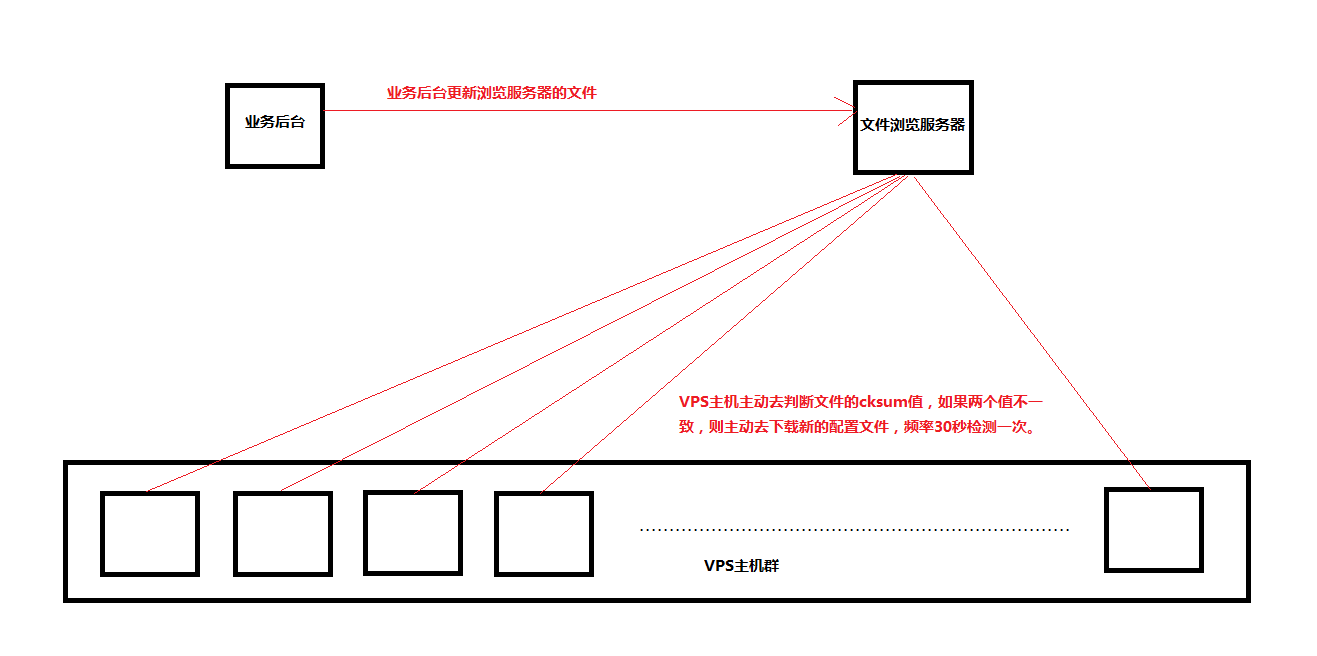 \
\
2.业务服务器远程更新浏览服务器文件的脚本
#!/bin/bash

operate=$

ip=$

conf_file="/var/www/html/test/ip_list"

file_chsum="/var/www/html/test/cksvalue"

file_ser="10.60.10.62"

cksum(){

  ssh ${file_ser} "cksum ${conf_file}|awk '{print\$1}' > ${file_chsum}"

  if [ $? -ne  ];then

    #生成cksum值失败

    echo ""

  fi

}

if [[ ! $ip =~ ^[-]{,}\.[-]{,}\.[-]{,}\.[-]{,}$ ]];then

  #IP不合法

  echo "";

  exit ;

fi

if [[ "${operate}" == "add" ]];then

  ips=`ssh ${file_ser} "cat $conf_file|grep ${ip}/32|wc -l"`

  if [ ${ips} -eq  ];then

    ssh ${file_ser} "echo "${ip}/" >> $conf_file"

    if [ $? -eq  ];then

      cksum

      #添加IP成功

      echo ""

      exit ;

    else

      #添加IP失败

      echo ""

      exit ;

    fi

  else

    #添加IP成功(IP已存在)

    echo "";

    exit ;

  fi

elif [[ "${operate}" == "del" ]];then

  ssh ${file_ser} "sed -i '/${ip}\/32/d' $conf_file"

  if [ $? -eq  ];then

    cksum

    #删除IP成功

    echo ""

    exit ;

  else

    #删除IP失败

    echo ""

    exit ;

  fi

else

  #参数1($)不合法

  echo ""

  exit ;

fi
3.浏览服务器采用http的方式提供配置文件和cksum值的浏览和下载
4.VPS主机群每隔30校验一次配置文件的cksum值来保持配置文件的最新状态
* * * * * sleep  && sh /tmp/sync_customIP.sh

* * * * * sleep  && sh /tmp/sync_customIP.sh
#!/bin/bash

conf_file_url="http://10.60.10.62:8060/test/ip_list"

cksum_url="http://10.60.10.62:8060/test/cksvalue"

local_conf_file="/tmp/ip_list"

time=`date`

log="/tmp/sync_customIP.log"

get_cksum() {

  remote_cksum=`curl -s "${cksum_url}"`

  local_cksum=`cksum ${local_conf_file}|awk '{print\$1}'`

}

sync_file() {

  cat ${local_conf_file} > /tmp/.tmp_ip.txt

  wget -q  ${conf_file_url} -O ${local_conf_file};

}

get_cksum

if [[ "$remote_cksum" != "$local_cksum" ]];then

  sync_file

  get_cksum

  if [[ "$remote_cksum" != "$local_cksum" ]];then

    cat /tmp/.tmp_ip.txt > ${local_conf_file}

    echo "${time} sync fail.." >> $log

  else

    echo "${time} sync  success.." >> $log

  fi

else

  echo "${time} there are no need to sync.. ">> $log

fi

log_count=`cat $log |wc -l`

if [ $log_count -gt  ];then

  sed -i '1,1000d' $log

fi
服务器群秒级别文件同步(ssh+SHELL)的更多相关文章
- 负载均衡配置下的不同服务器【Linux】文件同步问题
负载均衡配置下的不同服务器[Linux]文件同步问题2017年04月13日 22:04:28 守望dfdfdf 阅读数:2468 标签: linux负载均衡服务器 更多个人分类: 工作 问题编辑版权声 ...
- linux多服务器之间的目录文件同步
一.rsync是什么 在开始正式学习rsync之前,我们先来回答这个问题:rsync是什么. rsync(remote synchronize)是Liunx/Unix下的一个远程数据同步工具.它可通过 ...
- 文件同步服务器,iis 集群 ,代码同步(一)
文件同步服务器 BitTorrent Sync 有点像TeamViewer远程协助 软件,私钥连接. 使用版本就30 天,最近测试了,功能不够理想.有点遗憾,我觉得我可以写一个! 确实很好用.
- rsync+sersync+inotify实现服务器间文件同步之一
rsync+sersync+inotify实现服务器间文件同步之一:rsync安装配置 2013年12月14日 ⁄ Linux管理, 服务器集群技术 ⁄ 共 4925字 ⁄ rsync+sersync ...
- 使用inotify+rsync实现服务器间文件同步
1. rsync 1.1 什么是rsync rsync是一个远程数据同步工具,可通过LAN/WAN快速同步多台主机间的文件.它使用所谓的“Rsync演算法”来使本地和远程两个主机之间的文件达到 ...
- BAT实现服务器文件同步
服务器文件同步有很多工具,例如 GoodSync.rsync.BitTorrent Sync等……其实WINDOWS下自带了一个文件同步利器:ROBOCOPY.它是一个命令行的目录复制命令,自从Win ...
- BitTorrent Sync - 神奇的文件同步软件,无需服务器让多台电脑互相同步!
176,487 微博 腾讯 空间 微信 141 49 如今人们对文件备份和同步的需求已经越来越强烈了.像 Dropbox 一样的云存储网盘有很多,但它们都有一个局限性,就是所有的文件都得经过它们的服务 ...
- linux服务器之间的文件同步;rsync+inotifywait;同步多个目录
1.双向同步:unison+inotify 2.单向同步:rsync+inotify python版的pyinotify 本文介绍第二种方法: 1.Inotify 是一个 Linux特性,它监控文件系 ...
- Rsync+inotify实现文件实时同步#附shell脚本
强烈推荐先仔细看此文 https://segmentfault.com/a/1190000002427568 实验环境 centos 7.3 vm2:192.168.221.128 同步服务器 vm1 ...
随机推荐
- js压缩上传图片base64长度
im发送图片,现将图片压缩再上传 1) 调用 FileReader 的 reader.readAsDataURL(img); 方法, 在其onload事件中, 将用户选择的图片读入 Image对象. ...
- [转] NGUI自适应
很多做移动终端开发的童鞋都可能遇到一个问题,就是如何自适应其实NGUI已经能帮我们实现,下面就告诉大家怎么整这个自适应.1,create a new ui 2,uiroot下添加uipanel(scr ...
- [Scikit-learn] 1.1 Generalized Linear Models - Lasso Regression
Ref: http://blog.csdn.net/daunxx/article/details/51596877 Ref: https://www.youtube.com/watch?v=ipb2M ...
- 使用Ajax long polling实现简单的聊天程序
关于web实时通信,通常使用长轮询或这长连接方式进行实现. 为了能够实际体会长轮询,通过Ajax长轮询实现了一个简单的聊天程序,在此作为笔记. 长轮询 传统的轮询方式是,客户端定时(一般使用setIn ...
- ios开发之--数组的一些操作
1,创建数组 NSMutableArray * array =[[NSMutableArray alloc] initWithObjects:@"a",@"b" ...
- TCP三次握手原则
“已失效的连接请求报文段”的产生在这样一种情况下: client发出的第一个连接请求报文段并没有丢失,而是在某个网络结点长时间的滞留了,以致延误到连接释放以后的某个时间才到达server. 本来这是一 ...
- error: pathspec 'master' did not match any file(s) known to git.
问题描述: 在远程服务器上新建裸仓库git --bare init : git clone裸仓库到本地: 本地新建并切换分支xccdev,git checkout -b xccdev: 从xccde ...
- bat批处理文件按顺序执行exe
start /d "deepstream.io-windows-3.1.0" deepstream.exe rem 等待1秒钟 choice /t 1 /d y /n cd &qu ...
- Python生成器笔记
Python中三大器有迭代器,生成器,装饰器,本文主要讲述生成器.主要从生成器的概念,本质,以及yield关键字的使用执行过程. 本质:生成器是一类特殊的迭代器,使用了yield关键字的函数不再是函数 ...
- Codeforces Round #363 (Div. 1) B. Fix a Tree 树的拆环
题目链接:http://codeforces.com/problemset/problem/698/B题意:告诉你n个节点当前的父节点,修改最少的点的父节点使之变成一棵有根树.思路:拆环.题解:htt ...