
[Canvas]人物型英雄出现(前作仅为箭头)
源码点此下载,用浏览器打开index.html观看。
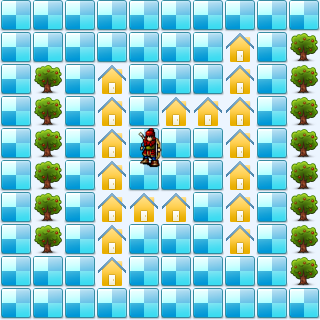
代码:
<!DOCTYPE html>
<html lang="utf-8">
<meta http-equiv="Content-Type" content="text/html; charset=utf-8"/>
<head>
     <title>地图加载 英雄出现2 19.3.6 15:37 by:逆火狂飙 horn19782016@163.com</title>

     <style>
     #canvas{
        background:#ffffff;
        cursor:pointer;
        margin-left:10px;
        margin-top:10px;
        -webkit-box-shadow:3px 3px 6px rgba(0,0,0,0.5);
        -moz-box-shadow:3px 3px 6px rgba(0,0,0,0.5);
        box-shadow:3px 3px 6px rgba(0,0,0,0.5);
     }

     #controls{
        margin-top:10px;
        margin-left:15px;
     }
     </style>

    </head>

     <body onload="init()">
        <div id="controls">
            <input id='animateBtn' type='button' value='开始'/>
        </div>

        <canvas id="canvas" width="160px" height="160px" >
            出现文字表示你的浏览器不支持HTML5
        </canvas>
     </body>
</html>
<script type="text/javascript">
<!--
var paused=true;
animateBtn.onclick=function(e){
    paused=! paused;

    if(paused){
        animateBtn.value="开始";

    }else{
        animateBtn.value="停止";

        window.requestAnimationFrame(animate);
    }
}

var ctx;// 绘图环境
var r;// 表盘半径
var terrain;
var hero;
function init(){
    // init Canvas
    var canvas=document.getElementById('canvas');
    r=160;
    canvas.width =2*r;
    canvas.height=2*r;
    ctx=canvas.getContext('2d');

    terrain=new Terrain();
    hero=new Hero();

    // 响应键盘事件
    canvas.addEventListener('keydown', doKeyDown, true);
    canvas.focus();
    window.addEventListener('keydown', doKeyDown, true);
};

function draw(){
    // Clear Canvas
    ctx.clearRect(0,0,ctx.canvas.width,ctx.canvas.height);
    ctx.fillStyle="#ECF5FF";
    ctx.fillRect(0,0,ctx.canvas.width,ctx.canvas.height);

    terrain.paint(ctx);
    hero.paint(ctx);
}

function animate(){
    if(!paused){
        draw();
        window.requestAnimationFrame(animate); /// 让浏览器自行决定帧速率
    }
}

function doKeyDown(e) {
    var keyID = e.keyCode ? e.keyCode :e.which;
    if(keyID === 38 || keyID === 87)  { // up arrow and W
        hero.move('up');
        e.preventDefault();
    }
    if(keyID === 39 || keyID === 68)  { // right arrow and D
        hero.move('right');
        e.preventDefault();
    }
    if(keyID === 40 || keyID === 83)  { // down arrow and S
        hero.move('down');
        e.preventDefault();
    }
    if(keyID === 37 || keyID === 65)  { // left arrow and A
        hero.move('left');
        e.preventDefault();
    }
}

//---------------------------------------------------地形类定义开始------------------------------------------------------------------->>
Terrain=function(){
    this.files=["road.png","tree.png","home.png",];

    this.maps=new Array(
        [0,0,0,0,0,0,0,0,0,0],
        [0,0,1,1,1,1,1,1,0,0],
        [0,0,0,0,0,0,0,0,0,0],
        [0,0,2,2,2,2,2,2,2,0],
        [0,0,0,0,0,0,2,0,0,0],
        [0,0,0,2,0,0,2,0,0,0],
        [0,0,0,2,0,0,0,0,0,0],
        [0,2,2,2,2,2,2,2,0,0],
        [0,0,0,0,0,0,0,0,0,0],
        [0,1,1,1,1,1,1,1,1,0],
    );
}
Terrain.prototype={
    files:[],
    // Property
    maps:0,

    // method
    paint:function(ctx){
        for(var i=0;i<this.maps.length;i++){
            var arr=this.maps[i];

            for(var j=0;j<arr.length;j++){
                var value=arr[j];

                var img=new Image();
                img.src=this.files[value];

                ctx.drawImage(img,i*32,j*32);
            }
        }
    },

    getValue:function(i,j){
        if(i<0 || i>=this.maps.length){
            return undefined;
        }
        var arr=this.maps[i];
        if(j<0 || j>=arr.length){
            return undefined;
        }
        var value=arr[j];
        return value;
    },
}
//---------------------------------------------------地形类定义结束-------------------------------------------------------------------<<

//---------------------------------------------------英雄类定义开始------------------------------------------------------------------->>
Hero=function(){
    this.files=["arrow_left.png","arrow_right.png","arrow_up.png","arrow_down.png",];

    this.pngs=[
        {left:0,top:10,width:40,height:40},
        {left:0,top:66,width:40,height:40},
        {left:0,top:120,width:40,height:40},
        {left:0,top:180,width:40,height:40},
    ];
}
Hero.prototype={
    files:[],
    pngs:[],
    x:160,
    y:160,
    xTo:160,
    yTo:160,
    step:32,
    direction:'up',

    // method
    paint:function(ctx){
        var img=new Image();
        img.src='bowman.png';

        var index=0;
        if(this.direction=='up'){
            index=3;
        }
        if(this.direction=='down'){
            index=0;
        }
        if(this.direction=='left'){
            index=1;
        }
        if(this.direction=='right'){
            index=2;
        }
        var pos=this.pngs[index];
        ctx.drawImage(img,pos.left,pos.top,pos.width,pos.height,this.x,this.y,pos.width,pos.height);
        //ctx.drawImage(img,this.x,this.y);
    },

    move:function(direction){
        this.direction=direction;

        if(this.direction=='up'){
            this.yTo-=this.step;
        }
        if(this.direction=='down'){
            this.yTo+=this.step;
        }
        if(this.direction=='left'){
            this.xTo-=this.step;
        }
        if(this.direction=='right'){
            this.xTo+=this.step;
        }

        if(terrain.getValue(this.xTo/this.step,this.yTo/this.step)==0){
            this.x=this.xTo;
            this.y=this.yTo;
        }else{
            this.xTo=this.x;
            this.yTo=this.y;
        }
    }
}
//---------------------------------------------------英雄类定义结束-------------------------------------------------------------------<<
//-->
</script>
2019年3月6日15点41分
[Canvas]人物型英雄出现(前作仅为箭头)的更多相关文章
- [Canvas]游戏增加怪物爆炸效果,改善箭头形状
请点此下载代码并用浏览器打开试玩. 图例: 代码: <!DOCTYPE html> <html lang="utf-8"> <meta http-eq ...
- 当LinkButton无效时,光标不显示为手型
在Flex组件LinkButton里,我们可以用useHandCursor属性来控制是否使用手型光标.现在我们要实现在LinkButton的enable=false时,useHandCursor=fa ...
- WPF在Canvas中绘图实现折线统计图
最近在WPF中做一个需要实现统计的功能,其中需要用到统计图,之前也没有接触过,度娘上大多都是各种收费或者免费的第三方控件,不想用第三方控件那就自己画一个吧. 在园子还找到一篇文章,思路来自这篇文章,文 ...
- 03.Web大前端时代之:HTML5+CSS3入门系列~H5功能元素
Web大前端时代之:HTML5+CSS3入门系列:http://www.cnblogs.com/dunitian/p/5121725.html 2.功能元素 1.hgroup 对网页或区段(secti ...
- CCF-NOIP-2018 提高组(复赛) 模拟试题(五)
T1 相遇 [问题描述] 在一场奇怪的梦里,小 Y 来到了一个神奇的国度.这个国度可以用一根数轴表示,小 Y 在 N 处,而小 Y 想吃的美食在 K 处.小 Y 有两种方式移动, 一种叫做步行, 一种 ...
- 【Cocos2dx游戏开发】Cocos2d-x简介
一.简介 最近在做一个Android下的卡牌游戏--<九州幻想>开发项目,而我们使用的引擎是Cocos2dx,所以想要写写笔记来记录一下项目中的收获.当然首先稍微介绍一下Cocos2d-x ...
- 前端之JavaScript基础
前端之JavaScript基础 本节内容 JS概述 JS基础语法 JS循环控制 ECMA对象 BOM对象 DOM对象 1. JS概述 1.1. javascript历史 1992年Nombas开发出C ...
- C# 词法分析器(六)构造词法分析器
系列导航 (一)词法分析介绍 (二)输入缓冲和代码定位 (三)正则表达式 (四)构造 NFA (五)转换 DFA (六)构造词法分析器 (七)总结 现在最核心的 DFA 已经成功构造出来了,最后一步就 ...
- C++学习笔记35:函数模板
函数模板 函数模板的目的 设计通用的函数,以适应广泛的数据型式 函数模板的定义格式 template<模板型式参数列表>返回值型式 函数名称(参数列表): 原型:template<c ...
随机推荐
- CentOS 6.8 搭建 Git 代码托管系统 Gitea
[荐] Gitea:Git with a cup of tea,在 Gogs 基础上,发展起来的 自助 Git 服务系统.Gogs是一个个人维护的版本,而Gitea是一个社区组织维护的,版本迭代更新快 ...
- Golang 版本发布 与 TIOBE 排名
2016年国庆节(10月1日)开始接触 Go 语言,记录一下它的 版本发布 与 TIOBE 排名: Golang 排行榜 月份 版本 排名 备注 2012.03 1.0 201 ...
- android adb命令 unable to connect to 192.168.1.155:5555
如果使用有线网络无法用adb connect命令连接设备的话,可以选择使用无线wifi来连接. 首先在android设备上装一个叫做Adb Wireless的软件,打开wifi,然后打开adb wir ...
- 在简历中使用STAR法则
一.什么是STAR法则? The STAR (Situation, Task, Action, Result) format is a job interview technique used by ...
- 避免string.Format方法的装箱
我们知道,使用string.Format方法可能会存在装箱的情况.比如如下: static void Main(string[] args) { string s = string.Format(&q ...
- UIProgressView 详解
自定义progressView 包括背景图片和进度条的图片以及进度条的高度. //进度条 UIProgressView *aProgressView = [[UIProgressView allo ...
- 【python】python安装tensorflow报错:python No matching distribution found for tensorflow==1.12.0
python安装tensorflow报错:python No matching distribution found for tensorflow==1.12.0 python版本是3.7.2 要安装 ...
- Java-----隐藏手机号中间四位,身份证号码中间几位
phone.replaceAll("(\\d{3})\\d{4}(\\d{4})","$1****$2");152****4799 idCard.replace ...
- 两种方法获取MyBatis刚刚插入的id
主要就是在xml文件中的写法,其他省略 方法一: <insert id="insert" parameterType="com.xxx.xxxx.pojo.User ...
- 犯罪心理第一季/全集Criminal Minds迅雷下载
本季Criminal Minds Season1(2005)看点:<犯罪心理>是CBS在2005年9月22日首播的犯罪剧情系列剧,描述了FBI位于维吉尼亚州匡提科总部下属的BAU(行为分析 ...