
[Canvas]人物型英雄出现(前作仅为箭头)
源码点此下载,用浏览器打开index.html观看。
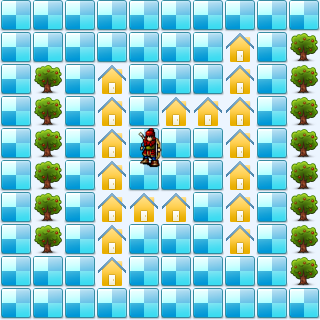
代码:
<!DOCTYPE html>
<html lang="utf-8">
<meta http-equiv="Content-Type" content="text/html; charset=utf-8"/>
<head>
     <title>地图加载 英雄出现2 19.3.6 15:37 by:逆火狂飙 horn19782016@163.com</title>

     <style>
     #canvas{
        background:#ffffff;
        cursor:pointer;
        margin-left:10px;
        margin-top:10px;
        -webkit-box-shadow:3px 3px 6px rgba(0,0,0,0.5);
        -moz-box-shadow:3px 3px 6px rgba(0,0,0,0.5);
        box-shadow:3px 3px 6px rgba(0,0,0,0.5);
     }

     #controls{
        margin-top:10px;
        margin-left:15px;
     }
     </style>

    </head>

     <body onload="init()">
        <div id="controls">
            <input id='animateBtn' type='button' value='开始'/>
        </div>

        <canvas id="canvas" width="160px" height="160px" >
            出现文字表示你的浏览器不支持HTML5
        </canvas>
     </body>
</html>
<script type="text/javascript">
<!--
var paused=true;
animateBtn.onclick=function(e){
    paused=! paused;

    if(paused){
        animateBtn.value="开始";

    }else{
        animateBtn.value="停止";

        window.requestAnimationFrame(animate);
    }
}

var ctx;// 绘图环境
var r;// 表盘半径
var terrain;
var hero;
function init(){
    // init Canvas
    var canvas=document.getElementById('canvas');
    r=160;
    canvas.width =2*r;
    canvas.height=2*r;
    ctx=canvas.getContext('2d');

    terrain=new Terrain();
    hero=new Hero();

    // 响应键盘事件
    canvas.addEventListener('keydown', doKeyDown, true);
    canvas.focus();
    window.addEventListener('keydown', doKeyDown, true);
};

function draw(){
    // Clear Canvas
    ctx.clearRect(0,0,ctx.canvas.width,ctx.canvas.height);
    ctx.fillStyle="#ECF5FF";
    ctx.fillRect(0,0,ctx.canvas.width,ctx.canvas.height);

    terrain.paint(ctx);
    hero.paint(ctx);
}

function animate(){
    if(!paused){
        draw();
        window.requestAnimationFrame(animate); /// 让浏览器自行决定帧速率
    }
}

function doKeyDown(e) {
    var keyID = e.keyCode ? e.keyCode :e.which;
    if(keyID === 38 || keyID === 87)  { // up arrow and W
        hero.move('up');
        e.preventDefault();
    }
    if(keyID === 39 || keyID === 68)  { // right arrow and D
        hero.move('right');
        e.preventDefault();
    }
    if(keyID === 40 || keyID === 83)  { // down arrow and S
        hero.move('down');
        e.preventDefault();
    }
    if(keyID === 37 || keyID === 65)  { // left arrow and A
        hero.move('left');
        e.preventDefault();
    }
}

//---------------------------------------------------地形类定义开始------------------------------------------------------------------->>
Terrain=function(){
    this.files=["road.png","tree.png","home.png",];

    this.maps=new Array(
        [0,0,0,0,0,0,0,0,0,0],
        [0,0,1,1,1,1,1,1,0,0],
        [0,0,0,0,0,0,0,0,0,0],
        [0,0,2,2,2,2,2,2,2,0],
        [0,0,0,0,0,0,2,0,0,0],
        [0,0,0,2,0,0,2,0,0,0],
        [0,0,0,2,0,0,0,0,0,0],
        [0,2,2,2,2,2,2,2,0,0],
        [0,0,0,0,0,0,0,0,0,0],
        [0,1,1,1,1,1,1,1,1,0],
    );
}
Terrain.prototype={
    files:[],
    // Property
    maps:0,

    // method
    paint:function(ctx){
        for(var i=0;i<this.maps.length;i++){
            var arr=this.maps[i];

            for(var j=0;j<arr.length;j++){
                var value=arr[j];

                var img=new Image();
                img.src=this.files[value];

                ctx.drawImage(img,i*32,j*32);
            }
        }
    },

    getValue:function(i,j){
        if(i<0 || i>=this.maps.length){
            return undefined;
        }
        var arr=this.maps[i];
        if(j<0 || j>=arr.length){
            return undefined;
        }
        var value=arr[j];
        return value;
    },
}
//---------------------------------------------------地形类定义结束-------------------------------------------------------------------<<

//---------------------------------------------------英雄类定义开始------------------------------------------------------------------->>
Hero=function(){
    this.files=["arrow_left.png","arrow_right.png","arrow_up.png","arrow_down.png",];

    this.pngs=[
        {left:0,top:10,width:40,height:40},
        {left:0,top:66,width:40,height:40},
        {left:0,top:120,width:40,height:40},
        {left:0,top:180,width:40,height:40},
    ];
}
Hero.prototype={
    files:[],
    pngs:[],
    x:160,
    y:160,
    xTo:160,
    yTo:160,
    step:32,
    direction:'up',

    // method
    paint:function(ctx){
        var img=new Image();
        img.src='bowman.png';

        var index=0;
        if(this.direction=='up'){
            index=3;
        }
        if(this.direction=='down'){
            index=0;
        }
        if(this.direction=='left'){
            index=1;
        }
        if(this.direction=='right'){
            index=2;
        }
        var pos=this.pngs[index];
        ctx.drawImage(img,pos.left,pos.top,pos.width,pos.height,this.x,this.y,pos.width,pos.height);
        //ctx.drawImage(img,this.x,this.y);
    },

    move:function(direction){
        this.direction=direction;

        if(this.direction=='up'){
            this.yTo-=this.step;
        }
        if(this.direction=='down'){
            this.yTo+=this.step;
        }
        if(this.direction=='left'){
            this.xTo-=this.step;
        }
        if(this.direction=='right'){
            this.xTo+=this.step;
        }

        if(terrain.getValue(this.xTo/this.step,this.yTo/this.step)==0){
            this.x=this.xTo;
            this.y=this.yTo;
        }else{
            this.xTo=this.x;
            this.yTo=this.y;
        }
    }
}
//---------------------------------------------------英雄类定义结束-------------------------------------------------------------------<<
//-->
</script>
2019年3月6日15点41分
[Canvas]人物型英雄出现(前作仅为箭头)的更多相关文章
- [Canvas]游戏增加怪物爆炸效果,改善箭头形状
请点此下载代码并用浏览器打开试玩. 图例: 代码: <!DOCTYPE html> <html lang="utf-8"> <meta http-eq ...
- 当LinkButton无效时,光标不显示为手型
在Flex组件LinkButton里,我们可以用useHandCursor属性来控制是否使用手型光标.现在我们要实现在LinkButton的enable=false时,useHandCursor=fa ...
- WPF在Canvas中绘图实现折线统计图
最近在WPF中做一个需要实现统计的功能,其中需要用到统计图,之前也没有接触过,度娘上大多都是各种收费或者免费的第三方控件,不想用第三方控件那就自己画一个吧. 在园子还找到一篇文章,思路来自这篇文章,文 ...
- 03.Web大前端时代之:HTML5+CSS3入门系列~H5功能元素
Web大前端时代之:HTML5+CSS3入门系列:http://www.cnblogs.com/dunitian/p/5121725.html 2.功能元素 1.hgroup 对网页或区段(secti ...
- CCF-NOIP-2018 提高组(复赛) 模拟试题(五)
T1 相遇 [问题描述] 在一场奇怪的梦里,小 Y 来到了一个神奇的国度.这个国度可以用一根数轴表示,小 Y 在 N 处,而小 Y 想吃的美食在 K 处.小 Y 有两种方式移动, 一种叫做步行, 一种 ...
- 【Cocos2dx游戏开发】Cocos2d-x简介
一.简介 最近在做一个Android下的卡牌游戏--<九州幻想>开发项目,而我们使用的引擎是Cocos2dx,所以想要写写笔记来记录一下项目中的收获.当然首先稍微介绍一下Cocos2d-x ...
- 前端之JavaScript基础
前端之JavaScript基础 本节内容 JS概述 JS基础语法 JS循环控制 ECMA对象 BOM对象 DOM对象 1. JS概述 1.1. javascript历史 1992年Nombas开发出C ...
- C# 词法分析器(六)构造词法分析器
系列导航 (一)词法分析介绍 (二)输入缓冲和代码定位 (三)正则表达式 (四)构造 NFA (五)转换 DFA (六)构造词法分析器 (七)总结 现在最核心的 DFA 已经成功构造出来了,最后一步就 ...
- C++学习笔记35:函数模板
函数模板 函数模板的目的 设计通用的函数,以适应广泛的数据型式 函数模板的定义格式 template<模板型式参数列表>返回值型式 函数名称(参数列表): 原型:template<c ...
随机推荐
- Code Fragment-UI加载策略之-可视者优先加载
通常情况 通常程序的UI不太复杂,我们会直接加载这些UI信息 复杂的UI 加载的元素就相对多一些. 加载的数据相对多. 因为UI元素和数据元素都比较多,加载的时间相对多. 可视者优先加载 不是默认的加 ...
- jstat命令 -- Java虚拟机监控统计工具
http://blog.sina.com.cn/s/blog_5f5716580100u76r.html 语法:jstat [generalOption | outputOptions vmid [i ...
- 树莓派创始人访谈:我们是怎么让大家都成为DIY黑客的
原文出处: Linux.CN 请记住它是为喜欢折腾的人准备的只要35美元的计算机 我永远不会忘记我第一次看到树莓派的情形.那个小巧的,信用卡大小的计算机,性能却足够强劲,可以作为一般家用PC,媒体中心 ...
- 源码编译Tkinter
要让Python支持Tkinter, 需要首先安装tcl和tk两个软件包. 下载地址: http://www.tcl.tk/software/tcltk/download.html 或 tcl:htt ...
- AngularJS的增删改查、state嵌套案例,不涉及服务端
本篇实践一个案例,大致是:左边有导航菜单,右边显示列表,并可对列表项编辑或删除,也可添加新的列表项.借此,可体会到:如何组织可扩展的AngualrJS文件结构,如何点击左侧菜单项右侧显示相应内容,an ...
- git 两个中心仓库上的分支 merge
首先在一个中心仓库里面添加另外一个仓库的所有分支. 命令: git remote add Cangku2 https://github.com/abc/abc.git git fetch 这之后在使用 ...
- @NotBlank注解使用不生效的解决办法
@NotBlank注解使用时必须在入参处(controller)加@Valid. 如: public Class User{ @NotBlank(message = "用户名不能为空&quo ...
- 苹果无法连接到itunes store怎么办
方法1:设置--还原--还原网络设置,再进app store就可以了.方法2:重置访问限制“设置”–> “通用” –> “访问限制”,开启访问限制5秒,然后再关闭访问限制.方法3:重置当前 ...
- 用SparseArray代替HashMap
SparseArray是android提供的一个工具类,它可以用来替代hashmap进行对象的存储,其内部实现了一个矩阵压缩算法,很适合存储稀疏矩阵的. PS:support包中还提供了兼容的类Spa ...
- Oracle行列转换小结
目录结构如下:行转列列转行[一].行转列 1.1.初始测试数据 表结构:TEST_TB_GRADE Sql代码 create table TEST_TB_GRADE ( ID NUM ...