
Bootstrap学习总结笔记(24)-- 基于BootstrapValidator的Form表单验证
Form表单进行数据验证是十分必要的,我们可以自己写JS脚本或者使用JQuery Validate 插件来实现。对于Bootstrap而言,利用BootstrapValidator来做Form表单验证是个相当不错的选择,两者完全兼容,我们也不用去关注CSS样式等美工效果。
0x01 引入BootstrapValidator
官网:BootstrapValidator,作为一个纯粹的使用者,我们可以在上面的链接处下载相关文件并引入,也可以利用CDN方式引入:
<link href="//cdn.bootcss.com/bootstrap-validator/0.5.3/css/bootstrapValidator.min.css" rel="stylesheet">

<script src="//cdn.bootcss.com/bootstrap-validator/0.5.3/js/bootstrapValidator.min.js"></script>- 1
- 2
0x02 用户注册实例
下面使用一个用户注册的实例,来总结BootstrapValidator的基本使用方法(其中的JS和CSS文件的引入,请根据自己的实际位置进行调整):
<!DOCTYPE html>

<html lang="zh-cn">

<head>

    <meta charset="UTF-8">

    <title>用户注册</title>

    <meta name="viewport" content="width=device-width, initial-scale=1">

    <link href="../../../css/bootstrap.min.css" rel="stylesheet">

    <link href="//cdn.bootcss.com/bootstrap-validator/0.5.3/css/bootstrapValidator.min.css" rel="stylesheet">

    <script src="http://cdn.bootcss.com/jquery/1.11.1/jquery.min.js"></script>

    <script src="../../../js/bootstrap.min.js"></script>

    <script src="//cdn.bootcss.com/bootstrap-validator/0.5.3/js/bootstrapValidator.min.js"></script>

</head>

<body>

<div class="container col-lg-3 col-lg-offset-3">

    <div class="page-header">

        <h3>用户注册</h3>

    </div>

    <div>

        <form id="registerForm" method="POST" class="form-horizontal" action="用户注册.html">

            <div class="form-group">

                <!--注册的用户名-->

                <label class="control-label" for="username">*请输入注册用户名:</label>

                <input type="text" class="form-control" placeholder="请输入注册用户名" name="username" id="username">

            </div>

            <div class="form-group">

                <!--注册密码-->

                <label class="control-label" for="password">*请输入注册密码:</label>

                <input type="password" class="form-control" placeholder="请输入注册密码" name="password" id="password">

            </div>

            <div class="form-group">

                <!--确认密码-->

                <label class="control-label" for="repassword">*请输入确认密码:</label>

                <input type="password" class="form-control" placeholder="请输入确认密码" name="repassword" id="repassword">

            </div>

            <div class="form-group">

                <label class="control-label" for="phone">*请输入手机号码:</label>

                <input type="text" class="form-control" placeholder="请输入手机号码" name="phone" id="phone">

            </div>

            <div class="form-group">

                <label class="control-label" for="email">*请输入电子邮箱:</label>

                <input type="text" class="form-control" placeholder="请输入电子邮箱" name="email" id="email">

            </div>

            <div class="form-group">

                <label class="control-label" for="inviteCode">*请输入邀请码:</label>

                <input type="text" class="form-control" placeholder="请输入邀请码" name="inviteCode" id="inviteCode">

            </div>

            <div class="form-group">

                <button type="submit" class="btn btn-primary form-control">提交注册</button>

            </div>

        </form>

    </div>

</div>

<script>

    $(function () {

        <!--数据验证-->

        $("#registerForm").bootstrapValidator({

            message:'This value is not valid',

//            定义未通过验证的状态图标

            feedbackIcons: {/*输入框不同状态,显示图片的样式*/

                valid: 'glyphicon glyphicon-ok',

                invalid: 'glyphicon glyphicon-remove',

                validating: 'glyphicon glyphicon-refresh'

            },

//            字段验证

            fields:{

//                用户名

                username:{

                    message:'用户名非法',

                    validators:{

//                        非空

                        notEmpty:{

                            message:'用户名不能为空'

                        },

//                        限制字符串长度

                        stringLength:{

                            min:3,

                            max:20,

                            message:'用户名长度必须位于3到20之间'

                        },

//                        基于正则表达是的验证

                        regexp:{

                            regexp:/^[a-zA-Z0-9_\.]+$/,

                            message:'用户名由数字字母下划线和.组成'

                        }

                    }

                },

//                密码

                password:{

                    message:'密码非法',

                    validators:{

                        notEmpty:{

                            message:'密码不能为空'

                        },

//                        限制字符串长度

                        stringLength:{

                            min:3,

                            max:20,

                            message:'密码长度必须位于3到20之间'

                        },

//                        相同性检测

                        identical:{

//                            需要验证的field

                            field:'password',

                            message:'两次密码输入不一致'

                        },

//                        基于正则表达是的验证

                        regexp:{

                            regexp:/^[a-zA-Z0-9_\.]+$/,

                            message:'密码由数字字母下划线和.组成'

                        }

                    }

                },

                //                确认密码

                repassword:{

                    message:'密码非法',

                    validators:{

                        notEmpty:{

                            message:'密码不能为空'

                        },

//                        限制字符串长度

                        stringLength:{

                            min:3,

                            max:20,

                            message:'密码长度必须位于3到20之间'

                        },

//                        相同性检测

                        identical:{

//                            需要验证的field

                            field:'password',

                            message:'两次密码输入不一致'

                        },

//                        基于正则表达是的验证

                        regexp:{

                            regexp:/^[a-zA-Z0-9_\.]+$/,

                            message:'密码由数字字母下划线和.组成'

                        }

                    }

                },

//                电子邮箱

                email:{

                    validators:{

                        notEmpty:{

                            message:'邮箱地址不能为空'

                        },

                        emailAddress:{

                            message:'请输入正确的邮箱地址'

                        }

                    }

                },

//                手机号码

                phone:{

                    validators:{

                        notEmpty:{

                            message:'手机号码不能为空'

                        },

                        stringlength:{

                            min:11,

                            max:11,

                            message:'请输入11位手机号码'

                        },

                        regexp:{

                            regexp:/^1[3|5|8]{1}[0-9]{9}$/,

                            message:'请输入正确的手机号码'

                        }

                    }

                },

//                邀请码

                inviteCode:{

                    validators:{

                        notEmpty:{

                            message:'邀请码不能为空'

                        },

                        stringlength:{

                            min:9,

                            max:9,

                            message:'请输入9位邀请码'

                        },

                        regexp:{

                            regexp:/^[\w]{8}$/,

                            message:'邀请码由数字和字母组成'

                        }

                    }

                }

            }

        })

    })

</script>

</body>

</html>- 1
- 2
- 3
- 4
- 5
- 6
- 7
- 8
- 9
- 10
- 11
- 12
- 13
- 14
- 15
- 16
- 17
- 18
- 19
- 20
- 21
- 22
- 23
- 24
- 25
- 26
- 27
- 28
- 29
- 30
- 31
- 32
- 33
- 34
- 35
- 36
- 37
- 38
- 39
- 40
- 41
- 42
- 43
- 44
- 45
- 46
- 47
- 48
- 49
- 50
- 51
- 52
- 53
- 54
- 55
- 56
- 57
- 58
- 59
- 60
- 61
- 62
- 63
- 64
- 65
- 66
- 67
- 68
- 69
- 70
- 71
- 72
- 73
- 74
- 75
- 76
- 77
- 78
- 79
- 80
- 81
- 82
- 83
- 84
- 85
- 86
- 87
- 88
- 89
- 90
- 91
- 92
- 93
- 94
- 95
- 96
- 97
- 98
- 99
- 100
- 101
- 102
- 103
- 104
- 105
- 106
- 107
- 108
- 109
- 110
- 111
- 112
- 113
- 114
- 115
- 116
- 117
- 118
- 119
- 120
- 121
- 122
- 123
- 124
- 125
- 126
- 127
- 128
- 129
- 130
- 131
- 132
- 133
- 134
- 135
- 136
- 137
- 138
- 139
- 140
- 141
- 142
- 143
- 144
- 145
- 146
- 147
- 148
- 149
- 150
- 151
- 152
- 153
- 154
- 155
- 156
- 157
- 158
- 159
- 160
- 161
- 162
- 163
- 164
- 165
- 166
- 167
- 168
- 169
- 170
- 171
- 172
- 173
- 174
- 175
- 176
- 177
- 178
- 179
- 180
- 181
- 182
- 183
- 184
- 185
- 186
- 187
- 188
- 189
- 190
- 191
- 192
- 193
- 194
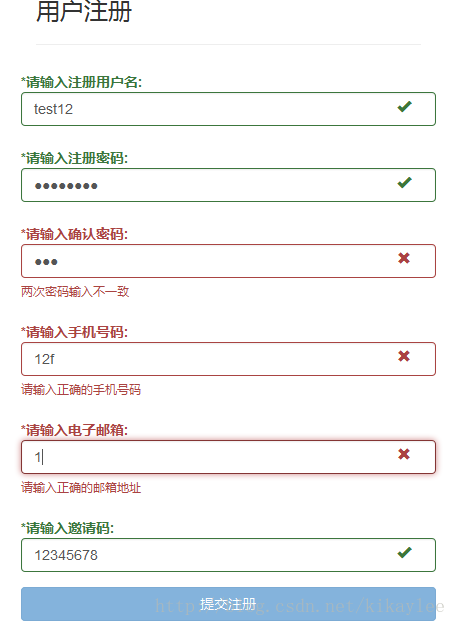
验证效果如下:
0x03 后记
在实际应用中,可能还会遇到类似Ajax提交验证的问题,处理过程是类似的,以后再结合实际的应用来讲这个问题。
类似BootstrapValidator这种基于JS来做验证的过程只是客户端验证,只是为了提高用户体验,并不能保证提交数据的安全性,后端开发者还要做相应的后台验证。
转自https://blog.csdn.net/kikaylee/article/details/53576062
Bootstrap学习总结笔记(24)-- 基于BootstrapValidator的Form表单验证的更多相关文章
- 基于Bootstrap+jQuery.validate Form表单验证实践
基于Bootstrap jQuery.validate Form表单验证实践 项目结构 : github 上源码地址:https://github.com/starzou/front-end- ...
- 基于Jquery Validate 的表单验证
基于Jquery Validate 的表单验证 jquery.validate.js是jquery下的一个验证插件,运用此插件我们可以很便捷的对表单元素进行格式验证. 在讲述基于Jquery Vali ...
- 基于jQuery的Validate表单验证
表单验证可以说在前端开发工作中是无处不在的~ 有数据,有登录,有表单, 都需要前端验证~~ 而我工作中用到最多的就是基于基于jQuery的Validate表单验证~ 就向下面这样~ 因为今天有个朋 ...
- 黄聪: Bootstrap之Form表单验证神器: BootstrapValidator(转)
前言:做Web开发的我们,表单验证是再常见不过的需求了.友好的错误提示能增加用户体验.博主搜索bootstrap表单验证,搜到的结果大部分都是文中的主题:bootstrapvalidator.今天就来 ...
- Bootstrap之Form表单验证神器: BootstrapValidator(转)
前言:做Web开发的我们,表单验证是再常见不过的需求了.友好的错误提示能增加用户体验.博主搜索bootstrap表单验证,搜到的结果大部分都是文中的主题:bootstrapvalidator.今天就来 ...
- JS组件系列——Form表单验证神器: BootstrapValidator
前言:做Web开发的我们,表单验证是再常见不过的需求了.友好的错误提示能增加用户体验.博主搜索bootstrap表单验证,搜到的结果大部分都是文中的主题:bootstrapvalidator.今天就来 ...
- bootstrapValidator.js 做表单验证
有这样的一个场景,我们在提交form表单的时候 可能要做一些验证,比如判断是不是为空,电话的格式验证,邮箱的格式验证等等,手写起来也是可以得. 但是今天我介绍一个bootstrap插件简化开发.就是b ...
- [转]bootstrapValidator.js 做表单验证
本文转自:https://www.cnblogs.com/nele/p/5493414.html 作者:@nele本文为作者原创,转载请注明出处:https://www.cnblogs.com/nel ...
- Form表单验证神器: BootstrapValidator
前言:做Web开发的我们,表单验证是再常见不过的需求了.友好的错误提示能增加用户体验.博主搜索bootstrap表单验证,搜到的结果大部分都是文中的主题:bootstrapvalidator.今天就来 ...
随机推荐
- 第三百七十节,Python分布式爬虫打造搜索引擎Scrapy精讲—elasticsearch(搜索引擎)用Django实现搜索结果分页
第三百七十节,Python分布式爬虫打造搜索引擎Scrapy精讲—elasticsearch(搜索引擎)用Django实现搜索结果分页 逻辑处理函数 计算搜索耗时 在开始搜索前:start_time ...
- C#提高------------------------Attribute自定制概念
C#基础知识梳理系列八:定制特性Attribute 摘 要 设计类型的时候可以使用各种成员来描述该类型的信息,但有时候我们可能不太愿意将一些附加信息放到类的内部,因为这样,可能会给类型本身的信息描 ...
- Java与编码问题串讲之二–如何理解java采用Unicode编码
Java开发者必须牢记:在Java中字符仅以一种形式存在,那就是Unicode(不选择任何特定的编码,直接使用他们在字符集中的编号,这是统一的唯一方法).由于java采用unicode编码,char ...
- 由“如何取得CPU的温度与型号”学到的知识延伸WQL
[Base]:WMI是一项核心的 Windows 管理技术:用户可以使用 WMI 管理本地和远程计算机.WQL就是 WMI 中的查询语言,翻译成中文好像可以成为 Windows 管理规范查询语言. 1 ...
- S 参数说明
微波系统主要研究信号和能量两大问题:信号问题主要是研究幅频和相频特性:能量问题主要是研究能量如何有效地传输.微波系统是分布参数电路,必须采用场分析法,但场分析法过于复杂,因此需要一种简化的分析方法. ...
- 制作CentOS fence-agents 镜像
1, Download centos7 iso file: Centos7 ISO download: http://buildlogs.centos.org/rolling/7/isos/x86_6 ...
- UITableView:可展开的 UITableView
针对 TableView,有些时候需要在点击 cell 时,展开这行 cell,显现出更多的选项或者全部内容等. 比较容易想到的处理方案就是利用 section,在未选择之前,每一行都是一个 sect ...
- 【中文分词】DAG、DP、HMM、Viterbi
http://blog.sina.com.cn/s/blog_8267db980102wq41.html http://www.cnblogs.com/leeshine/p/5804679.html ...
- Visual Studio快捷键大全
快捷键的使用可以简化大家的操作,在一定程度上提高工作的效率,下文中将为大家介绍一些VS中经常用到的快捷键,希望对大家有用. 方法/步骤 关于解决方案和项目 用于快速跳转 用于代码的文本编辑 ...
- Cannot retrieve the latest commit at this time.
此时无法检索最新提交. GitHub页面上提示: Cannot retrieve the latest commit at this time. 还没更新的意思,等他更新就好了. 更新后: