
TX2之多线程读取视频及深度学习推理
背景
一般在TX2上部署深度学习模型时,都是读取摄像头视频或传入视频文件进行推理,从视频中抽取帧进行目标检测等任务。对于大点的模型,推理的速度是赶不上摄像头或视频的帧率的,如果我们使用单线程进行处理,即读取一帧检测一帧,推理会堵塞视频的正常传输,表现出来就是摄像头视频有很大的延迟,如果是对实时性要求较高,这种延迟是难以接受的。因此,采用多线程的方法,将视频读取与深度学习推理放在两个线程里,互不影响,达到实时的效果。
实现方法
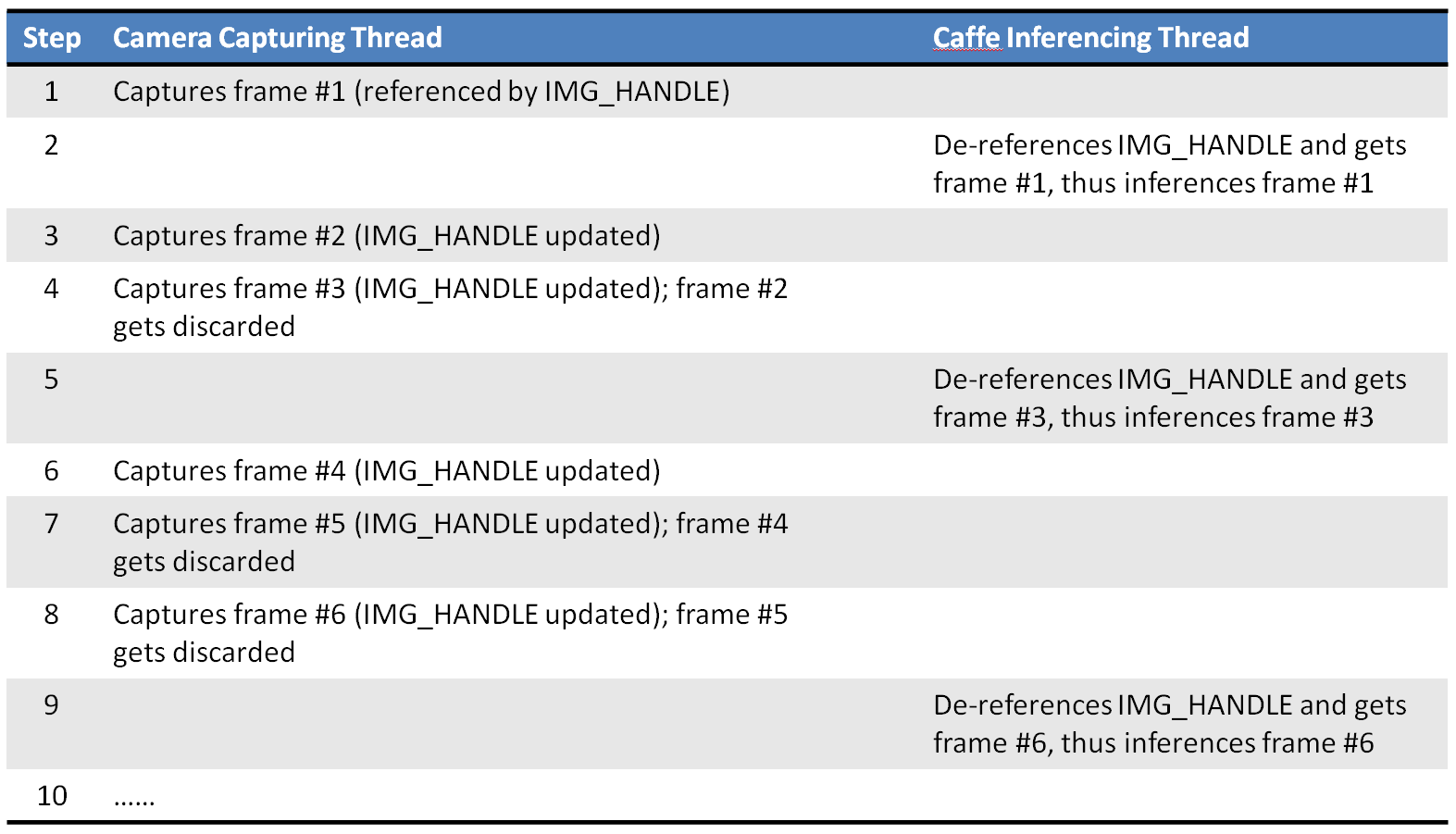
将摄像头的视频读取放入子线程,充当一个生产者的角色,将推理放入主线程,充当消费者的角色,主线程推理完一帧后从子线程提数据,继续推理,下图是原博文的一幅图片,描述了两个线程的关系:
程序实现
子线程
"""camera.py

This code implements the Camera class, which encapsulates code to

handle IP CAM, USB webcam or the Jetson onboard camera.  The Camera

class is further extend to take either a video or an image file as

input.

"""

import time

import logging

import threading

import numpy as np

import cv2

def open_cam_rtsp(uri, width, height, latency):

    """Open an RTSP URI (IP CAM)."""

    gst_str = ('rtspsrc location={} latency={} ! '

               'rtph264depay ! h264parse ! omxh264dec ! '

               'nvvidconv ! '

               'video/x-raw, width=(int){}, height=(int){}, '

               'format=(string)BGRx ! videoconvert ! '

               'appsink').format(uri, latency, width, height)

    return cv2.VideoCapture(gst_str, cv2.CAP_GSTREAMER)

def open_cam_usb(dev, width, height):

    """Open a USB webcam.

    We want to set width and height here, otherwise we could just do:

        return cv2.VideoCapture(dev)

    """

    gst_str = ('v4l2src device=/dev/video{} ! '

               'video/x-raw, width=(int){}, height=(int){}, '

               'format=(string)RGB ! videoconvert ! '

               'appsink').format(dev, width, height)

    return cv2.VideoCapture(gst_str, cv2.CAP_GSTREAMER)

def open_cam_onboard(width, height):

    """Open the Jetson onboard camera.

    On versions of L4T prior to 28.1, you might need to add

    'flip-method=2' into gst_str.

    """

    gst_str = ('nvcamerasrc ! '

               'video/x-raw(memory:NVMM), '

               'width=(int)2592, height=(int)1458, '

               'format=(string)I420, framerate=(fraction)30/1 ! '

               'nvvidconv ! '

               'video/x-raw, width=(int){}, height=(int){}, '

               'format=(string)BGRx ! videoconvert ! '

               'appsink').format(width, height)

    return cv2.VideoCapture(gst_str, cv2.CAP_GSTREAMER)

def grab_img(cam):

    """This 'grab_img' function is designed to be run in the sub-thread.

    Once started, this thread continues to grab a new image and put it

    into the global 'img_handle', until 'thread_running' is set to False.

    """

    while cam.thread_running:

        if cam.args.use_image:

            assert cam.img_handle is not None, 'img_handle is empty in use_image case!'

            # keep using the same img, no need to update it

            time.sleep(0.01)  # yield CPU to other threads

        else:

            _, cam.img_handle = cam.cap.read()

            fps = cam.cap.get(cv2.CAP_PROP_FPS)

            time.sleep(1/fps)  # fps = 20hz

            print('time sleep ', 1/fps)

            if cam.img_handle is None:

                logging.warning('grab_img(): cap.read() returns None...')

                break

    cam.thread_running = False

class Camera():

    """Camera class which supports reading images from theses video sources:

    1. Video file

    2. Image (jpg, png, etc.) file, repeating indefinitely

    3. RTSP (IP CAM)

    4. USB webcam

    5. Jetson onboard camera

    """

    def __init__(self, args):

        self.args = args

        self.is_opened = False

        self.thread_running = False

        self.img_handle = None

        self.img_width = 0

        self.img_height = 0

        self.cap = None

        self.thread = None

    def open(self):

        """Open camera based on command line arguments."""

        assert self.cap is None, 'Camera is already opened!'

        args = self.args

        if args.use_file:

            self.cap = cv2.VideoCapture(args.filename)

            # ignore image width/height settings here

        elif args.use_image:

            self.cap = 'OK'

            self.img_handle = cv2.imread(args.filename)

            # ignore image width/height settings here

            if self.img_handle is not None:

                self.is_opened = True

                self.img_height, self.img_width, _ = self.img_handle.shape

        elif args.use_rtsp:

            self.cap = open_cam_rtsp(

                args.rtsp_uri,

                args.image_width,

                args.image_height,

                args.rtsp_latency

            )

        elif args.use_usb:

            self.cap = open_cam_usb(

                args.video_dev,

                args.image_width,

                args.image_height

            )

        else:  # by default, use the jetson onboard camera

            self.cap = open_cam_onboard(

                args.image_width,

                args.image_height

            )

        if self.cap != 'OK':

            if self.cap.isOpened():

                # Try to grab the 1st image and determine width and height

                _, img = self.cap.read()

                if img is not None:

                    self.img_height, self.img_width, _ = img.shape

                    self.is_opened = True

    def start(self):

        assert not self.thread_running

        self.thread_running = True

        self.thread = threading.Thread(target=grab_img, args=(self,))

        self.thread.start()

    def stop(self):

        self.thread_running = False

        self.thread.join()

    def read(self):

        if self.args.use_image:

            return np.copy(self.img_handle)

        else:

            return self.img_handle

    def release(self):

        assert not self.thread_running

        if self.cap != 'OK':

            self.cap.release()
主线程
主线程程序以tensorflow object-detection部分为主,重点看里边读摄像头或视频的方法,运行时要传入读取的摄像头或视频参数:
# coding: utf-8

import numpy as np

import os

import six.moves.urllib as urllib

import sys

import tarfile

import tensorflow as tf

import zipfile

from collections import defaultdict

from io import StringIO

from matplotlib import pyplot as plt

from PIL import Image

import cv2

import time

from PIL import Image

import tensorflow.contrib.tensorrt as trt

from camera import Camera

import argparse

os.environ['CUDA_VISIBLE_DEVICES'] = '0'

# This is needed since the notebook is stored in the object_detection folder.

sys.path.append("..")

from object_detection.utils import ops as utils_ops

if tf.__version__ < '1.4.0':

  raise ImportError('Please upgrade your tensorflow installation to v1.4.* or later!')

from utils import label_map_util

from utils import visualization_utils as vis_util

# Path to frozen detection graph. This is the actual model that is used for the object detection.

PATH_TO_FROZEN_GRAPH = 'data/ssd_mobilenet_coco_0129/frozen_inference_graph.pb'

# List of the strings that is used to add correct label for each box.

PATH_TO_LABELS = os.path.join('data/object-detection.pbtxt')

NUM_CLASSES = 12

VIDEO_NAME = 'data/2018-09-10_162811'

filename = VIDEO_NAME + '.mp4'

def parse_args():

    """Parse input arguments."""

    desc = ('This script captures and displays live camera video, '

            'and does real-time object detection with TF-TRT model '

            'on Jetson TX2/TX1')

    parser = argparse.ArgumentParser(description=desc)

    parser.add_argument('--file', dest='use_file',

                        help='use a video file as input (remember to '

                        'also set --filename)',

                        action='store_true')

    parser.add_argument('--image', dest='use_image',

                        help='use an image file as input (remember to '

                        'also set --filename)',

                        action='store_true')

    parser.add_argument('--filename', dest='filename',

                        help='video file name, e.g. test.mp4',

                        default='data/2018-09-10_162811.mp4', type=str)

    parser.add_argument('--rtsp', dest='use_rtsp',

                        help='use IP CAM (remember to also set --uri)',

                        action='store_true')

    parser.add_argument('--uri', dest='rtsp_uri',

                        help='RTSP URI, e.g. rtsp://admin:jiaxun123@192.168.170.119/H.264/ch1/main',

                        default=None, type=str)

    parser.add_argument('--latency', dest='rtsp_latency',

                        help='latency in ms for RTSP [200]',

                        default=200, type=int)

    parser.add_argument('--usb', dest='use_usb',

                        help='use USB webcam (remember to also set --vid)',

                        action='store_true')

    parser.add_argument('--vid', dest='video_dev',

                        help='device # of USB webcam (/dev/video?) [1]',

                        default=1, type=int)

    parser.add_argument('--width', dest='image_width',

                        help='image width [1280]',

                        default=1280, type=int)

    parser.add_argument('--height', dest='image_height',

                        help='image height [720]',

                        default=720, type=int)

    parser.add_argument('--confidence', dest='conf_th',

                        help='confidence threshold [0.3]',

                        default=0.3, type=float)

    args = parser.parse_args()

    return args

def detect_in_video():

    args = parse_args()

    detection_graph = tf.Graph()

    with detection_graph.as_default():

        od_graph_def = tf.GraphDef()

        with tf.gfile.GFile(PATH_TO_FROZEN_GRAPH, 'rb') as fid:

            serialized_graph = fid.read()

            od_graph_def.ParseFromString(serialized_graph)

            tf.import_graph_def(od_graph_def, name='')

    label_map = label_map_util.load_labelmap(PATH_TO_LABELS)

    categories = label_map_util.convert_label_map_to_categories(

        label_map, max_num_classes=NUM_CLASSES, use_display_name=True)

    category_index = label_map_util.create_category_index(categories)

    config = tf.ConfigProto()

    config.gpu_options.allow_growth = True

    with detection_graph.as_default():

        with tf.Session(graph=detection_graph,config=config) as sess:

            image_tensor = detection_graph.get_tensor_by_name('image_tensor:0')

            detection_boxes = detection_graph.get_tensor_by_name(

                'detection_boxes:0')

            detection_scores = detection_graph.get_tensor_by_name(

                'detection_scores:0')

            detection_classes = detection_graph.get_tensor_by_name(

                'detection_classes:0')

            num_detections = detection_graph.get_tensor_by_name(

                'num_detections:0')

            cam = Camera(args)

            cam.open()

            cam.start()

            while cam.thread_running:

                frame = cam.read()

                color_frame = cv2.cvtColor(frame, cv2.COLOR_BGR2RGB)

                image_np_expanded = np.expand_dims(color_frame, axis=0)

                (boxes, scores, classes, num) = sess.run(

                    [detection_boxes, detection_scores,

                        detection_classes, num_detections],

                    feed_dict={image_tensor: image_np_expanded})

def main():

  detect_in_video()

if __name__ =='__main__':

  main()
Ref
TX2之多线程读取视频及深度学习推理的更多相关文章
- 在TX2上多线程读取视频帧进行caffe推理
参考文章:Multi-threaded Camera Caffe Inferencing TX2之多线程读取视频及深度学习推理 背景 一般在TX2上部署深度学习模型时,都是读取摄像头视频或者传入视频文 ...
- NVIDIA TensorRT高性能深度学习推理
NVIDIA TensorRT高性能深度学习推理 NVIDIA TensorRT 是用于高性能深度学习推理的 SDK.此 SDK 包含深度学习推理优化器和运行时环境,可为深度学习推理应用提供低延迟和高 ...
- Papers | 图像/视频增强 + 深度学习
目录 I. ARCNN 1. Motivation 2. Contribution 3. Artifacts Reduction Convolutional Neural Networks (ARCN ...
- 【ARM-Linux开发】【CUDA开发】【深度学习与神经网络】Jetson Tx2安装相关之三
JetPack(Jetson SDK)是一个按需的一体化软件包,捆绑了NVIDIA®Jetson嵌入式平台的开发人员软件.JetPack 3.0包括对Jetson TX2 , Jetson TX1和J ...
- 机器学习(Machine Learning)&深度学习(Deep Learning)资料【转】
转自:机器学习(Machine Learning)&深度学习(Deep Learning)资料 <Brief History of Machine Learning> 介绍:这是一 ...
- 机器学习(Machine Learning)与深度学习(Deep Learning)资料汇总
<Brief History of Machine Learning> 介绍:这是一篇介绍机器学习历史的文章,介绍很全面,从感知机.神经网络.决策树.SVM.Adaboost到随机森林.D ...
- TensorRT深度学习训练和部署图示
TensorRT深度学习训练和部署 NVIDIA TensorRT是用于生产环境的高性能深度学习推理库.功率效率和响应速度是部署的深度学习应用程序的两个关键指标,因为它们直接影响用户体验和所提供服务的 ...
- MLPerf结果证实至强® 可有效助力深度学习训练
MLPerf结果证实至强 可有效助力深度学习训练 核心与视觉计算事业部副总裁Wei Li通过博客回顾了英特尔这几年为提升深度学习性能所做的努力. 目前根据英特尔 至强 可扩展处理器的MLPerf结果显 ...
- 实战深度学习OpenCV(二):读取并播放本地或者摄像头的视频
一.读取并播放的代码如下: #include "pch.h" #include <iostream> #include <opencv2/core/core.hp ...
随机推荐
- ansible的ad-hoc模式
一.什么是ad-hoc模式 ansible中有两种模式,分别是ad-hoc模式和playbook模式 ad-hoc简而言之,就是"临时命令" 二.ad-hoc模式使用的场景 场景一 ...
- eclipse添加web项目报错“Target runtime Apache Tomcat v7.0 is not defined.”
项目检出后,发现是Tomcat7 发布的,修改文件: 工作空间--->项目名称--->.settings--->org.eclipse.wst.common.project.face ...
- Selenium运用-漫画批量下载
今天我们要爬去的网站是http://comic.sfacg.com/.漫画网站一般都是通过JavaScript和AJAX来动态加载漫画的,这也就意味着想通过原来爬取静态网站的方式去下载漫画是不可能的, ...
- Eclipse Failed to get the required ADT version number from SDK
之前本人的AndroidStudio和Eclipse使用的是同一个SDK,然后使用AndroidStudio的 SDK Manager对SDK进行了update,再打开Eclipse就报了“Eclip ...
- js流程图:aworkflow.js
auto-workflow 用于快速构建各种关系图的库 github地址:https://github.com/auto-workflow/AWorkflow 快速开始 npm install awo ...
- 保证Service不被Kill的解决方案
1.Service设置成START_STICKY(onStartCommand方法中),kill 后会被重启(等待5秒左右),重传Intent,保持与重启前一样 2.通过 startForegroun ...
- 说一下自己对于 Linux 哲学的理解
查阅了一些资料,官方的哲学思想貌似是: 一切皆文件 由众多单一目的的小程序,一个程序只实现一个功能,多个程序组合完成复杂任务 文本文件保存配置信息 尽量避免与用户交互 什么,你问我的理解?哲学思想?E ...
- CodeForces 907E Party(bfs+状压DP)
Arseny likes to organize parties and invite people to it. However, not only friends come to his part ...
- CentOS下安装PHP的AMQP扩展方法和步骤
AMQP,即Advanced Message Queuing Protocol,一个提供统一消息服务的应用层标准高级消息队列协议,是应用层协议的一个开放标准,为面向消息的中间件设计.基于此协议的客户端 ...
- jQuery获取各种input输入框的值
1.获取一组radio单选框的值(name属性为一组的radio的name属性) var q1 = $("input[name=element_name]:checked").va ...