
springAOP实现方法运行时间统计
aop的before和after,寻思分别在两个方法里获得当前时间,最后一减就可以了。
因此,今天就探讨了一下这个问题,和大家分享一下。
创建maven工程,引入spring的依赖包,配置好applicationContext-aop.xml,如下:
<?xml version="1.0" encoding="UTF-8"?>
<beans xmlns="http://www.springframework.org/schema/beans"
xmlns:xsi="http://www.w3.org/2001/XMLSchema-instance" xmlns:aop="http://www.springframework.org/schema/aop"
xmlns:p="http://www.springframework.org/schema/p"
xmlns:context="http://www.springframework.org/schema/context" xmlns:tx="http://www.springframework.org/schema/tx"
xsi:schemaLocation="
http://www.springframework.org/schema/beans http://www.springframework.org/schema/beans/spring-beans-4.1.xsd
http://www.springframework.org/schema/aop http://www.springframework.org/schema/aop/spring-aop-4.1.xsd
http://www.springframework.org/schema/context
http://www.springframework.org/schema/context/spring-context-4.1.xsd
">
<!-- 切面所在的类包路径 -->
<context:component-scan base-package="com.product" />
<!-- 启动该切面代理 -->
<!-- <aop:aspectj-autoproxy proxy-target-class="true"/> -->
</beans>
然后,创建两个包,一个来放切面类,一个放测试类。
测试类如下
package com.product.service;
import org.springframework.context.support.ClassPathXmlApplicationContext;
import org.springframework.stereotype.Component;
import org.springframework.stereotype.Service;
@Service
public class TimeTest {
public void testMethod(){
System.out.println("执行方法");
}
public void testMethod2(){
int sum = 0;
for(int i=0;i<1000;i++){
sum += i;
}
System.out.println(sum);
System.out.println("执行方法2");
}
@SuppressWarnings("resource")
public static void main(String[] args) {
ClassPathXmlApplicationContext ctx = new ClassPathXmlApplicationContext("classpath:applicationContext-aop.xml");
TimeTest A = (TimeTest)ctx.getBean("timeTest");
A.testMethod();
//A.testMethod2();
ctx.destroy();
}
}
写这个切面类。
package com.product.test.aopTest;
import org.aspectj.lang.ProceedingJoinPoint;
import org.aspectj.lang.annotation.After;
import org.aspectj.lang.annotation.Around;
import org.aspectj.lang.annotation.Aspect;
import org.aspectj.lang.annotation.Before;
import org.aspectj.lang.annotation.Pointcut;
import org.aspectj.lang.reflect.MethodSignature;
import org.springframework.stereotype.Component;
@Aspect
@Component
public class MethodTimeMonitor {
private long startTime;
//声明切面类路径,类型必须为final String类型的,注解里要使用的变量只能是静态常量类型的
//public static final String POINT = "execution(* com.product.service.*.*(..))";
//也可以使用注解声明切入点,如下
@Pointcut("execution(* com.product.service.*.*(..))")
public void point(){}
@Before("point()")
public void doBefore(){
this.startTime = System.currentTimeMillis();
}
@After("point()")
public void doAfter(){
long endTime = System.currentTimeMillis();
System.out.println("方法执行了"+(endTime-this.startTime)+"ms");
}
}
现在,运行测试类,ok,看到如下结果:
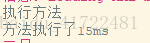
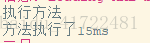
说明次思路可行。
只是,当面试官继续问我before和after是写在两个方法中,那变量怎么能互通的时候,我竟然忘了它们本来就在一个类里,只需要把起始时间设为成员变量就好了,支吾了半天没答上来。
之后,笔者看了些资料,发现还有其他思路,比如aroud。
此思路和之前的没太大改变,只是在MethodTimeMonitor里,注掉之前的方法,新增around方法,如下:
@Around("point()")
public Object doAround(ProceedingJoinPoint pjp){
long startTime = System.currentTimeMillis();
Object obj = null;
try {
obj = pjp.proceed();
} catch (Throwable e) {
// TODO Auto-generated catch block
e.printStackTrace();
}
long endTime = System.currentTimeMillis();
MethodSignature signature = (MethodSignature) pjp.getSignature();
String methodName = signature.getDeclaringTypeName() + "." + signature.getName();
System.out.println(methodName+"方法执行了"+(endTime-startTime)+"ms");
return obj;
}
好了,再次运行测试类,发现还是能得到一样的结果。

此外,笔者还了解到,aspect可以通过配置的方式实现,详见http://calatustela.iteye.com/blog/1910025。
另外,要提醒大家的是,注意:
1.配置文件尽可能放在src下,引入时直接加classpath就可以了。
2.<context:annotation-config />的作用是为使用到的注解自动配置对应的AnnotationBeanPostProcessor。而当使用自动扫描<context:component-scan
base-package="com.product.service" />后,它兼具有上述功能,因此两者取一即可。
此外,注意使用了spring注解的类包都要包括在内,否则可能某些包没有扫描,出现意外结果。
3.spring的注解bean加载机制中,获取某个bean用context.getBean("className");不过注意,className是该类首字母小写后的类名。若要自定义,可在注解后声明,如
@Controller("Name")。详见http://blog.csdn.net/damon834274634/article/details/38725909。
---------------------
转自:https://blog.csdn.net/baidu_41722481/article/details/79379040
springAOP实现方法运行时间统计的更多相关文章
- Python实现__metaclass__实现方法运行时间统计
几天前写的,参考了园友的一篇文章,链接找不到了.先感谢,找到了链接再补上.
- java监测方法运行时间/效率方法
前言: 这周在写一个小项目,虽然小但是是纯调外部接口的,调完了接口还不停的循环接口返回的数据(已转换JSONArray),然后再判断值,再做不同处理,关键是数据量还比较大,这刚做完还没开始上线,测试也 ...
- spring3.0框架检测方法运行时间测试(转)
主要利用了Spring AOP 技术,对想要统计的方法进行横切处理,方法执行前开始计时,方法执行后停止计时,得到计时方法就是该方法本次消耗时间. 步骤: 首先编写自己的Interceptor类来实现M ...
- 字典get方法和setdesault方法,统计message中各元素的出现频次
message= 'There are moments in life when you miss someone so much that you just want to pick them fr ...
- 统计方法运行时间【Java实现】
接口Command:定义命令的执行操作 package common; public interface Command { // 运行方法 void run(); } CommandRuntime ...
- java线程一之创建线程、线程池以及多线程运行时间统计
线程和进程的基本概念 进程和线程是动态的概念. 进程是 "执行中的程序",是一个动词,而程序是一个名词,进程运行中程序的"代码",而且还有自己的 ...
- 使用SpringAop 验证方法参数是否合法
(原文地址:http://blog.csdn.net/is_zhoufeng/article/details/7683194) 1.依赖包 aspectjweaver.jar 其中Maven的配 ...
- [Done]Spring @Pointcut 切点调用不到(SpringAOP嵌套方法不起作用) 注意事项
今天在开发过程中,遇到一个问题卡了很久,测试代码如下: package spring.pointcut; import org.aspectj.lang.ProceedingJoinPoint; im ...
- 通过日志过滤的方法,统计每天内容详情页面的PV数
1.目的: 每天凌晨0点1分统计用户点击进入内容详情页的次数,对内容点击量形成榜单. 2.分析: A./data/log/epg.access.log日志实时打印用户访问页面的日志,并且每天凌晨0点会 ...
随机推荐
- C#变量初始化
在C#中声明变量使用下述语法: datatype identifier;, 例如: int i; 该语句声明int变量i.编译器不允许在表达式中使用这个变量,除非用一个值初始化了改变量.如果你不需要使 ...
- 无归档情况下使用BBED处理ORA-01113错误
在丢失归档情况下,恢复时常会遇到ora-01113错误,以下实验模拟表空间offline,然后在丢失归档文件的情况下使用BBED修改文件头信息,最后恢复数据文件: 数据库版本: SQL> sel ...
- mybatis思维导图(一)
写在前面 与hibernate相比,我无疑更喜欢mybatis,就因为我觉得它真的好用,哈哈.它简单上手和掌握:sql语句和代码分开,方便统一管理和优化:当然缺点也有:sql工作量很大,尤其是字段多. ...
- HDU 4714 Tree2cycle (树形DP)
题意:给定一棵树,断开一条边或者接上一条边都要花费 1,问你花费最少把这棵树就成一个环. 析:树形DP,想一想,要想把一棵树变成一个环,那么就要把一些枝枝叶叶都换掉,对于一个分叉是大于等于2的我们一定 ...
- 【小梅哥SOPC学习笔记】给NIOS II CPU增加看门狗定时器并使用
给NIOS II CPU增加看门狗定时器并使用 配置看门狗定时器: 1. 设置计时溢出时间为1秒 2. 计数器位宽为32位 3. 勾选No Start/Stop control bits 4. 勾选F ...
- 学习python3
定义一个函数 你可以定义一个由自己想要功能的函数,以下是简单的规则: 函数代码块以 def 关键词开头,后接函数标识符名称和圆括号 (). 任何传入参数和自变量必须放在圆括号中间,圆括号之间可以用于定 ...
- delphi Table切换控件顺序问题
delphi Table切换控件顺序问题 Tagorder的值就是确定Table键切换顺序的 以上做法只能解决同一类型的多个控件(如Edit1,edit2....)显示顺序问题 假如有不同类型的控件如 ...
- [LeetCode 题解]: String to Interger (atoi)
Implement atoi to convert a string to an integer. Hint: Carefully consider all possible input cases. ...
- 玩转车联网1---初识OBD和行车助手
题目取得有点大,不免有博取眼球之嫌.车联网作为物联网的一个分支,预计在2015年市场会达到1500亿,特斯拉股票balabala,谷歌无人驾驶, 当然,我们是技术类博客,得找个能够快速上手,快速落地的 ...
- win10与子系统Ubuntu 相关配置
系统间 文件访问: 1. 在win10环境下访问Ubuntu文件系统的home目录:C:\Users\xxx\AppData\Local\Packages\CanonicalGroupLimited. ...