
xsl-mode属性用法
本文出自 “熔 岩” 博客,出处http://lavasoft.blog.51cto.com/62575/60517
对某一个元素做多次处理,那么选择<xsl:apply-template元素处理。
如果要每次对同一个元素处理输出不同的结果,那么就需要使用mode属性。
<xsl:template>和<xsl:apply-templates>都有一个mode属性,只有在这两个元素里面同时设定了mode属性,并且属性值相同,那么模板规则才会匹配。
<?xml-stylesheet type="text/xsl" href="employees.xsl"?>
<!--这是公司雇员的信息-->
<employees>
<employee sn="E-200402100001">
<name>zhangsan</name>
<age>25</age>
<!--月薪小于等于2000元的雇员工资,以现金方式发放-->
<monthly_pay mode="cash">
1200.00
</monthly_pay>
</employee>
<employee sn="E-200402100006">
<name>lisi</name>
<age>28</age>
<monthly_pay mode="cash">
1600.00
</monthly_pay>
</employee>
<employee sn="E-200503220001">
<name>wangwu</name>
<age>30</age>
<!--月薪高于2000元的雇员工资,以信用卡转帐的方式发放-->
<monthly_pay mode="credit_card">
3500.00
</monthly_pay>
</employee>
</employees>
<xsl:stylesheet version="1.0" xmlns:xsl="http://www.w3.org/1999/XSL/Transform">
<xsl:template match="/">
<table border="1">
<xsl:apply-templates select="employees/employee" mode="table"/>
</table>
<xsl:apply-templates select="employees/employee" mode="list"/>
</xsl:template>
<xsl:template match="employee" mode="table">
<tr>
<td><xsl:value-of select="name"/></td>
<td><xsl:value-of select="age"/></td>
<td><xsl:value-of select="monthly_pay"/></td>
</tr>
</xsl:template>
<xsl:template match="employee" mode="list">
<ul>
<li><xsl:value-of select="name"/></li>
<li><xsl:value-of select="age"/></li>
<li><xsl:value-of select="monthly_pay"/></li>
</ul>
</xsl:template>
</xsl:stylesheet>
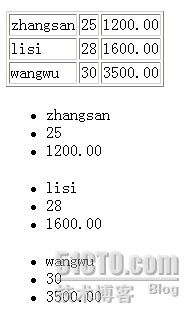
<tr>
<td>zhangsan</td>
<td>25</td>
<td>1200.00</td>
</tr>
<tr>
<td>lisi</td>
<td>28</td>
<td>1600.00</td>
</tr>
<tr>
<td>wangwu</td>
<td>30</td>
<td>3500.00</td>
</tr>
</table>
<ul>
<li>zhangsan</li>
<li>25</li>
<li>1200.00</li>
</ul>
<ul>
<li>lisi</li>
<li>28</li>
<li>1600.00</li>
</ul>
<ul>
<li>wangwu</li>
<li>30</li>
<li>3500.00</li>
</ul>
xsl-mode属性用法的更多相关文章
- JS中Array数组的三大属性用法
原文:JS中Array数组的三大属性用法 Array数组主要有3大属性,它们分别是length属性.prototype属性和constructor属性. JS操作Array数组的方法及属性 本文总结了 ...
- js原生之scrollTop、offsetHeight和offsetTop等属性用法详解
scrollTop.offsetHeight和offsetTop等属性用法详解:标题中的几个相关相关属性在网页中有这大量的应用,尤其是在运动框架中,但是由于有些属性相互之间的概念比较混杂或者浏览器兼容 ...
- Android - include属性用法
include属性用法 本文地址: http://blog.csdn.net/caroline_wendy Android的layout中, 能够使用include属性样式, 这样能够把不同的layo ...
- css文本属性用法总结
稍稍总结了下css文本的一些属性用法,自己忘记的时候也可以用来查查,不用去查网站那么麻烦. 下面是部分总结,也希望对其他人有用 文本修饰 (1)text-decoration: 文本修饰(横线) 4 ...
- scrollTop、offsetHeight和offsetTop等属性用法详解--转转转
scrollTop.offsetHeight和offsetTop等属性用法详解: 标题中的几个相关相关属性在网页中有这大量的应用,尤其是在运动框架中,但是由于有些属性相互之间的概念比较混杂或者浏览器兼 ...
- 跨平台移动开发 Xuijs超轻量级的框架Style CSS属性用法
PhoneGap里面推荐使用的超轻量级的框架 Style CSS属性用法 设置css属性:setstyle 通过ID设置css属性 x$('#top1').setStyle('color', '#DB ...
- WPF Visibility属性用法
WPF Visibility属性用法 Visible 元素在窗体中正常显示 Collaspsed 元素不显示,也不占用空间 Hidden 元素不显示,但是任然为它保留空间
- godot新手教程1[button信号使用]<godot节点信号对照及节点属性用法>
button(按钮)节点信号对照: 1:pressed() #按钮点击信号 #绑定按钮点击后触发信号 Pressed使用案例: func _on_”节点路径”_Button_pressed( ...
- HTML5 <a>标签的ping属性用法
随着移动互联网用户井喷式的增长,web前端开发中的HTML5在近几年备受瞩目,越来越多的人从事html5开发相关工作.今天小编也来凑个热闹,和大家一起来谈谈HTML5中<a>标签的ping ...
随机推荐
- HTML5、微信、APP:创业寒冬只能选其一,该选哪个?
HTML5手机网站 优势:开发技术简单,研发周期短,用户接触成本低 劣势:功能实现相比APP存在差距,用户重复使用难度大,用户粘性差 适合场景:把手机网站当成网络上的“电子产品介绍手册”.手机网站更适 ...
- DHT协议C++实现过程中各种问题
---恢复内容开始--- 博主是个菜鸟,什么地方写的不对或者理解有误的地方还请指正出来. DHT协议是BT协议中的一部分,也是一个辅助性的协议.HTTP协议中用 来定位资源也就是html文本是用URL ...
- svn检出的时候报 Unable to connect to a repository at URL错误(摘自CSDN)
背景:1. SVN服务器:VisualSVN-Server-2.5.5: 2. SVN客户端:TortoiseSVN-1.7.6.22632-x64-svn-1.7.4.msi: 在S ...
- HDU4411 最小费用流
题目:http://acm.hdu.edu.cn/showproblem.php?pid=4411 floyd处理出最短路 每个点拆为i.i+n,i到i+n连一条容量为1,费用为负无穷的边,代表这个城 ...
- 疯狂了!当游戏爱上MongoDB会怎么样???
导读 前端时间魔兽这个电影我相信大家都看过了哈,作为一个码农,有时候我也会去思考魔兽世界这个游戏背后他的一些设计和实现,比如他用什么数据库.当然真正用什么数据库这个我是不确定的,我们今天的主题是当游戏 ...
- Java实现线性阈值模型(Linear Threshold Model)
影响力传播的线性阈值模型: 网络中连接任意两个节点u,v之间的边都有权重,任意一个节点它的各个邻居节点的边的权重之和为1,即 N(v):neighbors of v. 网络中的节点分为已激活节点和未激 ...
- 360随身wifi在win10中连不上网络
找到服务"Wired AutoConfig"和"WLAN AutoConfig"项,点击"启动"按钮,确保使其正常启动. 讲本地网卡共享到移 ...
- LeetCode 205 Isomorphic Strings
Problem: Given two strings s and t, determine if they are isomorphic. Two strings are isomorphic if ...
- WPF 变量转换的实现
有时候,我们传入的是一个值,但是真正显示的需要是另一个值,这时候就需要转换.比如我们传入一个枚举值,而不同的枚举值对于的图片是不一样的. 这时候就需要一个转换规则.WPF里面给我们提供了一个接口IVa ...
- MFC 按钮如何改变颜色
我们发现想改变对话框的背景颜色是很简单的,但是对话框的背景颜色改变了后,我们发现按钮的颜色没有改变,如下图. 这样做出来的对话框看起来,不是很自然,我们也想把按钮的颜色改变一下.这就用到了按钮的重绘. ...