
Refresh Tokens: When to Use Them and How They Interact with JWTs
In this post we will explore the concept of refresh tokens as defined by OAuth2. We will learn why they came to be and how they compare to other types of tokens. We will also learn how to use them with a simple example. Read on!
Update: at the moment this article was written Auth0 had not gone through OpenID Connect certification. Some of the terms used in this article such as access token do not conform to this spec but do conform to the OAuth2 specification. OpenID Connect establishes a clear distinction between access tokens (used to access the API of the authorization server) and the id token(used for client authentication against a resource server).
Introduction
Modern authentication and/or authorization solutions have introduced the concept of tokens into their protocols. Tokens are specially crafted pieces of data that carry just enough information to either authorize the user to perform an action, or allow a client to get additional information about the authorization process (to then complete it). In other words, tokens are pieces of information that allow the authorization process to be performed. Whether this information is readable or parsable by the client (or any party other than the authorization server) is defined by the implementation. The important thing is: the client gets this information, and then uses it to get access to a resource. The JSON Web Token (JWT) spec defines a way in which common token information may be represented by an implementation.
A short JWT recap
JWT defines a way in which certain common information pertaining to the process of authentication/authorization may be represented. As the name implies, the data format is JSON. JWTs carry certain common fields such as subject, issuer, expiration time, etc. JWTs become really useful when combined with other specs such as JSON Web Signature (JWS) and JSON Web Encryption (JWE). Together these specs provide not only all the information usually needed for an authorization token, but also a means to validate the content of the token so that it cannot be tampered with (JWS) and a way to encrypt information so that it remains opaque to the client (JWE). The simplicity of the data format (and its other virtues) have helped JWTs become one of the most common types of tokens. If you are interested in learning how to implement JWTs in your web apps, check this excellent post by Ryan Chenkie.
Token types
For the purposes of this post, we will focus on the two most common types of tokens: access tokens and refresh tokens.
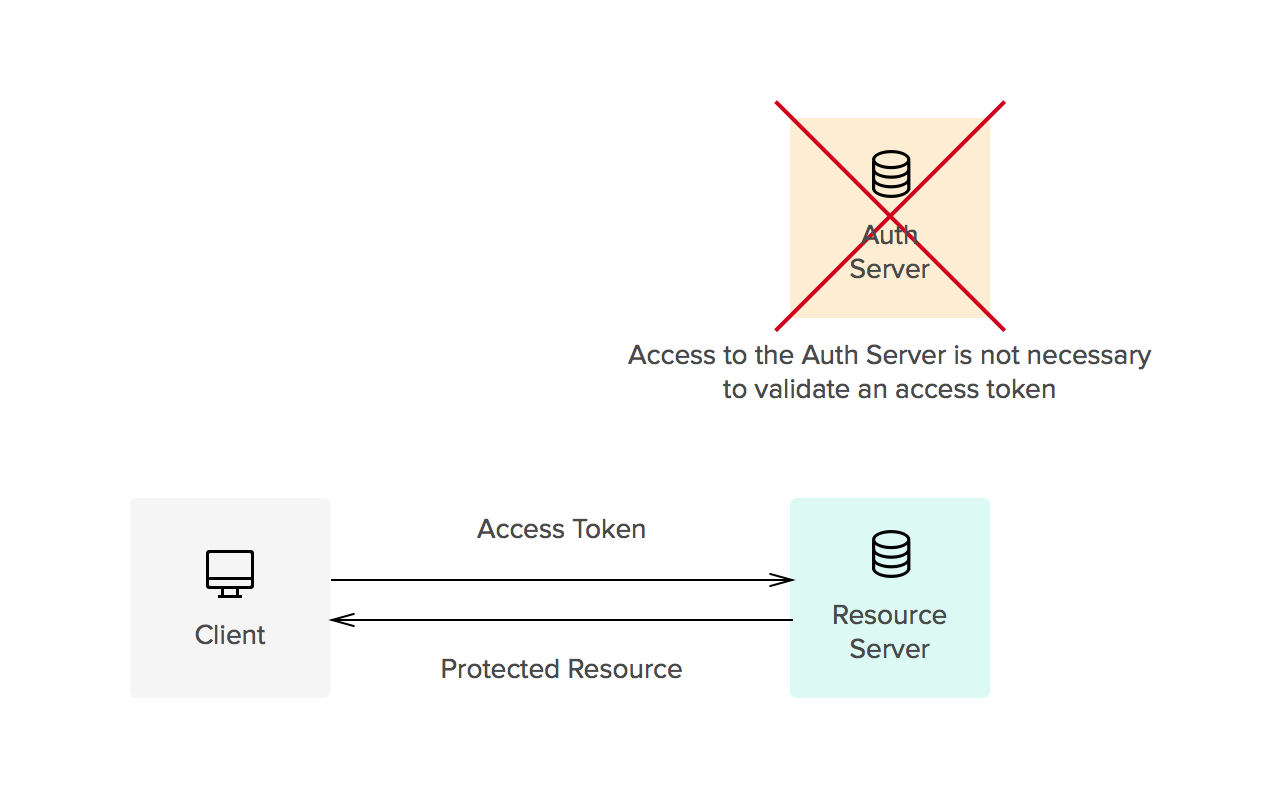
- Access tokens carry the necessary information to access a resource directly. In other words, when a client passes an access token to a server managing a resource, that server can use the information contained in the token to decide whether the client is authorized or not. Access tokens usually have an expiration date and are short-lived.
- Refresh tokens carry the information necessary to get a new access token. In other words, whenever an access token is required to access a specific resource, a client may use a refresh token to get a new access token issued by the authentication server. Common use cases include getting new access tokens after old ones have expired, or getting access to a new resource for the first time. Refresh tokens can also expire but are rather long-lived. Refresh tokens are usually subject to strict storage requirements to ensure they are not leaked. They can also be blacklisted by the authorization server.
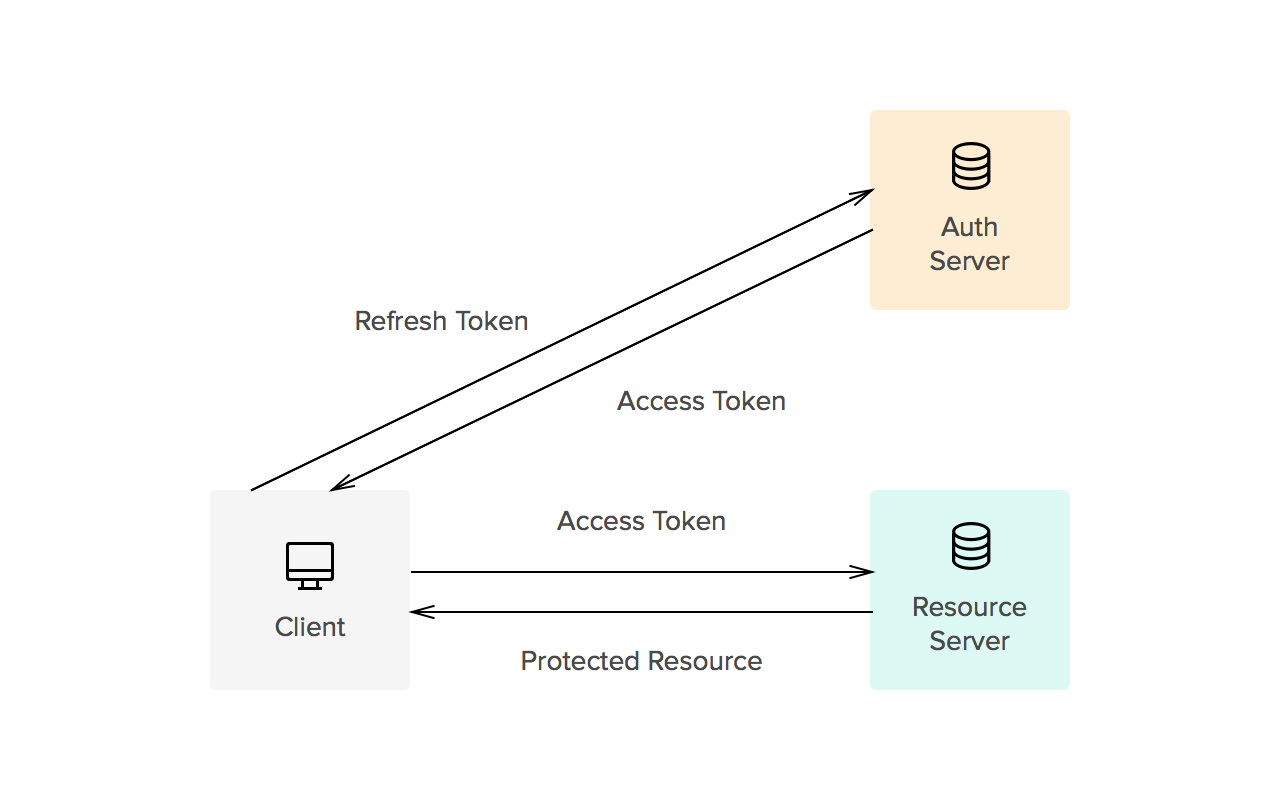
Whether tokens are opaque or not is usually defined by the implementation. Common implementations allow for direct authorization checks against an access token. That is, when an access token is passed to a server managing a resource, the server can read the information contained in the token and decide itself whether the user is authorized or not (no checks against an authorization server are needed). This is one of the reasons tokens must be signed (using JWS, for instance). On the other hand, refresh tokens usually require a check against the authorization server. This split way of handling authorization checks allows for three things:
- Improved access patterns against the authorization server (lower load, faster checks)
- Shorter windows of access for leaked access tokens (these expire quickly, reducing the chance of a leaked token allowing access to a protected resource)
- Sliding-sessions (see below)
Sliding-sessions
Sliding-sessions are sessions that expire after a period of inactivity. As you can imagine, this is easily implemented using access tokens and refresh tokens. When a user performs an action, a new access token is issued. If the user uses an expired access token, the session is considered inactive and a new access token is required. Whether this token can be obtained with a refresh token or a new authentication round is required is defined by the requirements of the development team.
Security considerations
Refresh tokens are long-lived. This means when a client gets a refresh token from a server, this token must be stored securely to keep it from being used by potential attackers. If a refresh token is leaked, it may be used to obtain new access tokens (and access protected resources) until it is either blacklisted or it expires (which may take a long time). Refresh tokens must be issued to a single authenticated client to prevent use of leaked tokens by other parties. Access tokens must be kept secret, but as you may imagine, security considerations are less strict due to their shorter life.
"Access tokens must be kept secret, security considerations are less strict due to their shorter life."
TWEET THIS

Example: a refresh-token issuing server
For the purposes of this example we will use a simple server based on node-oauth2-server that will issue access and refresh tokens. Access tokens will be required to access a protected resource. The client will be a simple CURL command. The code from this example is based on the examples from node-oauth2-server. We have modified the base examples to use JWT for access tokens.
Node-oauth2-server uses a predefined API for the model. You can find the docs here. The following code shows how to implement the model for JWT access tokens.
DISCLAIMER: Please note the code in the following example is not production ready.
model.generateToken = function(type, req, callback) {

  //Use the default implementation for refresh tokens

  console.log('generateToken: ' + type);

  if(type === 'refreshToken') {

    callback(null, null);

    return;

  }

  //Use JWT for access tokens

  var token = jwt.sign({

    user: req.user.id

  }, secretKey, {

    expiresIn: model.accessTokenLifetime,

    subject: req.client.clientId

  });

  callback(null, token);

}

model.getAccessToken = function (bearerToken, callback) {

  console.log('in getAccessToken (bearerToken: ' + bearerToken + ')');

  try {

    var decoded = jwt.verify(bearerToken, secretKey, {

        ignoreExpiration: true //handled by OAuth2 server implementation

    });

    callback(null, {

      accessToken: bearerToken,

      clientId: decoded.sub,

      userId: decoded.user,

      expires: new Date(decoded.exp * 1000)

    });

  } catch(e) {

    callback(e);

  }

};

model.saveAccessToken = function (token, clientId, expires, userId, callback) {

  console.log('in saveAccessToken (token: ' + token +

              ', clientId: ' + clientId + ', userId: ' + userId.id +

              ', expires: ' + expires + ')');

  //No need to store JWT tokens.

  console.log(jwt.decode(token, secretKey));

  callback(null);

};
The OAuth2 token endpoint (/oauth/token) handles issuing of all types of grants (password and refresh tokens). All other endpoints are protected by the OAuth2 middleware that checks for the access token.
// Handle token grant requests

app.all('/oauth/token', app.oauth.grant());

app.get('/secret', app.oauth.authorise(), function (req, res) {

  // Will require a valid access_token

  res.send('Secret area');

});
So, for instance, assuming there is a user 'test' with password 'test' and a client 'testclient' with a client secret 'secret', one could request a new access token/refresh token pair as follows:
$ curl -X POST -H 'Authorization: Basic dGVzdGNsaWVudDpzZWNyZXQ=' -d 'grant_type=password&username=test&password=test' localhost:3000/oauth/token

{

    "token_type":"bearer",

    "access_token":"eyJ0eXAiOiJKV1QiLCJhbGciOiJIUzI1NiJ9.eyJ1c2VyIjoiVlx1MDAxNcKbwoNUwoonbFPCu8KhwrYiLCJpYXQiOjE0NDQyNjI1NDMsImV4cCI6MTQ0NDI2MjU2M30.MldruS1PvZaRZIJR4legQaauQ3_DYKxxP2rFnD37Ip4",

    "expires_in":20,

    "refresh_token":"fdb8fdbecf1d03ce5e6125c067733c0d51de209c"

}
The authorization header contains the client id and secret encoded as BASE64 (testclient:secret).
To access a protected resource with that access token:
$ curl 'localhost:3000/secret?access_token=eyJ0eXAiOiJKV1QiLCJhbGciOiJIUzI1NiJ9.eyJ1c2VyIjoiVlx1MDAxNcKbwoNUwoonbFPCu8KhwrYiLCJpYXQiOjE0NDQyNjI1NDMsImV4cCI6MTQ0NDI2MjU2M30.MldruS1PvZaRZIJR4legQaauQ3_DYKxxP2rFnD37Ip4'

Secret area
Access to the "secret area" will not cause a database lookup to validate the access token thanks to JWT.
Once the token has expired:
$ curl 'localhost:3000/secret?access_token=eyJ0eXAiOiJKV1QiLCJhbGciOiJIUzI1NiJ9.eyJ1c2VyIjoiVlx1MDAxNcKbwoNUwoonbFPCu8KhwrYiLCJpYXQiOjE0NDQyNjI2MTEsImV4cCI6MTQ0NDI2MjYzMX0.KkHI8KkF4nmi9z6rAQu9uffJjiJuNnsMg1DC3CnmEV0'

{

    "code":401,

    "error":"invalid_token",

    "error_description":"The access token provided has expired."

}
Now we can use the refresh token to get a new access token by hitting the token endpoint like so:
curl -X POST -H 'Authorization: Basic dGVzdGNsaWVudDpzZWNyZXQ=' -d 'refresh_token=fdb8fdbecf1d03ce5e6125c067733c0d51de209c&grant_type=refresh_token' localhost:3000/oauth/token

{

    "token_type":"bearer",

    "access_token":"eyJ0eXAiOiJKV1QiLCJhbGciOiJIUzI1NiJ9.eyJ1c2VyIjoiVlx1MDAxNcKbwoNUwoonbFPCu8KhwrYiLCJpYXQiOjE0NDQyNjI4NjYsImV4cCI6MTQ0NDI2Mjg4Nn0.Dww7TC-d0teDAgsmKHw7bhF2THNichsE6rVJq9xu_2s",

    "expires_in":20,

    "refresh_token":"7fd15938c823cf58e78019bea2af142f9449696a"

}
DISCLAIMER: Please note the code in the previous example is not production ready.
See the full code here.
Aside: use refresh tokens in your Auth0 apps
At Auth0 we do the hard part of authentication for you. Refresh tokens are not an exception. Once you have setup your app with us, follow the docs here to learn how to get a refresh token.
Conclusion
Refresh tokens improve security and allow for reduced latency and better access patterns to authorization servers. Implementations can be simple using tools such as JWT + JWS. If you are interested in learning more about tokens (and cookies), check our article here.
You can also check the Refresh Tokens landing page for more information.
可以参考:http://www.haomou.net/2014/08/13/2014_web_token/ 对于使用json web token
Refresh Tokens: When to Use Them and How They Interact with JWTs的更多相关文章
- ASP.NET OWIN OAuth:refresh token的持久化
在前一篇博文中,我们初步地了解了refresh token的用途——它是用于刷新access token的一种token,并且用简单的示例代码体验了一下获取refresh token并且用它刷新acc ...
- Web API与OAuth:既生access token,何生refresh token
在前一篇博文中,我们基于 ASP.NET Web API 与 OWIN OAuth 以 Resource Owner Password Credentials Grant 的授权方式( grant_t ...
- Implement JSON Web Tokens Authentication in ASP.NET Web API and Identity 2.1 Part 3 (by TAISEER)
http://bitoftech.net/2015/02/16/implement-oauth-json-web-tokens-authentication-in-asp-net-web-api-an ...
- [转]An introduction to OAuth 2.0 using Facebook in ASP.NET Core
本文转自:http://andrewlock.net/an-introduction-to-oauth-2-using-facebook-in-asp-net-core/ This is the ne ...
- OAuth 2.0 Threat Model and Security Considerations (rfc6819)
Authorization server The following data elements are stored or accessible on the authorization serve ...
- 基于OWIN WebAPI 使用OAuth授权服务【客户端验证授权(Resource Owner Password Credentials Grant)】
适用范围 前面介绍了Client Credentials Grant ,只适合客户端的模式来使用,不涉及用户相关.而Resource Owner Password Credentials Grant模 ...
- NodeJS路径的小问题
今天从新过了一边node的基础知识,自己写了一个小例子: foo.js exports.setSome = function (x) {return x }; saveData.js /** * Cr ...
- The OAuth 2.0 Authorization Framework-摘自https://tools.ietf.org/html/rfc6749
Internet Engineering T ...
- 为Web Api 2认证服务器增加令牌刷新功能
Refresh tokens can potentially improve the situation but also increase complexity. A refresh token i ...
随机推荐
- 程序猿怎样变身IT讲师
我以前写过一篇文章,"一张图道尽程序猿的出路",里面有一张图: 这张图随着"一张图道尽程序猿的出路"这篇文章,以前被伯乐在线.docin(豆丁网).IT面试.J ...
- 自己定义AlertDialog对话框布局
自己定义对话框中的信息body布局 LayoutInflater inflater =getLayoutInflater(); View layout = inflater.inflate(R.lay ...
- std::string compare
#include <iostream> #define NULL 0 #define MAX_LIMIT 5 //#define MAX_LENGTH 2 bool ComparePC2S ...
- java对象深入理解
1.对象可以携带更多信息 2.对象的方法不占用堆的存储空间 3.对象的状态指的是成员变量的值 4.对象的方法操作的也都是成员变量信息,最后返回的结果也都赋值给成员变量. 5.所以,new对象时,就会在 ...
- java合并PDF,itext.jar
远原文:http://illy.iteye.com/blog/856479 我们有时候需要将多个PDF文件合并成一个.GUI工具的方式就不说了, 这里只讨论使用java程式如何合并PDF.我们只需要使 ...
- XDroidRequest网络请求框架,新开源
XDroidRequest 是一款网络请求框架,它的功能也许会适合你.这是本项目的第三版了,前两版由于扩展性问题一直不满意,思考来 思考去还是觉得Google的Volley的扩展性最强,于是借鉴了Vo ...
- WebLogic中WLS 组件漏洞(CVE-2017-10271)专项检测工具
来源: 时间:2017-12-23 00:00:00 作者: 浏览:1929 次 近期安恒信息在应急响应过程中发现有恶意攻击者利用WebLogic漏洞对企业服务器发起大范围远程攻击,攻击成功后植入挖矿 ...
- 海思hi3518 移植live555 实现H264的RTSP播放
用海思的交叉编译工具交叉编译live555 ,结合海思例子venc中的H264部分,完成RTSP的视频数据发布. 用vlc可以播放,但是实时性比较差,慢了5秒
- 实用Linux命令
lsof -i:6379 查看某个端口的程序有没有起起来. netstat -tnlp 可以查看监听的端口,其中l是listening, p是显示program, n是显示ip而不是name, t看起 ...
- css整站规划
准备1 css reset /** * Eric Meyer's Reset CSS v2.0 (http://meyerweb.com/eric/tools/css/reset/) * http:/ ...