
winform之2---messagebox用法
MessageBox.Show();可谓是winform开发中用的次数最多的东东啦。先贴一张msdn的图解

msdn好像没有更新哎,只提供了这几种方法,并且参数名称和最新的有差别,但实际上messagebox.show()有21种重载方法,用的时候再细细查看吧。基本上都有返回结果,返回结果的如下表,一般在if判断中使用,比如DialogResult.OK这样的。
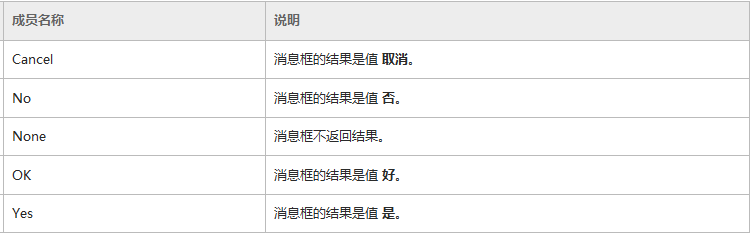
下面简单举几个例子。
 1个参数。

 .     1个参数。

                   MessageBox.Show(string text);

 //     显示具有指定文本的消息框。

 //

 // 参数:

 //   text:

 //     要在消息框中显示的文本。

 //

 // 返回结果:

 //     System.Windows.Forms.DialogResult 值之一。
 2个参数。

 .     2个参数。

                MessageBox.Show(string text, string caption);

 //     显示具有指定文本和标题的消息框。

 //

 // 参数:

 //   text:

 //     要在消息框中显示的文本。

 //

 //   caption:

 //     要在消息框的标题栏中显示的文本。

 //

 // 返回结果:

 //     System.Windows.Forms.DialogResult 值之一。
 3个参数

 .     3个参数。

              MessageBox.Show(string text, string caption, MessageBoxButtons buttons);

 //     显示具有指定文本、标题和按钮的消息框。

 //

 // 参数:

 //   text:

 //     要在消息框中显示的文本。

 //

 //   caption:

 //     要在消息框的标题栏中显示的文本。

 //

 //   buttons:

 //     System.Windows.Forms.MessageBoxButtons 值之一,可指定在消息框中显示哪些按钮。

 //

 // 返回结果:

 //     System.Windows.Forms.DialogResult 值之一。

 //

 // 异常:

 //   System.ComponentModel.InvalidEnumArgumentException:

 //     指定的 buttons 参数不是 System.Windows.Forms.MessageBoxButtons 的成员。

 //

 //   System.InvalidOperationException:

 //     试图在运行模式不是用户交互模式的进程中显示 System.Windows.Forms.MessageBox。这是由 System.Windows.Forms.SystemInformation.UserInteractive

 //     属性指定的。
 4个参数

 .     4个参数。

                     MessageBox.Show(string text, string caption, MessageBoxButtons buttons, MessageBoxIcon icon);

 //     显示具有指定文本、标题、按钮和图标的消息框。

 //

 // 参数:

 //   text:

 //     要在消息框中显示的文本。

 //

 //   caption:

 //     要在消息框的标题栏中显示的文本。

 //

 //   buttons:

 //     System.Windows.Forms.MessageBoxButtons 值之一,可指定在消息框中显示哪些按钮。

 //

 //   icon:

 //     System.Windows.Forms.MessageBoxIcon 值之一,它指定在消息框中显示哪个图标。

 //

 // 返回结果:

 //     System.Windows.Forms.DialogResult 值之一。

 //

 // 异常:

 //   System.ComponentModel.InvalidEnumArgumentException:

 //     指定的 buttons 参数不是 System.Windows.Forms.MessageBoxButtons 的成员。- 或 - 指定的 icon

 //     参数不是 System.Windows.Forms.MessageBoxIcon 的成员。

 //

 //   System.InvalidOperationException:

 //     试图在运行模式不是用户交互模式的进程中显示 System.Windows.Forms.MessageBox。这是由 System.Windows.Forms.SystemInformation.UserInteractive

 //     属性指定的。
 5个参数

 .     5个参数。

                   MessageBox.Show(string text, string caption, MessageBoxButtons buttons,

                                           MessageBoxIcon icon, MessageBoxDefaultButton defaultButton);

 //     显示具有指定文本、标题、按钮、图标和默认按钮的消息框。

 //

 // 参数:

 //   text:

 //     要在消息框中显示的文本。

 //

 //   caption:

 //     要在消息框的标题栏中显示的文本。

 //

 //   buttons:

 //     System.Windows.Forms.MessageBoxButtons 值之一,可指定在消息框中显示哪些按钮。

 //

 //   icon:

 //     System.Windows.Forms.MessageBoxIcon 值之一,它指定在消息框中显示哪个图标。

 //

 //   default Button:

 //     System.Windows.Forms.MessageBoxDefaultButton 值之一,可指定消息框中的默认按钮。

 //

 // 返回结果:

 //     System.Windows.Forms.DialogResult 值之一。

 //

 // 异常:

 //   System.ComponentModel.InvalidEnumArgumentException:

 //     buttons 不是 System.Windows.Forms.MessageBoxButtons 的成员。- 或 - icon 不是 System.Windows.Forms.MessageBoxIcon

 //     的成员。- 或 - defaultButton 不是 System.Windows.Forms.MessageBoxDefaultButton 的成员。

 //

 //   System.InvalidOperationException:

 //     试图在运行模式不是用户交互模式的进程中显示 System.Windows.Forms.MessageBox。这是由 System.Windows.Forms.SystemInformation.UserInteractive

 //     属性指定的。
 6个参数

 .     6个参数。

                  MessageBox.Show(string text, string caption, MessageBoxButtons buttons, MessageBoxIcon icon,

                                                        MessageBoxDefaultButton defaultButton, MessageBoxOptions options);

 //     显示具有指定文本、标题、按钮、图标、默认按钮和选项的消息框。

 //

 // 参数:

 //   text:

 //     要在消息框中显示的文本。

 //

 //   caption:

 //     要在消息框的标题栏中显示的文本。

 //

 //   buttons:

 //     System.Windows.Forms.MessageBoxButtons 值之一,可指定在消息框中显示哪些按钮。

 //

 //   icon:

 //     System.Windows.Forms.MessageBoxIcon 值之一,它指定在消息框中显示哪个图标。

 //

 //   defaultButton:

 //     System.Windows.Forms.MessageBoxDefaultButton 值之一,可指定消息框中的默认按钮。

 //

 //   options:  //

 //     System.Windows.Forms.MessageBoxOptions 值之一,可指定将对消息框使用哪些显示和关联选项。若要使用默认值,请传入

 //     0。

 //

 // 返回结果:

 //     System.Windows.Forms.DialogResult 值之一。

 //

 // 异常:

 //   System.ComponentModel.InvalidEnumArgumentException:

 //     buttons 不是 System.Windows.Forms.MessageBoxButtons 的成员。- 或 - icon 不是 System.Windows.Forms.MessageBoxIcon

 //     的成员。- 或 - 指定的 defaultButton 不是 System.Windows.Forms.MessageBoxDefaultButton

 //     的成员。

 //

 //   System.InvalidOperationException:

 //     试图在运行模式不是用户交互模式的进程中显示 System.Windows.Forms.MessageBox。这是由 System.Windows.Forms.SystemInformation.UserInteractive

 //     属性指定的。

 //

 //   System.ArgumentException:

 //     options 同时指定了 System.Windows.Forms.MessageBoxOptions.DefaultDesktopOnly 和

 //     System.Windows.Forms.MessageBoxOptions.ServiceNotification。- 或 - buttons

 //     指定了无效的 System.Windows.Forms.MessageBoxButtons 组合。
7个参数

.     7个参数。

                MessageBox.Show(string text, string caption, MessageBoxButtons buttons, MessageBoxIcon icon,

                                        MessageBoxDefaultButton defaultButton, MessageBoxOptions options, bool displayHelpButton);

//     显示一个具有指定文本、标题、按钮、图标、默认按钮、选项和“帮助”按钮的消息框。

//

// 参数:

//   text:

//     要在消息框中显示的文本。

//

//   caption:

//     要在消息框的标题栏中显示的文本。

//

//   buttons:

//     System.Windows.Forms.MessageBoxButtons 值之一,可指定在消息框中显示哪些按钮。

//

//   icon:

//     System.Windows.Forms.MessageBoxIcon 值之一,它指定在消息框中显示哪个图标。

//

//   defaultButton:

//     System.Windows.Forms.MessageBoxDefaultButton 值之一,可指定消息框中的默认按钮。

//

//   options:

//     System.Windows.Forms.MessageBoxOptions 值之一,可指定将对消息框使用哪些显示和关联选项。若要使用默认值,请传入

//     0。

//

//   helpButton:

//     如果显示“帮助”按钮,则为 true;否则为 false。默认为 false。

//

// 返回结果:

//     System.Windows.Forms.DialogResult 值之一。

//

// 异常:

//   System.ComponentModel.InvalidEnumArgumentException:

//     buttons 不是 System.Windows.Forms.MessageBoxButtons 的成员。- 或 - icon 不是 System.Windows.Forms.MessageBoxIcon

//     的成员。- 或 - 指定的 defaultButton 不是 System.Windows.Forms.MessageBoxDefaultButton

//     的成员。

//

//   System.InvalidOperationException:

//     试图在运行模式不是用户交互模式的进程中显示 System.Windows.Forms.MessageBox。这是由 System.Windows.Forms.SystemInformation.UserInteractive

//     属性指定的。

//

//   System.ArgumentException:

//     options 同时指定了 System.Windows.Forms.MessageBoxOptions.DefaultDesktopOnly 和

//     System.Windows.Forms.MessageBoxOptions.ServiceNotification。- 或 - buttons

//     指定了无效的 System.Windows.Forms.MessageBoxButtons 组合。
 也是  个参数

 .  (也是  个参数)

                         MessageBox.Show(string text, string caption, MessageBoxButtons buttons,

                                                      MessageBoxIcon icon, MessageBoxDefaultButton defaultButton,

                                                                                MessageBoxOptions options, string helpFilePath);

 //     使用指定的帮助文件显示一个具有指定文本、标题、按钮、图标、默认按钮、选项和“帮助”按钮的消息框。

 //

 // 参数:

 //   text:

 //     要在消息框中显示的文本。

 //

 //   caption:

 //     要在消息框的标题栏中显示的文本。

 //

 //   buttons:

 //     System.Windows.Forms.MessageBoxButtons 值之一,可指定在消息框中显示哪些按钮。

 //

 //   icon:

 //     System.Windows.Forms.MessageBoxIcon 值之一,它指定在消息框中显示哪个图标。

 //

 //   defaultButton:

 //     System.Windows.Forms.MessageBoxDefaultButton 值之一,可指定消息框中的默认按钮。

 //

 //   options:

 //     System.Windows.Forms.MessageBoxOptions 值之一,可指定将对消息框使用哪些显示和关联选项。若要使用默认值,请传入

 //     0。

 //

 //   helpFilePath:

 //     用户单击“帮助”按钮时显示的“帮助”文件的路径和名称。

 //

 // 返回结果:

 //     System.Windows.Forms.DialogResult 值之一。

 //

 // 异常:

 //   System.ComponentModel.InvalidEnumArgumentException:

 //     buttons 不是 System.Windows.Forms.MessageBoxButtons 的成员。- 或 - icon 不是 System.Windows.Forms.MessageBoxIcon

 //     的成员。- 或 - 指定的 defaultButton 不是 System.Windows.Forms.MessageBoxDefaultButton

 //     的成员。

 //

 //   System.InvalidOperationException:

 //     试图在运行模式不是用户交互模式的进程中显示 System.Windows.Forms.MessageBox。这是由 System.Windows.Forms.SystemInformation.UserInteractive

 //     属性指定的。

 //

 //   System.ArgumentException:

 //     options 同时指定了 System.Windows.Forms.MessageBoxOptions.DefaultDesktopOnly 和

 //     System.Windows.Forms.MessageBoxOptions.ServiceNotification。- 或 - buttons

 //     指定了无效的 System.Windows.Forms.MessageBoxButtons 组合。
winform之2---messagebox用法的更多相关文章
- C# MessageBox 用法大全(转)
C# MessageBox 用法大全 http://www.cnblogs.com/Tammie/archive/2011/08/05/2128623.html 我们在程序中经常会用到MessageB ...
- paip.c++ qt messagebox用法
paip.c++ qt messagebox用法 作者Attilax , EMAIL:1466519819@qq.com 来源:attilax的专栏 地址:http://blog.csdn.net ...
- C#中MessageBox用法大全(转)
我们在程序中经常会用到MessageBox. MessageBox.Show()共有21中重载方法.现将其常见用法总结如下: 1.MessageBox.Show("Hello~~~~&quo ...
- C# winform 中MessageBox用法大全(附效果图) (转载+说明)
声明:这篇文章是转载的转载的,由于原作者的博客被关闭 我就不再列出了,提前先说明下,if语句中的判断有些太长,建议提前声明一个变量, DialogResult MsgBoxResult; ...
- C# winform 中MessageBox用法大全(附效果图)
我们在程序中经常会用到MessageBox. MessageBox.Show()共有21中重载方法.现将其常见用法总结如下: 1.MessageBox.Show(“Hello~~~~”); 最简单的, ...
- winform 中 MessageBox 用法大全
(转自:http://blog.csdn.net/xuenzhen123/article/details/4808005) MessageBox.Show()共有21中重载方法.现将其常见用法总结如下 ...
- winform TreeView的一些用法以及异步加载
今天,主要弄了一下对于树型控件的一些方法,以及异步加载.参考: http://www.cnblogs.com/greatverve/archive/2012/03/23/winform-treevie ...
- C#中MessageBox用法大全
我们在程序中经常会用到MessageBox. MessageBox.Show()共有21中重载方法.现将其常见用法总结如下: 1.MessageBox.Show("Hello~~~~&quo ...
- c# MessageBox 用法大全
我们在程序中经常会用到MessageBox. 1.MessageBox.Show("Hello~~~~"); 最简单的,只显示提示信息. 2.MessageBox.Show(&qu ...
- MFC之MessageBox用法
一 函数原型及参数 function MessageBox(hWnd: HWND; Text, Caption: PChar; Type: Word): Integer; hWnd:对话框父窗口 ...
随机推荐
- JavaScript中cookie的路径(path)和域(domain)
cookie虽然是由一个网页所创建,但并不只是创建cookie的网页才能读 取该cookie.在默认情况下,与创建cookie的网页在同一目录或子目录下的所有网页都可以读取该cookie.但如果在这个 ...
- asp.net个人笔记
1.进程外session一记 配置进程外session, 在webconfig中配置<sessionState timeout="60" mode="StateSe ...
- DevExpress ASP.NET 使用经验谈(8)-ASPxGridView自定义列和基本事件
为演示本节示例,我们在原来Users表增加[性别Gender].[兴趣爱好Hobbies],[CreateTime创建时间],[ModifyTime]修改时间这4个字段, ALTER TABLE [d ...
- 【转】How to Start Intel Hardware-assisted Virtualization (hypervisor) on Linux to Speed-up Intel Android x86 Emulator
[转]How to Start Intel Hardware-assisted Virtualization (hypervisor) on Linux to Speed-up Intel Andro ...
- UVa---------10935(Throwing cards away I)
题目: Problem B: Throwing cards away I Given is an ordered deck of n cards numbered 1 to n with card 1 ...
- ELF文件数据布局探索(1)
作为一名Linux小白,第一次看到a.out这个名字,感觉实在是奇怪,搜了一下才知道这是编译器输出的默认可执行文件名 然后vi一下,哇,各种乱码,仔细看看,发现了三个清晰的字符ELF.继续搜索, 第一 ...
- html一些东东
在IE浏览器中,当input获得焦点时,点击有unselectable="on"属性的标签时,不会触发onblur事件 在 IE11 下,浏览器自作多情在 text input 组 ...
- AOI自动光学检测机技术在电路板检查中的应用
1.简述 AOI技术在许多不同的制造业领域使用,自从电子影像技术开始发展,就被各种人利用在不同的应用领域.大家最熟悉的数字相机.数字摄影机是大家生活中最常用到的器材之一,而工业产品的生产也大量使用这些 ...
- DELPHI编写服务程序总结
DELPHI编写服务程序总结 一.服务程序和桌面程序的区别 Windows 2000/XP/2003等支持一种叫做“系统服务程序”的进程,系统服务和桌面程序的区别是:系统服务不用登陆系统即可运行:系统 ...
- service and intentservice
Service是Android中四大组件之一,在Android开发中起到非常重要的作用,先来看一下官方对Service的定义: A Service is an application componen ...