
Android 之 ExpandableListView 的使用
喜欢显示好友QQ那样的列表,可以展开,可以收起,在android中,以往用的比较多的是listview,虽然可以实现列表的展示,但在某些情况下,我们还是希望用到可以分组并实现收缩的列表,那就要用到android的ExpandableListView,今天研究了一下这个的用法,也参考了很多资料动手写了一个小demo,实现了基本的功能,但界面优化方面做得还不够好,有待改进,素材采用了Q版三国杀武将的图片,很有爱哈哈,下面直接上效果图以及源代码~!

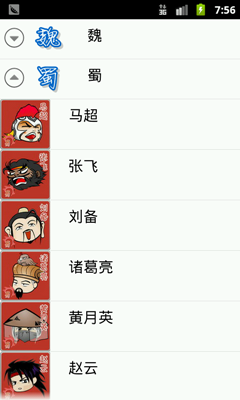

main.xml的布局很简单啦,只是一个ExpandableListView 就OK了
但值得简单说下的是 android:cacheColorHint="#00000000",这个设置可以去除拖动view时背景变成黑色的效果
android:listSelector="#00000000" ,可以去除选中时的黄色底色
 <?xml version="1.0" encoding="utf-8"?>

 <LinearLayout xmlns:android="http://schemas.android.com/apk/res/android"

     android:layout_width="fill_parent"

     android:layout_height="fill_parent"

     android:orientation="vertical" >

     <ExpandableListView

         android:id="@+id/list"

         android:layout_width="fill_parent"

         android:layout_height="fill_parent"

         android:background="#ffffff"

         android:cacheColorHint="#00000000"

         android:listSelector="#00000000"

         >

     </ExpandableListView>

 </LinearLayout>
java代码:
 package com.eyu.activity_test;

 import android.app.Activity;

 import android.graphics.Color;

 import android.os.Bundle;

 import android.view.Gravity;

 import android.view.View;

 import android.view.ViewGroup;

 import android.view.Window;

 import android.widget.AbsListView;

 import android.widget.BaseExpandableListAdapter;

 import android.widget.ExpandableListAdapter;

 import android.widget.ExpandableListView;

 import android.widget.ExpandableListView.OnChildClickListener;

 import android.widget.ImageView;

 import android.widget.LinearLayout;

 import android.widget.TextView;

 import android.widget.Toast;

 public class ExpandableList extends Activity{

     protected void onCreate(Bundle savedInstanceState) {

         // TODO Auto-generated method stub

         super.onCreate(savedInstanceState);

         requestWindowFeature(Window.FEATURE_NO_TITLE);

         setContentView(R.layout.main);

         final ExpandableListAdapter adapter = new BaseExpandableListAdapter() {

             //设置组视图的图片

             int[] logos = new int[] { R.drawable.wei, R.drawable.shu,R.drawable.wu};

             //设置组视图的显示文字

             private String[] generalsTypes = new String[] { "魏", "蜀", "吴" };

             //子视图显示文字

             private String[][] generals = new String[][] {

                     { "夏侯惇", "甄姬", "许褚", "郭嘉", "司马懿", "杨修" },

                     { "马超", "张飞", "刘备", "诸葛亮", "黄月英", "赵云" },

                     { "吕蒙", "陆逊", "孙权", "周瑜", "孙尚香" }

             };

             //子视图图片

             public int[][] generallogos = new int[][] {

                     { R.drawable.xiahoudun, R.drawable.zhenji,

                             R.drawable.xuchu, R.drawable.guojia,

                             R.drawable.simayi, R.drawable.yangxiu },

                     { R.drawable.machao, R.drawable.zhangfei,

                             R.drawable.liubei, R.drawable.zhugeliang,

                             R.drawable.huangyueying, R.drawable.zhaoyun },

                     { R.drawable.lvmeng, R.drawable.luxun, R.drawable.sunquan,

                             R.drawable.zhouyu, R.drawable.sunshangxiang } };

             //自己定义一个获得文字信息的方法

             TextView getTextView() {

                 AbsListView.LayoutParams lp = new AbsListView.LayoutParams(

                         ViewGroup.LayoutParams.FILL_PARENT, );

                 TextView textView = new TextView(

                         ExpandableList.this);

                 textView.setLayoutParams(lp);

                 textView.setGravity(Gravity.CENTER_VERTICAL);

                 textView.setPadding(, , , );

                 textView.setTextSize();

                 textView.setTextColor(Color.BLACK);

                 return textView;

             }

             //重写ExpandableListAdapter中的各个方法

             @Override

             public int getGroupCount() {

                 // TODO Auto-generated method stub

                 return generalsTypes.length;

             }

             @Override

             public Object getGroup(int groupPosition) {

                 // TODO Auto-generated method stub

                 return generalsTypes[groupPosition];

             }

             @Override

             public long getGroupId(int groupPosition) {

                 // TODO Auto-generated method stub

                 return groupPosition;

             }

             @Override

             public int getChildrenCount(int groupPosition) {

                 // TODO Auto-generated method stub

                 return generals[groupPosition].length;

             }

             @Override

             public Object getChild(int groupPosition, int childPosition) {

                 // TODO Auto-generated method stub

                 return generals[groupPosition][childPosition];

             }

             @Override

             public long getChildId(int groupPosition, int childPosition) {

                 // TODO Auto-generated method stub

                 return childPosition;

             }

             @Override

             public boolean hasStableIds() {

                 // TODO Auto-generated method stub

                 return true;

             }

             @Override

             public View getGroupView(int groupPosition, boolean isExpanded,

                     View convertView, ViewGroup parent) {

                 // TODO Auto-generated method stub

                 LinearLayout ll = new LinearLayout(

                         ExpandableList.this);

                 ll.setOrientation();

                 ImageView logo = new ImageView(ExpandableList.this);

                 logo.setImageResource(logos[groupPosition]);

                 logo.setPadding(, , , );

                 ll.addView(logo);

                 TextView textView = getTextView();

                 textView.setTextColor(Color.BLACK);

                 textView.setText(getGroup(groupPosition).toString());

                 ll.addView(textView);

                 return ll;

             }

             @Override

             public View getChildView(int groupPosition, int childPosition,

                     boolean isLastChild, View convertView, ViewGroup parent) {

                 // TODO Auto-generated method stub

                 LinearLayout ll = new LinearLayout(

                         ExpandableList.this);

                 ll.setOrientation();

                 ImageView generallogo = new ImageView(

                         ExpandableList.this);

                 generallogo

                         .setImageResource(generallogos[groupPosition][childPosition]);

                 ll.addView(generallogo);

                 TextView textView = getTextView();

                 textView.setText(getChild(groupPosition, childPosition)

                         .toString());

                 ll.addView(textView);

                 return ll;

             }

             @Override

             public boolean isChildSelectable(int groupPosition,

                     int childPosition) {

                 // TODO Auto-generated method stub

                 return true;

             }

         };

         ExpandableListView expandableListView = (ExpandableListView) findViewById(R.id.list);

         expandableListView.setAdapter(adapter);

         //设置item点击的监听器

         expandableListView.setOnChildClickListener(new OnChildClickListener() {

             @Override

             public boolean onChildClick(ExpandableListView parent, View v,

                     int groupPosition, int childPosition, long id) {

                 Toast.makeText(

                         ExpandableList.this,

                         "你点击了" + adapter.getChild(groupPosition, childPosition),

                         Toast.LENGTH_SHORT).show();

                 return false;

             }

         });

     }

 }
Android 之 ExpandableListView 的使用的更多相关文章
- 22.Android之ExpandableListView树形列表学习
Android经常用到树形菜单,一般ExpandableListView可以满足这个需要,今天学习下. XML代码: <?xml version="1.0" encoding ...
- Android之ExpandableListView
ExpandableListView可以用来表现多层级的listView,本文主要是ExpandableListView的一个简单实现 布局文件 <LinearLayout xmlns:andr ...
- Android中ExpandableListView控件基本使用
本文採用一个Demo来展示Android中ExpandableListView控件的使用,如怎样在组/子ListView中绑定数据源.直接上代码例如以下: 程序结构图: layout文件夹下的 mai ...
- Android在ExpandableListView控制的基本使用
在本文中,Demo为了展示Android在ExpandableListView用途管制.如该组/儿子ListView绑定数据源. 直接上代码例如以下: 程序结构图: layout文件夹下的 main. ...
- android 的 ExpandableListView Example Tutorial
https://www.journaldev.com/9942/android-expandablelistview-example-tutorial Welcome to Android Expan ...
- android原生ExpandableListView
android原生可扩展ExpandableListView就是可以伸缩的listView,一条标题下面有多条内容. 这个list的adapter对的数据要求与普通ListView的数据要求也有一些差 ...
- Android中ExpandableListView的使用
ExpandableListView是Android中可以实现下拉list的一个控件,具体的实现方法如下: 首先:在layout的xml文件中定义一个ExpandableListView < L ...
- android 之 ExpandableListView列表中的列表
有时候,我们需要设计这样一个界面,外面有一个列表,当我们点击其中列表中的某个条目时,就会展开这个条目,出现一个新的列表.比如下图:(程序运行的效果图,在这里贴出来) 当我们点击第一项时,视图变为: - ...
- Android 关于ExpandableListView去掉里头的分割线
关于ExpandableListView去掉里面的分割线关于ExpandableListView,自己写了个类继承自BaseExpandableListAdaptergroups,childs都弄好了 ...
随机推荐
- poj 2976 Dropping tests (二分搜索之最大化平均值之01分数规划)
Description In a certain course, you take n tests. If you get ai out of bi questions correct on test ...
- 解决IE6下DIV无法实现1px高度问题
2.多加一个line-height:1px的属性,不过得在DIV里多加一个 ,也就是空格,以下为引用的内容: <styletypestyletype="text/css"&g ...
- asp.net页面之间的跳转
调用Request.CurrentExecutionFilePath方法返回到当前页面 站点中常常要跳转页面,调用Request.CurrentExecutionFilePath方法能够获取当前页面的 ...
- swing入门例子
// a simple exmple that can show the basis of swing------------------------------------------------- ...
- 在 VS2008 下操作 Excel 的方法总结
这些天做个软件,需要读取 Excel 并导入到数据库中,所以研究了一下在 VC 下操作 Excel 的方法,这里做个总结,以作备忘. 一.最常用的 OLE 自动化方式 这个方式应该说是功能最全的方 ...
- 代码实现Layout android:layout_alignParentRight
代码实现Layout android:layout_alignParentRight 例如: android:id="@+id/account_option" android:la ...
- 解决mdi窗体闪烁的问题
/// 解决mdi窗体闪烁的问题 /// </summary> protected override CreateParams CreateParams { get { CreatePar ...
- C#随机生成连续多少个十六进制数字
1.调用系统函数生成全球唯一标识 Guid.NewGuid().ToString(); 2.生成16组十六进制数 ,)+Guid.NewGuid().ToString().Substring(,)+G ...
- 如何让checkbox复选框只能单选
function框架div 如何让checkbox复选框只能单选 在项目开发中遇到一个这样的问题,要让一列复选框架在任何时间段内只能选择一个. 有人说怎么不用单选框了,因为单选框一旦选择了就不能取消选 ...
- MySQL查看当前连接数、连接数和最大连接数
MySQL查看当前所有连接的详细资料: mysqladmin -u root -p processlist MySQL查看当前连接数(Threads为连接数) mysqladmin -u root - ...