
Oracle Linux Server 7安装VMwareTools问题
OracleLinuxServer7安装VMwareTools问题
#./vmware-install.pl时报错:
#-bash: ./vmware-instal.pl:/usr/bin/perl:bad interpreter:No such file or directory
原因:
未安装perl环境。
解决方法:
在YUM环境下安装perl。
配置本地yum源:(参考资料:http://www.cnblogs.com/rusking/p/4248946.html)
编写 /etc/yum.repos.d/local_repo.repo 文件内容如下。
[rhel-source]
name=Red Hat Enterprise Linux Local repo
##仓库描述
baseurl=file:///opt/rpm/local_repo
##软件仓库位置
enabled=1
##是否启用
gpgcheck=1
gpgkey=file:///etc/pki/rpm-gpg/RPM-GPG-KEY-oracle
##签名秘钥,/etc/pki/rpm-gpg/在这个目录下,可进入该目录查看。
YUM安装perl:
#yum install perl
perl安装完成之后,再安装vmwareTool,执行/vmware-install.pl,默认安装,一路回车即可。
======================
其它问题:
在安装vmware tool的过程中,出现如下提示:
What is the location of the "ifconfig" program on your machine?
此处回车不行,因为系统没有安装ifconfig,需要重新手动安装后,再来安装vmware Tool。
Yum安装ifconfig:
#yum search ifconfig
#net-tools.x86_64:Basc networking tools
#yum install net-tools-2.0-0.17.20131004git.e17.x86_64.rpm
之后,再来安装vmware tool正常。
--------之后,问题又出现了,安装完VMware Tool之后,reboot默认启动到字符界面。也切换不到图形登录界面。
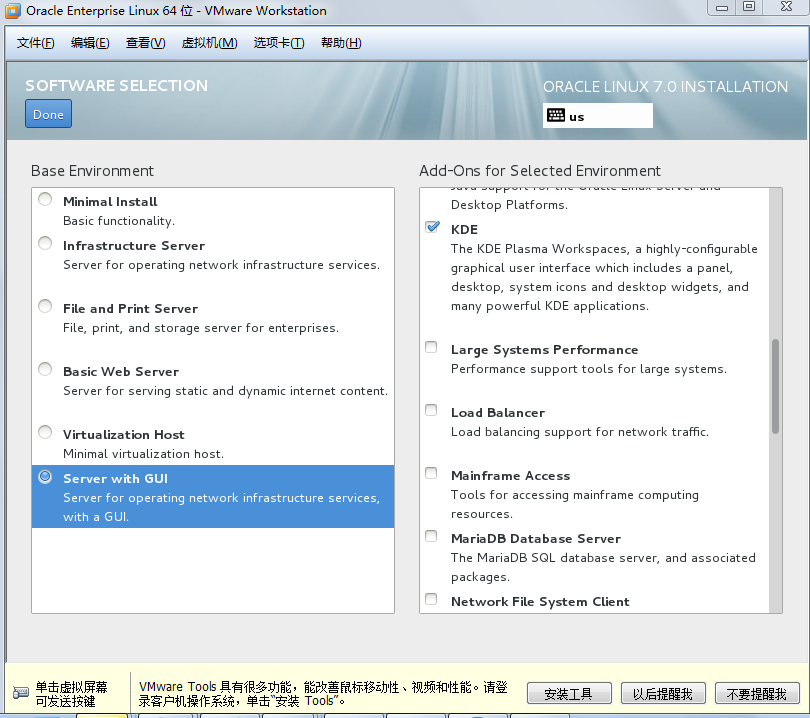
继续折腾--重新安装,在安装过程中注意SOFTWARE SELECTION,不要选择默认安装,需要选择最后一个Server With GUI,右边组件随便选择。如下图:
官方安装文档:http://oracle-base.com/articles/linux/oracle-linux-7-installation.php
SELinux
If the OS is to be used for an Oracle installation, it is easier if Secure Linux (SELinux) is disabled or switched to permissive. To do this edit the "/etc/selinux/config" file, making sure the SELINUX flag is set as follows.
SELINUX=permissive
If SELinux is configured after installation, the server will need a reboot for the change to take effect.
Firewall
If the OS is to be used for an Oracle installation, it is easier if the firewall is disabled. This can be done by issuing the following commands from a terminal window as the "root" user.
# systemctl stop firewalld

# systemctl disable firewalld
You can install and configure it later if you wish.
SSH
Make sure the SSH daemon is started using the following commands.
# systemctl start sshd.service

# systemctl enable sshd.service
=================
重新安装后,进行图形界面正常。安装VMware tool:
1、[root@localhost vmware-tools-distrib]# ./vmware-install.pl
The installer found the following conflicting packages installed on the system and will now remove them:
open-vm-tools
error: Failed dependencies:
libhgfs.so.0()(64bit) is needed by (installed) open-vm-tools-desktop-9.4.0-3.el7.x86_64
libvmtools.so.0()(64bit) is needed by (installed) open-vm-tools-desktop-9.4.0-3.el7.x86_64
open-vm-tools(x86-64) = 9.4.0-3.el7 is needed by (installed) open-vm-tools-desktop-9.4.0-3.el7.x86_64
Failed to remove the following packages:
open-vm-tools
Please manually remove them before installing VMware Tools.
Execution aborted.
2、[root@localhost vmware-tools-distrib]# yum remove open-vm-tools 卸载open-vm-tools
3、[root@localhost vmware-tools-distrib]# ./vmware-install.pl 重新安装vmware tool
一路回车,直到安装完成。
Oracle Linux Server 7安装VMwareTools问题的更多相关文章
- Oracle Linux 5.7安装VMware Tools的问题
案例环境介绍: 虚拟机的版本:VMware® Workstation 8.0.3 build-703057 操作系统版本:Oracle Linux Server release 5.7 ...
- Oracle Linux(64位)安装64位Oracle10g遇到ins_ctx.mk问题
在Oracle Linux Server Release 5.7上安装64位Oracle 10g 时,遇到如下问题: Error in invoking target 'install' of mak ...
- 在Oracle Linux Server release 6.4下配置ocfs2文件系统
① 安装ocfs-tools-1.8 如果是使用RedHat Enterprise Linux 6.4,也可以安装ocfs-tools-1.8的,只是要插入Oracle Linux Server re ...
- oracle linux 6.8 安装
' 测试环境vm虚拟机 硬盘大小50G 内存2G CPU 4 选择install or upgrade an existing system 选择skip跳过内存检查 Next 选择语言,Next 选 ...
- Oracle linux 6.3 安装11g R2 RAC on vbox
1 安装系统 Virtual box 4.3 Oracle linux 6.3 Oracle 11g r2 Make sure "Adapter 1" is enabled, se ...
- RAC分解步骤之一,在oracle linux 4u4上安装oracle 10.2.0.1.0操作日志
练习oracle的rac组建过程,第一步,先练习4u4上安装oracle 10.2.0.1.0.直接安装rac,有些难度.从简单的做起.总RAC步骤,参照小布老师的RAC组建. 1. 启动vc,登陆v ...
- oracle linux 6 docker 安装
docker对安装系统的内核版本有严格的要求,本文针对oracle linux 6.5进行讲解,其它系统参见: https://docs.docker.com/v1.5/installation/ 下 ...
- 虚拟机linux操作系统上安装vmwareTools
当你安装过操作系统后,你就可以在虚拟机上找到这个画面,在管理里面有一个安装VMwareTools这就是我们的目标,打开后就直接点击下载并安装就好了 当下载完成后在虚拟机下面就会出现这个东西,他的意思就 ...
- Linux server配置安装Java,Tomcat服务器
系统:Ubuntu 16.04 dev_desktop 1.Java安装并配置环境变量 (1)从Java官方网站下载最新版JDK: http://www.oracle.com/technetwork/ ...
随机推荐
- Flashback version/Transaction Query,FlashbackTable
Flashback version Query相对于Flashback Query 只能看到某一点的对象状态, Oracle 10g引入的Flashback Version Query可以看到过去某个 ...
- JS 事件对象和事件冒泡
1.事件对象 js的事件对象中保存了当前被触发事件的一些相关的属性信息,如事件源.事件发生时的鼠标位置.事件按键等. 事件对象的获取方法: IE中可以window.event直接获取,而Firefox ...
- 纯html网页重定向与跳转
javaScript 跳转 方法一: <script language="javascript"> window.location = "http:// ...
- Web 前沿——HTML5 Form Data 对象的使用(转)
XMLHttpRequest Level 2 添加了一个新的接口——FormData.利用 FormData 对象,我们可以通过 JavaScript 用一些键值对来模拟一系列表单控件,我们还可以使用 ...
- oracle11gr2 netca 无法启动 报错
安装oracle软件后,必须要先配置listener才能dbca建库,但是netca却报下面的错误. Oracle Net Services Configuration: # # An unexpec ...
- shell脚本例子
#!/bin/sh str="####" echo $1 | grep $str 1>/dev/null if [ `echo $?` -eq 0 ] then ec ...
- KVC与KVO的理解
KVC与KVO是Objective C的关键概念. Key—Value Coding (KVC) 即是指NSKeyValueCoding,一个非正式的Protocol,提供一种机制间接访问对象的属性. ...
- 【mysql】1206 SQLSTATE: HY000 (ER_LOCK_TABLE_FULL) 问题
最近在做一个项目,其中一需求是:部分数据库中的数据需要定时删除掉(满足一定条件,比如7天前的数据都不保留) 最初的执行方法: 使用Quartz定时执行数据库操作,进行数据删除,数据库操作使用delet ...
- MVC再次学习1
1.0 匿名函数和匿名类: internal delegate int AddDel(int a, int b); //泛型委托 delegate T Demo<T>(int a,int ...
- jQuery源码学习:使用隐藏的new来创建对象
在JQuery源码中发现,JQuery定义一个类,但不用new关键字去创建该类对象,而使用方法调用()方式去创建该对象. 很多时候我们是这样写类,然后使用new创建对象的: function Pers ...