
iOS开发-仿微信图片分享界面实现
分享功能目前几乎已成为很多app的标配了,其中微信,微博等app的图片分享界面设计的很棒,不仅能够展示缩略图,还可以预览删除。最近我在做一款社交分享app,其中就要实现图文分享功能,于是试着自行实现仿微信分享风格的功能。
核心思想:
主要是使用UICollectionView来动态加载分享图片内容,配合预览页面,实现动态添加和预览删除图片效果。
实现效果:
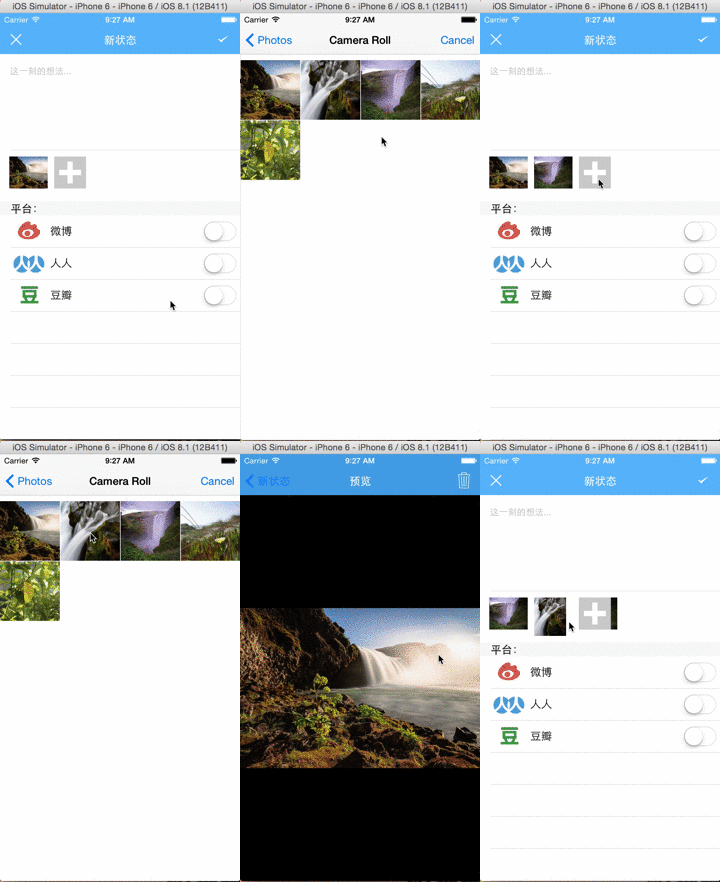
核心代码如下:

分享界面:
//

//  PostTableViewController.h

//  NineShare

//

//  Created by 张昌伟 on 15/1/26.

//  Copyright (c) 2015年 9Studio. All rights reserved.

//

#import <UIKit/UIKit.h>

#import "UMSocial.h"

#import "YSYPreviewViewController.h"

@interface PostTableViewController : UITableViewController<UITextViewDelegate,UICollectionViewDataSource,UICollectionViewDelegate,UIActionSheetDelegate,UIImagePickerControllerDelegate,UMSocialUIDelegate,UINavigationControllerDelegate>

@property (weak, nonatomic) IBOutlet UICollectionView *photosCollectionView;

@property (weak, nonatomic) IBOutlet UISwitch *WeiboSwitch;

@property (weak, nonatomic) IBOutlet UISwitch *RenrenSwitch;

- (IBAction)DoubanSwitched:(id)sender;

- (IBAction)RenrenSwitched:(id)sender;

- (IBAction)WeiboSwitched:(id)sender;

+(void) deleteSelectedImage:(NSInteger) index;

+(void) deleteSelectedImageWithImage:(UIImage*)image;

@end
实现文件
//

//  PostTableViewController.m

//  NineShare

//

//  Created by 张昌伟 on 15/1/26.

//  Copyright (c) 2015年 9Studio. All rights reserved.

//

#import "PostTableViewController.h"

#import "NineShareService.h"

static NSMutableArray *currentImages;

@interface PostTableViewController ()

@property (weak, nonatomic) IBOutlet UITextView *shareContent;

- (IBAction)postStatus:(id)sender;

- (IBAction)cancelPost:(id)sender;

-(void) loadSNSStatus;

@property (weak, nonatomic) IBOutlet UISwitch *DoubanSwitch;

@property (weak, nonatomic) IBOutlet UITextView *backgroundTextView;

@property NSMutableArray *snsArray;

//@property NSMutableArray *photos;

@property NineShareService *dataContext;

@property NSMutableDictionary *tempDict;

-(void) openCamera;

-(void) openLibary;

@end

@implementation PostTableViewController

- (void)viewDidLoad {

    [super viewDidLoad];

    if(currentImages ==nil)

    {

        currentImages=[[NSMutableArray alloc] init];

    }

    // Uncomment the following line to preserve selection between presentations.

    // self.clearsSelectionOnViewWillAppear = NO;

    // Uncomment the following line to display an Edit button in the navigation bar for this view controller.

    // self.navigationItem.rightBarButtonItem = self.editButtonItem;

    _dataContext=[NineShareService getInstance];

    [self loadSNSStatus];

}

-(void)viewWillAppear:(BOOL)animated{

    [_photosCollectionView reloadData];

}

- (void)didReceiveMemoryWarning {

    [super didReceiveMemoryWarning];

    // Dispose of any resources that can be recreated.

}

-(void) loadSNSStatus{

    _snsArray=[NSMutableArray arrayWithContentsOfFile:[[NSBundle mainBundle] pathForResource:@"sns" ofType:@"plist"]];

    if(_snsArray.count>0)

    {

        [_WeiboSwitch setOn:[_snsArray[0] boolValue] animated:YES];

        [_RenrenSwitch setOn:[_snsArray[1] boolValue] animated:YES];

        [_DoubanSwitch setOn:[_snsArray[2] boolValue] animated:YES];

    }

}

-(BOOL)textView:(UITextView *)textView shouldChangeTextInRange:(NSRange)range replacementText:(NSString *)text{

    if(![text isEqualToString:@""])

    {

        [_backgroundTextView setHidden:YES];

    }

    if([text isEqualToString:@""]&&range.length==1&&range.location==0){

        [_backgroundTextView setHidden:NO];

    }

    if ([text isEqualToString:@"\n"]) {

        [textView resignFirstResponder];

        return NO;

    }

    return YES;

}

-(void)textViewDidBeginEditing:(UITextView *)textView

{

    CGRect frame = textView.frame;

    int offset = frame.origin.y + 32 - (self.view.frame.size.height - 216.0);//键盘高度216

    NSTimeInterval animationDuration = 0.30f;

    [UIView beginAnimations:@"ResizeForKeyboard" context:nil];

    [UIView setAnimationDuration:animationDuration];

    //将视图的Y坐标向上移动offset个单位,以使下面腾出地方用于软键盘的显示

    if(offset > 0)

        self.view.frame = CGRectMake(0.0f, -offset, self.view.frame.size.width, self.view.frame.size.height);

    [UIView commitAnimations];

}

-(void)textViewDidEndEditing:(UITextView *)textView{

    self.view.frame =CGRectMake(0, 0, self.view.frame.size.width, self.view.frame.size.height);

}

-(void)collectionView:(UICollectionView *)collectionView didSelectItemAtIndexPath:(NSIndexPath *)indexPath{

    if(indexPath.row==currentImages.count)

    {

        UIActionSheet *action=[[UIActionSheet alloc] initWithTitle:@"选取照片" delegate:self cancelButtonTitle:@"取消" destructiveButtonTitle:nil otherButtonTitles:@"从摄像头选取", @"从图片库选择",nil];

        [action showInView:self.view];

    }

    else

    {

        [YSYPreviewViewController setPreviewImage:currentImages[indexPath.row]];

        [self.navigationController pushViewController:[[UIStoryboard storyboardWithName:@"Main" bundle:[NSBundle mainBundle]] instantiateViewControllerWithIdentifier:@"PreviewVC"] animated:YES];

    }

}

-(NSInteger)collectionView:(UICollectionView *)collectionView numberOfItemsInSection:(NSInteger)section{

    return currentImages.count==0?1:currentImages.count+1;

}

-(UICollectionViewCell *)collectionView:(UICollectionView *)collectionView cellForItemAtIndexPath:(NSIndexPath *)indexPath{

    UICollectionViewCell *cell=[collectionView dequeueReusableCellWithReuseIdentifier:@"collectionCell" forIndexPath:indexPath];

    UIImageView *imageView=[[UIImageView alloc] initWithFrame:CGRectMake(0, 0, 50, 50)];

    if(currentImages.count==0||indexPath.row==currentImages.count)

    {

        imageView.image=[UIImage imageNamed:@"Add"];

    }

    else{

        while ([cell.contentView.subviews lastObject] != nil) {

            [(UIView*)[cell.contentView.subviews lastObject] removeFromSuperview];

        }

        imageView.image=currentImages[indexPath.row];

    }

    imageView.contentMode=UIViewContentModeScaleAspectFill;

    [cell.contentView addSubview:imageView];

    return  cell;

}

-(void)saveSNSToFile{

    NSString *destPath=[NSSearchPathForDirectoriesInDomains(NSDocumentDirectory, NSUserDomainMask, YES) lastObject];

    if (![[NSFileManager defaultManager] fileExistsAtPath:destPath]) {

         NSString *path=[[NSBundle mainBundle] pathForResource:@"sns" ofType:@"plist"];

        [[NSFileManager defaultManager] copyItemAtPath:path toPath:destPath error:nil];

    }

    if(_snsArray==nil)

        _snsArray=[[NSMutableArray alloc] init];

    [_snsArray removeAllObjects];

    [_snsArray addObject:_WeiboSwitch.isOn?@"YES":@"NO"];

    [_snsArray addObject:_RenrenSwitch.isOn?@"YES":@"NO"];

    [_snsArray addObject:_DoubanSwitch.isOn?@"YES":@"NO"];

    if(_snsArray.count>0)

    {

        [_snsArray writeToFile:destPath atomically:YES];

    }

}

- (IBAction)postStatus:(id)sender {

    if(_WeiboSwitch.isOn)

        [[UMSocialDataService defaultDataService]  postSNSWithTypes:@[UMShareToSina] content:_shareContent.text.length>0?_shareContent.text: @"9Share for ios test message" image:currentImages.count==0?nil:currentImages[0] location:nil urlResource:nil presentedController:self completion:^(UMSocialResponseEntity *response){

            if (response.responseCode == UMSResponseCodeSuccess) {

                NSLog(@"分享成功!");

                if(!(_RenrenSwitch.isOn||_DoubanSwitch.isOn))

                {

                    [self saveSNSToFile];

                    [self dismissViewControllerAnimated:YES completion:nil];

                }

            }

        }];

    if(_RenrenSwitch.isOn)

        [[UMSocialDataService defaultDataService]  postSNSWithTypes:@[UMShareToRenren] content:_shareContent.text.length>0?_shareContent.text: @"9Share for ios test message" image:currentImages.count==0?nil:currentImages[0] location:nil urlResource:nil presentedController:self completion:^(UMSocialResponseEntity *response){

            if (response.responseCode == UMSResponseCodeSuccess) {

                NSLog(@"分享成功!");

                if(!_DoubanSwitch.isOn)

                {

                    [self saveSNSToFile];

                    [self dismissViewControllerAnimated:YES completion:nil];

                }

            }

        }];

    if(_DoubanSwitch.isOn)

        [[UMSocialDataService defaultDataService]  postSNSWithTypes:@[UMShareToDouban] content:_shareContent.text.length>0?_shareContent.text: @"9Share for ios test message" image:currentImages.count==0?nil:currentImages[0] location:nil urlResource:nil presentedController:self completion:^(UMSocialResponseEntity *response){

            if (response.responseCode == UMSResponseCodeSuccess) {

                NSLog(@"分享成功!");

                [self saveSNSToFile];

                [self dismissViewControllerAnimated:YES completion:nil];

            }

        }];

}

-(void)imagePickerController:(UIImagePickerController *)picker didFinishPickingMediaWithInfo:(NSDictionary *)info{

    [picker dismissViewControllerAnimated:YES completion:nil];

    UIImage *image=[info objectForKey:UIImagePickerControllerOriginalImage];

    NSData *tempData=UIImageJPEGRepresentation(image, 0.5f);

    image=[UIImage imageWithData:tempData];

    if(currentImages ==nil)

    {

        currentImages=[[NSMutableArray alloc] init];

    }

    [currentImages addObject:image];

    [_photosCollectionView reloadData];

   // [self saveImage:image withName:@""]

}

-(void)imagePickerControllerDidCancel:(UIImagePickerController *)picker{

    [picker dismissViewControllerAnimated:YES completion:nil];

}

- (IBAction)cancelPost:(id)sender {

    [self dismissViewControllerAnimated:YES completion:nil];

}

-(void)actionSheet:(UIActionSheet *)actionSheet clickedButtonAtIndex:(NSInteger)buttonIndex{

    switch (buttonIndex) {

        case 0:

            [self openCamera];

            break;

        case 1:

            [self openLibary];

            break;

            default:

            break;

    }

}

-(void)openCamera{

    //UIImagePickerControllerSourceType *type=UIImagePickerControllerSourceTypeCamera;

    if([UIImagePickerController isSourceTypeAvailable:UIImagePickerControllerSourceTypeCamera])

       {

           UIImagePickerController *picker=[[UIImagePickerController alloc] init];

           picker.delegate=self;

           picker.sourceType=UIImagePickerControllerSourceTypeCamera;

           picker.allowsEditing=YES;

           [self presentViewController:picker animated:YES completion:nil];

       }

}

-(void)openLibary{

    if([UIImagePickerController isSourceTypeAvailable:UIImagePickerControllerSourceTypePhotoLibrary])

    {

        UIImagePickerController *picker=[[UIImagePickerController alloc] init];

        picker.delegate=self;

        picker.sourceType=UIImagePickerControllerSourceTypePhotoLibrary;

        picker.allowsEditing=YES;

        [self presentViewController:picker animated:YES completion:nil];

    }

}

-(void) saveImage:(UIImage *)image withName:(NSString *)name

{

    NSData *imageData=UIImageJPEGRepresentation(image, 0.5);

    NSString *path=[NSTemporaryDirectory() stringByAppendingPathComponent:name];

    [imageData writeToFile:path atomically:YES];

}

- (IBAction)DoubanSwitched:(id)sender {

    if(_DoubanSwitch.isOn){

        if(![UMSocialAccountManager isOauthAndTokenNotExpired:UMShareToDouban])

        {

            //进入授权页面

            [UMSocialSnsPlatformManager getSocialPlatformWithName:UMShareToDouban].loginClickHandler(self,[UMSocialControllerService defaultControllerService],YES,^(UMSocialResponseEntity *response){

                if (response.responseCode == UMSResponseCodeSuccess) {

                    //获取微博用户名、uid、token等

                    UMSocialAccountEntity *snsAccount = [[UMSocialAccountManager socialAccountDictionary] valueForKey:UMShareToDouban];

                    NSLog(@"username is %@, uid is %@, token is %@",snsAccount.userName,snsAccount.usid,snsAccount.accessToken);

                    //进入你的分享内容编辑页面

                    UMSocialAccountEntity *doubanAccount = [[UMSocialAccountEntity alloc] initWithPlatformName:UMShareToDouban];

                    doubanAccount.usid = snsAccount.usid;

                    doubanAccount.accessToken = snsAccount.accessToken;

                    //    weiboAccount.openId = @"tencent weibo openId";          //腾讯微博账户必需设置openId

                    //同步用户信息

                    [UMSocialAccountManager postSnsAccount:doubanAccount completion:^(UMSocialResponseEntity *response){

                        if (response.responseCode == UMSResponseCodeSuccess) {

                            //在本地缓存设置得到的账户信息

                            [UMSocialAccountManager setSnsAccount:doubanAccount];

                            //进入你自定义的分享内容编辑页面或者使用我们的内容编辑页面

                        }}];

                }

                else {

                    [_DoubanSwitch setOn:NO animated:YES];

                }

            });

        }

    }

}

- (IBAction)RenrenSwitched:(id)sender {

    if(_DoubanSwitch.isOn)

    {

        if(![UMSocialAccountManager isOauthAndTokenNotExpired:UMShareToRenren])

        {

            //进入授权页面

            [UMSocialSnsPlatformManager getSocialPlatformWithName:UMShareToRenren].loginClickHandler(self,[UMSocialControllerService defaultControllerService],YES,^(UMSocialResponseEntity *response){

                if (response.responseCode == UMSResponseCodeSuccess) {

                    //获取微博用户名、uid、token等

                    UMSocialAccountEntity *snsAccount = [[UMSocialAccountManager socialAccountDictionary] valueForKey:UMShareToRenren];

                    NSLog(@"username is %@, uid is %@, token is %@",snsAccount.userName,snsAccount.usid,snsAccount.accessToken);

                    //进入你的分享内容编辑页面

                    UMSocialAccountEntity *renrenAccount = [[UMSocialAccountEntity alloc] initWithPlatformName:UMShareToRenren];

                    renrenAccount.usid = snsAccount.usid;

                    renrenAccount.accessToken = snsAccount.accessToken;

                    //    weiboAccount.openId = @"tencent weibo openId";          //腾讯微博账户必需设置openId

                    //同步用户信息

                    [UMSocialAccountManager postSnsAccount:renrenAccount completion:^(UMSocialResponseEntity *response){

                        if (response.responseCode == UMSResponseCodeSuccess) {

                            //在本地缓存设置得到的账户信息

                            [UMSocialAccountManager setSnsAccount:renrenAccount];

                            //进入你自定义的分享内容编辑页面或者使用我们的内容编辑页面

                        }}];

                }

                else{

                    [_RenrenSwitch setOn:NO animated:YES];

                }

            });

        }

    }

}

- (IBAction)WeiboSwitched:(id)sender {

    if(_WeiboSwitch.isOn)

    {

        if(![UMSocialAccountManager isOauthAndTokenNotExpired:UMShareToSina])

        {

            [UMSocialSnsPlatformManager getSocialPlatformWithName:UMShareToSina].loginClickHandler(self,[UMSocialControllerService defaultControllerService],YES,^(UMSocialResponseEntity *response){

                if(response.responseCode==UMSResponseCodeSuccess){

                    UMSocialAccountEntity *snsAccount=[[UMSocialAccountManager socialAccountDictionary] valueForKey:UMShareToSina];

                    UMSocialAccountEntity *sinaAccount=[[UMSocialAccountEntity alloc] initWithPlatformName:UMShareToSina];

                    //缓存到本地

                    sinaAccount.usid = snsAccount.usid;

                    sinaAccount.accessToken = snsAccount.accessToken;

                    //    weiboAccount.openId = @"tencent weibo openId";          //腾讯微博账户必需设置openId

                    //同步用户信息

                    [UMSocialAccountManager postSnsAccount:sinaAccount completion:^(UMSocialResponseEntity *response){

                        if (response.responseCode == UMSResponseCodeSuccess) {

                            //在本地缓存设置得到的账户信息

                            [UMSocialAccountManager setSnsAccount:sinaAccount];

                            //进入你自定义的分享内容编辑页面或者使用我们的内容编辑页面

                        }}];

                }

                else

                {

                    [_WeiboSwitch setOn:NO animated:YES];

                }

            });

        }

    }

}

+(void)deleteSelectedImage:(NSInteger)index

{

    if(currentImages!=nil)

        [currentImages removeObjectAtIndex:index];

}

+(void)deleteSelectedImageWithImage:(UIImage *)image{

    if(currentImages!=nil)

        [currentImages removeObject:image];

}

@end
预览界面:
//

//  YSYPreviewViewController.h

//  NineShare

//

//  Created by ZhangChangwei on 15/2/1.

//  Copyright (c) 2015年 9Studio. All rights reserved.

//

#import <UIKit/UIKit.h>

#import "PostTableViewController.h"

@interface YSYPreviewViewController : UIViewController<UIActionSheetDelegate>

+(void) setPreviewImage:(UIImage *)image;

@end
//

//  YSYPreviewViewController.m

//  NineShare

//

//  Created by ZhangChangwei on 15/2/1.

//  Copyright (c) 2015年 9Studio. All rights reserved.

//

#import "YSYPreviewViewController.h"

static UIImage *currentImage;

@interface YSYPreviewViewController ()

- (IBAction)deleteSelectedImage:(id)sender;

@property (weak, nonatomic) IBOutlet UIImageView *previewImageView;

@end

@implementation YSYPreviewViewController

- (void)viewDidLoad {

    [super viewDidLoad];

    // Do any additional setup after loading the view.

    _previewImageView.image=currentImage;

}

- (void)didReceiveMemoryWarning {

    [super didReceiveMemoryWarning];

    // Dispose of any resources that can be recreated.

}

/*

#pragma mark - Navigation

// In a storyboard-based application, you will often want to do a little preparation before navigation

- (void)prepareForSegue:(UIStoryboardSegue *)segue sender:(id)sender {

    // Get the new view controller using [segue destinationViewController].

    // Pass the selected object to the new view controller.

}

*/

- (IBAction)deleteSelectedImage:(id)sender {

    UIActionSheet *action=[[UIActionSheet alloc] initWithTitle:@"要删除这张照片吗?" delegate:self cancelButtonTitle:@"取消" destructiveButtonTitle:@"删除" otherButtonTitles: nil];

    [action showInView:self.view];

}

-(void)actionSheet:(UIActionSheet *)actionSheet clickedButtonAtIndex:(NSInteger)buttonIndex{

    if(buttonIndex==actionSheet.cancelButtonIndex)

    {

        return;

    }

    else

    {

        [PostTableViewController deleteSelectedImageWithImage:currentImage];

        [self.navigationController popToRootViewControllerAnimated:YES];

    }

}

+(void)setPreviewImage:(UIImage *)image{

    currentImage=image;

}

@end
到这里就可以实现完整的带预览删除的图文分享功能了^_^
iOS开发-仿微信图片分享界面实现的更多相关文章
- iOS开发之微信平台分享
在工程开始之前应该先准备在微信开放平台申请的appid,从微信平台下载sdk文件.下面开始步骤讲述 1.先将SDK导入工程目录 2.在info.plist文件设置相关信息,包括appid标识.白名单 ...
- Android开发之使用GridView+仿微信图片上传功能(附源代码)
前言:如果转载文章请声明转载自:https://i.cnblogs.com/EditPosts.aspx?postid=7419021 .另外针对有些网站转载本人的文章结果源码链接不对的问题,本人在 ...
- iOS开发之微信聊天页面实现
在上篇博客(iOS开发之微信聊天工具栏的封装)中对微信聊天页面下方的工具栏进行了封装,本篇博客中就使用之前封装的工具栏来进行聊天页面的编写.在聊天页面中主要用到了TableView的知识,还有如何在俩 ...
- iOS开发之微信聊天工具栏的封装
之前山寨了一个新浪微博(iOS开发之山寨版新浪微博小结),这几天就山寨个微信吧.之前已经把微信的视图结构简单的拖了一下(IOS开发之微信山寨版),今天就开始给微信加上具体的实现功能,那么就先从微信的聊 ...
- Android仿微信图片上传,可以选择多张图片,缩放预览,拍照上传等
仿照微信,朋友圈分享图片功能 .可以进行图片的多张选择,拍照添加图片,以及进行图片的预览,预览时可以进行缩放,并且可以删除选中状态的图片 .很不错的源码,大家有需要可以下载看看 . 微信 微信 微信 ...
- iOS高仿微信项目、阴影圆角渐变色效果、卡片动画、波浪动画、路由框架等源码
iOS精选源码 iOS高仿微信完整项目源码 Khala: Swift 编写的iOS/macOS 路由框架 微信左滑删除效果的实现与TableViewCell的常用样式介绍 实现阴影圆角并存,渐变色背景 ...
- [deviceone开发]-仿微信应用(一):框架搭建
一.简介 这个示例是一步一步跟我学DeviceOne开发 - 仿微信应用系列文档对应的文档.详细介绍了ListView,IndexListView,add方法等常用功能,推荐初学者学习. 二.效果图 ...
- [转]Android 超高仿微信图片选择器 图片该这么加载
快速加载本地图片缩略图的方法: 原文地址:Android 超高仿微信图片选择器 图片该这么加载 其示例代码下载: 仿微信图片选择器 ImageLoader
- Android 高级UI设计笔记06:仿微信图片选择器(转载)
仿微信图片选择器: 一.项目整体分析: 1. Android加载图片的3个目标: (1)尽可能的去避免内存溢出. a. 根据图片的显示大小去压缩图片 b. 使用缓存对我们图片进行管理(LruCache ...
随机推荐
- java中的四种修饰符:private、protected、public和default的区别
本类 本包 子类 包外 public 可以 可以 可以 可以 protected 可以 可以 可以 不可以 default 可以 可以 不可以 不可以 private 可以 不可以 不可以 不可以 ...
- python基本数据类型之字符串(一)
python中字符串中有很多方法,具体方法如下图所示: 分割方法 字符串的分割方法: 1.join方法: join方法是字符串方法中最重要的方法之一,它的作用是将某一字符插入到字符串中用作连接. 具体 ...
- Manacher算法,最长回文串
给你10000长度字符串,然你求最长回文字串,输出长度,暴力算法肯定超时 #include <iostream> #include <string> #include < ...
- urb的处理流程
USB分析 2013年11月11日 16:06:24 阅读数:1807 转载自:http://blog.csdn.net/aaa6695798/article/details/4776202 很久 ...
- python 基础_ 打印输出 循环分支2
一.在python3中的打印输出 1.输出字符串是print("hello world!!!") #输出字符串的时候可以是单引号括起来,也可以是双引号括起来.区别在于 2.输出变量 ...
- 怎样导入现有的NiosII工程
查找路径
- GCC基础知识学习
GCC基础知识学习 一.GCC编译选项解析 常用编译选项 命令格式:gcc [选项] [文件名] -E:仅执行编译预处理: -S:将C代码转换为汇编代码: -c:仅执行编译操作,不进行连接操作: -o ...
- ejb servlet demo
官方文档: http://docs.oracle.com/javaee/6/tutorial/doc/gijre.html package converter.ejb; import java.mat ...
- Ng第八课:神经网络表述(Neural Networks: Representation)
8.1 非线性假设 8.2 神经元和大脑 8.3 模型表示 1 8.4 模型表示 2 8.5 特征和直观理解 1 8.6 样本和直观理解 II 8.7 多类分类 8.1 非线性假设 无 ...
- uwsgi_read_timeout超时处理
最近发现一服务器一个奇怪的现象: Django的视图函数在浏览器一个请求的情况下,竟然做了两个请求的函数处理.不可思议,找了几天也不知道为什么, 只发现只要用uwsgi_read_timeout之后, ...