
How To Scan QRCode For UWP (1)
本文将介绍实现一个类似于微信扫一扫功能的UI界面,后续会再实现具体的识别二维码的功能。
实例使用的Win10 SDK Version是Windows 10 Anniversary Edition(10.0;Build 14393)。
简单的介绍UI布局
UI 布局采用 3*3 的Grid,扫描Foucs部分占据最中间,其他格子的背景色都是灰色并且设置了Opacity="0.2"。
扫描的动画采用的是线性动画DoubleAnimation,需要提到的是Storyboard.TargetName - 附加属性,要进行动画处理的对象的名称,Storyboard.TargetProperty - 附加属性,要进行动画处理的对象的属性。
此外还使用了CaptureElement来预览摄像头捕获的图像,具体如何实现会在下篇文章来介绍。
UI具体实现
  <Grid Background="#FF1D1D1D">

         <Grid>

             <CaptureElement x:Name="PreviewControl" Visibility="Collapsed"  VerticalAlignment="Stretch" HorizontalAlignment="Stretch" Stretch="Fill" />

             <Grid IsHitTestVisible="False">

                 <Grid.RowDefinitions>

                     <RowDefinition Height="*"/>

                     <RowDefinition Height="Auto"/>

                     <RowDefinition Height="*"/>

                 </Grid.RowDefinitions>

                 <Grid.ColumnDefinitions>

                     <ColumnDefinition Width="*"/>

                     <ColumnDefinition Width="Auto"/>

                     <ColumnDefinition Width="*"/>

                 </Grid.ColumnDefinitions>

                 <Grid Opacity="0.2" Background="LightGray" Grid.ColumnSpan="3"></Grid>

                 <Grid Opacity="0.2" Background="LightGray" Grid.Row="1"></Grid>

                 <Grid Opacity="0.2" Background="LightGray" Grid.Row="1" Grid.Column="2"></Grid>

                 <Grid Opacity="0.2" Background="LightGray" Grid.Row="2"  Grid.ColumnSpan="3"></Grid>

                 <Grid x:Name="scanGrid" Grid.Row="1" Grid.Column="1" Opacity="1">

                     <Grid.Resources>

                         <Storyboard x:Name="scanStoryboard">

                             <DoubleAnimation x:Name="scanAnimation"

                                 Storyboard.TargetName="scanLine"

                                 Storyboard.TargetProperty="(Canvas.Top)"

                                 Duration="0:0:2"

                                 To="300"

                                 RepeatBehavior="Forever"/>

                         </Storyboard>

                     </Grid.Resources>

                     <Border x:Name="leftTopBorder" HorizontalAlignment="Left" VerticalAlignment="Top"  BorderBrush="White" />

                     <Border x:Name="rightTopBorder" HorizontalAlignment="Right" VerticalAlignment="Top"  BorderBrush="White" />

                     <Border x:Name="leftBottomBorder" HorizontalAlignment="Left" VerticalAlignment="Bottom"  BorderBrush="White" />

                     <Border x:Name="rightBottomBorder" HorizontalAlignment="Right" VerticalAlignment="Bottom"  BorderBrush="White" />

                     <Canvas x:Name="scanCavas" Margin="10">

                         <Line Name="scanLine" X1="0" Y1="0" Y2="0" Stroke="Red" StrokeThickness="3" />

                     </Canvas>

                 </Grid>

             </Grid>

         </Grid>

     </Grid>
UI自适应
由于在Win10里,App就像destop application可以随便改变窗口的大小,所以当窗口大小改变的时候我们需要重新计算Border的Width,Height,Line的宽度等等。
可以在Page的SizeChanged来实现我们的代码。
 const int borderThickness = ;

 private void InitFocusRec()

         {

             leftTopBorder.BorderThickness = new Thickness(borderThickness, borderThickness, , );

             rightTopBorder.BorderThickness = new Thickness(, borderThickness, borderThickness, );

             leftBottomBorder.BorderThickness = new Thickness(borderThickness, , , borderThickness);

             rightBottomBorder.BorderThickness = new Thickness(, , borderThickness, borderThickness);

             var borderLength = ;

             leftTopBorder.Width = leftTopBorder.Height = borderLength;

             rightTopBorder.Width = rightTopBorder.Height = borderLength;

             leftBottomBorder.Width = leftBottomBorder.Height = borderLength;

             rightBottomBorder.Width = rightBottomBorder.Height = borderLength;

             var focusRecLength = Math.Min(ActualWidth / , ActualHeight / );

             scanGrid.Width = scanGrid.Height = focusRecLength;

             scanCavas.Width = scanCavas.Height = focusRecLength;

             scanStoryboard.Stop();

             scanLine.X2 = scanCavas.Width - ;

             scanAnimation.To = scanCavas.Height;

             scanStoryboard.Begin();

         }

         private void Page_SizeChanged(object sender, SizeChangedEventArgs e)

         {

             InitFocusRec();

         }
预览效果图如下: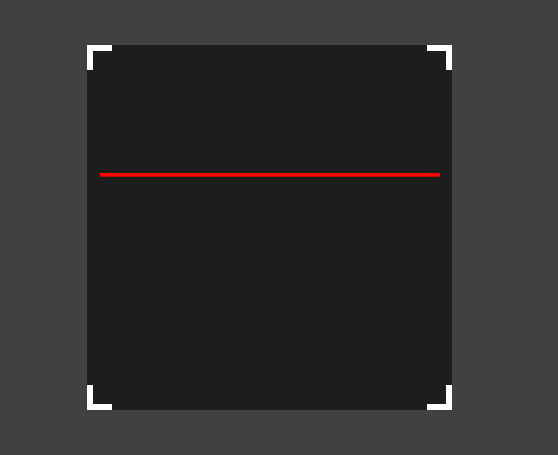
后续将介绍实现摄像头的预览功能。
How To Scan QRCode For UWP (1)的更多相关文章
- How To Scan QRCode For UWP (4)
QR Code的全称是Quick Response Code,中文翻译为快速响应矩阵图码,有关它的简介可以查看维基百科. 我准备使用ZXing.Net来实现扫描二维码的功能,ZXing.Net在Cod ...
- How To Scan QRCode For UWP (3)
这一节主要介绍如何去设置MediaCapture拍照的分辨率. MediaCapture 包含一个 VideoDeviceController对象,凭借它可以控制摄像头的很多设置,其中包括设置拍照的分 ...
- How To Scan QRCode For UWP (2)
这篇随笔主要介绍照相预览功能,重要使用的是MediaCapture对象,MediaCapture对象还可以用来处理录音和录制视频,本文只讨论照相功能. 1:查找摄像头 后置摄像头优先,找不到后置摄像头 ...
- SWIFT Scan QRCode
SWIFT中扫描QRCode代码如下,照着敲一次再看下API的注释应该就没问题了. import UIKit import Foundation import AVFoundation class V ...
- Python生成二维码脚本
简单的记录下二维码生成和解析的Python代码 依赖下面三个包: PIL(图像处理包,安装:pip install PIL) qrcode(二维码生成包,安装:pip install qrcode) ...
- 初涉扫码登录:edusoho实现客户端扫码登录(简版)
一.项目简介及需求 edusoho是一套商业版的在线教育平台,项目本身基于symfony2框架开发,现在有一款自己的APP,要求在不多修改edusoho自身代码的基础上,实现客户端对PC端扫码登录.不 ...
- 一次使用Python连接数据库生成二维码并安装为windows服务的工作任务
最近有一个需求,在现有生产系统上的人员库中增加一个此人员关键信息的二维码,支持文字版和跳转版两种方式,与报表工具关联,可打印.以windows服务方式,定时检查,只要发现某人员没有此二维码信息,就生成 ...
- python库使用整理
1. 环境搭建 l Python安装包:www.python.org l Microsoft Visual C++ Compiler for Python l pip(get-pip.py):p ...
- AppCan移动应用开发平台新增9个超有用插件(内含演示样例代码)
使用AppCan平台进行移动开发.你所须要具备的是Html5+CSS +JS前端语言基础.此外.Hybrid混合模式应用还需结合原生语言对功能模块进行封装,对于没有原生基础的开发人员,怎样实现App里 ...
随机推荐
- Le Chapitre VI
Ah! petit prince, j'ai compris, peu à peu, ainsi, ta petite vie mélancolique. Tu n'avais eu longtemp ...
- abaqus学习笔记-abaqus与umat调用基本原理
参考: 1.http://ivt-abaqusdoc.ivt.ntnu.no:2080/v6.14/books/sub/default.htm 2.ABAQUS 用户材料子程序开发及应用-杨曼娟 3. ...
- IntelliJ IDEA 2017版 spring-boot 拦截器的操作三种方式
一.注解方式 @WebServlet(urlPatterns = "/myServlet") public class MyServlet extends HttpServlet ...
- 微信小程序之基础入门
微信小程序有几个基础的文件:js(JavaScript逻辑代码),json(页面配置),wxml(类似hthml布局),wxss(css样式) 我们使用app.json文件来对微信小程序进行全局配置, ...
- Mysql之数据表操作
数据表操作: 查看当前数据库中所有的表: show tables; 查看当前使用数据库: select database(); 使用数据表: use 表名; 创建数据表: create table 数 ...
- Warning the user/local/mysql/data directory is not owned by the mysql user
sudo chown -RL root:mysql /usr/local/mysql sudo chown -RL mysql:mysql /usr/local/mysql/data sudo /us ...
- bzoj5109(图论好题)
我的参考题解:https://www.cnblogs.com/ccz181078/p/7907022.html: 不过我感觉题解的压位有问题,(1<<x)还不炸上天.不过这题数据水,好像怎 ...
- Hdu1151 Air Raid(最小覆盖路径)
Air Raid Problem Description Consider a town where all the streets are one-way and each street leads ...
- Java中sleep()与wait()区别(涉及类锁相关概念)
在区别之前,我们首先先了解一下关于对象锁,类锁的相关概念(当时查阅的详细地址:http://www.importnew.com/20444.html,该作者对类锁和对象锁进行了详细的举例分析) 对象锁 ...
- ASP.NET Web API 框架研究 ASP.NET 路由
ASP.NET Web API 如果采用Web Host方式来寄宿,在请求进入Web API 消息处理管道之前,就会用ASP.NET 自身的路由系统根据注册的路由表,解析出当前请求的HttpContr ...