
SQL Server:使用 PIVOT 行转列和 UNPIVOT 列转行
| ylbtech-SQL Server:使用 PIVOT 行转列和 UNPIVOT 列转行 |
| A,PIVOT 语法 返回顶部 |
PIVOT 提供的语法比一系列复杂的 SELECT...CASE 语句中所指定的语法更简单和更具可读性。有关 PIVOT 语法的完整说明,请参阅 FROM (Transact-SQL)。
以下是带批注的 PIVOT 语法。
SELECT <非透视的列>,

    [第一个透视的列] AS <列名称>,

    [第二个透视的列] AS <列名称>,

    ...

    [最后一个透视的列] AS <列名称>,

FROM

    (<生成数据的 SELECT 查询>)

    AS <源查询的别名>

PIVOT

(

    <聚合函数>(<要聚合的列>)

FOR

[<包含要成为列标题的值的列>]

    IN ( [第一个透视的列], [第二个透视的列],

    ... [最后一个透视的列])

) AS <透视表的别名>

<可选的 ORDER BY 子句>;
| B,PIVOT 示例1返回顶部 |
go

-- ==========================

-- 学生成绩表,ByYuanbo

-- ==========================

-- drop table StudentScores;

create table StudentScores

(

username    varchar(20),        --姓名

[subject]    varchar(30),        --科目

score        float,              --成绩

);

go

-- 01、插入测试数据

insert into StudentScores(username,[subject],score) values('张三', '语文', 80);

insert into StudentScores(username,[subject],score) values('张三', '语文', 90);

insert into StudentScores(username,[subject],score) values('张三', '数学', 90);

insert into StudentScores(username,[subject],score) values('张三', '英语', 70);

insert into StudentScores(username,[subject],score) values('张三', '生物', 85);

insert into StudentScores(username,[subject],score) values('李四', '语文', 70);

insert into StudentScores(username,[subject],score) values('李四', '数学', 92);

insert into StudentScores(username,[subject],score) values('李四', '数学', 100);

insert into StudentScores(username,[subject],score) values('李四', '英语', 76);

insert into StudentScores(username,[subject],score) values('李四', '生物', 88);

insert into StudentScores(username,[subject],score) values('王二', '语文', 60);

insert into StudentScores(username,[subject],score) values('王二', '数学', 82);

insert into StudentScores(username,[subject],score) values('王二', '英语', 96);

insert into StudentScores(username,[subject],score) values('王二', '生物', 78);

go

-- 02、查询数据

select * from StudentScores;

--P1、如果我想知道每位学生的每科成绩,而且每个学生的全部成绩排成一行,这样方便我查看、统计,导出数据

--A1、传统 case 方法

select username as '姓名'

,max(case [subject] when '语文' then score else 0 end) as '语文'

,max(case [subject] when '数学' then score else 0 end) as '数学'

,max(case [subject] when '英语' then score else 0 end) as '英语'

,max(case [subject] when '生物' then score else 0 end) as '生物'

from StudentScores

group by username;

/*

以下是带批注的 PIVOT 语法。

SELECT <非透视的列>,

    [第一个透视的列] AS <列名称>,

    [第二个透视的列] AS <列名称>,

    ...

    [最后一个透视的列] AS <列名称>,

FROM

    (<生成数据的 SELECT 查询>)

    AS <源查询的别名>

PIVOT

(

    <聚合函数>(<要聚合的列>)

FOR

[<包含要成为列标题的值的列>]

    IN ( [第一个透视的列], [第二个透视的列],

    ... [最后一个透视的列])

) AS <透视表的别名>

<可选的 ORDER BY 子句>;

*/

go

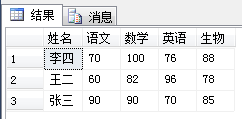
-- A2:PIVOT 方法

select username as '姓名',[语文],[数学],[英语],[生物] from StudentScores a

PIVOT

(

max(a.score) for a.subject in([语文],[数学],[英语],[生物])

)b;
示例脚本源
--A1、传统 case 方法

select username as '姓名'

,max(case [subject] when '语文' then score else 0 end) as '语文'

,max(case [subject] when '数学' then score else 0 end) as '数学'

,max(case [subject] when '英语' then score else 0 end) as '英语'

,max(case [subject] when '生物' then score else 0 end) as '生物'

from StudentScores

group by username;
-- A2:PIVOT 方法

select username as '姓名',[语文],[数学],[英语],[生物] from StudentScores a

PIVOT

(

max(a.score) for a.subject in([语文],[数学],[英语],[生物])

)b;
| C,UNPIVOT 示例1返回顶部 |
go

-- ==========================

-- 工程详细表,ByYuanbo

-- ==========================

-- drop table ProjectDetail;

create table ProjectDetail

(

projectName varchar(20),        --功能名称

overseaSupply int,            --海外供应商供给数量

nativeSupply int,            --国内供应商供给数量

southSupply int,            --南方供应商供给数量

northSupply int                --北方供应商供给数量

);

go

-- 01、添加测试数据

insert into ProjectDetail(projectName,overseaSupply,nativeSupply,southSupply,northSupply)

 values('A', 100, 200, 50, 50);

insert into ProjectDetail(projectName,overseaSupply,nativeSupply,southSupply,northSupply)

 values('B', 200, 300, 150, 150);

insert into ProjectDetail(projectName,overseaSupply,nativeSupply,southSupply,northSupply)

 values('C', 159, 400, 20, 320);

 go

 -- 02、查询数据

select * from ProjectDetail;

-- P1:查询项目每个供应商的供给数量?

-- A1:UNPIVOT 方法

select b.projectName,b.supplier,b.supllyNumber from (

select projectName,overseaSupply,nativeSupply,southSupply,northSupply from ProjectDetail) a

UNPIVOT

(

supllyNumber for supplier in(overseaSupply,nativeSupply,southSupply,northSupply)

)b;
示例脚本源
-- P1:查询项目每个供应商的供给数量?

-- A1:UNPIVOT 方法

select b.projectName,b.supplier,b.supllyNumber from (

select projectName,overseaSupply,nativeSupply,southSupply,northSupply from ProjectDetail) a

UNPIVOT

(

supllyNumber for supplier in(overseaSupply,nativeSupply,southSupply,northSupply)

)b;
| D,PIVOT 示例2返回顶部 |
go

-- ==========================

-- 销售季度表,ByYuanbo

-- ==========================

-- drop table SalesByQuarter

create table SalesByQuarter

(

year int,            -- 年份

quarter char(2),    -- 季度

amount money        -- 总额

);

go

-- 01、插入数据

set nocount on

declare @index int

declare @q int

set @index = 0

declare @year int

while (@index < 30)

begin

    set @year = 2005 + (@index % 4)

    set @q = (CasT((RAND() * 500) as int) % 4) + 1

    insert into SalesByQuarter values(@year, 'Q' + CasT(@q as char(1)), RAND() * 10000.00)

    set @index = @index + 1

end;

go

-- 02、查询

select * from SalesByQuarter;

go

-- 03、传统 CASE 方法

select year as 年份

,sum(case when quarter = 'Q1' then amount else 0 end) 一季度

,sum(case when quarter = 'Q2' then amount else 0 end) 二季度

,sum(case when quarter = 'Q3' then amount else 0 end) 三季度

,sum(case when quarter = 'Q4' then amount else 0 end) 四季度

from SalesByQuarter

group by year

order by year desc;

go

-- 04、PIVOT 方法

select year as 年份, Q1 as 一季度, Q2 as 二季度, Q3 as 三季度, Q4 as 四季度 from SalesByQuarter

PIVOT(SUM (amount) FOR quarter IN (Q1, Q2, Q3, Q4) )P

order by year desc;
示例脚本源
| E,返回顶部 |
| F,返回顶部 |
| G,相关资源返回顶部 |
| H,返回顶部 |
 |
作者:ylbtech 出处:http://storebook.cnblogs.com/ 本文版权归作者和博客园共有,欢迎转载,但未经作者同意必须保留此段声明,且在文章页面明显位置给出原文连接,否则保留追究法律责任的权利。 |
SQL Server:使用 PIVOT 行转列和 UNPIVOT 列转行的更多相关文章
- Sql server 中将数据行转列列转行(二)
老规矩,先弄一波测试数据,数据填充代码没有什么意义,先折叠起来: /* 第一步:创建临时表结构 */ CREATE TABLE #Student --创建临时表 ( StuName ), --学生名称 ...
- SQL Server里PIVOT运算符的”红颜祸水“
在今天的文章里我想讨论下SQL Server里一个特别的T-SQL语言结构——自SQL Server 2005引入的PIVOT运算符.我经常引用这个与语言结构是SQL Server里最危险的一个——很 ...
- SQL Server数据库PIVOT函数的使用详解(一)
http://database.51cto.com/art/201108/285250.htm SQL Server数据库中,PIVOT在帮助中这样描述滴:可以使用 PIVOT 和UNPIVOT 关系 ...
- SQL server 2005 PIVOT运算符的使用
原文:SQL server 2005 PIVOT运算符的使用 PIVOT,UNPIVOT运算符是SQL server 2005支持的新功能之一,主要用来实现行到列的转换.本文主要介绍PIVOT运算符的 ...
- SQL Server 2014新特性探秘(3)-可更新列存储聚集索引
简介 列存储索引其实在在SQL Server 2012中就已经存在,但SQL Server 2012中只允许建立非聚集列索引,这意味着列索引是在原有的行存储索引之上的引用了底层的数据,因此会 ...
- 通过DBCC Page查看在SQL Server中哪行数据被锁住了?
原文:通过DBCC Page查看在SQL Server中哪行数据被锁住了? 如何查看被锁的是哪行数据?通过dbcc page可以. 要想明白这个问题: 首先,需要模拟阻塞问题,这里直接模拟了阻塞问题的 ...
- SQL Server删除重复行的6个方法
SQL Server删除重复行是我们最常见的操作之一,下面就为您介绍六种适合不同情况的SQL Server删除重复行的方法,供您参考. 1.如果有ID字段,就是具有唯一性的字段 delect ta ...
- SQL Server获取指定行的数据
SQL Server获取指定行(如第二行)的数据 --SQL Server获取指定行(如第二行)的数据-- --法一(对象法)-- select * from ( select * , numbe ...
- SQL SERVER 判断是否存在数据库、表、列、视图
SQL SERVER 判断是否存在数据库.表.列.视图 --1. 判断数据库是否存在 IF EXISTS (SELECT * FROM SYS.DATABASES WHERE NAME = '数据库名 ...
随机推荐
- React Native Android启动白屏的一种解决方案上
我们用RN去开发Android应用的时候,我们会发现一个很明显的问题,这个问题就是启动时每次都会有1~3秒的白屏时间,直到项目加载出来 为什么会出现这个问题? RN开发的应用在启动时,首先会将js b ...
- 循序渐进学.Net Core Web Api开发系列【12】:缓存
系列目录 循序渐进学.Net Core Web Api开发系列目录 本系列涉及到的源码下载地址:https://github.com/seabluescn/Blog_WebApi 一.概述 本篇介绍如 ...
- k8s+Jenkins+GitLab-自动化部署asp.net core项目
0.目录 整体架构目录:ASP.NET Core分布式项目实战-目录 k8s架构目录:Kubernetes(k8s)集群部署(k8s企业级Docker容器集群管理)系列目录 此文阅读目录: 1.闲聊 ...
- WEP保护帧移除工具airdecloak-ng
WEP保护帧移除工具airdecloak-ng 为了防止WEP加密数据被破解,WIPS(无线入侵防御系统)会发送WEP保护帧.攻击者抓取WEP数据包时,也会获取这一类包,导致破解失败.aircra ...
- 【Hadoop】HDFS - 创建文件流程详解
1.本文目的 通过解析客户端创建文件流程,认知hadoop的HDFS系统的一些功能和概念. 2.主要概念 2.1 NameNode(NN): HDFS系统核心组件,负责分布式文件系统的名字空间管理.I ...
- 微信小程序自定义组件封装及父子间组件传值
首先在我们可以直接写到需要的 page 中,然后再进行抽取组件,自定义组件建议 wxzx-xxx 命名 官网地址:https://developers.weixin.qq.com/miniprogra ...
- Fiddler可以支持Websocket抓包了
今天试了一下,Fiddler已经可以支持客户端Websocket抓包了,并且查看的方式也非常方便. websocket作为一个标准的应用层的协议,在CS端程序用起来也比传统的tcp协议方便了,比较常见 ...
- sqlserver 2012 查询时提示“目录名称无效”
重装系统或者用360等软件清理了相应的临时文件导致解决:在运行中输入 %temp% 回车,会跳出找不到路径的提示,然后到提示的目录建没有找到的目录文件夹即可.
- C# ie通过打印控件点打印,总是弹出另存为xps的对话框
用的是lodop打印控件,点打印后,总是弹出另存为xps的对话框,后来在网上查到可能是把windows自带的Microsoft XPS Document Writer设为默认打印机的原因. 但现在没有 ...
- 图解tensorflow 源码分析
http://www.cnblogs.com/yao62995/p/5773578.html https://github.com/yao62995/tensorflow