
android&php 加密解密
MyCryptActivity.java
- package com.test.crypt;
- import android.app.Activity;
- import android.os.Bundle;
- import android.view.View;
- import android.view.View.OnClickListener;
- import android.widget.Button;
- import android.widget.EditText;
- public class MyCryptActivity extends Activity {
- /** Called when the activity is first created. */
- private EditText plainTextbefore, plaintextafter, ciphertext;
- private Button button01;
- private MCrypt mcrypt;
- @Override
- public void onCreate(Bundle savedInstanceState) {
- super.onCreate(savedInstanceState);
- setContentView(R.layout.main);
- plainTextbefore = (EditText)findViewById(R.id.EditText01);
- ciphertext = (EditText)findViewById(R.id.EditText02);
- plaintextafter = (EditText)findViewById(R.id.EditText03);
- button01=(Button)findViewById(R.id.Button01);
- plainTextbefore.setHint("请输入要加密的字符串");
- button01.setOnClickListener(new OnClickListener() {
- @Override
- public void onClick(View v) {
- // TODO Auto-generated method stub
- String plainText = plainTextbefore.getText().toString();
- mcrypt = new MCrypt();
- try {
- String encrypted = MCrypt.bytesToHex( mcrypt.encrypt(plainText));
- String decrypted = new String( mcrypt.decrypt( encrypted ) );
- ciphertext.setText(encrypted);
- plaintextafter.setText(decrypted);
- } catch (Exception e) {
- // TODO Auto-generated catch block
- e.printStackTrace();
- }
- }
- });
- }
- }
MCrypt.java
- package com.test.crypt;
- import java.security.NoSuchAlgorithmException;
- import javax.crypto.Cipher;
- import javax.crypto.NoSuchPaddingException;
- import javax.crypto.spec.IvParameterSpec;
- import javax.crypto.spec.SecretKeySpec;
- public class MCrypt {
- private String iv = "0123456789123456";//
- private IvParameterSpec ivspec;
- private SecretKeySpec keyspec;
- private Cipher cipher;
- private String SecretKey = "0123456789abcdef";//secretKey
- public MCrypt()
- {
- ivspec = new IvParameterSpec(iv.getBytes());//偏移量
- keyspec = new SecretKeySpec(SecretKey.getBytes(), "AES");//生成密钥
- try {
- cipher = Cipher.getInstance("AES/CBC/NoPadding");
- } catch (NoSuchAlgorithmException e) {
- // TODO Auto-generated catch block
- e.printStackTrace();
- } catch (NoSuchPaddingException e) {
- // TODO Auto-generated catch block
- e.printStackTrace();
- }
- }
- public byte[] encrypt(String text) throws Exception
- {
- if(text == null || text.length() == 0)
- throw new Exception("Empty string");
- byte[] encrypted = null;
- try {
- cipher.init(Cipher.ENCRYPT_MODE, keyspec, ivspec);
- encrypted = cipher.doFinal(padString(text).getBytes());
- } catch (Exception e)
- {
- throw new Exception("[encrypt] " + e.getMessage());
- }
- return encrypted;
- }
- public byte[] decrypt(String code) throws Exception
- {
- if(code == null || code.length() == 0)
- throw new Exception("Empty string");
- byte[] decrypted = null;
- try {
- cipher.init(Cipher.DECRYPT_MODE, keyspec, ivspec);//<span style="font-family: Simsun;font-size:16px; ">用密钥和一组算法参数初始化此 Cipher。</span>
- decrypted = cipher.doFinal(hexToBytes(code));
- } catch (Exception e)
- {
- throw new Exception("[decrypt] " + e.getMessage());
- }
- return decrypted;
- }
- public static String bytesToHex(byte[] data)
- {
- if (data==null)
- {
- return null;
- }
- int len = data.length;
- String str = "";
- for (int i=0; i<len; i++) {
- if ((data[i]&0xFF)<16)
- str = str + "0" + java.lang.Integer.toHexString(data[i]&0xFF);
- else
- str = str + java.lang.Integer.toHexString(data[i]&0xFF);
- }
- return str;
- }
- public static byte[] hexToBytes(String str) {
- if (str==null) {
- return null;
- } else if (str.length() < 2) {
- return null;
- } else {
- int len = str.length() / 2;
- byte[] buffer = new byte[len];
- for (int i=0; i<len; i++) {
- buffer[i] = (byte) Integer.parseInt(str.substring(i*2,i*2+2),16);
- }
- return buffer;
- }
- }
- private static String padString(String source)
- {
- char paddingChar = ' ';
- int size = 16;
- int x = source.length() % size;
- int padLength = size - x;
- for (int i = 0; i < padLength; i++)
- {
- source += paddingChar;
- }
- return source;
- }
- }
main.xml
- <?xml version="1.0" encoding="utf-8"?>
- <LinearLayout xmlns:android="http://schemas.android.com/apk/res/android"
- android:orientation="vertical"
- android:layout_width="fill_parent"
- android:layout_height="fill_parent">
- <TableLayout
- android:id="@+id/TableLayout01"
- android:layout_width="fill_parent"
- android:layout_height="wrap_content"
- android:collapseColumns="2"
- android:stretchColumns="1">
- <TableRow
- android:id="@+id/TableRow01"
- android:layout_width="wrap_content"
- android:layout_height="wrap_content">
- <TextView
- android:layout_width="fill_parent"
- android:layout_height="wrap_content"
- android:text="明文:"></TextView>
- <EditText
- android:id="@+id/EditText01"
- android:layout_width="wrap_content"
- android:layout_height="wrap_content"></EditText>
- </TableRow>
- <TableRow
- android:id="@+id/TableRow02"
- android:layout_width="wrap_content"
- android:layout_height="wrap_content">
- <TextView
- android:layout_width="wrap_content"
- android:layout_height="wrap_content"
- android:text="密文:"></TextView>
- <EditText
- android:id="@+id/EditText02"
- android:layout_width="wrap_content"
- android:layout_height="wrap_content"></EditText>
- </TableRow>
- <TableRow
- android:id="@+id/TableRow03"
- android:layout_width="wrap_content"
- android:layout_height="wrap_content">
- <TextView
- android:layout_width="wrap_content"
- android:layout_height="wrap_content"
- android:text="明文:"></TextView>
- <EditText
- android:id="@+id/EditText03"
- android:layout_width="wrap_content"
- android:layout_height="wrap_content"></EditText>
- </TableRow>
- </TableLayout>
- <Button
- android:layout_width="fill_parent"
- android:layout_height="wrap_content"
- android:id="@+id/Button01"
- android:text="显示密文,并解密"></Button>
- </LinearLayout>
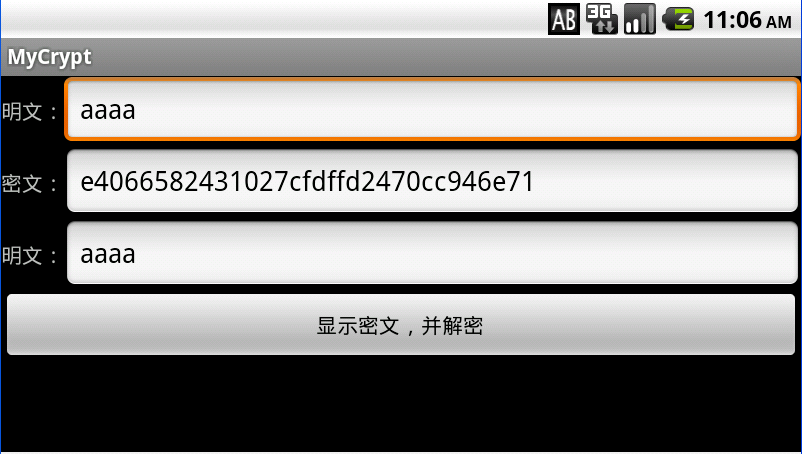
php:
- <?php
- class MCrypt
- {
- private $iv = 'fedcba9876543210'; #Same as in JAVA
- private $key = '0123456789abcdef'; #Same as in JAVA
- function __construct()
- {
- }
- function encrypt($str) {
- //$key = $this->hex2bin($key);
- $iv = $this->iv;
- $td = mcrypt_module_open('rijndael-128', '', 'cbc', $iv);
- mcrypt_generic_init($td, $this->key, $iv);
- $encrypted = mcrypt_generic($td, $str);
- mcrypt_generic_deinit($td);
- mcrypt_module_close($td);
- return bin2hex($encrypted);
- }
- function decrypt($code) {
- //$key = $this->hex2bin($key);
- $code = $this->hex2bin($code);
- $iv = $this->iv;
- $td = mcrypt_module_open('rijndael-128', '', 'cbc', $iv);
- mcrypt_generic_init($td, $this->key, $iv);
- $decrypted = mdecrypt_generic($td, $code);
- mcrypt_generic_deinit($td);
- mcrypt_module_close($td);
- return utf8_encode(trim($decrypted));
- }
- protected function hex2bin($hexdata) {
- $bindata = '';
- for ($i = 0; $i < strlen($hexdata); $i += 2) {
- $bindata .= chr(hexdec(substr($hexdata, $i, 2)));
- }
- return $bindata;
- }
- }
android&php 加密解密的更多相关文章
- C#/IOS/Android通用加密解密方法
原文:C#/IOS/Android通用加密解密方法 公司在做移动端ios/android,服务器提供接口使用的.net,用到加密解密这一块,也在网上找了一些方法,有些是.net加密了android解密 ...
- Android RSA加密解密
概述 RSA是目前最有影响力的公钥加密算法,该算法基于一个十分简单的数论事实:将两个大素数相乘十分容易,但那时想要对其乘积进行因式分解却极其困 难,因此可以将乘积公开作为加密密钥,即公钥,而两个大素数 ...
- android -------- AES加密解密算法
AES加密标准又称为高级加密标准Rijndael加密法,是美国国家标准技术研究所NIST旨在取代DES的21世纪的加密标准.AES的基本要求是,采用对称分组密码体制,密钥长度可以为128.192或25 ...
- android AES 加密解密
import java.security.Provider; import java.security.SecureRandom; import javax.crypto.Cipher; import ...
- Android Des加密解密
算法转自:http://www.linuxidc.com/Linux/2011-08/41866.htm import java.security.Key; import java.security. ...
- android -------- RSA加密解密算法
RSA加密算法是一种非对称加密算法.在公开密钥加密和电子商业中RSA被广泛使用 RSA公开密钥密码体制.所谓的公开密钥密码体制就是使用不同的加密密钥与解密密钥,是一种“由已知加密密钥推导出解密密钥在计 ...
- android Base64加密解密
// 加密传入的数据是byte类型的,并非使用decode方法将原始数据转二进制,String类型的数据 使用 str.getBytes()即可 String str = "Hello!&q ...
- android -------- DES加密解密算法
DES全称为Data Encryption Standard,即数据加密标准,是一种使用密钥加密的块算法,1977年被美国联邦政府的国家标准局确定为联邦资料处理标准(FIPS),并授权在非密级政府通信 ...
- android -------- Base64 加密解密算法
Base64是网络上最常见的用于传输8Bit字节码的编码方式之一,Base64就是一种基于64个可打印字符来表示二进制数据的方法.可查看RFC2045-RFC2049,上面有MIME的详细规范. Ba ...
随机推荐
- application/json 四种常见的 POST 提交数据方式
四种常见的 POST 提交数据方式 HTTP/1.1 协议规定的 HTTP 请求方法有 OPTIONS.GET.HEAD.POST.PUT.DELETE.TRACE.CONNECT 这几种.其中 ...
- https协议通信过程
https协议通信过程 我们都知道HTTPS能够加密信息,以免敏感信息被第三方获取.所以很多银行网站或电子邮箱等等安全级别较高的服务都会采用HTTPS协议. HTTPS简介 HTTPS其实是有两部分组 ...
- 【CodeChef】QTREE- Queries on tree again!
题解 给你一棵基环树,环长为奇数(两点间最短路径只有一条) 维护两点间路径最大子段和,支持把一条路径上的值取反 显然只要断开一条边维护树上的值,然后对于那条边分类讨论就好了 维护树上的值可以通过树链剖 ...
- C++Primer,C++标准IO库阅读心得
IO 标准库类型和头文件 iostream istream 从流中读取 ostream 写到流中去 iostream 对流进行读写:从 istream 和 ostream 派生而来fstream if ...
- thinkphp5.0未定义变量模板中提示错误
在用tp5.0做一个项目网站,公共头需要用到一个变量,但这个变量又不想挨着定义,然后,刷新前台的时候就给提示,未定义变量. 直接放解决方案: 在config.php文件顶部添加: error_repo ...
- js导出带格式的表格(包括单元格合并,字体样式等)
function HtmlExportToExcelForEntire() { var uri = 'data:application/vnd.ms-excel;base64,', template ...
- python django查询一周,一月,一年时间
首先是当前时间的确定,对于年月日,orm模型都有对应的方法直接查询,周是没有方法直接查询的,我是没有找到这个方法,只能间接的查询 1 2 3 now_time = datetime.datetime. ...
- 024.Zabbix告警等级机制
一 等级告警 告警升级可以对告警结果按自定义的时间段进行进行消息发送,并执行命令,形成一个梯度的告警处理. 二 按时间自定义告警梯度 2.1 添加时间发生的时间戳和发送时间 2.2 设置三个等级梯度 ...
- Java核心编程快速入门
Java核心编程部分的基础学习内容就不一一介绍了,本文的重点是JAVA中相对复杂的一些概念,主体内容如下图所示. 反射reflect是理解Java语言工作原理的基础,Java编译器首先需要将我们编写的 ...
- GRYZ 模 拟 赛 系 列 之 迷 宫(不就是个洪水)
- 迷 宫 (maze.cpp/c/pas) Description Karles 和朋友到迷宫玩耍,没想到遇上了 10000000 年一次的大洪水,好在 Karles 是一个喜 欢思考的人,他发现迷 ...