
jenkins 整合maven,svn(配置钩子程序实现提交代码自动构建),tomcat实现热部署(windows+linux分别实现)
springboot : https://blog.csdn.net/zjh_746140129/article/details/80904876
1 准备工作:
(1)运行jenkins的tomcat
(2)运行我们项目的tomcat
(3)SVN服务器
jenkins就是一个war包,相信大家都非常熟悉,扔在tomcat webapp下就能跑,具体操作步骤上网去搜一搜一大把,我们主要是来记录一下如何实现钩子程序,实现代码的动态部署。
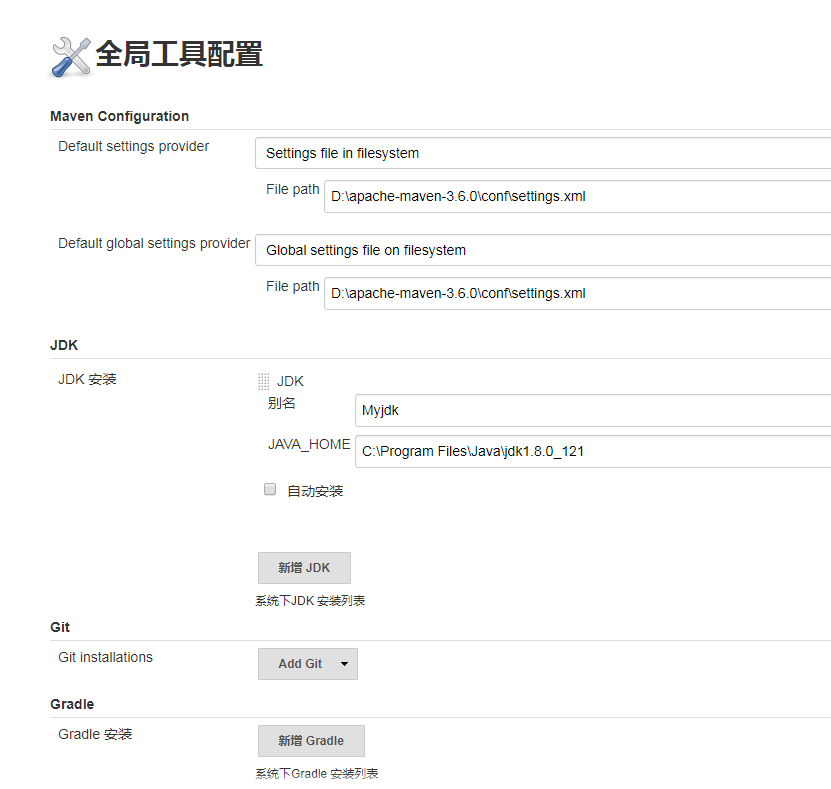
jenkins配置的话我们需要配置jdk,maven,maven的settings.xml,服务器的tomcat。
jenkins第一次进入后台会提示去下载插件,我们只要耐心等待一会儿就好,因为我们要实现热部署,所以需要另外手动去下载一个叫depoly to container 的插件, 直接ctrl+f全局搜索就行。

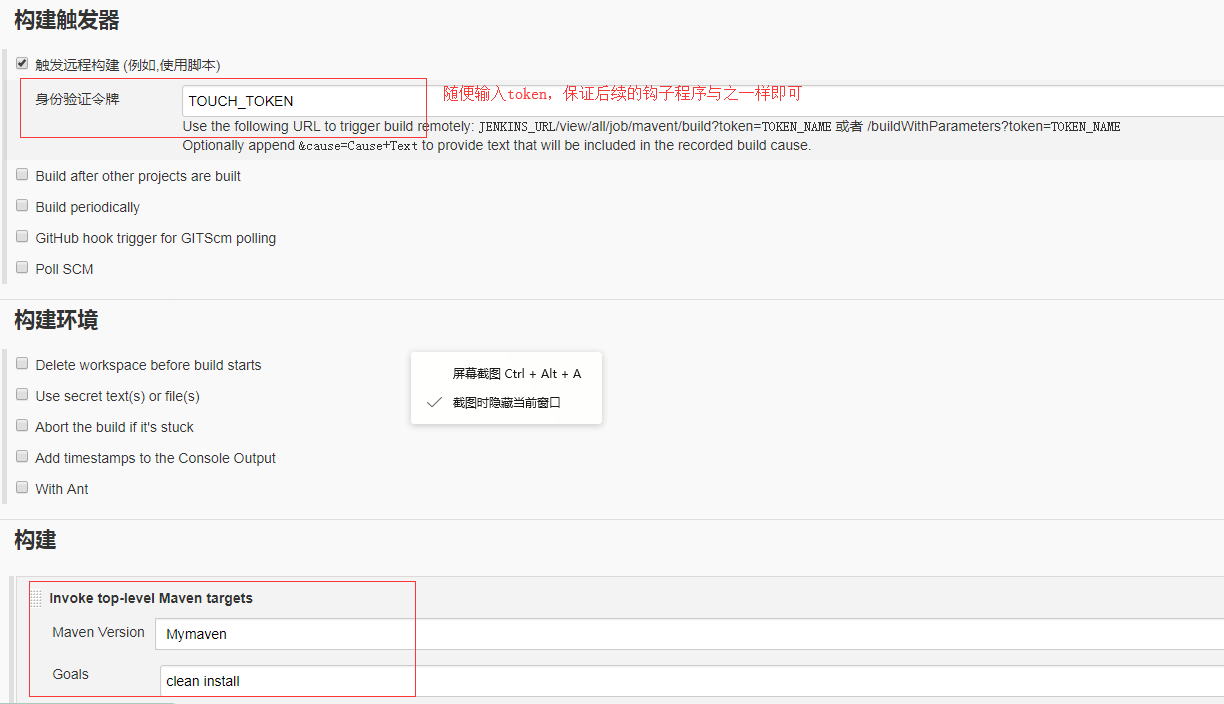
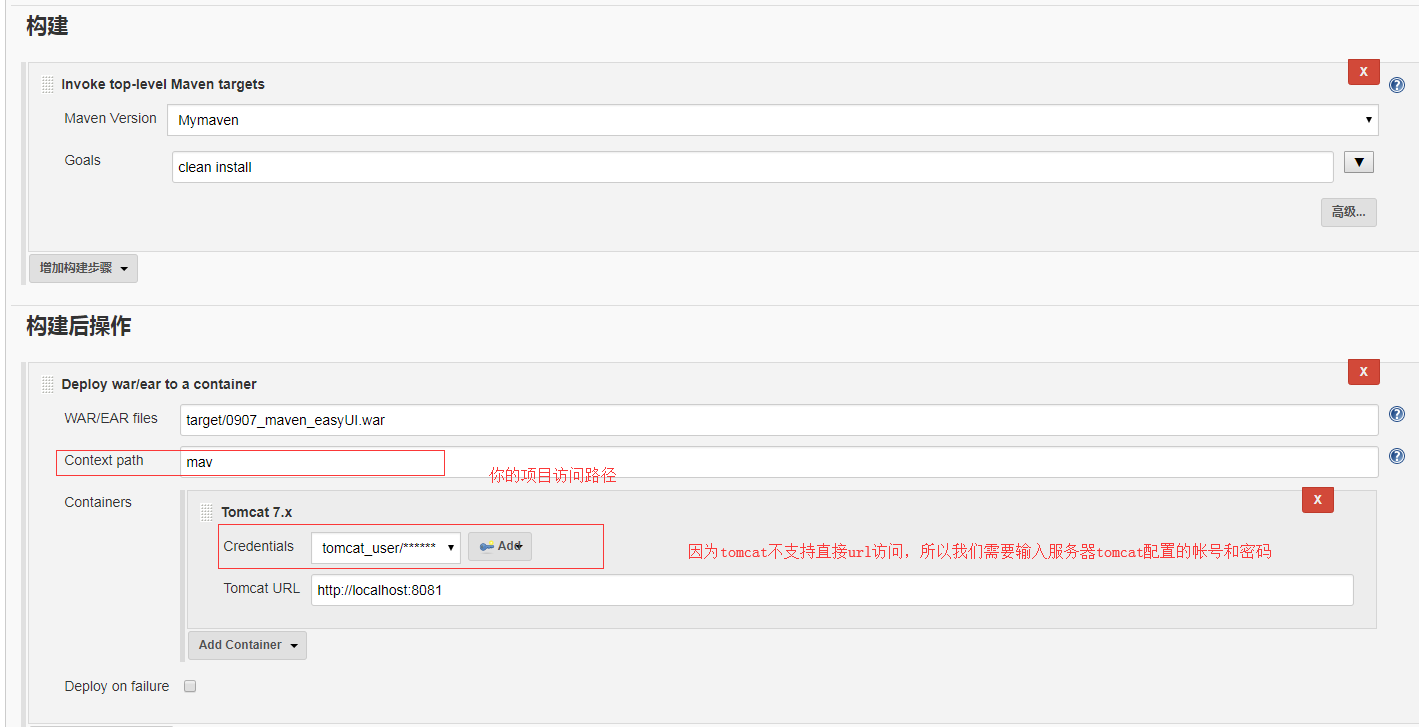
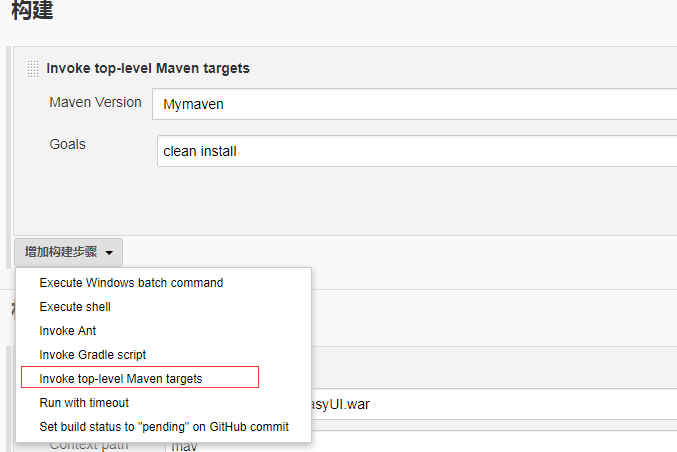
其余配置如下:过程太简单直接略过


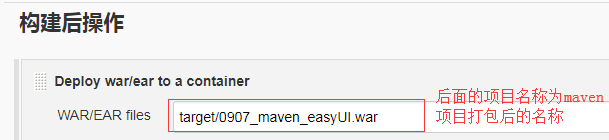
maven 项目打包方法




<?xml version='1.0' encoding='utf-8'?>

<!--

  Licensed to the Apache Software Foundation (ASF) under one or more

  contributor license agreements.  See the NOTICE file distributed with

  this work for additional information regarding copyright ownership.

  The ASF licenses this file to You under the Apache License, Version 2.0

  (the "License"); you may not use this file except in compliance with

  the License.  You may obtain a copy of the License at

      http://www.apache.org/licenses/LICENSE-2.0

  Unless required by applicable law or agreed to in writing, software

  distributed under the License is distributed on an "AS IS" BASIS,

  WITHOUT WARRANTIES OR CONDITIONS OF ANY KIND, either express or implied.

  See the License for the specific language governing permissions and

  limitations under the License.

-->

<tomcat-users>

<!--

  NOTE:  By default, no user is included in the "manager-gui" role required

  to operate the "/manager/html" web application.  If you wish to use this app,

  you must define such a user - the username and password are arbitrary. It is

  strongly recommended that you do NOT use one of the users in the commented out

  section below since they are intended for use with the examples web

  application.

-->

<!--

  NOTE:  The sample user and role entries below are intended for use with the

  examples web application. They are wrapped in a comment and thus are ignored

  when reading this file. If you wish to configure these users for use with the

  examples web application, do not forget to remove the <!.. ..> that surrounds

  them. You will also need to set the passwords to something appropriate.

-->

<!--

  <role rolename="tomcat"/>

  <role rolename="role1"/>

  <user username="tomcat" password="<must-be-changed>" roles="tomcat"/>

  <user username="both" password="<must-be-changed>" roles="tomcat,role1"/>

  <user username="role1" password="<must-be-changed>" roles="role1"/>

-->

<role rolename="manager-gui"/>

<role rolename="manager-script"/>

<role rolename="manager-jmx"/>

<role rolename="manager-status"/>

<user username="tomcat_user" password="" roles="manager-gui,manager-script,manager-jmx,manager-status" />

</tomcat-users>
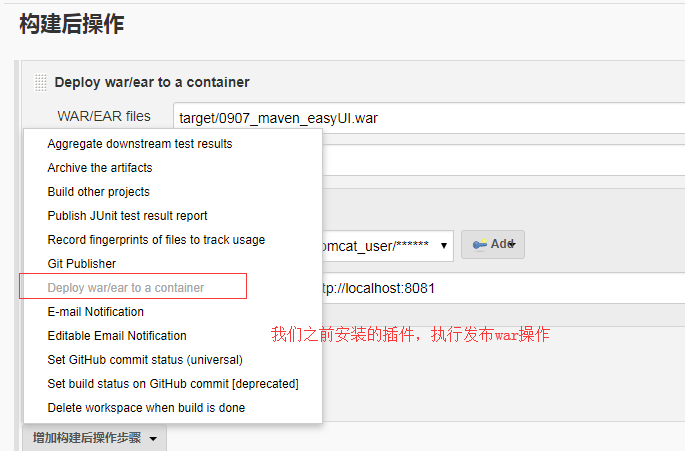

这样我们的项目就自动部署到服务器的tomcat上面了,接下来就该如何自动触发钩子程序,去实现自动构建了。
我们进入svn服务器根目录:
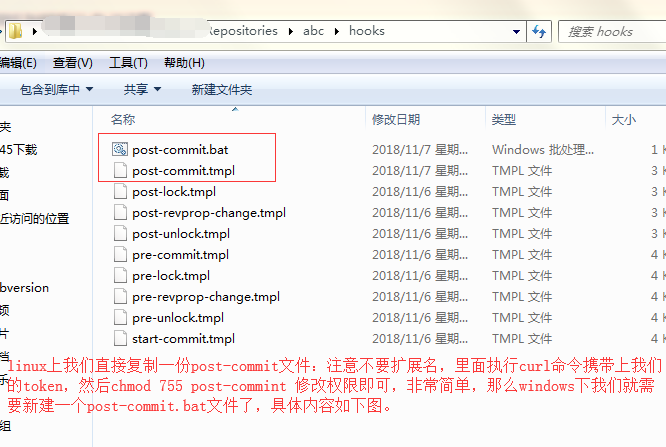
@echo off

start cmd /c "curl -X post -v -u admin:你的jenkins登录密码 http://127.0.0.1:8080/jenkins/view/all/job/mavent/build?token=TOUCH_TOKEN"
windows 上想要使用curl命令需要下载curl插件,然后配置环境变量后才能起作用。
最后我们修改svn的登录权限
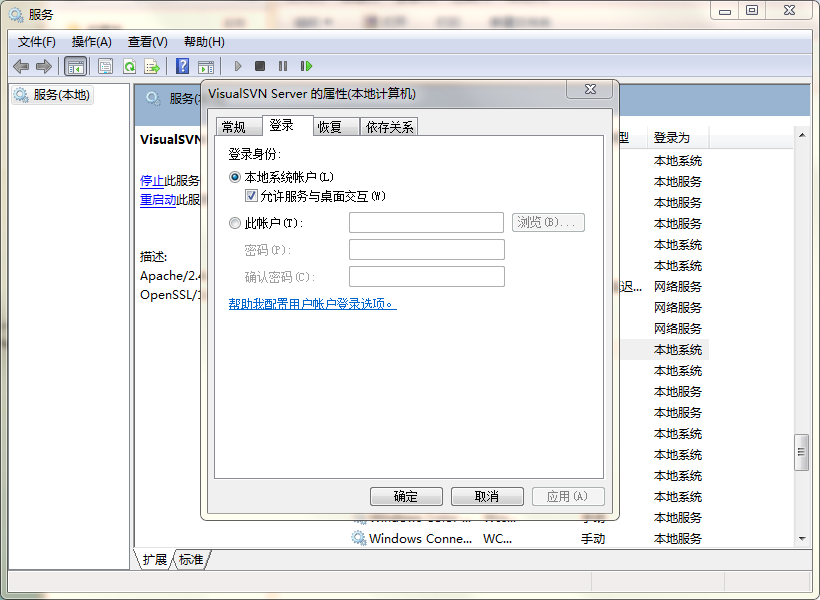
那么现在只要在本地电脑提交代码到svn服务器,即会自动触发构建了!
3.2 自动化部署
“自动化”的具体体现:向版本库提交新的代码后,应用服务器上自动部署,用户或测试人员使用的马上就是最新的应用程序。
4
更多 Java –大数据 –前端 –python 人工智能资料下载,可访问百度:尚硅谷官网

JavaEE
高级课程系列

搭建上述持续集成环境可以把整个构建、部署过程自动化,很大程度上减轻工作量。对于程序员的日常开发来说不会造成任何额外负担——自己把代码提交上去之后,服务器上运行的马上就是最新版本——一切都发生在无形中。
下面我们讲带领大家一步一步搭建整套持续集成环境,这个操作过程只需要细心认真即可,没有任何难度。但是需要优秀的你具备以下前置知识:
ü Linux 基本操作命令和 VIM 编辑器使用
ü Maven 的项目构建管理
ü GitHub 或 SVN 使用
jenkins 整合maven,svn(配置钩子程序实现提交代码自动构建),tomcat实现热部署(windows+linux分别实现)的更多相关文章
- jenkins结合gitlab实现提交代码自动构建
jenkins可以说是现在非常流行的一个继续集成工具,几乎所有的公司都在用,并且它也基本是devops的连接者,是一个比较核心的工具. 主要记录以下两个: 利用jenkins和gitlab的webho ...
- SVN配置钩子文件限制提交文件时必须填写更新日志
进入相应SVN仓库hooks目录,编辑文件pre-commit #!/bin/sh REPOS="$1"TXN="$2" SVNLOOK=/usr/bin/sv ...
- Centos7下搭建SVN服务,本地提交代码自动同步到WEB目录
1.安装SVN服务[root@bogon ~]# yum -y install subversion 2.查看svnserve安装目录[root@bogon ~]# whereis svnserves ...
- 转载:tomcat实现热部署的配置
tomcat实现热部署的配置 我们实现热部署后,自然就可以通过maven操作tomcat了,所以就需要maven取得操作tomcat的权限,现在这一步就是配置tomcat的可操作权限. 进入tom ...
- SVN配置钩子
安装测试环境:109 CentOS4.6 安装: SVN1.32http://subversion.tigris.org/downloads/subversion-1.3.2.tar.gz安装:解压 ...
- linux虚拟机安装jenkins及maven/jdk配置
一.jenkins安装 (1)tomcat下载,下载地址:https://tomcat.apache.org 选择对应的版本,以下以新版的tomcat 9.0版本为例 下载zip包 (2)jenkin ...
- svn利用钩子脚本功能实现代码同步到web目录
一.hook简单介绍 为了方便管理员控制提交的过程 ,Subversion提供了hook机制.当特定的 事件发生时,相应的 hook会被调用,hook其实就相当于特定事件的处理函数.每个hook会得到 ...
- Jenkins部署web项目到Tomcat(热部署)
使用这个方式的话需要tomcat中有初始时Manage这个项目,本质上是通过http://ip:port/manager/html这个地址的上传接口进行上传,进行热部署(需要远程tomcat 必须开启 ...
- tomcat实现热部署的配置
p { margin-bottom: 0.25cm; direction: ltr; color: rgb(0, 0, 0); line-height: 120%; text-align: justi ...
随机推荐
- python的WSGI接口
WSGI:Web Server Gateway Interface. WSGI是为python语言定义的web服务器和web应用程序或框架之间的一种简单而实用的接口.wsgi是一个web组件的接口规范 ...
- Linux使用imagemagick的convert命令压缩图片、节省服务器空间
一.安装: sudo apt-get install imagemagick 二.说明 imagemagick的命令convert可以完成此任务,其参数-resize用来改变图片尺寸,可以直接指定像素 ...
- 关于Spring mvc注解中的定时任务的配置
关于spring mvc注解定时任务配置 简单的记载:避免自己忘记,不是很确定我理解的是否正确.有错误地方望请大家指出. 1,定时方法执行配置: (1)在applicationContext.xml中 ...
- [USACO08DEC]Trick or Treat on the Farm 记忆化搜索
这一题非常水,因为每个点的下一个目的地是唯一的,可以考虑对每一个还为访问过的点dfs直接找出所有的环,同时更新每一个点能去的点的数量(即答案). 我们dfs时找到环上已经遍历过的一个点,用当前的dfn ...
- Javascript - 表达式与语句
表达式与语句(Expression&Statement) 流程控制语句 1.嵌入式语句 嵌入式即这种语句可以无限嵌套N层.所有嵌入式语句只需要键入首个关键单词,在visual studio里按 ...
- Heapify
Given an integer array, heapify it into a min-heap array. For a heap array A, A[0] is the root of he ...
- linux下简单的备份的脚本 2 【转】
转自:http://blog.chinaunix.net/xmlrpc.php?r=blog/article&uid=26807463&id=4577034 之前写过linux下简单的 ...
- Daemon函数的用法
Daemon函数的用法 说明: 让一个程序后台运行. 原型: #include <unistd.h> int daemon(int nochdir, int noclose); #incl ...
- IE WebBrowser内核设置
public class IEVersion { /// <summary> /// IE WebBrowser内核设置 /// </summary> public stati ...
- 001_docker-compose构建elk环境
由于打算给同事分享elk相关的东西,搭建配置elk环境太麻烦了,于是想到了docker.docker官方提供了docker-compose编排工具,elk集群一键就可以搞定,真是兴奋.好了下面咱们开始 ...