
利用STM32CubeMX来生成USB_HID_Mouse工程
硬件开发板:STM32F103C8

软件平台

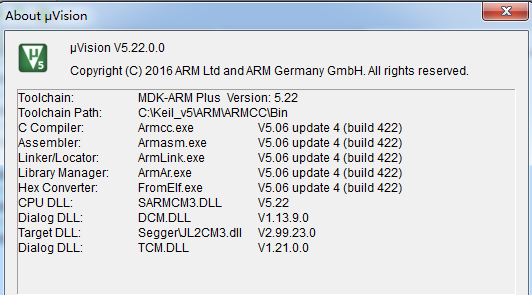
好了现在开始利用STM32CubeMX来生成我们的工程
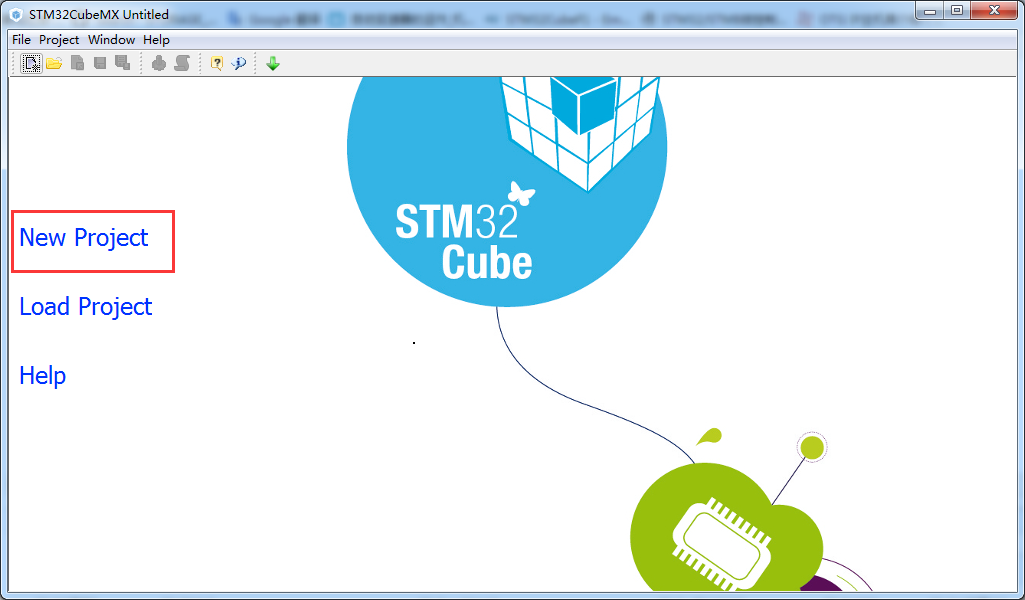
1、新建工程
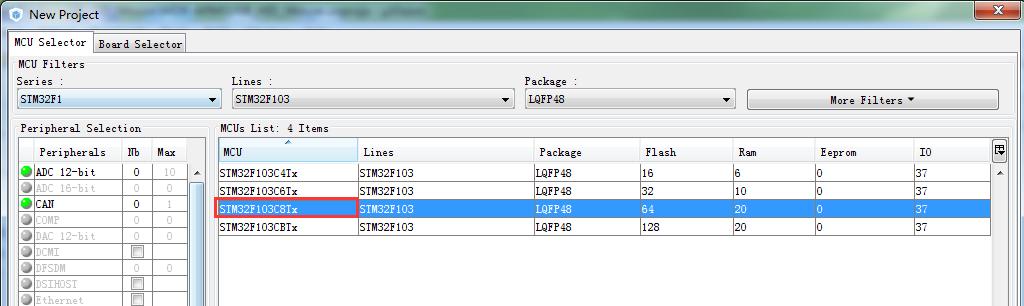
选择MCU的型号
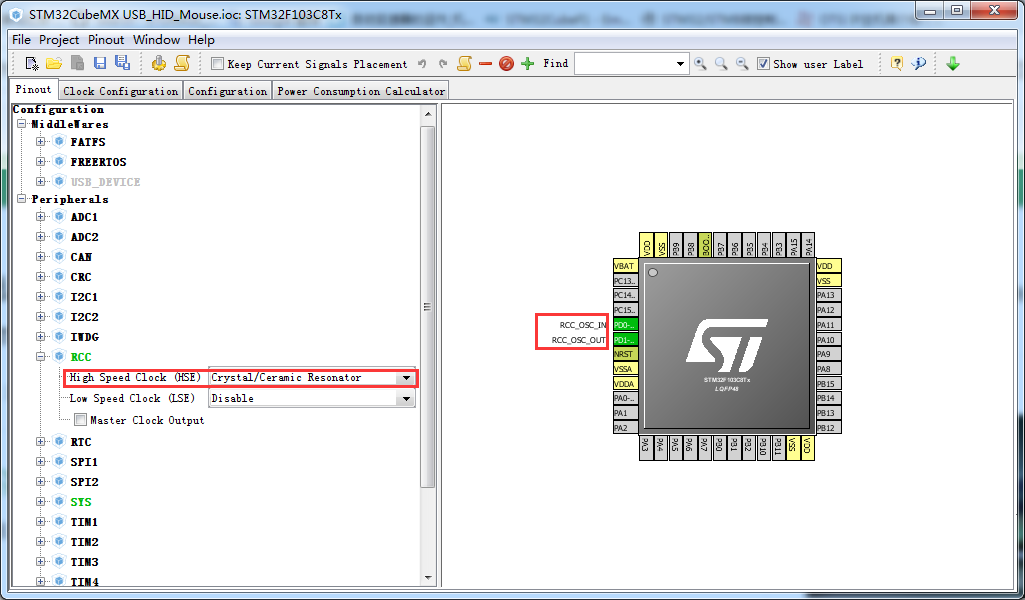
选择选择时钟
开启usb的模块
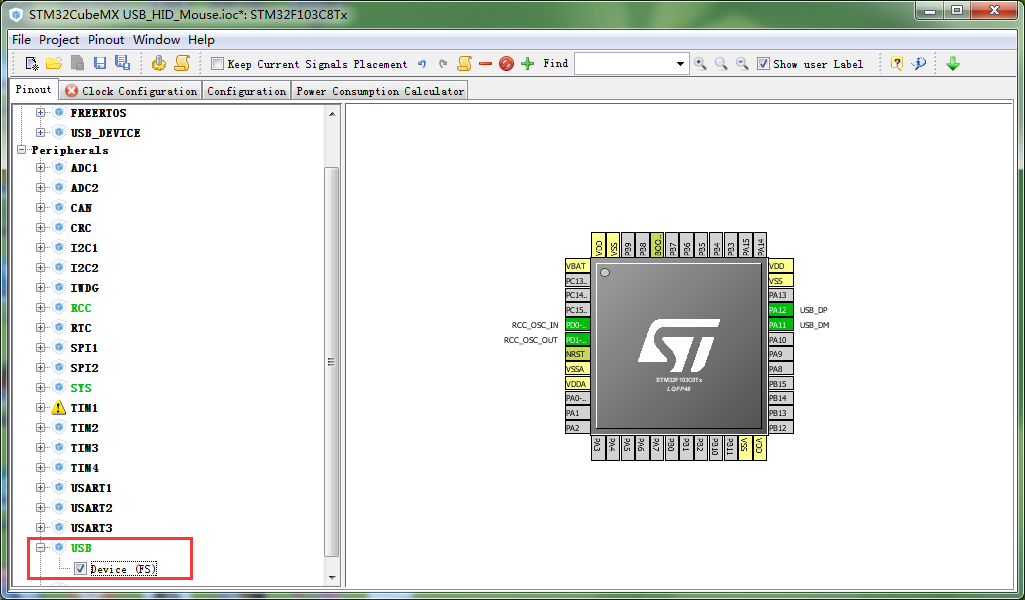
选择USB的类

配置时钟树(主要是设置usb的48Mhz)

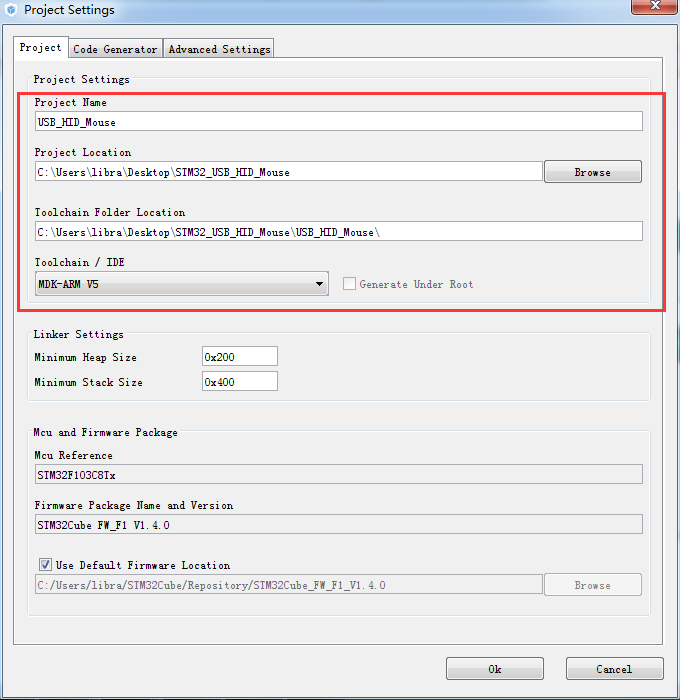
设置工程路径和编译环境
打开工程
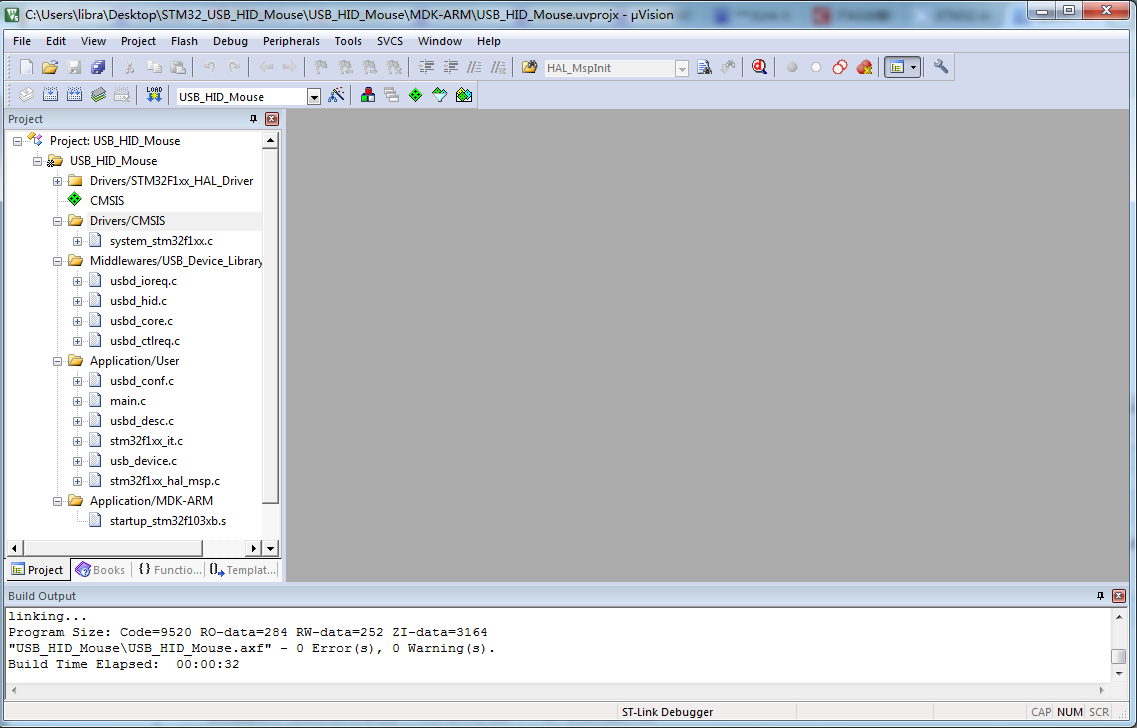
我们现在在main.c进行修改
/* USER CODE BEGIN Includes */

#include "usbd_hid.h"

/* USER CODE END Includes */
  /* USER CODE BEGIN 1 */

  // HID Mouse

  struct mouseHID_t {

      uint8_t buttons;

      int8_t x;

      int8_t y;

      int8_t wheel;

  };

  struct mouseHID_t mouseHID;

  mouseHID.buttons = ;

  mouseHID.x = ;

  mouseHID.y = ;

  mouseHID.wheel = ;

  /* USER CODE END 1 */
  /* USER CODE BEGIN 3 */

  // Send HID report
    mouseHID.x = 10;
    USBD_HID_SendReport(&hUsbDeviceFS, (uint8_t*)&mouseHID, sizeof(struct mouseHID_t));
    HAL_Delay(1000);
  }
  /* USER CODE END 3 */
编译下载后复位
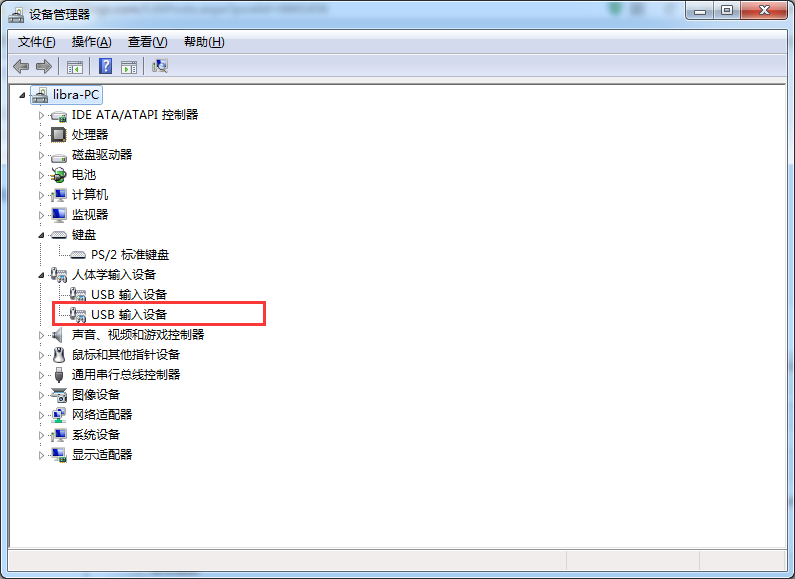
在电脑设备管理中可以看到一个新的USB输入设备(到这部时候可以看到我们的STM32的USB枚举成功)
可以看到我们鼠标光标移动
如果出现
***JLink Error: Bad JTAG communication: Write to IR: Expected 0x1, got 0xF (TAP Command : 10) @ Off 0x5.
将在HAL_MspInit()代码中 __HAL_AFIO_REMAP_SWJ_DISABLE();给注释掉
为了回顾之前的浅析USB HID ReportDesc (HID报告描述符)
我们将对static uint8_t HID_MOUSE_ReportDesc[HID_MOUSE_REPORT_DESC_SIZE]进行分析
源码
__ALIGN_BEGIN static uint8_t HID_MOUSE_ReportDesc[HID_MOUSE_REPORT_DESC_SIZE]  __ALIGN_END =

{

  0x05,   0x01,

  0x09,   0x02,

  0xA1,   0x01,

  0x09,   0x01,

  0xA1,   0x00,

  0x05,   0x09,

  0x19,   0x01,

  0x29,   0x03,

  0x15,   0x00,

  0x25,   0x01,

  0x95,   0x03,

  0x75,   0x01,

  0x81,   0x02,

  0x95,   0x01,

  0x75,   0x05,

  0x81,   0x01,

  0x05,   0x01,

  0x09,   0x30,

  0x09,   0x31,

  0x09,   0x38,

  0x15,   0x81,

  0x25,   0x7F,

  0x75,   0x08,

  0x95,   0x03,

  0x81,   0x06,

  0xC0,   0x09,

  0x3c,   0x05,

  0xff,   0x09,

  0x01,   0x15,

  0x00,   0x25,

  0x01,   0x75,

  0x01,   0x95,

  0x02,   0xb1,

  0x22,   0x75,

  0x06,   0x95,

  0x01,   0xb1,

  0x01,   0xc0

};
注释整理后
__ALIGN_BEGIN static uint8_t HID_MOUSE_ReportDesc[HID_MOUSE_REPORT_DESC_SIZE]  __ALIGN_END =

{

  0x05, 0x01,                    // USAGE_PAGE (Generic Desktop)

  0x09, 0x02,                    // USAGE (Mouse)

  0xa1, 0x01,                    // COLLECTION (Application)

  0x09, 0x01,                    //   USAGE (Pointer)

  0xa1, 0x00,                    //   COLLECTION (Physical)

  0x05, 0x09,                    //     USAGE_PAGE (Button)

  0x19, 0x01,                    //     USAGE_MINIMUM (Button 1)

  0x29, 0x03,                    //     USAGE_MAXIMUM (Button 3)

  0x15, 0x00,                    //     LOGICAL_MINIMUM (0)

  0x25, 0x01,                    //     LOGICAL_MAXIMUM (1)

  0x95, 0x03,                    //     REPORT_COUNT (3)

  0x75, 0x01,                    //     REPORT_SIZE (1)

  0x81, 0x02,                    //     INPUT (Data,Var,Abs)

  0x95, 0x01,                    //     REPORT_COUNT (1)

  0x75, 0x05,                    //     REPORT_SIZE (5)

  0x81, 0x03,                    //     INPUT (Cnst,Var,Abs)

  0x05, 0x01,                    //     USAGE_PAGE (Generic Desktop)

  0x09, 0x30,                    //     USAGE (X)

  0x09, 0x31,                    //     USAGE (Y)

  0x09, 0x38,                    //     USAGE (Wheel)

  0x15, 0x81,                    //     LOGICAL_MINIMUM (-127)

  0x25, 0x7f,                    //     LOGICAL_MAXIMUM (127)

  0x75, 0x08,                    //     REPORT_SIZE (8)

  0x95, 0x03,                    //     REPORT_COUNT (3)

  0x81, 0x06,                    //     INPUT (Data,Var,Rel)

  0xC0,                          //   END_COLLECTION

  0x09, 0x3c,                    //     USAGE (Motion Wakeup)

  0x05, 0xff,                    //     USAGE_PAGE (0xff) //在HID Usage Tables 1.12中15 页中UASE PAGES表格为Reserved

  0x09, 0x01,                    //     USAGE (SMBBatteryMode)

  0x15, 0x00,                    //     LOGICAL_MINIMUM (0)

  0x25, 0x01,                    //     LOGICAL_MAXIMUM (1)

  0x75, 0x01,                    //     REPORT_SIZE (1)

  0x95, 0x02,                    //     REPORT_COUNT (2)

  0xb1, 0x22,                    //     FEATURE(Data,Var,Abs,NPrf)

  0x75, 0x06,                    //     REPORT_SIZE (6)

  0x95, 0x01,                    //     REPORT_COUNT (1)

  0xb1, 0x01,                    //     FEATURE(Cnst,Ary,Abs)

  0xc0                           // END_COLLECTION

};
现在各位同学请翻开《Universal Serial Bus Specification Revision 2.0 》<9.5 Descriptors >
我们参考Table 9-8. Standard Device Descriptor 将__ALIGN_BEGIN uint8_t USBD_FS_DeviceDesc[USB_LEN_DEV_DESC] 数据也按照这个表格填入数据
__ALIGN_BEGIN uint8_t USBD_FS_DeviceDesc[USB_LEN_DEV_DESC]的源码如下:
/* USB Standard Device Descriptor */

__ALIGN_BEGIN uint8_t USBD_FS_DeviceDesc[USB_LEN_DEV_DESC] __ALIGN_END =

  {

    0x12,                       /*bLength */

    USB_DESC_TYPE_DEVICE,       /*bDescriptorType*/

    0x00,                       /* bcdUSB */

    0x02,

    0x00,                       /*bDeviceClass*/

    0x00,                       /*bDeviceSubClass*/

    0x00,                       /*bDeviceProtocol*/

    USB_MAX_EP0_SIZE,          /*bMaxPacketSize*/

    LOBYTE(USBD_VID),           /*idVendor*/

    HIBYTE(USBD_VID),           /*idVendor*/

    LOBYTE(USBD_PID_FS),           /*idVendor*/

    HIBYTE(USBD_PID_FS),           /*idVendor*/

    0x00,                       /*bcdDevice rel. 2.00*/

    0x02,

    USBD_IDX_MFC_STR,           /*Index of manufacturer  string*/

    USBD_IDX_PRODUCT_STR,       /*Index of product string*/

    USBD_IDX_SERIAL_STR,        /*Index of serial number string*/

    USBD_MAX_NUM_CONFIGURATION  /*bNumConfigurations*/

  } ;

/* USB_DeviceDescriptor */
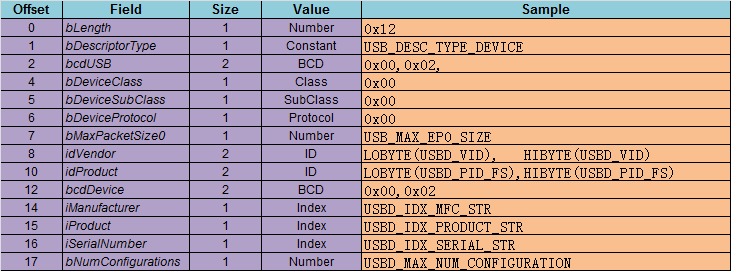
这个分析起来有点麻烦
/* USB HID device Configuration Descriptor */

__ALIGN_BEGIN static uint8_t USBD_HID_CfgDesc[USB_HID_CONFIG_DESC_SIZ]  __ALIGN_END =

{

  0x09, /* bLength: Configuration Descriptor size */

  USB_DESC_TYPE_CONFIGURATION, /* bDescriptorType: Configuration */

  USB_HID_CONFIG_DESC_SIZ,

  /* wTotalLength: Bytes returned */

  0x00,

  0x01,         /*bNumInterfaces: 1 interface*/

  0x01,         /*bConfigurationValue: Configuration value*/

  0x00,         /*iConfiguration: Index of string descriptor describing

  the configuration*/

  0xE0,         /*bmAttributes: bus powered and Support Remote Wake-up */

  0x32,         /*MaxPower 100 mA: this current is used for detecting Vbus*/

  /************** Descriptor of Joystick Mouse interface ****************/

  /* 09 */

  0x09,         /*bLength: Interface Descriptor size*/

  USB_DESC_TYPE_INTERFACE,/*bDescriptorType: Interface descriptor type*/

  0x00,         /*bInterfaceNumber: Number of Interface*/

  0x00,         /*bAlternateSetting: Alternate setting*/

  0x01,         /*bNumEndpoints*/

  0x03,         /*bInterfaceClass: HID*/

  0x01,         /*bInterfaceSubClass : 1=BOOT, 0=no boot*/

  0x02,         /*nInterfaceProtocol : 0=none, 1=keyboard, 2=mouse*/

  ,            /*iInterface: Index of string descriptor*/

  /******************** Descriptor of Joystick Mouse HID ********************/

  /* 18 */

  0x09,         /*bLength: HID Descriptor size*/

  HID_DESCRIPTOR_TYPE, /*bDescriptorType: HID*/

  0x11,         /*bcdHID: HID Class Spec release number*/

  0x01,

  0x00,         /*bCountryCode: Hardware target country*/

  0x01,         /*bNumDescriptors: Number of HID class descriptors to follow*/

  0x22,         /*bDescriptorType*/

  HID_MOUSE_REPORT_DESC_SIZE,/*wItemLength: Total length of Report descriptor*/

  0x00,

  /******************** Descriptor of Mouse endpoint ********************/

  /* 27 */

  0x07,          /*bLength: Endpoint Descriptor size*/

  USB_DESC_TYPE_ENDPOINT, /*bDescriptorType:*/

  HID_EPIN_ADDR,     /*bEndpointAddress: Endpoint Address (IN)*/

  0x03,          /*bmAttributes: Interrupt endpoint*/

  HID_EPIN_SIZE, /*wMaxPacketSize: 4 Byte max */

  0x00,

  HID_FS_BINTERVAL,          /*bInterval: Polling Interval (10 ms)*/

  /* 34 */

} ;
Table 9-10. Standard Configuration Descriptor
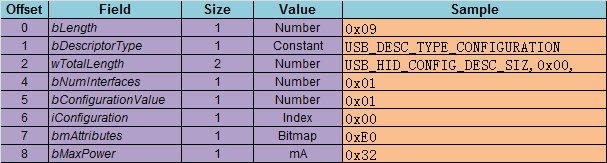
Table 9-12. Standard Interface Descriptor
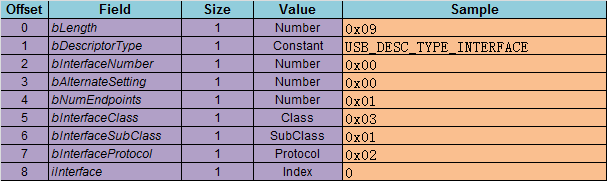
这边需要参考<Device Class Definition for Human Interface Devices (HID) Version 1.11 > "6.2.1 HID Descriptor"

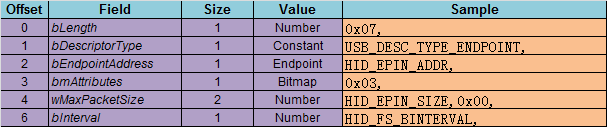
Table 9-13. Standard Endpoint Descriptor
现在利用软件直接看这个上面的信息
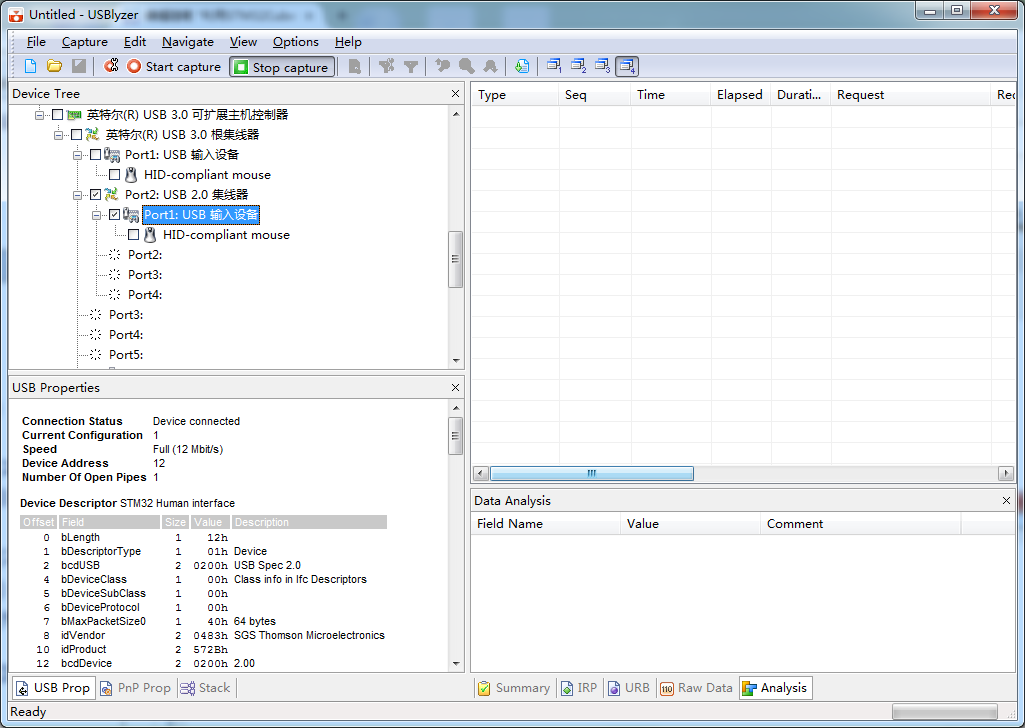
| Connection Status | Device connected |
| Current Configuration | 1 |
| Speed | Full (12 Mbit/s) |
| Device Address | 12 |
| Number Of Open Pipes | 1 |
| Offset | Field | Size | Value | Description |
|---|---|---|---|---|
| 0 | bLength | 1 | 12h | |
| 1 | bDescriptorType | 1 | 01h | Device |
| 2 | bcdUSB | 2 | 0200h | USB Spec 2.0 |
| 4 | bDeviceClass | 1 | 00h | Class info in Ifc Descriptors |
| 5 | bDeviceSubClass | 1 | 00h | |
| 6 | bDeviceProtocol | 1 | 00h | |
| 7 | bMaxPacketSize0 | 1 | 40h | 64 bytes |
| 8 | idVendor | 2 | 0483h | SGS Thomson Microelectronics |
| 10 | idProduct | 2 | 572Bh | |
| 12 | bcdDevice | 2 | 0200h | 2.00 |
| 14 | iManufacturer | 1 | 01h | "STMicroelectronics" |
| 15 | iProduct | 1 | 02h | "STM32 Human interface" |
| 16 | iSerialNumber | 1 | 03h | "00000000001A" |
| 17 | bNumConfigurations | 1 | 01h |
| Offset | Field | Size | Value | Description |
|---|---|---|---|---|
| 0 | bLength | 1 | 09h | |
| 1 | bDescriptorType | 1 | 02h | Configuration |
| 2 | wTotalLength | 2 | 0022h | |
| 4 | bNumInterfaces | 1 | 01h | |
| 5 | bConfigurationValue | 1 | 01h | |
| 6 | iConfiguration | 1 | 00h | |
| 7 | bmAttributes | 1 | E0h | Self Powered, Remote Wakeup |
| 4..0: Reserved | ...00000 | |||
| 5: Remote Wakeup | ..1..... | Yes | ||
| 6: Self Powered | .1...... | Yes | ||
| 7: Reserved (set to one) (bus-powered for 1.0) |
1....... | |||
| 8 | bMaxPower | 1 | 32h | 100 mA |
1 Endpoint
| Offset | Field | Size | Value | Description |
|---|---|---|---|---|
| 0 | bLength | 1 | 09h | |
| 1 | bDescriptorType | 1 | 04h | Interface |
| 2 | bInterfaceNumber | 1 | 00h | |
| 3 | bAlternateSetting | 1 | 00h | |
| 4 | bNumEndpoints | 1 | 01h | |
| 5 | bInterfaceClass | 1 | 03h | HID |
| 6 | bInterfaceSubClass | 1 | 01h | Boot Interface |
| 7 | bInterfaceProtocol | 1 | 02h | Mouse |
| 8 | iInterface | 1 | 00h |
| Offset | Field | Size | Value | Description |
|---|---|---|---|---|
| 0 | bLength | 1 | 09h | |
| 1 | bDescriptorType | 1 | 21h | HID |
| 2 | bcdHID | 2 | 0111h | 1.11 |
| 4 | bCountryCode | 1 | 00h | |
| 5 | bNumDescriptors | 1 | 01h | |
| 6 | bDescriptorType | 1 | 22h | Report |
| 7 | wDescriptorLength | 2 | 004Ah | 74 bytes |
Interrupt, 10 ms
| Offset | Field | Size | Value | Description |
|---|---|---|---|---|
| 0 | bLength | 1 | 07h | |
| 1 | bDescriptorType | 1 | 05h | Endpoint |
| 2 | bEndpointAddress | 1 | 81h | 1 In |
| 3 | bmAttributes | 1 | 03h | Interrupt |
| 1..0: Transfer Type | ......11 | Interrupt | ||
| 7..2: Reserved | 000000.. | |||
| 4 | wMaxPacketSize | 2 | 0004h | 4 bytes |
| 6 | bInterval | 1 | 0Ah | 10 ms |
Descriptor Mouse
| Item Tag (Value) | Raw Data |
|---|---|
| Usage Page (Generic Desktop) | 05 01 |
| Usage (Mouse) | 09 02 |
| Collection (Application) | A1 01 |
| Usage (Pointer) | 09 01 |
| Collection (Physical) | A1 00 |
| Usage Page (Button) | 05 09 |
| Usage Minimum (Button 1) | 19 01 |
| Usage Maximum (Button 3) | 29 03 |
| Logical Minimum (0) | 15 00 |
| Logical Maximum (1) | 25 01 |
| Report Count (3) | 95 03 |
| Report Size (1) | 75 01 |
| Input (Data,Var,Abs,NWrp,Lin,Pref,NNul,Bit) | 81 02 |
| Report Count (1) | 95 01 |
| Report Size (5) | 75 05 |
| Input (Cnst,Ary,Abs) | 81 01 |
| Usage Page (Generic Desktop) | 05 01 |
| Usage (X) | 09 30 |
| Usage (Y) | 09 31 |
| Usage (Wheel) | 09 38 |
| Logical Minimum (-127) | 15 81 |
| Logical Maximum (127) | 25 7F |
| Report Size (8) | 75 08 |
| Report Count (3) | 95 03 |
| Input (Data,Var,Rel,NWrp,Lin,Pref,NNul,Bit) | 81 06 |
| End Collection | C0 |
| Usage (Motion Wakeup) | 09 3C |
| Usage Page | 05 FF |
| Usage | 09 01 |
| Logical Minimum (0) | 15 00 |
| Logical Maximum (1) | 25 01 |
| Report Size (1) | 75 01 |
| Report Count (2) | 95 02 |
| Feature (Data,Var,Abs,NWrp,Lin,NPrf,NNul,NVol,Bit) |
B1 22 |
| Report Size (6) | 75 06 |
| Report Count (1) | 95 01 |
| Feature (Cnst,Ary,Abs,NWrp,Lin,Pref,NNul,NVol,Bit) |
B1 01 |
| End Collection | C0 |
利用STM32CubeMX来生成USB_HID_Mouse工程的更多相关文章
- 利用STM32CubeMX来生成USB_HID_Mouse工程【添加ADC】(1)
现在原来的基础上添加ADC的功能. 现在(利用STM32CubeMX来生成USB_HID_Mouse工程)基础上新增硬件 JoyStick Shield 游戏摇杆扩展板 与STM32F103C8的连接 ...
- 利用STM32CubeMX来生成USB_HID_Mouse工程【添加ADC】(2)【非dma和中断方式】
上回讲到怎么采集一路的adc的数据,这次我们来采集两路的数据. 现在直接修改原先的代码 /* Private variables ----------------------------------- ...
- 利用STM32CubeMX来生成USB_HID_host工程
修改时钟(备注这边使用25mhz的主晶振) 选择debug_level等级为3
- 试用bus hound来分析STM32CubeMX来生成USB_HID_Mouse工程
Bus Hound (x64). Complements of www.perisoft.net STM32_HID_mouse Device - Device ID (followed by the ...
- 利用STM32CubeMX之SPI
现在我们继续使用STM32CubeMX来生成SPI工程.我们的硬件平台还是我们熟悉的STM32F103C8开发板. 设置时钟树中的配置 现在打开SPI的设置 如果想修改管脚的名字可以红色框中进行修改, ...
- 利用STM32CubeMX生成HID双向通讯工程
使用开发板为正点原子ministm32 现在我们先使用HID descriptor Tool来生成我们需要的hid的 保存使用选择.H // D:\usb资料\HID\MSDEV\Projects\t ...
- 使用STM32CubeMX生成USB_HOST_HID工程[添加对CAPS_LOCK指示灯的控制][SetReport]
在之前(使用STM32CubeMX生成USB_HOST_HID工程)的基础上进行修改 在结合之前在pc上的测试 USB之HID类Set_Report Request[调试手记1] 测试代码如下: /* ...
- 使用STM32CubeMX生成RTC工程[闹钟中断2]
在上次使用STM32CubeMX生成RTC工程[闹钟中断]基础上实现周期间隔的闹钟 一些场合需要周期性的闹钟 现在为了方便设置每十秒来一次. 备注: 当然可以直接修改HAL库static HAL_St ...
- 利用Java动态生成 PDF 文档
利用Java动态生成 PDF 文档,则需要开源的API.首先我们先想象需求,在企业应用中,客户会提出一些复杂的需求,比如会针对具体的业务,构建比较典型的具备文档性质的内容,一般会导出PDF进行存档.那 ...
随机推荐
- JPanel添加键盘监听事件
因为在自己的游戏需求中谢了要用键盘控制飞机的移动,所以用到键盘监听事件,但是使用了JPanel之后添加了键盘监听事件,按相应的方向键飞机并没有反应.但是如果是为JFrame的内容面板加则会有反应. 为 ...
- redis(redis概念,运用场景,如何操作基本数据类型)
什么是redis:Nosql一种缓存数据库 redis可以干什么:redis可以减轻对数据库的请求压力如果不使用缓存:客服端->控制层->业务层->dao层使用缓存:客服端-> ...
- mysql监测工具
可视性是系统设计的最佳境界,MySQL 也不例外.一旦完成了 MySQL 环境的搭建.运行并调优,您千万不要认为已经万事大吉了. 数据库环境既会受到来自系统更改或流量负荷的影响,也会遇到例如流量高峰. ...
- [转][JS]修改链接中的参数
转自:https://blog.csdn.net/weixin_40845192/article/details/81561644 /** * url地址修改 * @param url 待修改url ...
- JVM -verbose参数详解(转)
原文 http://www.javaranger.com/archives/367 java -verbose[:class|gc|jni] 在输出设备上显示虚拟机运行信息. java -verbos ...
- SCCM2012 R2实战系列之四:初始化配置
在之前的文章中,我们已经完成了SCCM 2012 R2 独立主站点的部署.为了客户端代理软件的顺利安装和OSD操作系统的分发,我们需要配置组策略及DHCP服务.在本系列的第四部分,跟大家一起分享下如何 ...
- java中原生的发送http请求(无任何的jar包导入)
package com.teamsun.pay.wxpay.util; import java.io.BufferedReader; import java.io.IOException; impor ...
- 基于Boost的同步TCP通信
1:客户端 #include <iostream> #include <boost/asio.hpp> using namespace boost; using namespa ...
- Linux下Mysql自启动
如果你都是按照默认配置安装的那么只要按照如下步骤就可以了 1.cp /usr/local/mysql/support-files/mysql.server /etc/init.d/mysql 将服 ...
- Java - 25 Java 接口
Java 接口 接口(英文:Interface),在JAVA编程语言中是一个抽象类型,是抽象方法的集合,接口通常以interface来声明.一个类通过继承接口的方式,从而来继承接口的抽象方法. 接口并 ...