
WebGL模型拾取——射线法二
这篇文章是对射线法raycaster的补充,上一篇文章主要讲的是raycaster射线法拾取模型的原理,而这篇文章着重讲使用射线法要注意的地方。首先我们来看下图。
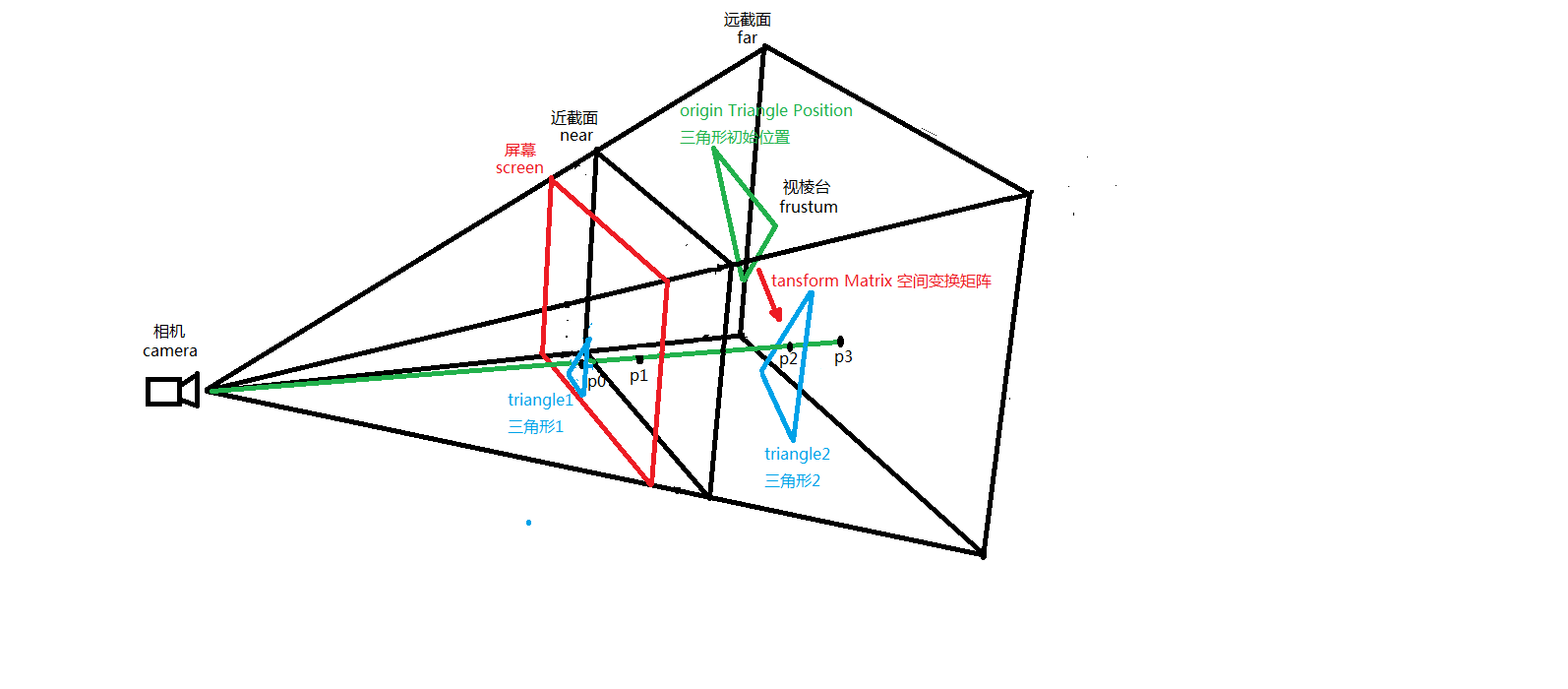
我来解释一下上图中的originTriangle,这就是Triangle2三角形第一次绘制在空间中的位置,而Triangle2当前的位置是经过一系列空间变换而来的(这些位置姿态变换大多是由用户鼠标交互产生),变换矩阵就是transformMatrix。这下就引出了本文第一个重点,那就是做raycaster的时候要保证线段碰撞模型的时候一定是模型当前所处的空间位置,即已经做过transformMatrix空间(姿态,位置)变换,否则线段如果和模型之前的初始化位置求交显然没有交点,就拾取失败了。这就是做raycaster要注意的第一个重点,即射线一定要和空间变换后的模型求交。
接下来我们再看一张图,请看下图。
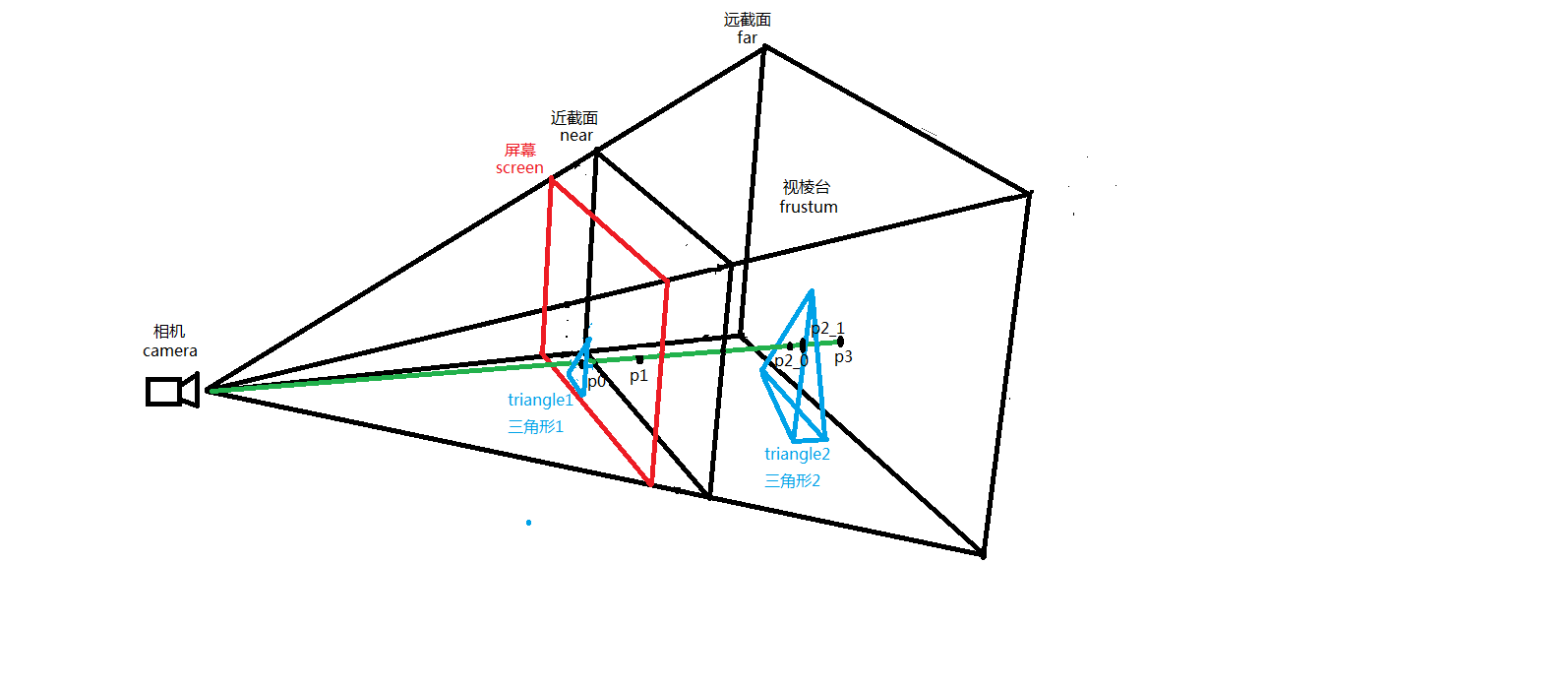
我们看到,射线和模型有2个交点,P2_0和P2_1,分别交四面体的前面于P2_0和交四面体的后面于P2_1。这就是我们要着重关注的本文第二个重点,即raycaster射线拾取模型过程中射线与单个模型有多个交点的问题。处理这个问题其实有很多办法,这里我们采用最简单的方式,就是距离相机(人眼)位置近者胜出的策略。计算交点的算法上一篇文章已经提到,这里不再赘述,但要说明的是,我们计算的每一个面在数据结构中都有自身模型父节点geometry,如果像上图一个四面体的geometry和射线产生了多个面相交,那我们就认为鼠标选中的是该模型geometry离相机(camera)(人眼)最近的交面上的交点。
对于上面2点的叙述,配合部分代码展示,是geometry空间变换的,代码如下。
Object.assign(CubeSection.prototype, {

    //重载,每一帧同步数据

    sync: function () {

        if(this._mode === "face") {//根据剖切模式管理鼠标拖拽逻辑

            if (this._selectFace) {

                let camera = this._viewer.getMainCamera();

                let last = this._mousePoints.getLast();

                let lastX = camera.getNormalizedX(last[]);

                let lastY = camera.getNormalizedY(last[]);

                let current = this._mousePoints.getCurrent();

                let currentX = camera.getNormalizedX(current[]);

                let currentY = camera.getNormalizedY(current[]);

                this._mousePoints.sync();

                let deltaX = currentX - lastX;

                let deltaY = currentY - lastY;

                if (Math.abs(deltaX) < Algorithm.EPSILON && Math.abs(deltaY) < Algorithm.EPSILON)

                    return;

                //如果面被选中,并且有移动量,需要进行剖切面移动处理

                let start = Vec3.MemoryPool.alloc();

                let end = Vec3.MemoryPool.alloc();

                camera.computeScreenToWorldNearFar(lastX, lastY, start, end, true);

                //获取起点与平面的交点

                let plane = this._cubeClip.getClipPlane(this._selectFace.getName());

                let planePt1 = Vec3.MemoryPool.alloc();

                if (Plane.intersectLine(planePt1, start, end, plane)) {

                    //将模型交点再转换到屏幕坐标上,主要为了获取z值给终点

                    let temppt = Vec3.MemoryPool.alloc();

                    camera.computeWorldToScreen(planePt1, temppt);

                    Vec3.set(temppt, currentX, currentY, temppt[]);

                    let planePt2 = Vec3.MemoryPool.alloc();

                    camera.computeScreenToWorld(temppt, planePt2);

                    Vec3.sub(temppt, planePt2, planePt1);

                    let dist = Vec3.dot(plane, temppt);

                    this.move(dist);

                    Vec3.MemoryPool.free(planePt2);

                    Vec3.MemoryPool.free(temppt);

                }

                Vec3.MemoryPool.free(planePt1);

                Vec3.MemoryPool.free(start);

                Vec3.MemoryPool.free(end);

            }

        } else if(this._mode === "translate"){

            if(this._selectAxis) {

                let camera = this._viewer.getMainCamera();

                let last = this._mousePoints.getLast();//前一帧鼠标的XY坐标

                let lastX = camera.getNormalizedX(last[]);

                let lastY = camera.getNormalizedY(last[]);

                let current = this._mousePoints.getCurrent();//目前帧鼠标的XY坐标

                let currentX = camera.getNormalizedX(current[]);

                let currentY = camera.getNormalizedY(current[]);

                this._mousePoints.sync();//继续下一帧同步鼠标XY坐标

                let deltaX = currentX - lastX;//X偏移量

                let deltaY = currentY - lastY;//Y偏移量

                if (Math.abs(deltaX) < Algorithm.EPSILON && Math.abs(deltaY) < Algorithm.EPSILON) {

                    //如果XY偏移量都为零,就直接返回,什么操作都不做

                    return;

                }

                //坐标系轴被选中,并且有偏移量,就要移动整个包围盒子

                let start = Vec3.MemoryPool.alloc();

                let end = Vec3.MemoryPool.alloc();

                //把屏幕上的XY坐标换算到视棱台near,far截面上的XY坐标

                camera.computeScreenToWorldNearFar(lastX, lastY, start, end, true);

                //当前pick的坐标轴

                let axis = this._selectAxis;

                //near-far线段截axis坐标轴的交点

                let intersectPoint1 = Vec3.MemoryPool.alloc();

                //射线碰撞

                let intersections = this._drawActor.linesegmentIntersect(start, end);//对场景中的所有物体进行线段碰撞检测

                //遍历intersections列表,按照离相机从远到近排列

                for (let i = ; i < intersections.length; i++) {

                    let geometry = intersections[i].getDrawable().getGeometry();

                    if (geometry && new String(geometry._name).substring(, ) === "axis") {

                        intersectPoint1 = intersections[i]._point;//获取到near-far线段和坐标轴的交点

                        break;

                    }

                }

                //将near-far和坐标轴的交点再转换到屏幕坐标上,主要为了获取z值给终点

                let screenPoint = Vec3.MemoryPool.alloc();

                camera.computeWorldToScreen(intersectPoint1, screenPoint);

                //screePoint(currentX, currentY, screenPoint.z)

                Vec3.set(screenPoint, currentX, currentY, screenPoint[]);

                //鼠标移动的第二个场景坐标系里的点坐标

                let intersectPoint2 = Vec3.MemoryPool.alloc();

                //把屏幕归一化坐标转化为场景世界坐标

                camera.computeScreenToWorld(screenPoint, intersectPoint2);

                Vec3.sub(screenPoint, intersectPoint2, intersectPoint1);

                let dist = ;

                if(this._selectAxis._name === "axisX"){

                    dist = screenPoint[];

                }else if(this._selectAxis._name === "axisY"){

                    dist = screenPoint[];

                }else if(this._selectAxis._name === "axisZ"){

                    dist = screenPoint[];

                }

                this.move(dist);

                //析构向量

                Vec3.MemoryPool.free(intersectPoint1);

                Vec3.MemoryPool.free(intersectPoint2);

                Vec3.MemoryPool.free(screenPoint);

                Vec3.MemoryPool.free(start);

                Vec3.MemoryPool.free(end);

            }

        } else if(this._mode === "rotate"){

        } else if(this._mode === "scale"){

        }

    },
updateTransform: function () {

        let mat = this._cubeRoot.getMatrix();

        //重新计算坐标系模型的_matrix

        this._coordinateSection.update(this._clipBox, this._scale, this._translate, this._rotate, this._scaleMatrix, this._translateMatrix, this._rotateMatrix, mat);

        Mat4.fromScaling(this._scaleMatrix, this._scale);

        Mat4.fromTranslation(this._translateMatrix, this._translate);

        Mat4.fromQuat(this._rotateMatrix, this._rotate);

        Mat4.mul(mat, this._translateMatrix, this._rotateMatrix);

        Mat4.mul(mat, mat, this._scaleMatrix);

        //剖切面数据的变换

        this._cubeClip.resetClipPlane();

        this._cubeClip.transformClipPlane(mat);

        //包围盒子更新

        this._clipBox.setMaxValue(0.5, 0.5, 0.5);

        this._clipBox.setMinValue(-0.5, -0.5, -0.5);

        this._clipBox.transformMat4(mat);

    },
接下来是选取离相机近的交点,代码如下
//拾取物体,根据当前剖切模式选择intersections列表中的碰撞对象

    pick: function (x, y) {

        let camera = this._viewer.getMainCamera();

        let start = Vec3.MemoryPool.alloc();

        let end = Vec3.MemoryPool.alloc();

        camera.computeScreenToWorldNearFar(x, y, start, end);

        let intersections = this._drawActor.linesegmentIntersect(start, end);

        let l = intersections.length;

        if (l !== ) {

            switch(this._mode){

                case "face" : {//面剖切

                    let intersection = intersections[];//LineSegmentIntersection

                    let geometry = intersection.getDrawable().getGeometry();

                    if (geometry) {

                        this._selectFace = geometry;

                        this._selectFace.setStateSet(this._selectState);

                        return true;

                    }

                }

                case "translate" : {//平移剖切

                    //遍历intersections列表,按照离相机从远到近排列

                    for(var i=; i<l; i++){

                        let geometry = intersections[i].getDrawable().getGeometry();

                        if(geometry && new String(geometry._name).substring(, ) === "axis"){

                            this._selectAxis = geometry;

                            this._selectAxis.setStateSet(this._selectStateAxis);

                            break;

                        }

                    }

                    return true;

                }

                case "rotate" : {//旋转剖切

                    //遍历intersections列表,按照离相机从远到近排列

                    for(var i=; i<l; i++){

                        let geometry = intersections[i].getDrawable().getGeometry();

                        if(geometry && new String(geometry._name).substring(, ) === "face"){

                            this._selectAxisFace = geometry;

                            this._selectAxisFace.setStateSet(this._selectStateAxisFace);

                            break;

                        }

                    }

                    return true;

                }

                case "scale" : {//缩放剖切

                    //遍历intersections列表,按照离相机从远到近排列

                    for(var i=; i<l; i++){

                        let geometry = intersections[i].getDrawable().getGeometry();

                        if(geometry && new String(geometry._name).substring(, ) === "axis"){

                            this._selectAxis = geometry;

                            this._selectAxis.setStateSet(this._selectStateAxis);

                            break;

                        }

                    }

                    return true;

                }

            }

        }

        return false;

    },
其中intersections[]交点列表是按照离相机由远到近距离排序的,intersection[i]交点离相机距离比intersection[i+1]交点离相机距离要近。这就是我们采取的离相机近交点胜出原则。
好了,以上就是raycaster射线拾取模型要注意的地方,如有错误,希望读者斧正,欢迎诸位同学留言。如需转载本文,请注明出处:https://www.cnblogs.com/ccentry/p/9977490.html
WebGL模型拾取——射线法二的更多相关文章
- WebGL模型拾取——射线法
今天要把WebGL中一个非常重要的算法记录下来——raycaster射线法拾取模型.首先我们来了解一下为什么要做模型拾取,我们在做webgl场景交互的时候经常要选中场景中的某个模型,比如鼠标拖拽旋转, ...
- Away3D引擎学习笔记(三)模型拾取(翻译)
原文详见http://away3d.com/tutorials/Introduction_to_Mouse_Picking.本文若有翻译不对的地方,敬请指出. 本教程详细介绍了Away3D 4.x中鼠 ...
- 射线法(1190 - Sleepwalking )
题目:http://lightoj.com/volume_showproblem.php?problem=1190 参考链接:https://blog.csdn.net/gkingzheng/arti ...
- matlab练习程序(射线法判断点与多边形关系)
依然是计算几何. 射线法判断点与多边形关系原理如下: 从待判断点引出一条射线,射线与多边形相交,如果交点为偶数,则点不在多边形内,如果交点为奇数,则点在多边形内. 原理虽是这样,有些细节还是要注意一下 ...
- LightOj1190 - Sleepwalking(判断点与多边形的位置关系--射线法模板)
题目链接:http://lightoj.com/volume_showproblem.php?problem=1190 题意:给你一个多边形含有n个点:然后又m个查询,每次判断点(x, y)是否在多边 ...
- Codeforces 375C Circling Round Treasures - 最短路 - 射线法 - 位运算
You have a map as a rectangle table. Each cell of the table is either an obstacle, or a treasure wit ...
- Revit API射线法读取空间中相交的元素
Revit API提供根据射线来寻找经过的元素.方法是固定模式,没什么好说.关键代码:doc.FindReferencesWithContextByDirection(ptStart, (ptEnd ...
- 【BZOJ1294】[SCOI2009]围豆豆Bean 射线法+状压DP+SPFA
[BZOJ1294][SCOI2009]围豆豆Bean Description Input 第一行两个整数N和M,为矩阵的边长. 第二行一个整数D,为豆子的总个数. 第三行包含D个整数V1到VD,分别 ...
- SGU 124. Broken line 射线法 eps的精准运用,计算几何 难度:3
124. Broken line time limit per test: 0.25 sec. memory limit per test: 4096 KB There is a closed bro ...
随机推荐
- 如何在linux centos 环境下运行.exe文件
linux是不能运行window下的可执行文件的,必须借助于wine.百度了以下wine如下: Wine (“Wine Is Not an Emulator” 的递归缩写)是一个能够在多种 POS ...
- Security Software Engineer
Security Software Engineer Are you excited to be part of the VR revolution and work on cutting edge ...
- vs2008编译openssl,静态库/动态库,批处理
::前期准备准备工作::1,下载安装好ActivePerl,::2,下载Openssl源码::3,本机有安装vc::4,此例在vs2008(vc9),openssl-1.0.2o下完成 echo of ...
- digital ocean 内存不足时增加swap文件的方法
买了比较低配的digitalocean 云主机,在执行composer update的时候出现内存不足的问题,但是内存大小已经固定了,除非加钱,还有别的方法吗? 有,增加swap分区,这样就可以弥补内 ...
- 使用PhotoShop将视频转为gif格式
由于文档中不方便上传视频,尤其是一些短视频,将其制作成gif格式更便于浏览,刚好PhotoShop中有这种功能,笔者在这里分享一下. 在PS中打开需要转换格式的视频文件,选择文件选项导出中的导出为We ...
- Vue那些事儿之用visual stuido code编写vue报的错误Elements in iteration expect to have 'v-bind:key' directives.
当用vsc打开我们的vue代码时,在其他编辑器里面本来没有错误,到这个编辑器里面 v-for就出毛病了.如下图所示, 那是因为我们打开了对vue进行Eslint的检查. 搜索vetur.validat ...
- php输出日志
error_log('你要输出的信息', 3, 'E:\work\jiajiayue\Application\Api\Controller\1.txt');die; php error_log记录日志 ...
- 分析占用了大量CPU处理时间的java进程中的进程
分析占用了大量 CPU 处理时间的是Java 进程中哪个线程 下面是详细步骤: 1. 首先确定进程的 ID ,可以使用 jps -v 或者 top 命令直接查看 2. 查看该进程中哪个线程占用大量 C ...
- oracle查询2G以上的表
SELECT a.*, b.comments FROM (SELECT OWNER, SEGMENT_NAME, SEGMENT_TYPE, ...
- Kubernetes1.91(K8s)安装部署过程(六)--node节点部署
hi,everybody,我回来了,之前安装到flannel之后,文章一直没有更新,甚至不少小伙伴都来加qq询问是否继续更新了, 这里说明下原因,我在部署1.91node的时候的确出现了各种各样的问题 ...