
使用IIS实现反向代理
IIS的反向代理是通过ARR模块来完成的,ARR模块需要另外安装,而且只能通过Web PlatForm Installer安装。关于安装来源与步骤,帖子已有很多,不做描述。启用“Application Request Routing”功能以及简单设置URL Rewrite的步骤也不做描述,帖子很多,几乎是千篇一律的贴图,意义不大。在此只记录一些知识要点:
1、规则设置中的第一个步骤“匹配URL”,匹配来源仅仅是请求的完整URL中除去协议、主机头、端口号、querystring后剩下的那一部分:
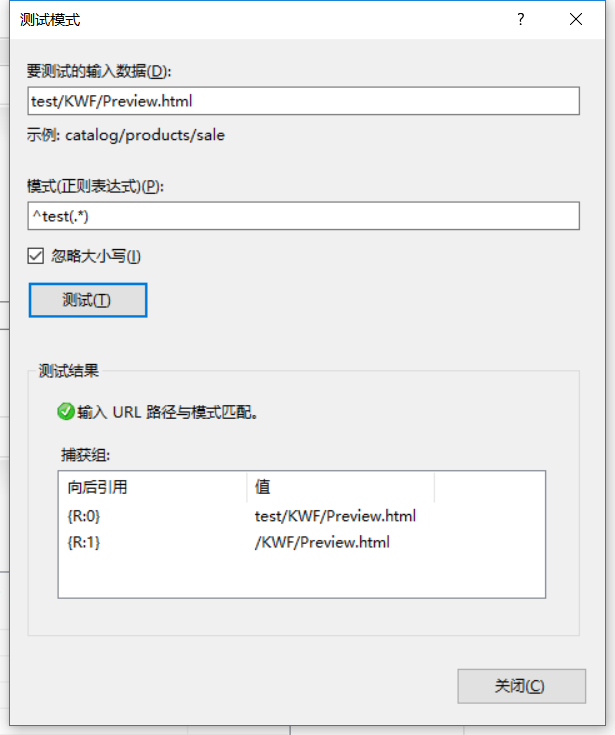
比如,预计浏览器的请求地址为:http://szh-it-2e02d/test/KWF/Preview.html?ticket=b037ec8c-6579-4e27-be43-dfc3e821c2d2&flowID=1278355,那么仅仅是”test/KWF/Preview.html“这一段会用于匹配测试。所产生的捕获组“{R:0}”“{R:1}”,即为正则表达式执行时匹配成功的块,数目因正则的不同而不同,将作为变量,可在后面的配置中引用。
2、“条件”这一块设置中,条件输入必须是可用的变量,而可以使用的变量有哪些呢?微软的帮助文档url-rewrite-module-configuration-reference一文已经列举得很清楚:
For an HTTP URL in this form: http(s)://<host>:<port>/<path>?<querystring>
- The <path> is matched against the pattern of the rule.
- The <querystring> is available in the server variable called QUERY_STRING and can be accessed by using a condition within a rule.
- The <host> is available in the server variable HTTP_HOST and can be accessed by using a condition within a rule.
- The <port> is available in the server variable SERVER_PORT and can be accessed by using a condition within a rule.
- Server variables SERVER_PORT_SECURE and HTTPS can be used to determine if a secure connection was used. These server variables can be accessed by using a condition within a rule.
- The server variable REQUEST_URI can be used to access the entire requested URL path, including the query string.
每一条规则,可以设置零到若干个条件,只有满足步骤1中的URL模式匹配时,才会进入步骤2的“条件”验证,只有满足条件验证,才会进入后续的处理。如果设置了条件,那么也会产生一些变量值,形如{C:0}{C:1},可在后续中使用。
界面上的条件设置只有按正则匹配这一种方式,实际上还有另外两种,但不支持可视化操作,需要手工编写配置文件。
- IsFile – This match type is used to determine whether the input string contains a physical path to a file on a file system. If a condition input string is not specified, the URL Rewrite Module uses the physical path of the requested file as a default value for the condition input. This match type can be used only for distributed rules.
- IsDirectory – This match type is used to determine whether the input string contains a physical path to a directory on a file system. If a condition input string is not specified, the URL Rewrite Module uses the physical path of the requested file as a default value for the condition input. This match type can be used only for distributed rules.
3、服务器变量。这一步可以自由添加一些变量值,也可以修改变量值,如:期望把端口从80转到81,可以做如下配置:
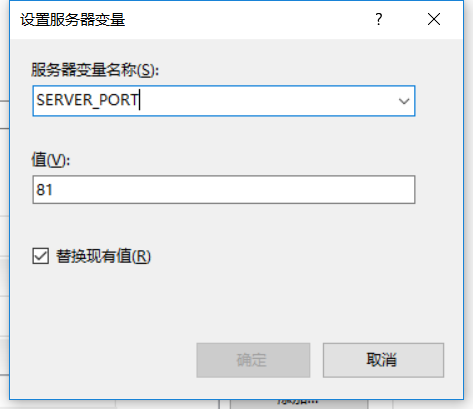
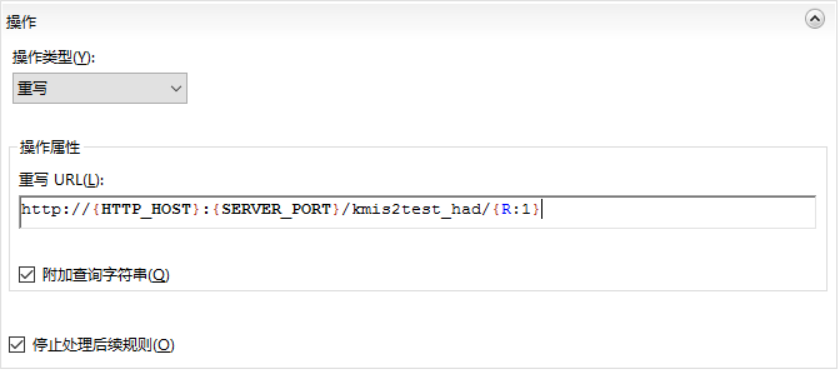
4、操作。这一步骤里首先要选择操作类型,如果是要做反向代理,那么应该选择“重写”这一种类型。重写的URL中,可以使用变量、常量来描述,比如:
5、很重要也是很有用的一点,使用反向代理时,客户端(浏览器)只需要能够访问反向代理服务器即可,与代理后的目标服务器是不产生直接访问的,代理充当了一个请求转发的作用。这一点已做验证。
使用IIS实现反向代理的更多相关文章
- windows利用iis配置反向代理实现ECS内网互通oss
IIS实现反向代理 新建两个站点,端口分别使用 80 和 81,在DNS中新建A记录,指向该计算机(10.4.34.41) 配置过程如下: 1.在Windows Server 2012 R2上 安装A ...
- SVN 通过IIS设置反向代理访问
原因 一个字,穷,没办法,只有一台机器 要当测试服务器还要做源码管理. 解决办法 通过IIS配置反向代理访问SVN,给SVN访问的HTTPS绑定上域名,就可以正常访问了. 1.修改SVN配置 把SVN ...
- IIS充当反向代理转发请求到Kestrel
接着上篇博文为ASP.NetCore程序启用SSL的code,这篇将介绍如何用IIS充当反向代理的角色转发请求到Kestrel服务器 介绍 与ASP.NET不同,ASP.netCore使用的是自托管w ...
- iis配置反向代理oss
windows利用iis配置反向代理实现ECS内网互通oss IIS实现反向代理 新建两个站点,端口分别使用 80 和 81,在DNS中新建A记录,指向该计算机(10.4.34.41) 配置过程如下: ...
- asp.net core 托管到windows服务,并用iis做反向代理
使用NSSM把.Net Core部署至 Windows 服务 为什么部署至Windows Services 在很多情况下,很少会把.Net Core项目部署至Windows服务中,特别是Asp.n ...
- 用IIS配置反向代理
http://my.oschina.net/tanyixiu/blog/123832 目标服务器:targetServer 配置反向代理的服务器:reveseProxServer 1.确定最终访问的网 ...
- IIS 7 反向代理 URL重写 转发动态请求
一.反向代理是什么 有一篇文章说的挺好的 Nginx 反向代理.负载均衡.页面缓存.URL重写及读写分离详解 http://www.server110.com/nginx/201402/5534.ht ...
- IIS实现反向代理
http://www.cnblogs.com/dreamer-fish/p/3911953.html C#实现: C#写的一个反向代理,可以缓存 https://www.oschina.net/cod ...
- IIS+nginx反向代理 负载均衡
本文没有过多的讲述,只讲述重点地方.由这两个转自的文章进行中和 1.nginx+iis实现负载均衡(这篇文章主要是有第2篇文章的工具) 2.nginx+iis使用(这篇文章讲得很详细,配置文件直接复制 ...
随机推荐
- 【译】第六篇 Replication:合并复制-发布
本篇文章是SQL Server Replication系列的第六篇,详细内容请参考原文. 合并复制,类似于事务复制,包括一个发布服务器,一个分发服务器和一个或多个订阅服务器.每一个发布服务器上可以定义 ...
- 【译】第六篇 Integration Services:初级工作流管理
本篇文章是Integration Services系列的第六篇,详细内容请参考原文. 简介在前几篇文章中,我们关注使用增量加载方式加载数据.在本篇文章,我们将关注使用优先约束管理SSIS控制流中的工作 ...
- CSS line-height与行内框
一.line-height的定义 line-height,行高,是指文本行基线间的垂直距离. 1. 什么是基线? 一般而言,一个文本行一共有四条线,从上到下依次为顶线.中线.基线.底线:在英文中 ...
- Indepence Mode 备份 weblogic
一般不在administation server 停止这个模式 管理服务器挂了,不会影响其他服务器的运行 备份一个domain copy 一个 /bin 把启动的脚本做一个修改 里面的doma ...
- gcc编译选项【转】
转自:https://blog.csdn.net/rheostat/article/details/19811407 常用选项 -E:只进行预处理,不编译-S:只编译,不汇编-c:只编译.汇编,不链接 ...
- 从一份配置清单详解 Nginx 服务器配置
概述 在前面< Nginx 服务器开箱体验> 一文中我们从开箱到体验,感受了一下 Nginx 服务器的魅力.Nginx 是轻量级的高性能 Web 服务器,提供了诸如 HTTP 代理和反 ...
- ggplot2使用初探
ggplot2已经成为了R语言中数据可视化的同义词, 这是一个强大的工具, 可以帮助我们制作优良的图表, 创造出令人吃惊的图片, 下面我们一起学习(本博文参考了知乎问题如何使用 ggplot2中黄宝臣 ...
- node项目中用到的一些模块
1.http模块,用来搭建服务器 代码,简单服务器实现 var http = require('http'); http.createServer(function (request, respons ...
- OpenCV与Python之图像的读入与显示以及利用Numpy的图像转换
1:读入图像,显示图像与保存图像 代码: import cv2 img=cv2.imread('lena.jpg',cv2.IMREAD_COLOR) cv2.namedWindow('lena',c ...
- P1986 元旦晚会
一道可以用各种各样的办法做的(水)题 在这里就介绍两种做法 题意: 自己看看吧,很明显的意思,就是求前i个人最少有多少个话筒. 解法1:差分约束 设\(dis[i]\)表示前\(i\)个人最少有多少个 ...