
yum 报错:centos yum (28, 'Connection time-out') Trying other mirror.
问题:
在本地的虚拟机使用yum安装软件时,经常出现 centos yum (28, 'Connection time-out') Trying other mirror. 或下面的那样情况imeout on http://mirrors.aliyun.com/centos/6/os/x86_64/repodata/repomd.xml: (28, 'Connection time-out') Trying other mirror.
在centOs上安装软件时。提示超时,或链接不上的信息:

http://mirrors.aliyun.com/centos/6/os/x86_64/repodata/repomd.xml: [Errno 12] Timeout on http://mirrors.aliyun.com/centos/6/os/x86_64/repodata/repomd.xml: (28, 'Connection time-out')

Trying other mirror.

http://mirrors.aliyuncs.com/centos/6/os/x86_64/repodata/repomd.xml: [Errno 12] Timeout on http://mirrors.aliyuncs.com/centos/6/os/x86_64/repodata/repomd.xml: (28, 'Connection time-out')

Trying other mirror.

http://mirrors.cloud.aliyuncs.com/centos/6/os/x86_64/repodata/repomd.xml: [Errno 14] PYCURL ERROR 6 - "Couldn't resolve host 'mirrors.cloud.aliyuncs.com'"

Trying other mirror.

http://mirrors.aliyun.com/epel/6/x86_64/repodata/repomd.xml: [Errno 12] Timeout on http://mirrors.aliyun.com/epel/6/x86_64/repodata/repomd.xml: (28, 'Connection time-out')

Trying other mirror.
当你用排查ping 网络时发现又是通的,浏览器访问链接也是通的。这就奇怪了,为什么yum一安装就说超时报错。换了阿里,网易好几个源都是一个问题,注意了,这可能不是repo源的问题,而是你DNS解析设置的问题。
我们知道网卡的DNS设置是首先生效的 /etc/sysconfig/network-scripts/ifcfg-eth0 然后才是全局的DNS配置文件 /etc/resolv.conf
可能你都都习惯这样设置(在网卡上直接配置外网的DNS解析地址),这样设置在你的公网服务器(如VPS,云服务器等环境)是没有问题的,可当在本地环境(如:虚拟机,本地网络)时就会造成了我们yum安装超时报错。
下面的就是常见不靠谱的DNS配置,
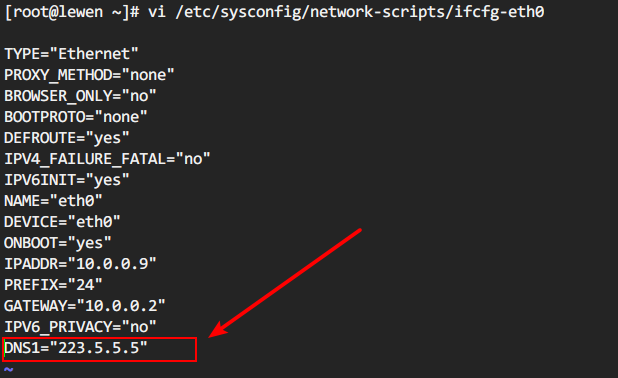

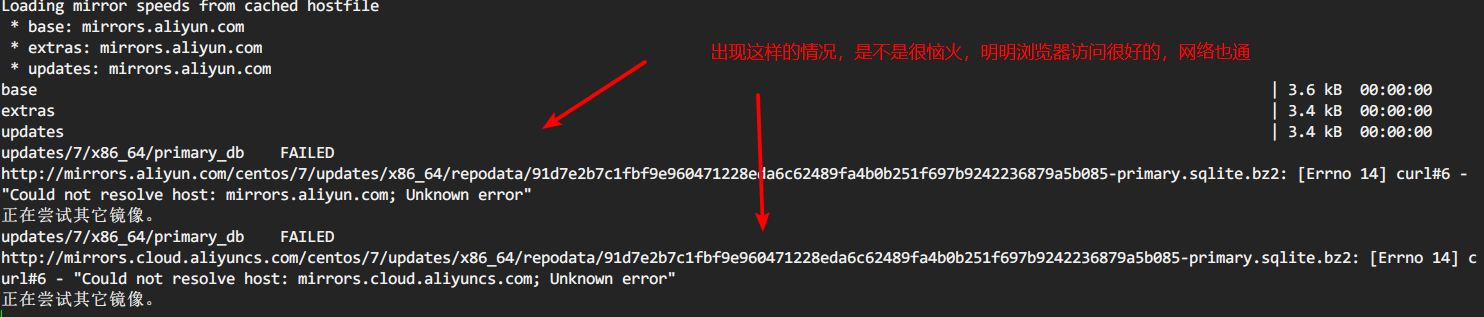
当你在你的虚拟机网卡设置成外网的DNS,网络好时没事,一不稳定,虚拟机网关在转发请求时,就容易掉,超时就会导致你安装软件失败。
而本地虚拟机DNS1设置为网关地址,请求通过网关出去会自己找本地的DNS服务器去解析,然后返回给本机。
解决方案:
建议本地虚拟机环境,设置DNS1为网关地址,DNS2 为 223.5.5.5 等其他公网DNS
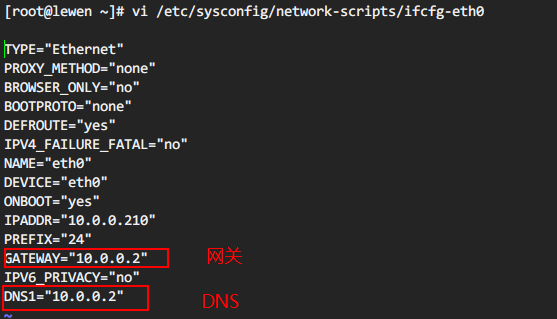
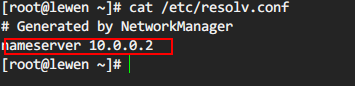
划线的地址要填你自己虚拟机的网关地址。
虚拟机的网关在网卡信息和相应软件的网络管理中可以找到。
我的本地虚拟机常用的DNS设置,可以参考
[root@web- ~]# cat /etc/sysconfig/network-scripts/ifcfg-eth0

TYPE="Ethernet"

BROWSER_ONLY="no"

BOOTPROTO="none"

DEFROUTE="yes"

DEVICE="eth0"

ONBOOT="yes"

IPADDR="10.0.0.6"

PREFIX=""

GATEWAY="10.0.0.2"

DNS1=10.0.0.2          # DNS1 设置为网关地址

DNS2=223.5.5.5         #DNS2设置为阿里DNS,或其他的如8.8.8.8

这样网卡的DNS设置就双保险了

[root@web- ~]# cat /etc/resolv.conf

# Generated by NetworkManager

nameserver 10.0.0.2

nameserver 8.8.8.8
换源
搞清楚自己的DNS设置后在设置repo源的问题。
注意上面提到的,自己网卡的DNS设置好后!! 然后再换源,不然换完还是超时报错,会很崩溃
这里是CentOS换国内阿里云yum源
1、备份
2、下载新的CentOS-Base.repo 到/etc/yum.repos.d/
CentOS

wget -O /etc/yum.repos.d/CentOS-Base.repo http://mirrors.aliyun.com/repo/Centos-5.repo

或者

curl -o /etc/yum.repos.d/CentOS-Base.repo http://mirrors.aliyun.com/repo/Centos-5.repo

CentOS

wget -O /etc/yum.repos.d/CentOS-Base.repo http://mirrors.aliyun.com/repo/Centos-6.repo

或者

curl -o /etc/yum.repos.d/CentOS-Base.repo http://mirrors.aliyun.com/repo/Centos-6.repo

CentOS

wget -O /etc/yum.repos.d/CentOS-Base.repo http://mirrors.aliyun.com/repo/Centos-7.repo

或者

curl -o /etc/yum.repos.d/CentOS-Base.repo http://mirrors.aliyun.com/repo/Centos-7.repo
3、之后运行yum makecache生成缓存
yum 报错:centos yum (28, 'Connection time-out') Trying other mirror.的更多相关文章
- yum报错 , yum相关配置信息,yum重装
docker源的问题 yum有很多错,比如网络问题,dns问题,timeout 错,还有不知道什么错误 网上有很多,网络问题,dns问题,但是我ping www.baidu.com通,所以不是这个问题 ...
- centOS下yum报错
CentOS下yum报错 备注:当我们在CentOS下使用yum命令的时候,会报一些错误,一下是我总结的几个解决问题的方法.(保证自己的服务器可以上网) 一.关于Loaded plugins: fas ...
- yum报错: Error: Cannot retrieve metalink for repository: epel. Please verify its path and try again
在Centos 5.x或6.x上安装RHEL EPEL Repo repository,资源库,源的意思.RHEL EPEL(Extra Packages for Enterprise Linux) ...
- 运行yum报错Error: Cannot retrieve metalink for reposit
http://www.netpc.com.cn/593.html 运行yum报错Error: Cannot retrieve metalink for reposit 今天给Centos通过rpm - ...
- 转:运行yum报错Error: Cannot retrieve metalink for reposit
http://www.netpc.com.cn/593.html 运行yum报错Error: Cannot retrieve metalink for repository: epel. Please ...
- rhel yum报错
用yum报错 http://mirrors.aliyun.com/centos/%24releasever/addons/x86_64/repodata/repomd.xml: [Errno 12] ...
- yum报错:Error: Multilib version problems found. This often means that the root
使用yum安装一些依赖库报错: yum -y install gcc gcc-c++ pcre pcre-devel zlib zlib-devel openssl openssl-devel 错误信 ...
- 解决yum 不能更新问题 :yum 报错Loaded plugins: fastestmirror, refresh-packagekit, security
2018-07-02 21:43:13 Yum报错 [root@db yum.repos.d]# yum makecache Loaded plugins: fastestmirror, ...
- Centos7.0安装python2.7后yum报错
yum报错: vi /usr/libexec/urlgrabber-ext-down 把头部的Python改成和/usr/bin/yum中一样的
- yum报错File "/usr/bin/yum", line 30 except KeyboardInterrupt, e:
原因:学python的时候,把centos7自带的python2.7改成了python3.6.2.而yum使用的是python2,所以会出现yum报错. 解决方法: 在文件/usr/bin/yum./ ...
随机推荐
- style css
Title 语文 用户名 用户名 数学 英语 <!DOCTYPE html><html lang="en"><head> <meta ch ...
- check_http检查http服务
选 项 说 明 -H, --hostname=ADDRESS 主机名或域名 -I, --IP-address=ADDRESS server的IP地址,用于在不能DNS的情况下 -p, --port=I ...
- struts2标签类别
要在jsp中使用Struts2的标志,先要指明标志的引入.通过jsp的代码的顶部加入以下的代码: <%@taglib prefix="s" uri="/struts ...
- SVN服务器端的安装和配置
第2章 SVN 的下载与安装 服务器端的安装和配置 所有的开发人员用自己的账号登录进来就可以拥有对仓库里面的所有文件的读和写的权限 创建用户
- PS切图导出代码后出现的图片布局散乱的解决方法——table布局
前言: 一般来说,大部分美工PS切图后导出的都是使用PS默认的table布局的页面,出现最多的异常是上传代码,替换图片后,发现图片布局散乱,完全不是想要的效果.轻微的是浏览器不兼容,只有部分浏览器可以 ...
- python之socket运用之执行命令
服务端的代码 import socket import subprocess HOST = "127.0.0.1" PORT = 5001 ip_bind = (HOST,PORT ...
- XAMPP下apache部署网站,多个虚拟机(空间)配置
之 前在 Mac 下一直使用 MAMP 搭建本地 php 环境,因为其强大的组合配置以及方便的 UI 操作.因为公司的电脑是 Windows 的,有时候需要搭建 php 环境来调试一些小东西方便自己 ...
- [leetcode]381. Insert Delete GetRandom O(1) - Duplicates allowed常数时间插入删除取随机值
Design a data structure that supports all following operations in average O(1) time. Note: Duplicate ...
- [leetcode]636. Exclusive Time of Functions函数独占时间
Given the running logs of n functions that are executed in a nonpreemptive single threaded CPU, find ...
- springboot的yaml基础语法与取值,配置类,配置文件加载优先级
1.基本语法k:(空格)v:表示一对键值对(一个空格必须有):以空格的缩进来控制层级关系:只要是左对齐的一列数据,都是同一个层级的属性和值也是大小写敏感: server: port: 8081 pat ...