
Android开发学习之Activity的简介
1.Activity的概念介绍
Activity是Android组件中最基本也是最常用的一种组件,在一个Android应用中,一个Activity通常就是一个单独的屏幕。每一个Activity都被实现为一个独立的类,并且继承于Activity这个基类。
activity类处于android.app包中,继承体系如下:
1.java.lang.Object
2.android.content.Context
3.android.app.ApplicationContext
4.android.app.Activity
2.Activity的创建
Activity提供了和用户交互的可视化界面。创建一个Activity一般是继承Activity(也可以是LisActivity,MapActivity等),覆盖Activity的onCreate( )方法,在该方法中调用setContentView( )方法来展示要显示的视图,调用findViewById( )方法实例化组件。注意Activity只有在清单文件中声明才能使用。
3.Activity的应用实例
3.1两个Activity之间的切换
要做到两个Activity之间的切换(也就是从一个Activity启动另一个Activity),可以使用startActivity( )方法或者startActivityForResult( ) (能够返回结果)。这两个方法要传递的参数是组件Intent。
下面的实例是MainActivity和SecondActivity之间的切换:
main.xml
- <?xml version="1.0" encoding="utf-8"?>
- <LinearLayout xmlns:android="http://schemas.android.com/apk/res/android"
- android:orientation="vertical"
- android:layout_width="fill_parent"
- android:layout_height="fill_parent"
- >
- <TextView
- android:layout_width="fill_parent"
- android:layout_height="wrap_content"
- android:text="@string/hello1"
- />
- <Button
- android:id="@+id/btn"
- android:layout_width="wrap_content"
- android:layout_height="wrap_content"
- android:text="转到SecondActivity"
- />
- </LinearLayout>
second.xml
- <?xml version="1.0" encoding="utf-8"?>
- <LinearLayout xmlns:android="http://schemas.android.com/apk/res/android"
- android:orientation="vertical"
- android:layout_width="fill_parent"
- android:layout_height="fill_parent"
- >
- <TextView
- android:layout_width="fill_parent"
- android:layout_height="wrap_content"
- android:text="@string/hello2"
- />
- <Button
- android:id="@+id/secondBtn"
- android:layout_width="wrap_content"
- android:layout_height="wrap_content"
- android:text="返回"
- />
- </LinearLayout>
MainActivity.java
- package com.android.test.activity;
- import android.app.Activity;
- import android.content.Intent;
- import android.os.Bundle;
- import android.view.View;
- import android.view.View.OnClickListener;
- import android.widget.Button;
- public class MainActivity extends Activity {
- private Button btn;
- @Override
- public void onCreate(Bundle savedInstanceState) {
- super.onCreate(savedInstanceState);
- setContentView(R.layout.main);
- btn = (Button)findViewById(R.id.btn);
- //响应按钮btn事件
- btn.setOnClickListener(new OnClickListener() {
- @Override
- public void onClick(View v) {
- //显示方式声明Intent,直接启动SecondActivity
- Intent it = new Intent(MainActivity.this,SecondActivity.class);
- //启动Activity
- startActivity(it);
- }
- });
- }
- }
SecondActivity.java
- package com.android.test.activity;
- import android.app.Activity;
- import android.content.Intent;
- import android.os.Bundle;
- import android.view.View;
- import android.view.View.OnClickListener;
- import android.widget.Button;
- public class SecondActivity extends Activity {
- private Button secondBtn;
- @Override
- protected void onCreate(Bundle savedInstanceState) {
- super.onCreate(savedInstanceState);
- setContentView(R.layout.second);
- secondBtn=(Button)findViewById(R.id.secondBtn);
- //响应按钮secondBtn事件
- secondBtn.setOnClickListener(new OnClickListener() {
- @Override
- public void onClick(View v) {
- //显示方式声明Intent,直接启动MainActivity
- Intent intent = new Intent(SecondActivity.this,MainActivity.class);
- //启动Activity
- startActivity(intent);
- }
- });
- }
- }
AndroidManifest.xml清单文件,16~18行为SecondActivity在清单文件里的声明
- <?xml version="1.0" encoding="utf-8"?>
- <manifest xmlns:android="http://schemas.android.com/apk/res/android"
- package="com.android.test.activity"
- android:versionCode="1"
- android:versionName="1.0">
- <uses-sdk android:minSdkVersion="10" />
- <application android:icon="@drawable/icon" android:label="@string/app_name">
- <activity android:name=".MainActivity"
- android:label="@string/app_name">
- <intent-filter>
- <action android:name="android.intent.action.MAIN" />
- <category android:name="android.intent.category.LAUNCHER" />
- </intent-filter>
- </activity>
- <activity android:name=".SecondActivity"
- android:label="@string/app_name">
- </activity>
- </application>
- </manifest>
效果图:


3.2.Activity之间传递数据
在Android开发中不同的Activity之间要传递数据,就需要用到对象Bundle,讲要传递的信息封装在该对象里面,并通过Intent对象传递到另一个Intent中。
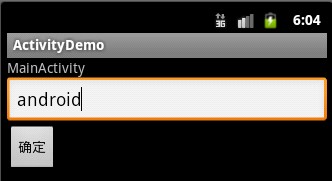
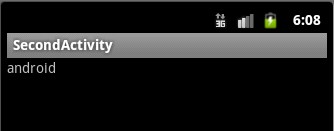
下面的实例在MainActivity中输入用户名数据,并将该用户名传递给SecondActivity:
main.xml
- <?xml version="1.0" encoding="utf-8"?>
- <LinearLayout xmlns:android="http://schemas.android.com/apk/res/android"
- android:orientation="vertical"
- android:layout_width="fill_parent"
- android:layout_height="fill_parent"
- >
- <TextView
- android:layout_width="fill_parent"
- android:layout_height="wrap_content"
- android:text="@string/hello"
- />
- <EditText
- android:id="@+id/txt"
- android:layout_width="fill_parent"
- android:layout_height="wrap_content"
- android:hint="请输入用户名"
- />
- <Button
- android:id="@+id/btn"
- android:layout_width="wrap_content"
- android:layout_height="wrap_content"
- android:text="确定"
- />
- </LinearLayout>
second.xml
- <?xml version="1.0" encoding="utf-8"?>
- <LinearLayout xmlns:android="http://schemas.android.com/apk/res/android"
- android:orientation="vertical"
- android:layout_width="fill_parent"
- android:layout_height="fill_parent"
- >
- <TextView
- android:id="@+id/secondTxt"
- android:layout_width="fill_parent"
- android:layout_height="wrap_content"
- />
- </LinearLayout>
strings.xml
- <?xml version="1.0" encoding="utf-8"?>
- <resources>
- <string name="hello">MainActivity</string>
- <string name="app_name">ActivityDemo</string>
- <string name="app_name1">SecondActivity</string>
- </resources>
MainActivity.java
- package com.android.test.activity;
- import android.app.Activity;
- import android.content.Intent;
- import android.os.Bundle;
- import android.view.View;
- import android.view.View.OnClickListener;
- import android.widget.Button;
- import android.widget.EditText;
- public class MainActivity extends Activity {
- private Button btn;
- private EditText txt;
- @Override
- public void onCreate(Bundle savedInstanceState) {
- super.onCreate(savedInstanceState);
- setContentView(R.layout.main);
- btn = (Button)findViewById(R.id.btn);
- txt=(EditText)findViewById(R.id.txt);
- //响应按钮btn事件
- btn.setOnClickListener(new OnClickListener() {
- @Override
- public void onClick(View v) {
- //获得用户名字符串
- String useName=txt.getText().toString();
- //声明Bundle对象
- Bundle data=new Bundle();
- //讲用户名信息添加到Bundle
- data.putString("useName", useName);
- //显示方式声明Intent,直接启动SecondActivity
- Intent it = new Intent(MainActivity.this,SecondActivity.class);
- //为Intent添加Bundle
- it.putExtras(data);
- //启动Activity
- startActivity(it);
- }
- });
- }
- }
SecondActivity.java
- package com.android.test.activity;
- import android.app.Activity;
- import android.content.Intent;
- import android.os.Bundle;
- import android.widget.TextView;
- public class SecondActivity extends Activity {
- private TextView secondTxt;
- @Override
- protected void onCreate(Bundle savedInstanceState) {
- super.onCreate(savedInstanceState);
- setContentView(R.layout.second);
- //获得Intent
- Intent it=getIntent();
- //从Intent中获得Bundle对象
- Bundle bundle=it.getExtras();
- //从Bundle中获得那么
- String name=bundle.getString("useName");
- secondTxt=(TextView)findViewById(R.id.secondTxt);
- secondTxt.setText(name);
- }
- }
AndroidManifest.xml清单文件
- <?xml version="1.0" encoding="utf-8"?>
- <manifest xmlns:android="http://schemas.android.com/apk/res/android"
- package="com.android.test.activity"
- android:versionCode="1"
- android:versionName="1.0">
- <uses-sdk android:minSdkVersion="10" />
- <application android:icon="@drawable/icon" android:label="@string/app_name">
- <activity android:name=".MainActivity"
- android:label="@string/app_name">
- <intent-filter>
- <action android:name="android.intent.action.MAIN" />
- <category android:name="android.intent.category.LAUNCHER" />
- </intent-filter>
- </activity>
- <activity android:name=".SecondActivity"
- android:label="@string/app_name1">
- </activity>
- </application>
- </manifest>
效果图:
Android开发学习之Activity的简介的更多相关文章
- android开发学习——关于activity 和 fragment在toolbar上设置menu菜单
在做一个项目,用的是Android Studio 系统的抽屉源码,但是随着页面的跳转,toolbar的title需要改变,toolbar上的menu菜单也需要改变,在网上找了好久,也尝试了很多,推荐给 ...
- Android开发学习之路--Activity之初体验
环境也搭建好了,android系统也基本了解了,那么接下来就可以开始学习android开发了,相信这么学下去肯定可以把android开发学习好的,再加上时而再温故下linux下的知识,看看androi ...
- Android开发学习路线的七个阶段和步骤
Android开发学习路线的七个阶段和步骤 Android学习参考路线 第一阶段:Java面向对象编程 1.Java基本数据类型与表达式,分支循环. 2.String和St ...
- Android开发学习之LauncherActivity开发启动的列表
Android开发学习之LauncherActivity开发启动的列表 创建项目:OtherActivity 项目运行结果: 建立主Activity:OtherActivity.java [jav ...
- Android开发学习之路--基于vitamio的视频播放器(二)
终于把该忙的事情都忙得差不多了,接下来又可以开始good good study,day day up了.在Android开发学习之路–基于vitamio的视频播放器(一)中,主要讲了播放器的界面的 ...
- Android开发学习之路-RecyclerView滑动删除和拖动排序
Android开发学习之路-RecyclerView使用初探 Android开发学习之路-RecyclerView的Item自定义动画及DefaultItemAnimator源码分析 Android开 ...
- Android开发学习路线图
Android开发学习方法: Android是一个比较庞大的体系,从底层的Linux内核到上层的应用层,各部分的内容跨度也比较大.因此,一个好的学习方法对我们学习Android开发很重要. 在此建议, ...
- android开发学习笔记000
使用书籍:<疯狂android讲义>——李刚著,2011年7月出版 虽然现在已2014,可我挑来跳去,还是以这本书开始我的android之旅吧. “疯狂源自梦想,技术成就辉煌.” 让我这个 ...
- Android开发学习总结(一)——搭建最新版本的Android开发环境
Android开发学习总结(一)——搭建最新版本的Android开发环境(转) 最近由于工作中要负责开发一款Android的App,之前都是做JavaWeb的开发,Android开发虽然有所了解,但是 ...
随机推荐
- 洛谷P1772 [ZJOI2006]物流运输 题解
题目描述 物流公司要把一批货物从码头A运到码头B.由于货物量比较大,需要n天才能运完.货物运输过程中一般要转停好几个码头.物流公司通常会设计一条固定的运输路线,以便对整个运输过程实施严格的管理和跟踪. ...
- C++的Vector用法
转自:http://www.cnblogs.com/wang7/archive/2012/04/27/2474138.html 在c++中,vector是一个十分有用的容器,下面对这个容器做一下总结. ...
- design-twitter
https://leetcode.com/problems/design-twitter/ class Twitter { unordered_map<int, set<int> & ...
- DialogPlus
项目地址:https://github.com/orhanobut/dialogplus Demo地址:https://github.com/baiqiantao/DialogPlusTest co ...
- JQuery缓冲加载图片插件lazyload.js的使用方法
lazyload.js是一个基于JQuery的插件,可以用来缓冲加载图片.如果一个网页很长并且有很多图片的话,下载图片就需要很多时间,那么就会影响整个网页的加载速度,而这款延迟加载插件,会通过你的滚动 ...
- Ionic 4 and the Lifecycle Hooks
原文: https://medium.com/@paulstelzer/ionic-4-and-the-lifecycle-hooks-4fe9eabb2864 ------------------- ...
- 【C/C++】:用C实现输出日期的阴历日子
前言 输出阴历一直是个老大难的问题.由于阴历日子没有规律.所以这里须要做的就是通过打表的算法做到输出阴历日子,可是非常多人都不太了解原理,我这里就给大家送上了一个福利.把自己做好的基于打表的阴历的日子 ...
- [Algorithm] Meeting hour optimization (Kanpsack problem) and Dynamic programming
For example we have array of meeting objects: const data = [ { name: }, { name: }, { name: }, { name ...
- 2015 -> 2016
2015年. 2015年前几个月,一直住在三亚,每天过着老年人般的生活. 每天吃饭睡觉看电视遛弯游泳.生活倒也满意. 4月份開始,从三亚一路开车回到上海,开开停停,最后享受了一次沿路的风景和满意. 5 ...
- (LeetCode 160)Intersection of Two Linked Lists
Write a program to find the node at which the intersection of two singly linked lists begins. For ex ...