
Xamarin+Prism开发详解六:DependencyService与IPlatformInitializer的关系
祝各位2017年事业辉煌!开年第一篇博客,继续探索Xamarin.Forms…
为什么我做Xamarin开发的时候中意于Prism.Forms框架?本章为你揭晓。
实例代码地址:https://github.com/NewBLife/XamarinDemo/tree/master/TextToSpeechDemo
DependencyService
1、简介
软件开发有一个原则叫【依赖倒置Dependence Inversion Principle 】
A.高层次的模块不应该依赖于低层次的模块,他们都应该依赖于抽象。
B.抽象不应该依赖于具体实现,具体实现应该依赖于抽象。
Xamarin.Forms在面对无法实现的平台特有功能时就是使用以上原则设计一个叫【DependencyService】的功能。DependencyService的目的就是让PCL共通代码可以调用与平台相关的功能,它使Xamarin.Forms能像原生应用一样做任何事情!
2、工作原理
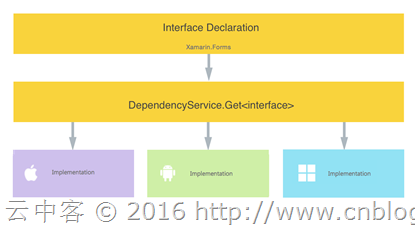
- 接口:定义功能接口在PCL类库或者共享类库
- 接口实现:各个平台实现接口功能
- 注册:各个平台实现接口的类库注册DependencyAttribute属性
- 调用:PCL类库或者共享类库调用DependencyService.Get<接口>()方法获取平台实例对象
稍微看看原代码了解Xamarin.Forms如何实现依赖注入
DependencyAttribute.cs文件,定义了程序集属性标签:
using System;

namespace Xamarin.Forms

{

    [AttributeUsage(AttributeTargets.Assembly, AllowMultiple = true)]

    public class DependencyAttribute : Attribute

    {

        public DependencyAttribute(Type implementorType)

        {

            Implementor = implementorType;

        }

        internal Type Implementor { get; private set; }

    }

}
DependencyService.cs文件的Get方法(实体对象默认是单例形式存在)。
static bool s_initialized;

        static readonly List<Type> DependencyTypes = new List<Type>();

        static readonly Dictionary<Type, DependencyData> DependencyImplementations = new Dictionary<Type, DependencyData>();

        public static T Get<T>(DependencyFetchTarget fetchTarget = DependencyFetchTarget.GlobalInstance) where T : class

        {

            if (!s_initialized)

                Initialize();

            Type targetType = typeof(T);

            if (!DependencyImplementations.ContainsKey(targetType))

            {

                Type implementor = FindImplementor(targetType);

                DependencyImplementations[targetType] = implementor != null ? new DependencyData { ImplementorType = implementor } : null;

            }

            DependencyData dependencyImplementation = DependencyImplementations[targetType];

            if (dependencyImplementation == null)

                return null;

            if (fetchTarget == DependencyFetchTarget.GlobalInstance)

            {

                if (dependencyImplementation.GlobalInstance == null)

                {

                    dependencyImplementation.GlobalInstance = Activator.CreateInstance(dependencyImplementation.ImplementorType);

                }

                return (T)dependencyImplementation.GlobalInstance;

            }

            return (T)Activator.CreateInstance(dependencyImplementation.ImplementorType);

        }
DependencyService.cs文件的Initialize方法,遍历所有程序集获取标记了DependencyAttribute属性的类型。这是不太好的地方,这样的做法性能会大打折扣,这也是为什么不推荐使用DependencyService的一个方面。
static void Initialize()

        {

            Assembly[] assemblies = Device.GetAssemblies();

            if (Registrar.ExtraAssemblies != null)

            {

                assemblies = assemblies.Union(Registrar.ExtraAssemblies).ToArray();

            }

            Type targetAttrType = typeof(DependencyAttribute);

            // Don't use LINQ for performance reasons

            // Naive implementation can easily take over a second to run

            foreach (Assembly assembly in assemblies)

            {

                Attribute[] attributes = assembly.GetCustomAttributes(targetAttrType).ToArray();

                if (attributes.Length == )

                    continue;

                foreach (DependencyAttribute attribute in attributes)

                {

                    if (!DependencyTypes.Contains(attribute.Implementor))

                    {

                        DependencyTypes.Add(attribute.Implementor);

                    }

                }

            }

            s_initialized = true;

        }
3,实例使用
使用TextToSpeechDemo(文本语音)实例讲解如何使用DependencyService。
项目结构:
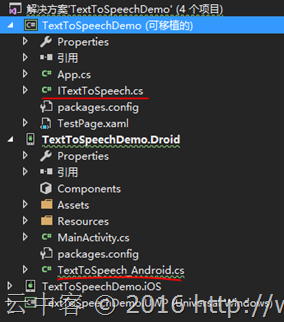
接口定义:
namespace TextToSpeechDemo

{

    public interface ITextToSpeech

    {

        void Speak(string text);

    }

}
Android平台实现ITextToSpeech接口:API定义
最重要的[assembly: Dependency(typeof(TextToSpeech_Android))] 这句注册Dependency属性。
using Android.Runtime;

using Android.Speech.Tts;

using System.Collections.Generic;

using TextToSpeechDemo.Droid;

using Xamarin.Forms;

[assembly: Dependency(typeof(TextToSpeech_Android))]

namespace TextToSpeechDemo.Droid

{

    public class TextToSpeech_Android : Java.Lang.Object, ITextToSpeech, TextToSpeech.IOnInitListener

    {

        TextToSpeech speaker;

        string toSpeak;

        public TextToSpeech_Android() { }

        public void Speak(string text)

        {

            var ctx = Forms.Context;

            toSpeak = text;

            if (speaker == null)

            {

                speaker = new TextToSpeech(ctx, this);

            }

            else

            {

                var p = new Dictionary<string, string>();

                speaker.Speak(toSpeak, QueueMode.Flush, p);

            }

        }

        public void OnInit([GeneratedEnum] OperationResult status)

        {

            if (status.Equals(OperationResult.Success))

            {

                System.Diagnostics.Debug.WriteLine("speaker init");

                var p = new Dictionary<string, string>();

                speaker.Speak(toSpeak, QueueMode.Flush, p);

            }

            else

            {

                System.Diagnostics.Debug.WriteLine("was quiet");

            }

        }

    }

}
iOS平台实现ITextToSpeech接口:
最重要的[assembly: Dependency(typeof(TextToSpeech_iOS))] 这句注册Dependency属性。
using AVFoundation;

using TextToSpeechDemo.iOS;

using Xamarin.Forms;

[assembly: Dependency(typeof(TextToSpeech_iOS))]

namespace TextToSpeechDemo.iOS

{

    class TextToSpeech_iOS : ITextToSpeech

    {

        public void Speak(string text)

        {

            var speechSynthesizer = new AVSpeechSynthesizer();

            var speechUtterance = new AVSpeechUtterance(text)

            {

                Rate = AVSpeechUtterance.MaximumSpeechRate / ,

                Voice = AVSpeechSynthesisVoice.FromLanguage("en-US"),

                Volume = 0.5f,

                PitchMultiplier = 1.0f

            };

            speechSynthesizer.SpeakUtterance(speechUtterance);

        }

    }

}
UWP平台实现ITextToSpeech接口:
最重要的[assembly: Dependency(typeof(TextToSpeech_UWP))] 这句注册Dependency属性。
using System;

using TextToSpeechDemo.UWP;

using Windows.Media.SpeechSynthesis;

using Windows.UI.Xaml.Controls;

using Xamarin.Forms;

[assembly: Dependency(typeof(TextToSpeech_UWP))]

namespace TextToSpeechDemo.UWP

{

    class TextToSpeech_UWP : ITextToSpeech

    {

        public async void Speak(string text)

        {

            MediaElement mediaElement = new MediaElement();

            var synth = new SpeechSynthesizer();

            var stream = await synth.SynthesizeTextToStreamAsync(text);

            mediaElement.SetSource(stream, stream.ContentType);

            mediaElement.Play();

        }

    }

}
调用平台特性的时候通过DependencyService.Get<T>()实现:
public void btnSpeak_Clicked(object sender, EventArgs args)

        {

            DependencyService.Get<ITextToSpeech>().Speak(txtData.Text.Trim());

        }
整体效果:
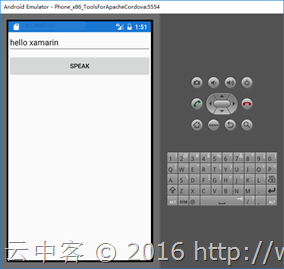
IPlatformInitializer
1、简介
IPlatformInitializer其实为Prism.Forms共通类库里面的一个接口,代码如下:
namespace Prism

{

    public interface IPlatformInitializer<T>

    {

        void RegisterTypes(T container);

    }

}
包含一个注册类型函数(注册实现了平台特性的类型)。至于为什么是泛型接口?这是为了支持多种IOC容器(AutoFac,Unity,DryIoc,Ninject等),主流为Unity。Unity的IPlatformInitializer代码如下:传入了Unity的容器类型IUnityContainer
using Microsoft.Practices.Unity;

namespace Prism.Unity

{

    public interface IPlatformInitializer : IPlatformInitializer<IUnityContainer>

    {

    }

}
2、工作原理
- 接口:定义功能接口在PCL类库或者共享类库
- 接口实现:各个平台实现接口功能
- 注册:各个平台实现IPlatformInitializer接口,并在RegisterTypes方法中将实现接口的类注册到IOC容器内
- 调用:ViewModel的构造函数添加接口为参数(Prism.Forms会自动从IOC容器加载)
调用RegisterTypes是在Prism.Forms共通类库里面PrismApplicationBase<T>的构造函数中:
protected PrismApplicationBase(IPlatformInitializer<T> initializer = null)

        {

            base.ModalPopping += PrismApplicationBase_ModalPopping;

            base.ModalPopped += PrismApplicationBase_ModalPopped;

            _platformInitializer = initializer;

            InitializeInternal();

        }

        /// <summary>

        /// Run the intialization process.

        /// </summary>

        void InitializeInternal()

        {

            ConfigureViewModelLocator();

            Initialize();

            OnInitialized();

        }

        /// <summary>

        /// Run the bootstrapper process.

        /// </summary>

        public virtual void Initialize()

        {

            Logger = CreateLogger();

            ModuleCatalog = CreateModuleCatalog();

            ConfigureModuleCatalog();

            Container = CreateContainer();

            ConfigureContainer();

            NavigationService = CreateNavigationService();

            RegisterTypes();

            _platformInitializer
?
.RegisterTypes(Container);

            InitializeModules();

        }
3,实例使用
使用PrismTextToSpeech(文本语音)实例讲解如何使用IPlatformInitializer。
项目结构:
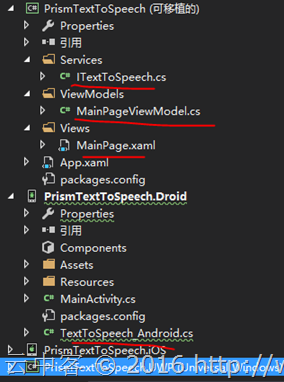
接口定义:
namespacePrismTextToSpeech.Services
{

    public interface ITextToSpeech

    {

        void Speak(string text);

    }

}
Android平台实现ITextToSpeech接口:API定义
与DependencyService的区别是没有Dependency属性。
using Android.Runtime;

using Android.Speech.Tts;

using PrismTextToSpeech.Services;

using System.Collections.Generic;

using Xamarin.Forms;

namespace PrismTextToSpeech.Droid

{

    public class TextToSpeech_Android : Java.Lang.Object, ITextToSpeech, TextToSpeech.IOnInitListener

    {

        TextToSpeech speaker;

        string toSpeak;

        public TextToSpeech_Android() { }

        public void Speak(string text)

        {

            var ctx = Forms.Context;

            toSpeak = text;

            if (speaker == null)

            {

                speaker = new TextToSpeech(ctx, this);

            }

            else

            {

                var p = new Dictionary<string, string>();

                speaker.Speak(toSpeak, QueueMode.Flush, p);

            }

        }

        public void OnInit([GeneratedEnum] OperationResult status)

        {

            if (status.Equals(OperationResult.Success))

            {

                System.Diagnostics.Debug.WriteLine("speaker init");

                var p = new Dictionary<string, string>();

                speaker.Speak(toSpeak, QueueMode.Flush, p);

            }

            else

            {

                System.Diagnostics.Debug.WriteLine("was quiet");

            }

        }

    }

}
注册类型到IOC容器:
using Android.App;

using Android.Content.PM;

using Android.OS;

using Microsoft.Practices.Unity;

using Prism.Unity;

using PrismTextToSpeech.Services;

namespace PrismTextToSpeech.Droid

{

    [Activity(Label = "PrismTextToSpeech", Icon = "@drawable/icon", MainLauncher = true, ConfigurationChanges = ConfigChanges.ScreenSize | ConfigChanges.Orientation)]

    public class MainActivity : global::Xamarin.Forms.Platform.Android.FormsAppCompatActivity

    {

        protected override void OnCreate(Bundle bundle)

        {

            TabLayoutResource = Resource.Layout.tabs;

            ToolbarResource = Resource.Layout.toolbar;

            base.OnCreate(bundle);

            global::Xamarin.Forms.Forms.Init(this, bundle);

            LoadApplication(new App(new AndroidInitializer()));

        }

    }

    public class AndroidInitializer : IPlatformInitializer

    {

        public void RegisterTypes(IUnityContainer container)

        {

            container.RegisterType
<ITextToSpeech, TextToSpeech_Android>
();

        }

    }

}
iOS与UWP的接口实现与DependencyService的一样,唯独就是没有Dependency属性,这里略过。
调用的时候:
using Prism.Commands;

using Prism.Mvvm;

using PrismTextToSpeech.Services;

namespace PrismTextToSpeech.ViewModels

{

    public class MainPageViewModel : BindableBase

    {

        private ITextToSpeech _textToSpeech;

        private string _speakText;

        public string SpeakText

        {

            get { return _speakText; }

            set

            {

                SetProperty(ref _speakText, value);

                SpeakCommand.RaiseCanExecuteChanged();

            }

        }

        public MainPageViewModel(ITextToSpeech textToSpeech)

        {

            _textToSpeech
=
 textToSpeech;

        }

        public DelegateCommand SpeakCommand => new DelegateCommand(

            () =>

            {

                _textToSpeech.Speak(SpeakText);

            },

            () => !string.IsNullOrEmpty(SpeakText)).ObservesProperty(() => this.SpeakText);

    }

}
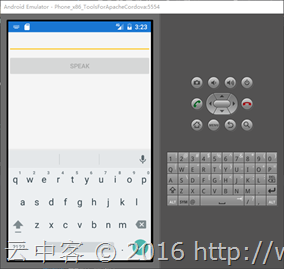
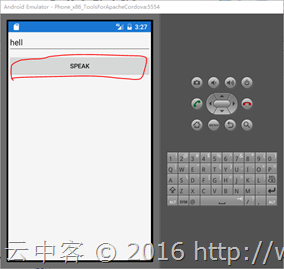
Prism就是这么简单,效果更佳:
DependencyAttribute+IPlatformInitializer
1、简介
这种方式是Prism为了兼容DepdencyService而创建的,及Prism内部封装了DependencyService。
namespace Prism.Services

{

    /// <summary>

    /// A service that provides acess to platform-specific implementations of a specified type

    /// </summary>

    public class DependencyService : IDependencyService

    {

        /// <summary>

        /// Returns a platform-specific implementation of a type registered with the Xamarin.Forms.DependencyService

        /// </summary>

        /// <typeparam name="T">The type of class to get</typeparam>

        /// <returns>The class instance</returns>

        public T Get<T>() where T : class

        {

            return Xamarin.Forms.DependencyService.Get<T>();

        }

    }

}
2、使用方法
- 接口:与DependencyService或者IPlatformInitializer实例一样
- 接口实现:与DependencyService实例一样
- 注册:与DependencyService实例一样,各个平台实现接口的类库注册DependencyAttribute属性
- 调用:与IPlatformInitializer实例一样,ViewModel的构造函数添加接口为参数(Prism.Forms会自动从IOC容器加载)
总结
DependencyService其实就是依赖注入的自我实现,而Prism的IPlatformInitializer则巧妙的借助Unity等容器达到同样的目的。不过从应用以后扩展角度也好,性能角度也好还是建议使用IOC容器技术(Prism创始人Brian Lagunas也是这么建议的)。特别是在使用Mvvm模式开发的时候,更加需要依赖IOC容器来管理ViewModel与Service,这也是我选择Prism做Xamarin开发的原因之一。
Xamarin+Prism开发详解六:DependencyService与IPlatformInitializer的关系的更多相关文章
- Xamarin+Prism开发详解七:Plugin开发与打包测试
有了上章[Xamarin+Prism开发详解六:DependencyService与IPlatformInitializer的关系]的基础,现在来理解Plugin开发就简单了. 本文实例代码地址:ht ...
- Xamarin+Prism开发详解四:简单Mac OS 虚拟机安装方法与Visual Studio for Mac 初体验
Mac OS 虚拟机安装方法 最近把自己的电脑升级了一下SSD固态硬盘,总算是有容量安装Mac 虚拟机了!经过心碎的安装探索,尝试了国内外的各种安装方法,最后在youtube上找到了一个好方法. 简单 ...
- Xamarin+Prism开发详解一:PCL跨平台类库与Profile的关系
在[Xamarin+Prism小试牛刀:定制跨平台Outlook邮箱应用]中提到过以下错误,不知道大伙还记得不: 无法安装程序包"Microsoft.Identity.Client 1.0. ...
- Xamarin+Prism开发详解三:Visual studio 2017 RC初体验
Visual studio 2017 RC出来一段时间了,最近有时间就想安装试试,随带分享一下安装使用体验. 1,卸载visual studio 2015 虽然可以同时安装visual studio ...
- Xamarin+Prism开发详解五:页面布局基础知识
说实在的研究Xamarin到现在,自己就没设计出一款好的UI,基本都在研究后台逻辑之类的!作为Xamarin爱好者,一些简单的页面布局知识还是必备的. 布局常见标签: StackLayout Abso ...
- Xamarin+Prism开发详解二:Xaml文件如何简单绑定Resources资源文件内容
我们知道在UWP里面有Resources文件xxx.resx,在Android里面有String.Xml文件等.那跨平台如何统一这些类别不一的资源文件以及Xaml设计文件如何绑定这些资源?应用支持多国 ...
- Xamarin+Prism开发详解八:自动化测试之NUnit实践
自动化测试很重要!很重要!以前多是手动测试,没有写过测试用例.这样的结果就是发现bug改了之后关联的其他功能又要从新测一遍.这样既浪费时间与成本,而且很无聊.之所以选择NUnit是公司需要,现在.ne ...
- 在【Xamarin+Prism开发详解三:Visual studio 2017 RC初体验】中分享了Visual studio 2017RC的大致情况,同时也发现大家对新的Visual Studio很是感兴趣。于是发时间深入研究了一下Visual Studio 2017RC 是不是和微软Connect()://2016上说得一样神。
总共列出了12点,耐心点慢慢看! 1,添加了不少[代码样式]的设置项目. 通过合理的设置每个人都能写出优美的代码,而且团队项目也可以达到统一代码风格. this首选项:可以设置[字段,属性,方法,事件 ...
- EasyPR--开发详解(6)SVM开发详解
在前面的几篇文章中,我们介绍了EasyPR中车牌定位模块的相关内容.本文开始分析车牌定位模块后续步骤的车牌判断模块.车牌判断模块是EasyPR中的基于机器学习模型的一个模块,这个模型就是作者前文中从机 ...
随机推荐
- Fis3前端工程化之项目实战
Fis3项目 项目目录结构: E:. │ .gitignore │ fis-conf.js │ index.html │ package.json │ README.md │ ├─material │ ...
- Javascript生成二维码(QR)
网络上已经有非常多的二维码编码和解码工具和代码,很多都是服务器端的,也就是说需要一台服务器才能提供二维码的生成.本着对服务器性能的考虑,这种小事情都让服务器去做,感觉对不住服务器,尤其是对于大流量的网 ...
- 再部署一个 instance 和 Local Network - 每天5分钟玩转 OpenStack(131)
上一节部署了 cirros-vm1 到 first_local_net,今天我们将再部署 cirros-vm2 到同一网络,并创建 second_local_net. 连接第二个 instance 到 ...
- 【原创分享·微信支付】 C# MVC 微信支付教程系列之扫码支付
微信支付教程系列之扫码支付 今天,我们来一起探讨一下这个微信扫码支付.何为扫码支付呢?这里面,扫的码就是二维码了,就是我们经常扫一扫的那种二维码图片,例如,我们自己添 ...
- 深入Java虚拟机--判断对象存活状态
程序计数器,虚拟机栈和本地方法栈 首先我们先来看下垃圾回收中不会管理到的内存区域,在Java虚拟机的运行时数据区我们可以看到,程序计数器,虚拟机栈,本地方法栈这三个地方是比较特别的.这个三个部分的特点 ...
- AbpZero--2.如何启动
1.直接启动 VS中直接启动 2.IIS站点 IIS中配置一个站点来启动(推荐) 3.登录 系统默认创建2个用户 默认用户名:admin 密码:123qwe 租户:Default 默认用户名:adm ...
- Android SDK 在线更新镜像服务器资源
本文转自:http://blog.kuoruan.com/24.html.感谢原作者. 什么是Android SDK SDK:(software development kit)软件开发工具包.被软件 ...
- 程序员必须要知道的Hadoop的一些事实
程序员必须要知道的Hadoop的一些事实.现如今,Apache Hadoop已经无人不知无人不晓.当年雅虎搜索工程师Doug Cutting开发出这个用以创建分布式计算机环境的开源软...... 1: ...
- NodeJs支付宝移动支付签名及验签
非常感谢 :http://www.jianshu.com/p/8513e995ff3a?utm_campaign=hugo&utm_medium=reader_share&utm_co ...
- Maven仓库搭建和配置
maven在本地搭建仓库的实际需求maven在项目构建过程需要下载一些必要的软件包,这些默认的下载链接都是访问maven的远程中央仓库Central Repo.如果项目中的成员,每次第一次构建的时候都 ...