
转载 ---> UITableViewCell的分割线
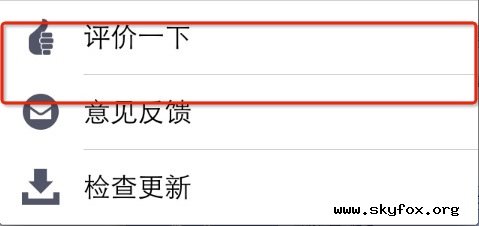
解决方法:
1,手写代码控制
|
1
|
self.tableView.separatorInset = UIEdgeInsetsMake(0, 0, 0, 0);
|
|
1
2
3
4
|
但是在iOS7之前是没有这个设置,所以要加下判断。以免程序在iOS7之前的环境下运行崩溃。
if ([[[UIDevice currentDevice] systemVersion] floatValue] >= 7) {
self.tableView.separatorInset = UIEdgeInsetsMake(0, 0, 0, 0);
}
|
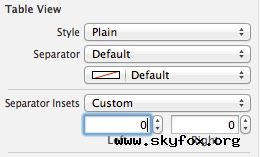
2,nib,通过下图把Separator Insets的模式改为Custom,并且把Left的15改为0
|
1
2
3
4
5
6
7
8
9
10
11
12
13
14
15
16
17
18
19
20
|
-(void)viewDidLayoutSubviews {
if ([self.mytableview respondsToSelector:@selector(setSeparatorInset:)]) {
[self.mytableview setSeparatorInset:UIEdgeInsetsZero];
}
if ([self.mytableview respondsToSelector:@selector(setLayoutMargins:)]) {
[self.mytableview setLayoutMargins:UIEdgeInsetsZero];
}
}
-(void)tableView:(UITableView *)tableView willDisplayCell:(UITableViewCell *)cell forRowAtIndexPath:(NSIndexPath *)indexPat{
if ([cell respondsToSelector:@selector(setLayoutMargins:)]) {
[cell setLayoutMargins:UIEdgeInsetsZero];
}
if ([cell respondsToSelector:@selector(setSeparatorInset:)]){
[cell setSeparatorInset:UIEdgeInsetsZero];
}
}
|
方法2:
使用UIAppearance,在程序开始的时候设置全局默认外观,不错的方法
|
1
2
3
4
5
6
7
8
9
|
[[UITableView appearance] setSeparatorStyle:UITableViewCellSeparatorStyleSingleLine];
[[UITableView appearance] setSeparatorInset:UIEdgeInsetsZero];
[[UITableViewCell appearance] setSeparatorInset:UIEdgeInsetsZero];
if ([UITableView instancesRespondToSelector:@selector(setLayoutMargins:)]) {
[[UITableView appearance] setLayoutMargins:UIEdgeInsetsZero];
[[UITableViewCell appearance] setLayoutMargins:UIEdgeInsetsZero];
[[UITableViewCell appearance] setPreservesSuperviewLayoutMargins:NO];
}
|
转载 ---> UITableViewCell的分割线的更多相关文章
- iOS UITableViewCell的分割线向左延长15(cell长度为全宽)
iOS7情况下: tableView.separatorInset = UIEdgeInsetsZero; iOS8.9情况下: 首先在viewDidLoad方法中加上如下代码: if ([table ...
- 解决UITableViewCell左侧分割线有空白的问题
ios7中,UITableViewCell左侧会有默认15像素的空白.设置setSeparatorInset:UIEdgeInsetsZero 能将空白去掉. ios8中,setSeparatorIn ...
- iOS中 自定义cell分割线/分割线偏移 韩俊强的博客
在项目开发中我们会常常遇到tableView 的cell分割线显示不全,左边会空出一截像素,更有甚者想改变系统的分割线,并且只要上下分割线的一个等等需求,今天重点解决以上需求,仅供参考: 每日更新关注 ...
- facebook design question 总结
http://blog.csdn.net/sigh1988/article/details/9790337 这里原帖地址: http://www.mitbbs.com/article_t/JobHun ...
- iOS开发tips-神奇的UITableView
概述 UITableView是iOS开发中使用频率最高的UI控件,在前面的文章中对于UITableView的具体用法有详细的描述,今天主要看一些UITableView开发中的常见一些坑,这些坑或许不深 ...
- 这里有一篇简单易懂的webSocket 快到碗里来~
这篇文章是我在学习的时候看到的 刚开始还不是很理解 后来自己百度 又问了一些人 回过头在看这篇文章 真的挺好的 但是原创已经不知道是谁了 转载哦~~~ -------------------- ...
- @Transactional注解事务不回滚不起作用无效
写在前面 数据库Mysql8.0 添加@Transactional注解后事务并未起作用. 修改表的引擎后ok了.(详看下面转载内容) ================================ ...
- WYS APP
UI图:http://modao.io/app/H8eZCQdV1pskjQ7z8bLh 四个tab:我要赛.赛事.运动吧.个人中心 赛事页面 1.主要是个NavigationController 2 ...
- UITableViewCell背景色.选中背景色,分割线,字体颜色设置
1.系统默认的颜色设置 //无色 cell.selectionStyle = UITableViewCellSelectionStyleNone; //蓝色 cell.selectionStyle = ...
随机推荐
- C# Sqlite事务
在 C#中执行Sqlite数据库事务有两种方式:Sql代码和C#代码 1.Sql代码: BEGIN… COMMIT /ROLLBACK 2.C#代码: using (SQLiteConnection ...
- Erlang高阶函数
对于函数式语言来说,函数也想普通的数据类型一样无处不在.函数即可以当成参数进行传递,也可以当成函数的返回值.当我第一次学习函数式编程的时候,我被这样的写法弄的头昏脑涨.下面我举例说明下(例子摘录自Le ...
- RHEL7进程管理
进程概念 名称 说明 程序 一组指令的集合 进程 程序的执行就是进程也可以把进程看成一个独立的程序在内存中有其对应的代码空间和数据空间,一个进程所拥有的数据和代码只属于自己进程是资源分配的基本单位,也 ...
- Opengles 管线编程介绍
OpenGL ES 2.0可编程管道 上图橙色部分(Vertex Shader和Fragment Shader)为此管道的可编程部分.整个管道包含以下两个规范: 1) OpenGL ...
- SharePoint List来做项目管理
其实这是一个常见的问题,已经不仅仅只是一次用SharePoint List来做项目管理了. 核心 1. SharePoint List Lookup自己来实现项目的父子关系 2. 权限控制,直接控制在 ...
- onWindowFocusChanged
这个onWindowFocusChanged指的是这个Activity得到或者失去焦点的时候 就会call. 也就是说 如果你想要做一个Activity一加载完毕,就触发什么的话 完全可以用这个!!! ...
- java 之 对象与垃圾回收
1.垃圾回收机制只负责回收堆内存中的对象,不会回收任何物理资源(如数据库连接,网络IO等资源) 2.程序无法精确控制垃圾回收的运行,垃圾回收会在合适的时候运行.当对象永久的失去引用后,系统会在合适的时 ...
- 怎样在VS2010中打开VS2012的项目
VS2012中对C#的支持度非常好,不管是编写方便程度(不需要插件就能高亮代码及代码自动提示功能),还对MFC的一些功能优化很多. 我们可以修改两个工程文件来把VS2012的工程文件一直到VS2010 ...
- C#拖放实现餐饮系统转台操作
转台是餐饮系统中常用的操作,一般系统都是右键选择弹出目标台界面,然后选择目标台确定,现在我们把需要转的台通过拖动到目标台图标上面就可以实现前面的操作,简单快捷. 转台操作时: 转台成功后: /// & ...
- nginx 做负载均衡
最近正在研究Nginx,Nginx作为反向代理服务器,可以对Web服务器提供加速,并且具有负载均衡的功能. 首先我要在官网下载Nginx(http://nginx.org/en/download.ht ...