
FreeMarker与Spring MVC的结合应用
Freemarker是一种基于java的模板引擎。SpringMVC对FreeMarker进行一些配置的支持,能够利用Freemarker只关注表现层以及Spring MVC的三层分离的特点,向前端输出HTML代码,实现代码和页面完全的隔离。
在SpringMVC中使用FreeMarker需要在spring的配置文件中做配置,首先是在web.xml中配置SpringMVC的Servlet,如下:
 <?xml version="1.0" encoding="UTF-8"?>

 <web-app xmlns:xsi="http://www.w3.org/2001/XMLSchema-instance" xmlns="http://xmlns.jcp.org/xml/ns/javaee" xsi:schemaLocation="http://xmlns.jcp.org/xml/ns/javaee http://xmlns.jcp.org/xml/ns/javaee/web-app_3_1.xsd" id="WebApp_ID" version="3.1">

   <display-name>freemarker_springmvc</display-name>

   <welcome-file-list>

     <welcome-file>index.html</welcome-file>

   </welcome-file-list>

   <listener>

     <listener-class>org.springframework.web.context.ContextLoaderListener</listener-class>

   </listener>

   <context-param>

     <param-name>contextConfigLocation</param-name>

     <param-value>WEB-INF/applicationContext.xml</param-value>

   </context-param>

   <servlet>

     <servlet-name>freemarker</servlet-name>

     <servlet-class>org.springframework.web.servlet.DispatcherServlet</servlet-class>

     <load-on-startup>1</load-on-startup>

   </servlet>

   <servlet-mapping>

     <servlet-name>freemarker</servlet-name>

     <url-pattern>/*</url-pattern>

   </servlet-mapping>

 </web-app>
然后在spring的配置文件applicationContext.xml中加入FreeMarker的配置:
     <!-- freemarker配置 -->

     <bean id="freemarkerConfig"

         class="org.springframework.web.servlet.view.freemarker.FreeMarkerConfigurer">

         <property name="templateLoaderPath" value="/WEB-INF/templates" />

         <property name="freemarkerSettings">

             <props>

                 <prop key="template_update_delay">0</prop>

                 <prop key="default_encoding">UTF-8</prop>

             </props>

         </property>

     </bean>
其中templateLoaderPath是指定模板文件的位置,freemarkerSetting是对FreeMarker的配置,包括boolean和date时间的显示格式,比如可以设置date_format属性的值为yyyy-MM-ss,格式化格式采用SimpleDateFormat。更多的配置可以参考Configuration和Configurable的API。
最后一步是配置FreeMarker在SpringMVC里面的视图解析器,在freemarker-servlet.xml的文件中添加:
     <!-- 针对freemarker的视图配置项 -->

     <bean id="viewResolver"

         class="org.springframework.web.servlet.view.freemarker.FreeMarkerViewResolver">

         <property name="cache" value="true" />

         <property name="prefix" value="/" />

         <property name="suffix" value=".ftl" />

         <property name="contentType" value="text/html;charset=UTF-8" />

         <property name="requestContextAttribute" value="request" /><!-- 定义request对象名称 -->

         <property name="exposeSessionAttributes" value="true" /> <!-- 暴露session属性 -->

     </bean>
其中requestContextAttribute属性通过查看springmvc的mvc模板的源码得知,在FreeMarkerViewResolver的父类UrlBasedViewResolver中定义的:
 /**

      * Set the name of the RequestContext attribute for all views.

      * @param requestContextAttribute name of the RequestContext attribute

      * @see AbstractView#setRequestContextAttribute

      */

     public void setRequestContextAttribute(String requestContextAttribute) {

         this.requestContextAttribute = requestContextAttribute;

     }
设置requestContext对象的变量名的,这样每个页面都能取得这个对象了。
exposeSessionAttributes的属性设置源码如下:
 /**

      * Set whether all HttpSession attributes should be added to the

      * model prior to merging with the template. Default is "false".

      * @see AbstractTemplateView#setExposeSessionAttributes

      */

     public void setExposeSessionAttributes(boolean exposeSessionAttributes) {

         this.exposeSessionAttributes = exposeSessionAttributes;

     }
更多属性设置可以参考spring的文档,这些属性对于velocity模板引擎也是通用的。
Controller代码如下,其中ModelAndView是org.springframework.web.servlet下的:
 import org.springframework.stereotype.Controller;

 import org.springframework.ui.Model;

 import org.springframework.web.bind.annotation.RequestMapping;

 import org.springframework.web.servlet.ModelAndView;

 @Controller

 public class TestController {

     @RequestMapping("/mv")

     public ModelAndView test(){

         ModelAndView mv = new ModelAndView();

         mv.setViewName("main_f");

         mv.addObject("user", "bigbang");

         return mv;

     }

     @RequestMapping("/main_first.html")

     public String main_first(Model model){

         model.addAttribute("user", "bigbang");

         return "main_f";

     }

     @RequestMapping("/main_second.html")

     public String main_second(Model model){

         model.addAttribute("user", "bigbang");

         return "main_s";

     }

     @RequestMapping("/anonymous.html")

     public String test2(){

         return "main_f";

     }

 }
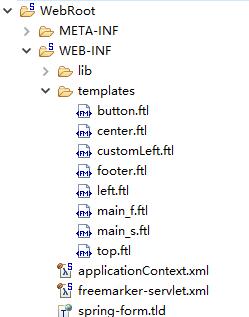
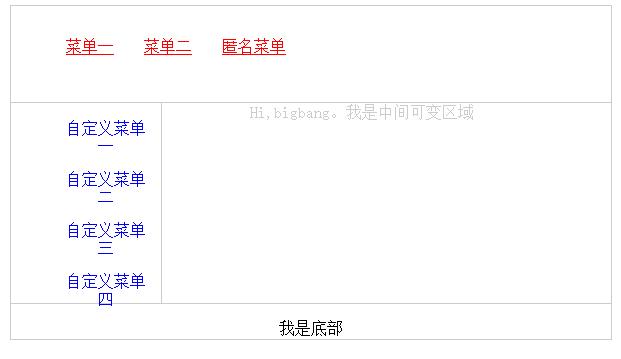
此处为体现了FreeMarker的使用,所以写了比较多的模块,在此只贴出文件位置图,其中main_f.ftl包含top.ftl、left.ftl和center.ftl,main_s.ftl包含top.ftl、customLeft.ftl和center.ftl:
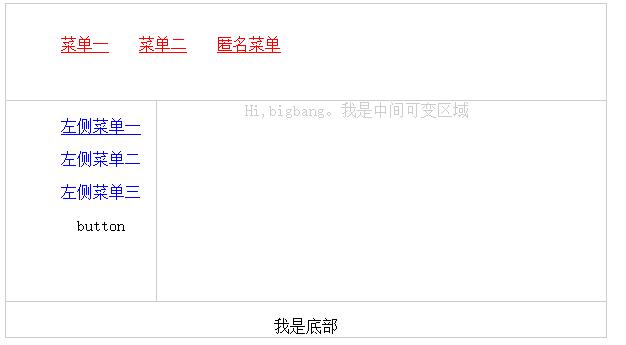
正常访问下的效果图如下:
请求main_first.html:
请求main_second.html的效果图如下:
FreeMarker与Spring MVC的结合应用的更多相关文章
- FreeMarker与Spring MVC 4集合的HelloWorld示例
0.整体的项目结构 1.引入POM <project xmlns="http://maven.apache.org/POM/4.0.0" xmlns:xsi="ht ...
- 【FreeMarker】Spring MVC与FreeMarker整合(二)
前一篇介绍了FreeMarker的基本使用,本例介绍Spring MVC与FreeMarker整合 不熟悉项目搭建,可参考 [FreeMarker]FreeMarker快速入门(一) 整合 1.新建S ...
- FreeMarker与Spring MVC 4结合错误:Caused by: java.lang.NoClassDefFoundError: org/springframework/ui/freemarker/FreeMarkerConfiguration
添加spring-context-support的依赖到POM: <!-- spring-context-support --> <!-- https://mvnrepository ...
- spring mvc+myBatis配置详解
一.spring mvc Spring框架(框架即:编程注解+xml配置的方式)MVC是Spring框架的一大特征,Spring框架有三大特征(IOC(依赖注入),AOP(面向切面),MVC(建模M- ...
- Spring MVC+FreeMarker简介
最近做项目,刚接触到SpringMVC与FreeMarker框架,就简单介绍一下自己的理解,不正确的地方请大家指教!! 1.Spring MVC工作原理: 用户发送请求--->前端服务器去找相对 ...
- 【转载】Spring MVC 整合 Freemarker
前言 1.为什么要使用Spring MVC呢? 2.为什么要使用Freemarker呢? 3.为什么不使用Struts2呢? 此示例出现的原因就是发现了struts2的性能太差,所以学习Spring ...
- [Spring MVC] - JSP + Freemarker视图解释器整合
Spring MVC中如果只使用JSP做视图,可以使用下面这段即可解决: <!-- 视图解释类 --> <bean class="org.springframework.w ...
- Spring mvc 中使用ftl引用共通文件出错 FreeMarker template error: Error reading included file "/WEB-INF/ftl/common/errormessage.ftl"
初次接触spring mvc,想做一个小的练习项目,结果在ftl文件中引用其它的共通ftl文件时出错.
- spring mvc + freemarker优雅的实现邮件定时发送
1. spring mvc工程中引入相关freemarker\mail的包 如:pom.xml中加入类似 <dependency> <groupId>javax.mail< ...
随机推荐
- jquery.easypiechart.js简介
此插件主要是用来统计新的访问.跳出率.服务器负载.使用的RAM等,功能很强大,带有HTML5的动画效果,效果非常炫,看效果吧easyPieChart一款新型的EASY饼图数据统计Jquery插件截图: ...
- JS-改变页面的颜色(三)
需求:点击页面的按钮,改变页面的颜色 思路:一先画出最简单的页面,二想办法获取页面的body节点,三想办法修改body节点的背景颜色属性,四通过一个方法获取随机的颜色值 和第二个例 ...
- JSP三大指令
JSP三大指令1.page-->最复杂,<%@page language = "java" info = "xxx" ..%> *pageE ...
- 解决hibernate只能插入一条数据的问题
hibernate初学,根据视频教程写好代码后,发现无论执行多少次main函数,数据库中只有一条数据,尝试多次,后来终于发现问题... 使用的工具是:MYSQL 5.7.13 eclipse 4. ...
- MyBatis学习总结(六)——调用存储过程
一.提出需求 查询得到男性或女性的数量, 如果传入的是0就女性否则是男性 二.准备数据库表和存储过程 create table p_user( id int primary key auto_incr ...
- Android IOS WebRTC 音视频开发总结(七一)-- H265/H264有何不同
本文整理自自网络,非原创,喜欢相关文章请关注我们的微信公众号:blackerteam H.265 H.265是ITU-TVCEG继H.264之后所制定的新的视频编码标准.H.265标准围绕着现有的视频 ...
- js获取浏览器窗口可视区域大小
获得浏览器窗口的尺寸(浏览器的视口,不包括工具栏和滚动条)的方法: 一.对于IE9+.Chrome.Firefox.Opera 以及 Safari: • window.innerHeight - 浏 ...
- 第 一 百 天上课 PHP TP框架 数据库修改和删除
修改的三种方式 //造数组的方式修改 public function xiugai1() { $db=D('yonghu'); $attr=array ( 'zhanghao'=>001, // ...
- mysql事件定时
DELIMITER $$ MONTH STARTS '2013-01-07 11:20:00' ON COMPLETION PRESERVE ENABLE DO BEGIN CALL ps(); EN ...
- 继续努力刷题--BE STRONGER AND STRONGER
Come on,baby~ (1)Contains Duplicate 有自己的思路:两个for双重循环直接一个个比较,但肯定不是最优解.所以,使用Set中的HashSet(一种没有重复元素的无序集合 ...