
FreeMarker与Spring MVC 4集合的HelloWorld示例
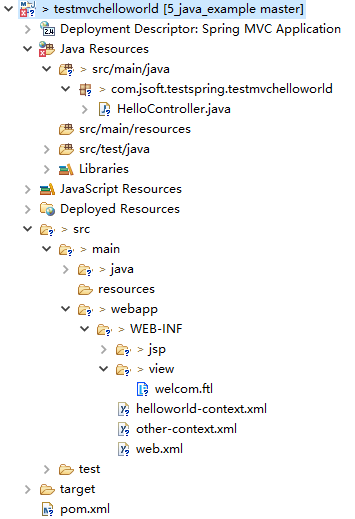
0、整体的项目结构
1、引入POM
<project xmlns="http://maven.apache.org/POM/4.0.0" xmlns:xsi="http://www.w3.org/2001/XMLSchema-instance"

    xsi:schemaLocation="http://maven.apache.org/POM/4.0.0 http://maven.apache.org/maven-v4_0_0.xsd">

    <modelVersion>4.0.0</modelVersion>

    <groupId>com.jsoft.testspring</groupId>

    <artifactId>testmvchelloworld</artifactId>

    <packaging>war</packaging>

    <version>0.0.1-SNAPSHOT</version>

    <name>testmvchelloworld Maven Webapp</name>

    <url>http://maven.apache.org</url>

    <dependencies>

        <dependency>

            <groupId>junit</groupId>

            <artifactId>junit</artifactId>

            <version>3.8.1</version>

            <scope>test</scope>

        </dependency>

        <!-- Servlet Library -->

        <!-- http://mvnrepository.com/artifact/javax.servlet/javax.servlet-api -->

        <dependency>

            <groupId>javax.servlet</groupId>

            <artifactId>javax.servlet-api</artifactId>

            <version>3.1.0</version>

            <scope>provided</scope>

        </dependency>

        <!-- Spring Core -->

        <!-- http://mvnrepository.com/artifact/org.springframework/spring-core -->

        <dependency>

            <groupId>org.springframework</groupId>

            <artifactId>spring-core</artifactId>

            <version>4.1.4.RELEASE</version>

        </dependency>

        <!-- Spring Web -->

        <!-- http://mvnrepository.com/artifact/org.springframework/spring-web -->

        <dependency>

            <groupId>org.springframework</groupId>

            <artifactId>spring-web</artifactId>

            <version>4.1.4.RELEASE</version>

        </dependency>

        <!-- Spring Web MVC -->

        <!-- http://mvnrepository.com/artifact/org.springframework/spring-webmvc -->

        <dependency>

            <groupId>org.springframework</groupId>

            <artifactId>spring-webmvc</artifactId>

            <version>4.1.4.RELEASE</version>

        </dependency>

        <!-- spring-context-support -->

        <!-- https://mvnrepository.com/artifact/org.springframework/spring-context-support -->

        <dependency>

            <groupId>org.springframework</groupId>

            <artifactId>spring-context-support</artifactId>

            <version>4.1.4.RELEASE</version>

        </dependency>

        <!-- https://mvnrepository.com/artifact/org.freemarker/freemarker -->

        <dependency>

            <groupId>org.freemarker</groupId>

            <artifactId>freemarker</artifactId>

            <version>2.3.26-incubating</version>

        </dependency>

    </dependencies>

    <build>

        <finalName>testmvchelloworld</finalName>

        <plugins>

            <!-- Config: Maven Tomcat Plugin -->

            <!-- http://mvnrepository.com/artifact/org.apache.tomcat.maven/tomcat7-maven-plugin -->

            <!-- http://tomcat.apache.org/maven-plugin-2.0/tomcat7-maven-plugin/plugin-info.html -->

            <plugin>

                <groupId>org.apache.tomcat.maven</groupId>

                <artifactId>tomcat7-maven-plugin</artifactId>

                <version>2.2</version>

                <!-- Config: contextPath and Port (Default:8080) -->

                <!--

                <configuration>

                    <path>/</path>

                    <port>8899</port>

                </configuration>

                 -->

            </plugin>

            <!-- Config: Maven Jetty Plugin -->

            <!-- http://mvnrepository.com/artifact/org.mortbay.jetty/jetty-maven-plugin -->

            <!-- http://www.eclipse.org/jetty/documentation/current/jetty-maven-plugin.html -->

            <plugin>

                <groupId>org.eclipse.jetty</groupId>

                <artifactId>jetty-maven-plugin</artifactId>

                <version>9.4.3.v20170317</version>

                <!-- Config: contextPath and Port (Default:8080) -->

                <!--

                <configuration>

                    <httpConnector>

                        <port>8899</port>

                    </httpConnector>

                    <webAppConfig>

                        <contextPath>/</contextPath>

                    </webAppConfig>

                </configuration>

                 -->

            </plugin>

        </plugins>

    </build>

</project>
注意:引入时参考上面不同颜色的引入,尤其是spring-context-support这个JAR包,里面包含了处理FreeMarker的UI组件。
2、配置web.xml
<web-app id="WebApp_ID" version="3.0"

         xmlns="http://java.sun.com/xml/ns/javaee"

         xmlns:xsi="http://www.w3.org/2001/XMLSchema-instance"

            xsi:schemaLocation="http://java.sun.com/xml/ns/javaee

                                 http://java.sun.com/xml/ns/javaee/web-app_3_0.xsd">

   <display-name>Spring MVC Application</display-name>

   <servlet>

       <servlet-name>spring-mvc</servlet-name>

       <servlet-class>org.springframework.web.servlet.DispatcherServlet</servlet-class>

       <!-- 默认:[servlet-name]-servlet.xml -->

       <!-- 通过初始化参数,指定xml文件的位置 -->

       <init-param>

           <param-name>contextConfigLocation</param-name>

           <param-value>/WEB-INF/helloworld-context.xml</param-value>

       </init-param>

       <load-on-startup>1</load-on-startup>

   </servlet>

   <servlet-mapping>

       <servlet-name>spring-mvc</servlet-name>

       <url-pattern>/</url-pattern>

   </servlet-mapping>

   <!-- 添加其它xml配置 -->

   <context-param>

       <param-name>contextConfigLocation</param-name>

       <param-value>/WEB-INF/other-context.xml</param-value>

   </context-param>

   <listener>

       <listener-class>org.springframework.web.context.ContextLoaderListener</listener-class>

   </listener>

</web-app>
3、配置helloworld-context.xml
<?xml version="1.0" encoding="UTF-8"?>

<beans xmlns="http://www.springframework.org/schema/beans"

    xmlns:xsi="http://www.w3.org/2001/XMLSchema-instance"

    xmlns:p="http://www.springframework.org/schema/p"

    xmlns:context="http://www.springframework.org/schema/context"

    xmlns:mvc="http://www.springframework.org/schema/mvc"

    xsi:schemaLocation="http://www.springframework.org/schema/beans

                        http://www.springframework.org/schema/beans/spring-beans.xsd

                        http://www.springframework.org/schema/context

                        http://www.springframework.org/schema/context/spring-context.xsd

                        http://www.springframework.org/schema/mvc

                        http://www.springframework.org/schema/mvc/spring-mvc.xsd">

    <context:component-scan base-package="com.jsoft.testspring" />

    <context:annotation-config />

    <!-- 配置FreeMarker -->

    <!--以下三种视图配置根据需要任选一种即可 -->

    <!-- 一般的视图配置 -->

    <!-- <bean class="org.springframework.web.servlet.view.InternalResourceViewResolver">

        <property name="prefix">

            <value>/WEB-INF/jsp/</value>

        </property>

        <property name="suffix">

            <value>.jsp</value>

        </property>

    </bean> -->

    <!-- 针对FreeMarker的视图配置 -->

    <bean id="viewResolver" class="org.springframework.web.servlet.view.freemarker.FreeMarkerViewResolver">

        <property name="cache" value="true" />

        <property name="prefix" value="" />

        <property name="suffix" value=".ftl" />

        <property name="contentType" value="text/html;charset=UTF-8"/>

        <property name="requestContextAttribute" value="request" />

        <property name="exposeSpringMacroHelpers" value="true" />

        <property name="exposeRequestAttributes" value="true" />

        <property name="exposeSessionAttributes" value="true" />

    </bean>

    <bean id="freemarkerConfig" class="org.springframework.web.servlet.view.freemarker.FreeMarkerConfigurer">

        <property name="templateLoaderPath" value="/WEB-INF/view" />

        <property name="freemarkerSettings">

            <props>

                <prop key="template_update_delay">0</prop>

                <prop key="default_encoding">UTF-8</prop>

                <prop key="number_format">0.##########</prop>

                <prop key="datetime_format">yyyy-MM-dd HH:mm:ss</prop>

                <prop key="classic_compatible">true</prop>

                <prop key="template_exception_handler">ignore</prop>

            </props>

        </property>

    </bean>

    <!-- 查看解析器也可以使用ResourceBundles或XML文件进行配置。如果您需要基于区域设置的不同视图解析,则必须使用资源束解析器。 -->

    <!-- 这个是针对返回视图还是json值的视图配置 来分别处理同步和异步请求 -->

    <!-- <bean class="org.springframework.web.servlet.view.ContentNegotiatingViewResolver">

        <property name="mediaTypes">

            <map>

                <entry key="html" value="text/html" />

                <entry key="json" value="application/json" />

            </map>

        </property>

        <property name="favorParameter" value="true" />

        <property name="viewResolvers">

            <list>

                <bean class="org.springframework.web.servlet.view.BeanNameViewResolver" />

                <bean id="viewResolver" class="org.springframework.web.servlet.view.freemarker.FreeMarkerViewResolver">

                    <property name="cache" value="true" />

                    <property name="prefix" value="" />

                    <property name="suffix" value=".ftl" />

                    <property name="contentType" value="text/html;charset=UTF-8"/>

                    <property name="requestContextAttribute" value="request" />

                    <property name="exposeSpringMacroHelpers" value="true" />

                    <property name="exposeRequestAttributes" value="true" />

                    <property name="exposeSessionAttributes" value="true" />

                </bean>

            </list>

        </property>

        <property name="defaultContentType" value="text/html" />

    </bean> -->

</beans>
说明:other-context.xml这个文件其实没有什么内容,当然,也可以将上述一些配置引入到这个文件上,效果是一致的。
4、新建模板页面welcom.ftl
<!DOCTYPE html PUBLIC "-//W3C//DTD XHTML 1.0 Transitional//EN" "http://www.w3.org/TR/xhtml1/DTD/xhtml1-transitional.dtd">

<html xmlns="http://www.w3.org/1999/xhtml" xml:lang="zh-CN" dir="ltr">

<head>

 <title>test!</title>

 <meta http-equiv="Content-Type" content="text/html; charset=UTF-8"/>

</head>

<body>

    <div>

        直接显示字符串<br />

        String:${strValue}<br/>

        <hr/>

    </div>

    <div>

    显示日期

    date:${myDate?date}<br/>

    <hr/>

    显示时间

    time:${myDate?time}<br/>

    <hr/>

    显示时间戳

    datetime:${myDate?datetime}<br/>

    <hr/>

    </div>

    <div>

    访问对象数组

    ObjectArray:

    ${objectArray[0]},${objectArray[1]},${objectArray[2]}

    <br />

    <hr/>

    </div>

    <div>

    遍历Set中的元素

    SetData:<br />

    <#list setData as value>

        ${value}

    </#list>

    <hr/>

    </div>

    <div>

    遍历List中的元素

    strList:<br/>

    <#list strList as strValue >

    <#if strValue_index == >

        ${strValue} is first element

    <#elseif !strValue_has_next>

        ${strValue} is last element

    <#else>

        ${strValue}

    </#if>

    <br />

    </#list>

    <hr/>

    </div>

    <div>

    获取map中的值

    <br/>

    map:

    key1=${map.key1},key2=${map.key2},key3=${map.key3}

    <hr/>

    </div>

</body>

</html>
5、编写HelloController.java
package com.jsoft.testspring.testmvchelloworld;

import java.util.ArrayList;

import java.util.Date;

import java.util.HashMap;

import java.util.HashSet;

import java.util.List;

import java.util.Map;

import java.util.Set;

import javax.servlet.http.HttpServletRequest;

import org.springframework.stereotype.Controller;

import org.springframework.ui.ModelMap;

import org.springframework.web.bind.annotation.RequestMapping;

import org.springframework.web.bind.annotation.RequestMethod;

import org.springframework.web.servlet.ModelAndView;

@Controller

@RequestMapping("/hello")

public class HelloController {

    @RequestMapping(method=RequestMethod.GET)

    public String printHello(ModelMap model){

        model.addAttribute("message","Hello Spring MVC Framework!");

        return "hello";

    }

    @RequestMapping(value = "/welcome", method = { RequestMethod.GET })

    public ModelAndView getFirstPage(HttpServletRequest request) {

        String strValue = "this is String";

        Date myDate = new Date();

        Object[] objectArray = new Object[] { 1, "str", 1.2 };

        Set<Object> setData = new HashSet<Object>();

        setData.add("dataValue1");

        setData.add("dataValue2");

        setData.add("dataValue3");

        List<String> strList = new ArrayList<String>();

        strList.add("字符串1");

        strList.add("字符串2");

        strList.add("字符串3");

        Map<String, Object> map = new HashMap<String, Object>();

        map.put("key1", "value1");

        map.put("key2", "value2");

        map.put("key3", "value3");

        //welcom就是视图的名称(welcom.ftl)

        ModelAndView mv = new ModelAndView("welcom");

        mv.addObject("strValue", strValue);

        mv.addObject("objectArray", objectArray);

        mv.addObject("strList", strList);

        mv.addObject("map", map);

        mv.addObject("myDate", myDate);

        mv.addObject("setData", setData);

        return mv;

    }

}
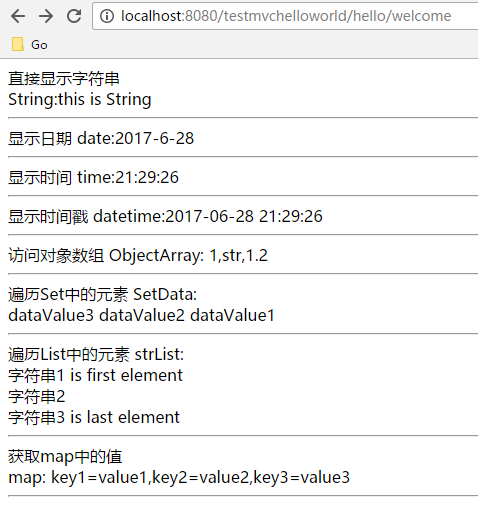
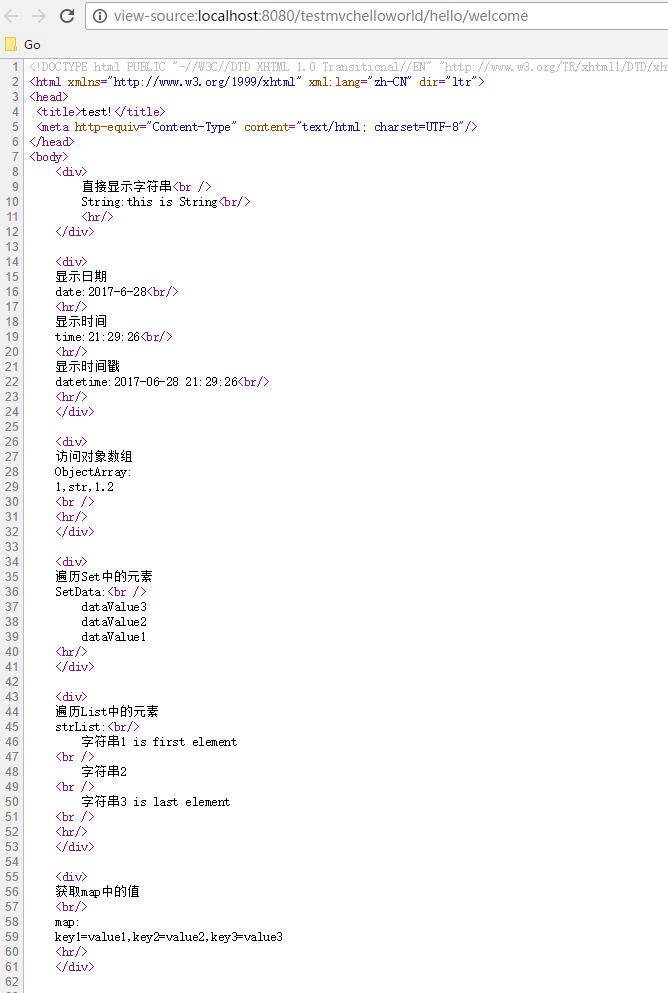
6、测试效果
通过命令运行:mvn tomcat7:run
测试工程:https://github.com/easonjim/5_java_example/tree/master/freemarker/test4
参考:
http://www.iteye.com/topic/1121801
FreeMarker与Spring MVC 4集合的HelloWorld示例的更多相关文章
- Spring MVC 学习笔记一 HelloWorld
Spring MVC 学习笔记一 HelloWorld Spring MVC 的使用可以按照以下步骤进行(使用Eclipse): 加入JAR包 在web.xml中配置DispatcherServlet ...
- FreeMarker与Spring MVC的结合应用
Freemarker是一种基于java的模板引擎.SpringMVC对FreeMarker进行一些配置的支持,能够利用Freemarker只关注表现层以及Spring MVC的三层分离的特点,向前端输 ...
- Spring mvc接受集合类型参数的方法
public String xxxxx(String xxxx, String xxxxx, @RequestParam("parameterList[]") List<St ...
- 【FreeMarker】Spring MVC与FreeMarker整合(二)
前一篇介绍了FreeMarker的基本使用,本例介绍Spring MVC与FreeMarker整合 不熟悉项目搭建,可参考 [FreeMarker]FreeMarker快速入门(一) 整合 1.新建S ...
- FreeMarker与Spring MVC 4结合错误:Caused by: java.lang.NoClassDefFoundError: org/springframework/ui/freemarker/FreeMarkerConfiguration
添加spring-context-support的依赖到POM: <!-- spring-context-support --> <!-- https://mvnrepository ...
- Spring MVC 文件上传简单示例(form、ajax方式 )
1.Form Upload SpringMVC 中,文件的上传是通过 MultipartResolver 实现的,所以要实现上传,只要注册相应的 MultipartResolver 即可. Multi ...
- Spring MVC使用@RestController生成JSON示例
继上一章的生成JSON示例http://www.cnblogs.com/EasonJim/p/7500405.html,现在还有另一种选择,就是使用@RestController,下面将参照上一节例子 ...
- Spring MVC拦截器完整代码示例
拦截器的作用: 编写一个自定义的类,实现相关拦截器接口: preHandler不放行,直接return false:直接跳转到错误页面error.jsp postHandler后置处理器,也就是C ...
- Spring MVC教程——检视阅读
Spring MVC教程--检视阅读 参考 Spring MVC教程--一点--蓝本 Spring MVC教程--c语言中午网--3.0版本太老了 Spring MVC教程--易百--4.0版本不是通 ...
随机推荐
- 304 Range Sum Query 2D - Immutable 二维区域和检索 - 不可变
给定一个二维矩阵,计算其子矩形范围内元素的总和,该子矩阵的左上角为 (row1, col1) ,右下角为 (row2, col2). 上图子矩阵左上角 (row1, col1) = (2, 1) ,右 ...
- 生成清除某个数据库下的所有表的SQL语句
方法1:重建库和表 用mysqldump --no-data把建表SQL导出来,然后drop database再create database,执行一下导出的SQL文件: 方法2:生成清空所有表的SQ ...
- 窗体基础WINFORM
winform 1.窗体: 造窗体界面: 窗体设计界面: 窗体类名不能重复! 属性: acceptbutton:回车是默认点击按钮 cancelbutton:按esc按键式默认的按钮 backcolo ...
- Java 8 (8) 默认方法
传统上,Java程序的接口是将相关方法按照预定组合到一起的方式.实现接口的类必须为接口中定义的方法提供一个实现,或者从父类中集成它的实现.但是,一旦类库的设计者需要更新接口,向接口中加入新的方法时候, ...
- poj1923 Fourier's Lines
思路: 记忆化搜索. n条直线的交点方案数 =(n-r)条平行线与r条直线交叉的交点数+r条直线本身的交点方案 =(n-r)*r+r条直线之间本身的交点方案数(0<r<=n) 于是可以枚举 ...
- C语言入门100题,考算法的居多
入门题,考算法的居多,共同学习! 1. 编程,统计在所输入的50个实数中有多少个正数.多少个负数.多少个零. 2. 编程,计算并输出方程X2+Y2=1989的所有整数解. 3. 编程,输入一个10进制 ...
- jmeter元件的作用域和顺序
jmeter是一个开源的性能测试工具,它可以通过鼠标拖拽来随意改变元件之间的顺序以及元件的父子关系,那么随着它们的顺序和所在的域不同,它们在执行的时候,也会有很多不同. jmeter的test pla ...
- Java中XML数据
Java中XML数据 XML解析——Java中XML的四种解析方式 XML是一种通用的数据交换格式,它的平台无关性.语言无关性.系统无关性.给数据集成与交互带来了极大的方便.XML在不同的语言环境中解 ...
- 06Microsoft SQL Server 完整性约束
Microsoft SQL Server 完整性约束 标识 IDENTITY自动编号 CREATE TABLE table_name( id ,), NAME ) not null, sex ) de ...
- MySQL数据导入sql文件过程中出错
错误类型: ERROR 1231 (42000): Variable 'time_zone' can't be set to the value of 'NULL' ERROR 1231 (42000 ...