
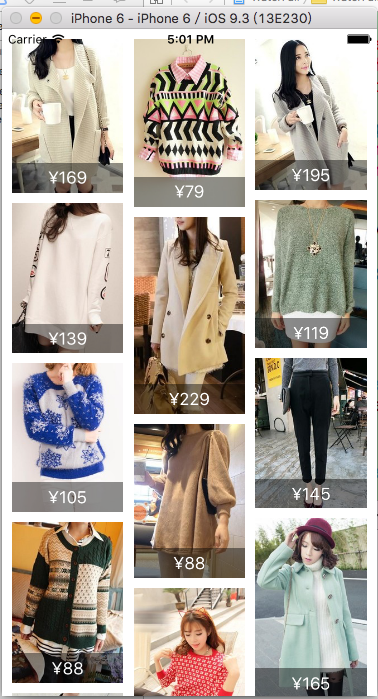
iOS 瀑布流的Demo
/**

 * 瀑布流Demo的主要代码,若想看完整的代码请到下面链接去下载

 *

 * 链接: https://pan.baidu.com/s/1slByAHB 密码: r3q6

 */

#import <UIKit/UIKit.h>

@interface AppDelegate : UIResponder <UIApplicationDelegate>

@property (strong, nonatomic) UIWindow *window;

@end
#import "AppDelegate.h"

#import "RootViewController.h"

@interface AppDelegate ()

@end

@implementation AppDelegate

- (BOOL)application:(UIApplication *)application didFinishLaunchingWithOptions:(NSDictionary *)launchOptions {

    self.window = [[UIWindow alloc] initWithFrame:[[UIScreen mainScreen] bounds]];

    // Override point for customization after application launch.

    self.window.backgroundColor = [UIColor whiteColor];

    self.window.rootViewController = [[RootViewController alloc] init];

    [self.window makeKeyAndVisible];

    return YES;

}

@end
#import <UIKit/UIKit.h>

@interface RootViewController : UIViewController

@end
#import "RootViewController.h"

#import "LFWaterfallLayout.h"

#import "XMGShop.h"

#import "MJExtension.h"

#import "MJRefresh.h"

#import "XMGShopCell.h"

@interface RootViewController ()<UICollectionViewDataSource,LFWaterfallLayoutDelegate>

@property (nonatomic , strong) UICollectionView *collectionView;

/**

 *  所有商品数据

 */

@property (nonatomic , strong) NSMutableArray *shops;

@end

@implementation RootViewController

static NSString *const identifier = @"waterfall";

- (NSMutableArray *)shops{

    if (!_shops) {

        _shops = [NSMutableArray array];

    }

    return _shops;

}

- (void)viewDidLoad {

    [super viewDidLoad];

    [self setupLayout];

    [self setupRefresh];

}

- (void)setupRefresh{

    self.collectionView.header = [MJRefreshNormalHeader headerWithRefreshingTarget:self refreshingAction:@selector(loadNewShops)];

    [self.collectionView.header beginRefreshing];

    self.collectionView.footer = [MJRefreshAutoNormalFooter footerWithRefreshingTarget:self refreshingAction:@selector(loadMoreShops)];

    self.collectionView.footer.hidden = YES;

}

- (void)loadNewShops{

    dispatch_after(dispatch_time(DISPATCH_TIME_NOW, (int64_t)(1.0 * NSEC_PER_SEC)), dispatch_get_main_queue(), ^{

        NSArray *shops = [XMGShop objectArrayWithFilename:@"1.plist"];

        NSLog(@"%@",shops);

        [self.shops removeAllObjects];

        [self.shops addObjectsFromArray:shops];

        // 刷新数据

        [self.collectionView reloadData];

        [self.collectionView.header endRefreshing];

    });

}

- (void)loadMoreShops{

    dispatch_after(dispatch_time(DISPATCH_TIME_NOW, (int64_t)(1.0 * NSEC_PER_SEC)), dispatch_get_main_queue(), ^{

        NSArray *shops = [XMGShop objectArrayWithFilename:@"1.plist"];

        [self.shops addObjectsFromArray:shops];

        // 刷新数据

        [self.collectionView reloadData];

        [self.collectionView.footer endRefreshing];

    });

}

- (void)setupLayout{

    // 创建布局

    LFWaterfallLayout *layout = [[LFWaterfallLayout alloc] init];

    layout.delegate = self;

    // 创建collecView

    self.collectionView = [[UICollectionView alloc] initWithFrame:self.view.bounds collectionViewLayout:layout];

    self.collectionView.backgroundColor = [UIColor whiteColor];

    self.collectionView.dataSource = self;

    [self.view addSubview:self.collectionView];

    // 注册

    [self.collectionView registerNib:[UINib nibWithNibName:NSStringFromClass([XMGShopCell class]) bundle:nil] forCellWithReuseIdentifier:identifier];

}

#pragma mark -- UICollectionViewDataSource --

- (NSInteger)collectionView:(UICollectionView *)collectionView numberOfItemsInSection:(NSInteger)section{

    self.collectionView.footer.hidden = self.shops.count == ;

    return self.shops.count;

}

- (UICollectionViewCell *)collectionView:(UICollectionView *)collectionView cellForItemAtIndexPath:(NSIndexPath *)indexPath{

    XMGShopCell *cell = [collectionView dequeueReusableCellWithReuseIdentifier:identifier forIndexPath:indexPath];

    cell.shop = self.shops[indexPath.item];

    return cell;

}

#pragma mark -- LFWaterfallLayoutDelegate --

- (CGFloat)waterflowLayout:(LFWaterfallLayout *)waterflowLayout heightForItemAtIndex:(NSUInteger)index itemWidth:(CGFloat)itemWidth{

    XMGShop *shop = self.shops[index];

    return itemWidth * shop.h / shop.w ;

}

//- (CGFloat)rowMarginInWaterflowLayout:(LFWaterfallLayout *)waterflowLayout{

//    return 30;

//}

- (void)didReceiveMemoryWarning {

    [super didReceiveMemoryWarning];

    // Dispose of any resources that can be recreated.

}

@end
#import <UIKit/UIKit.h>

@class LFWaterfallLayout;

@protocol LFWaterfallLayoutDelegate <NSObject>

@required

- (CGFloat)waterflowLayout:(LFWaterfallLayout *)waterflowLayout heightForItemAtIndex:(NSUInteger)index itemWidth:(CGFloat)itemWidth;

@optional

- (CGFloat)columnCountInWaterflowLayout:(LFWaterfallLayout *)waterflowLayout;

- (CGFloat)columnMarginInWaterflowLayout:(LFWaterfallLayout *)waterflowLayout;

- (CGFloat)rowMarginInWaterflowLayout:(LFWaterfallLayout *)waterflowLayout;

- (UIEdgeInsets)edgeInsetsInWaterflowLayout:(LFWaterfallLayout *)waterflowLayout;

@end

@interface LFWaterfallLayout : UICollectionViewLayout

@property (nonatomic , weak) id<LFWaterfallLayoutDelegate> delegate;

@end
#import "LFWaterfallLayout.h"

static const NSInteger LFDefaultColumnCount = ;//默认的列数

static const CGFloat LFDefaultColumnMargin = ;//每一列之间的间距

static const CGFloat LFDefaultRowMargin = ;//每一行之间的间距

static const UIEdgeInsets LFDefaultEdgeInsets = {,,,};//边缘间距

@interface LFWaterfallLayout ()

/**

 * 存放所有cell的布局属性

 */

@property (nonatomic , strong) NSMutableArray *attrsArray;

/**

 * 存放所有列的当前高度

 */

@property (nonatomic , strong) NSMutableArray *columnHeights;

- (CGFloat)rowMargin;

- (CGFloat)columnMargin;

- (NSInteger)columnCount;

- (UIEdgeInsets)endgeInsets;

@end

@implementation LFWaterfallLayout

#pragma mark -- 数据处理 --

- (CGFloat)rowMargin{

    if ([self.delegate respondsToSelector:@selector(rowMarginInWaterflowLayout:)]) {

        return [self.delegate rowMarginInWaterflowLayout:self];

    }else{

        return LFDefaultRowMargin;

    }

}

- (CGFloat)columnMargin{

    if ([self.delegate respondsToSelector:@selector(columnMarginInWaterflowLayout:)]) {

        return [self.delegate columnMarginInWaterflowLayout:self];

    }else{

        return LFDefaultColumnMargin;

    }

}

- (NSInteger)columnCount{

    if ([self.delegate respondsToSelector:@selector(columnCountInWaterflowLayout:)]) {

        return [self.delegate columnCountInWaterflowLayout:self];

    }else{

        return LFDefaultColumnCount;

    }

}

- (UIEdgeInsets)endgeInsets{

    if ([self.delegate respondsToSelector:@selector(edgeInsetsInWaterflowLayout:)]) {

        return [self.delegate edgeInsetsInWaterflowLayout:self];

    }else{

        return LFDefaultEdgeInsets;

    }

}

- (NSMutableArray *)attrsArray{

    if (!_attrsArray) {

        _attrsArray = [NSMutableArray array];

    }

    return _attrsArray;

}

- (NSMutableArray *)columnHeights{

    if (!_columnHeights) {

        _columnHeights = [NSMutableArray array];

    }

    return _columnHeights;

}

/**

 * 初始化

 */

- (void)prepareLayout{

    [super prepareLayout];

    // 清除以前计算的所有高度

    [self.columnHeights removeAllObjects];

    for (NSInteger i = ; i < self.columnCount; i++) {

        [self.columnHeights addObject:@(self.endgeInsets.top)];

    }

    // 清除之前所有的布局属性

    [self.attrsArray removeAllObjects];

    // 开始创建每一个cell对应的布局属性

    NSInteger count = [self.collectionView numberOfItemsInSection:];

    for (NSInteger i =  ;i < count;i++) {

        // 创建位置

        NSIndexPath *indexPath = [NSIndexPath indexPathForItem:i inSection:];

       // 获取indexPath位置对应cell的属性

        UICollectionViewLayoutAttributes *attributes = [self layoutAttributesForItemAtIndexPath:indexPath];

        [self.attrsArray addObject:attributes];

    }

}

/**

 * 决定cell的布局

 */

- (NSArray<UICollectionViewLayoutAttributes *> *)layoutAttributesForElementsInRect:(CGRect)rect{

    return self.attrsArray;

}

/**

 * 返回indexPath位置cell对应的布局属性

 */

- (UICollectionViewLayoutAttributes *)layoutAttributesForItemAtIndexPath:(NSIndexPath *)indexPath{

    // 创建布局属性

    UICollectionViewLayoutAttributes *attributes = [UICollectionViewLayoutAttributes layoutAttributesForCellWithIndexPath:indexPath];

    //collectionView的宽度

    CGFloat collectionViewWidth = self.collectionView.frame.size.width;

    // 找出高度最短的那一列

    NSInteger shortestColumn = ;

    // 找出最小高度

    CGFloat minColumnHeight = [self.columnHeights[] doubleValue];

    for (NSInteger i =  ; i < self.columnCount; i++) {

        // 取出第i列的高度

        CGFloat columnHeight = [self.columnHeights[i] doubleValue];

        // 比较大小

        if (minColumnHeight > columnHeight) {

            minColumnHeight = columnHeight;

            shortestColumn = i;

        }

    }

    // 宽度

    CGFloat width = (collectionViewWidth - self.endgeInsets.left - self.endgeInsets.right - (self.columnCount - ) *self.columnMargin) / self.columnCount;

    // x坐标

    CGFloat x = self.endgeInsets.left + shortestColumn * (width + self.columnMargin);

    // y坐标

    CGFloat y = minColumnHeight;

    if (y != self.endgeInsets.top) {

        y += self.rowMargin;

    }

    // 高度

    CGFloat height = [self.delegate waterflowLayout:self heightForItemAtIndex:indexPath.item itemWidth:width];

    //设置布局属性的frame

    attributes.frame = CGRectMake(x,y, width, height);

    // 更新高度

    self.columnHeights[shortestColumn] = @(CGRectGetMaxY(attributes.frame));

    return attributes;

}

- (CGSize)collectionViewContentSize{

    // 找出最大高度

    CGFloat maxColumnHeight = [self.columnHeights[] doubleValue];

    for (NSInteger i =  ; i < self.columnCount; i++) {

        // 取出第i列的高度

        CGFloat columnHeight = [self.columnHeights[i] doubleValue];

        // 比较大小

        if (maxColumnHeight < columnHeight) {

            maxColumnHeight = columnHeight;

        }

    }

    return CGSizeMake(, maxColumnHeight + self.endgeInsets.bottom);

}

@end
#import <UIKit/UIKit.h>

@interface XMGShop : NSObject

@property (nonatomic, assign) CGFloat w;

@property (nonatomic, assign) CGFloat h;

@property (nonatomic, copy) NSString *img;

@property (nonatomic, copy) NSString *price;

@end
#import "XMGShop.h"

@implementation XMGShop

@end
#import <UIKit/UIKit.h>

@class XMGShop;

@interface XMGShopCell : UICollectionViewCell

@property (nonatomic, strong) XMGShop *shop;

@end
#import "XMGShopCell.h"

#import "XMGShop.h"

#import "UIImageView+WebCache.h"

@interface XMGShopCell()

@property (weak, nonatomic) IBOutlet UIImageView *imageView;

@property (weak, nonatomic) IBOutlet UILabel *priceLabel;

@end

@implementation XMGShopCell

- (void)setShop:(XMGShop *)shop

{

    _shop = shop;

    // 1.图片

    [self.imageView sd_setImageWithURL:[NSURL URLWithString:shop.img] placeholderImage:[UIImage imageNamed:@"loading"]];

    // 2.价格

    self.priceLabel.text = shop.price;

}

@end
iOS 瀑布流的Demo的更多相关文章
- IOS 瀑布流UICollectionView实现
IOS 瀑布流UICollectionView实现 在实现瀑布流之前先来看看瀑布流的雏形(此方法的雏形 UICollectionView) 对于UICollectionView我们有几点注意事项 它和 ...
- iOS 瀑布流之栅格布局
代码地址如下:http://www.demodashi.com/demo/14760.html 一 .效果预览 二.确定需求 由下面的需求示意图可知模块的最小单位是正方形,边长是屏幕宽除去边距间隔后的 ...
- iOS 瀑布流封装
代码地址如下:http://www.demodashi.com/demo/12284.html 一.效果预览 功能描述:WSLWaterFlowLayout 是在继承于UICollectionView ...
- IOS 瀑布流
本篇博客应该算的上CollectionView的高级应用了,从iOS开发之窥探UICollectionViewController(一)到今天的(五),可谓是由浅入深的窥探了一下UICollectio ...
- ios 瀑布流的那些事情
转载: 屎壳郎情调-成长日记 首先要知道:瀑布流的核心就是要获取到图片的长宽 网上的很多例子都是加载本地图片的 对于新手而言 改成加载网络图片的确是有点压力的 因为本地的图片 我们是很容易就能获取到 ...
- iOS瀑布流实现(Swift)
这段时间突然想到一个很久之前用到的知识-瀑布流,本来想用一个简单的方法,发现自己走入了歧途,最终只能狠下心来重写UICollectionViewFlowLayout.下面我将用两种方法实现瀑布流,以及 ...
- iOS 瀑布流的基本原理
/** * 源代码链接 * 链接: https://pan.baidu.com/s/1nvLamEX 密码: kya5 */ #import <UIKit/UIKit.h> @interf ...
- ios瀑布流
http://blog.csdn.net/shenjx1225/article/details/9037631
- iOS开发笔记15:地图坐标转换那些事、block引用循环/weak–strong dance、UICollectionviewLayout及瀑布流、图层混合
1.地图坐标转换那些事 (1)投影坐标系与地理坐标系 地理坐标系使用三维球面来定义地球上的位置,单位即经纬度.但经纬度无法精确测量距离戒面积,也难以在平面地图戒计算机屏幕上显示数据.通过投影的方式可以 ...
随机推荐
- 如何设置jquery的ajax方法为同步
jax请求默认的都是异步的如果想同步 async设置为false就可以(默认是true) var html = $.ajax({ url: "some.php", async: ...
- Javascript 笔记与总结(2-10)删除节点,创建节点
[删除节点] 步骤: ① 找到对象 ② 找到他的父对象 parentObj ③ parentObj.removeChild(子对象); [例] <!DOCTYPE html> <ht ...
- OAuth2.0协议
简介 OAuth(Open Authorization),协议为用户资源的授权提供了一个安全的.开放而又简易的标准.与以往的授权方式不同之处是OAuth的授权不会使第三方触及到用户的帐号信息(如用户 ...
- Bootstrap页面布局15 - BS带下拉菜单的按钮
带下拉菜单的按钮 <div class='btn-toolbar'> <div class='btn-group'> <a href='javascript:;' cla ...
- [转]漫谈数据中心CLOS网络架构
http://djt.qq.com/article/view/238 1.数据中心网络架构挑战 随着技术的发展,数据中心的规模越来越大,一个数据中心的服务器容量从几年前的几千台服务器发展到今天的几万甚 ...
- easy ui 问题
easyui 的样式 和Bootstrap css 有冲突,不要一起使用 日期禁止输入 editable="false" ------------------------- ...
- Delphi中如何实现滚动文字
1.先添加一个Timer控件,其Interval属性设置为50. 2.再添加一个Label控件,Name为Label1. 3.然后在Timer的OnTimer事件添加如下代码: unit Unit13 ...
- CentOS_6.5安装Nginx+PHP+MySQL
#!/bin/bash PATH=/bin:/sbin:/usr/bin:/usr/sbin:/usr/local/bin:/usr/local/sbin:~/bin export PATH # Ch ...
- 【ZBar】ios错误ignoring file xxx missing required architecture x86_64 in file
解决方法: 1.在Project target里"Architectures"设置为:Standard (armv7,armv7s)或者 Standard (armv7,arm6 ...
- 简述AFN(AFNetWorking 2.X)的实现分析和简单使用【转】
[转载] Axc注:版本为AFNetWorking 2.6 3.0需要修改大部分对象 一:声明本 人以前一直是使用ASI网络请求类库的.最近才开始了解使用AFNetworing这个类库.网上也肯 ...