
Json.Net Demo2
新建一个空的Web项目,名称JsonServer,该网页实现Ajax数据请求和响应。
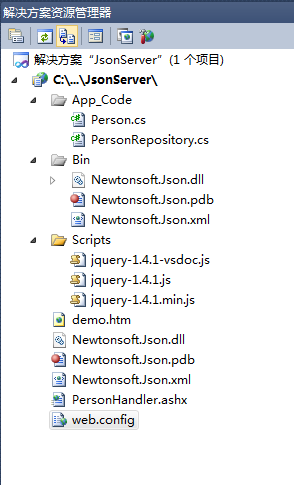
添加Newtonsoft.Json.dll的Dll引用,添加JQuery API文件,目录结构如下:
新建一个Person类
 using System;

 using System.Collections.Generic;

 using System.Linq;

 using System.Web;

 /// <summary>

 ///Person 的摘要说明

 /// </summary>

 /// <summary>

 /// 包含用户的基本信息

 /// </summary>

 public class Person

 {

     /// <summary>

     /// 获取或设置用户名

     /// </summary>

     public string Name { get; set; }

     /// <summary>

     /// 获取或设置用户年龄

     /// </summary>

     public int Age { get; set; }

     /// <summary>

     /// 获取或设置用户性别

     /// </summary>

     public string Gender { get; set; }

     /// <summary>

     /// 获取或设置用户国籍

     /// </summary>

     public string Country { get; set; }

     /// <summary>

     /// 获取或设置用户电子邮箱

     /// </summary>

     public string Email { get; set; }

 }
Person
新建一个数据操作类PersonRepository
 using System;

 using System.Collections.Generic;

 using System.Linq;

 using System.Web;

 /// <summary>

 ///Class1 的摘要说明

 /// </summary>

 /// <summary>

 /// 用户操作类

 /// </summary>

 public class PersonRepository

 {

     /// <summary>

     /// 获取用户列表

     /// </summary>

     /// <returns>所有用户信息</returns>

     public static List<Person> GetPersons()

     {

         List<Person> ps = new List<Person>();

         Person p1 = new Person { Name = "Tom", Age = , Country = "US", Gender = "Male", Email = "tom@gmail.com" };

         Person p2 = new Person { Name = "Jack", Age = , Country = "UK", Gender = "Male", Email = "jack@gmail.com" };

         Person p3 = new Person { Name = "Eden", Age = , Country = "Canada", Gender = "Female", Email = "eden@gmail.com" };

         Person p4 = new Person { Name = "Li Hua", Age = , Country = "China", Gender = "Male", Email = "lihui@163.com" };

         Person p5 = new Person { Name = "Lvo", Age = , Country = "US", Gender = "Male", Email = "lvo@gmail.com" };

         ps.Add(p1);

         ps.Add(p2);

         ps.Add(p3);

         ps.Add(p4);

         ps.Add(p5);

         return ps;

     }

 }
PersonRepository
新建一个一般处理程序PersonHandler
 <%@ WebHandler Language="C#" Class="PersonHandler" %>

 using System;

 using System.Web;

 using System.Collections.Generic;

 using Newtonsoft.Json;

 /// <summary>

 /// 处理用户类的请求

 /// </summary>

 public class PersonHandler : IHttpHandler

 {

     public void ProcessRequest(HttpContext context)

     {

         List<Person> persons = PersonRepository.GetPersons();

         string json = JsonConvert.SerializeObject(persons);

         context.Response.Write(json);

     }

     public bool IsReusable

     {

         get

         {

             return false;

         }

     }

 }
PersonHandler
添加一个Demo.html页面:
 <!DOCTYPE html PUBLIC "-//W3C//DTD XHTML 1.0 Transitional//EN" "http://www.w3.org/TR/xhtml1/DTD/xhtml1-transitional.dtd">

 <html xmlns="http://www.w3.org/1999/xhtml">

 <head>

     <title></title>

 </head>

 <body>

 <div>

         <table border="">

             <thead>

                 <tr>

                  <td>

                         用户名

                     </td>

                  <td>

                         年龄

                     </td>

                  <td>

                         性别

                     </td>

                  <td>

                         国籍

                     </td>

                  <td>

                         电子邮箱

                     </td>

                 </tr>

             </thead>

             <tbody id="personBody">

             </tbody>

         </table>

     </div>

 <script src="Scripts/jquery-1.4.1.min.js" type="text/javascript"></script>

     <script type="text/javascript">

         $(function () {

             $.getJSON("PersonHandler.ashx", function (data, status) {

                 if (status == "success") {

                     $.each(data, function (index, item) {

                         var beginTag = "<tr><td>";

                         var endTag = "</td></tr>";

                         var tag = "</td><td>";

                         $("#personBody").append($(beginTag + item.Name + tag + item.Age + tag + item.Gender + tag

                         + item.Country + tag + item.Email + endTag));

                     });

                 }

             });

         });

     </script>

 </body>

 </html>
demo.htm
运行程序,在浏览器中查看Demo.html页面:

Json.Net Demo2的更多相关文章
- webpack02
consumer-index.html <!DOCTYPE html> <html lang="en"> <head> <meta cha ...
- angularJS入门小Demo2 【包含不用数据库而用data.json格式响应前台的ajax请求方式测试】
事件绑定: <html> <head> <title>angularJS入门小demo-5 事件指令</title> <script src=&q ...
- js中eval详解,用Js的eval解析JSON中的注意点
先来说eval的用法,内容比较简单,熟悉的可以跳过eval函数接收一个参数s,如果s不是字符串,则直接返回s.否则执行s语句.如果s语句执行结果是一个值,则返回此值,否则返回undefined. 需要 ...
- Python全栈--7模块--random os sys time datetime hashlib pickle json requests xml
模块分为三种: 自定义模块 内置模块 开源模块 一.安装第三方模块 # python 安装第三方模块 # 加入环境变量 : 右键计算机---属性---高级设置---环境变量---path--分号+py ...
- jQuery form插件的使用--处理server返回的JSON, XML,HTML数据
详细代码: <!DOCTYPE HTML PUBLIC "-//W3C//DTD HTML 4.01 Transitional//EN"> <html> & ...
- http://www.bejson.com/go.html?u=http://www.bejson.com/demo2.html
json 解析工具http://www.bejson.com/go.html?u=http://www.bejson.com/demo2.html
- 通过Jquery中Ajax获取json文件数据
1. JSON(JavaScript Object Notation): javaScript对象表示法: 是存储和交换文本信息的语法,比xml更小,更快,更易解析. 2. JSON基本书写格式 : ...
- CI笔记6 json 传值
CI3.x 使用json,配合easyui, 其实很简单,走了很多的弯路, 首先在ci的控制器重,建立2个方法,一个用于显示加载view,一个用于echo json,就可以了. 需要注意的是,在ci的 ...
- C# Json反序列化处理
最近换工作了 从客户端转到Web端 第一个任务就是去别人的页面上抓取数据 用到的是JSON 因为他们网站json的格式有点怪 所以 就在JSON反序列化上面 花了一点时间 首先用到的工具是http:/ ...
随机推荐
- Scrum会议3(Beta版本)
组名:天天向上 组长:王森 组员:张政.张金生.林莉.胡丽娜 代码地址:HTTPS:https://git.coding.net/jx8zjs/llk.git SSH:git@git.coding.n ...
- HDU 1069 Monkey and Banana(二维偏序LIS的应用)
---恢复内容开始--- Monkey and Banana Time Limit: 2000/1000 MS (Java/Others) Memory Limit: 65536/32768 K ...
- c++ windows 获取mac地址
c++ windows 获取mac地址 GetAdaptersInfo 用windows api获取mac地址和硬盘id编号 aa
- PHP 命名空间总结
PHP 5.3 及以上版本中引入了命名空间 的概念. notes: 1. 在 PHP 中,命名空间用来解决在编写 类库 或 应用程序 时创建 可重用 的 代码如 类 或 函数 时碰到的两类问题: ① ...
- 20145235李涛 《Java程序设计》第3周学习总结
类与对象 定义类 类是对象的“设计图”,对象是类的实际类型.另外,定义时用class,建实例用new. 通过书上的代码才有所理解: class Clothes { String color; char ...
- java语言中数值自动转换的优先顺序
转换原则:从低精度向高精度转换byte .short.int.long.float.double.char数据类型的转换,分为自动转换和强制转换.自动转换是程序在执行过程中“悄然”进行的转换,不需要用 ...
- NSQ部署
一. 简介 NSQ主要有三个主要程序和一个Web服务程序: nsqd:是守护进程,接收,缓存,并投递消息给客户端 nsqlookupd:是一个守护进程,为消费者提供运行时发现服务,来查找指定 ...
- functional cohesion
Computer Science An Overview _J. Glenn Brookshear _11th Edition A weak form of cohesion is known as ...
- XPS to Blender 2.7x
XPS to Blender 2.7x(Blender internal the easy way) Things we are gonna need are Blender 2.7x www.ble ...
- myeclipse添加源码支持
在MyEclipse中开发,习惯于点击类名,按Ctrl键查看源码,但是,如果是Spring/Hibernate/Struts/JDK这些开源jar的源码该如何看呢? 一般,我们导入的只有jar文 件, ...