
(四十四)c#Winform自定义控件-水波-HZHControls
官网
前提
入行已经7,8年了,一直想做一套漂亮点的自定义控件,于是就有了本系列文章。
GitHub:https://github.com/kwwwvagaa/NetWinformControl
码云:https://gitee.com/kwwwvagaa/net_winform_custom_control.git
如果觉得写的还行,请点个 star 支持一下吧
欢迎前来交流探讨: 企鹅群568015492 
麻烦博客下方点个【推荐】,谢谢
NuGet
Install-Package HZH_Controls
目录
https://www.cnblogs.com/bfyx/p/11364884.html
用处及效果
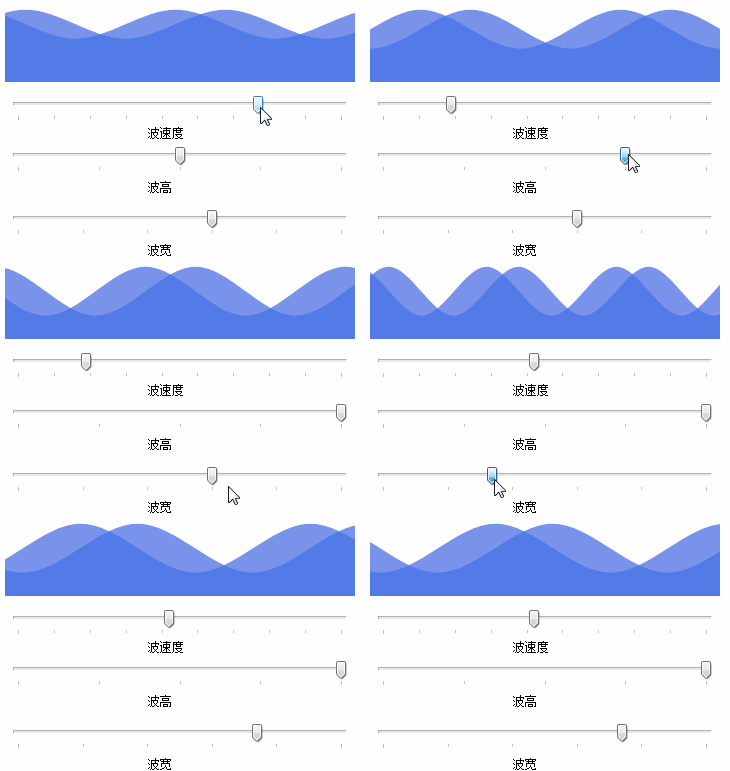
准备工作
这个用的GDI+画的,如果不了解,可以百度一下。
开始
添加一个类 UCWave ,继承Control
定义属性
 private Color m_waveColor = Color.FromArgb(, , );

         [Description("波纹颜色"), Category("自定义")]

         public Color WaveColor

         {

             get { return m_waveColor; }

             set { m_waveColor = value; }

         }

         private int m_waveWidth = ;

         /// <summary>

         /// 为方便计算,强制使用10的倍数

         /// </summary>

         [Description("波纹宽度(为方便计算,强制使用10的倍数)"), Category("自定义")]

         public int WaveWidth

         {

             get { return m_waveWidth; }

             set

             {

                 m_waveWidth = value;

                 m_waveWidth = m_waveWidth /  * ;

                 intLeftX = value * -;

             }

         }

         private int m_waveHeight = ;

         /// <summary>

         /// 波高

         /// </summary>

         [Description("波高"), Category("自定义")]

         public int WaveHeight

         {

             get { return m_waveHeight; }

             set { m_waveHeight = value; }

         }

         private int m_waveSleep = ;

         /// <summary>

         /// 波运行速度(运行时间间隔,毫秒)

         /// </summary>

         [Description("波运行速度(运行时间间隔,毫秒)"), Category("自定义")]

         public int WaveSleep

         {

             get { return m_waveSleep; }

             set

             {

                 if (value <= )

                     return;

                 m_waveSleep = value;

                 if (timer != null)

                 {

                     timer.Enabled = false;

                     timer.Interval = value;

                     timer.Enabled = true;

                 }

             }

         }

         Timer timer = new Timer();

         int intLeftX = -;
重绘
 protected override void OnPaint(PaintEventArgs e)

         {

             base.OnPaint(e);

             var g = e.Graphics;

             g.SetGDIHigh();

             List<Point> lst1 = new List<Point>();

             List<Point> lst2 = new List<Point>();

             int m_intX = intLeftX;

             while (true)

             {

                 lst1.Add(new Point(m_intX, ));

                 lst1.Add(new Point(m_intX + m_waveWidth / , m_waveHeight));

                 lst2.Add(new Point(m_intX + m_waveWidth / , ));

                 lst2.Add(new Point(m_intX + m_waveWidth /  + m_waveWidth / , m_waveHeight));

                 m_intX += m_waveWidth;

                 if (m_intX > this.Width + m_waveWidth)

                     break;

             }

             GraphicsPath path1 = new GraphicsPath();

             path1.AddCurve(lst1.ToArray(), 0.5F);

             path1.AddLine(this.Width + , -, this.Width + , this.Height);

             path1.AddLine(this.Width + , this.Height, -, this.Height);

             path1.AddLine(-, this.Height, -, -);

             GraphicsPath path2 = new GraphicsPath();

             path2.AddCurve(lst2.ToArray(), 0.5F);

             path2.AddLine(this.Width + , -, this.Width + , this.Height);

             path2.AddLine(this.Width + , this.Height, -, this.Height);

             path2.AddLine(-, this.Height, -, -);

             g.FillPath(new SolidBrush(Color.FromArgb(, m_waveColor.R, m_waveColor.G, m_waveColor.B)), path1);

             g.FillPath(new SolidBrush(Color.FromArgb(, m_waveColor.R, m_waveColor.G, m_waveColor.B)), path2);

         }
为了“波动”,添加定时器,定时器事件如下
 void timer_Tick(object sender, EventArgs e)

         {

             intLeftX -= ;

             if (intLeftX == m_waveWidth * -)

                 intLeftX = m_waveWidth * -;

             this.Refresh();

         }
完整代码
 using System;

 using System.Collections.Generic;

 using System.ComponentModel;

 using System.Drawing;

 using System.Drawing.Drawing2D;

 using System.Linq;

 using System.Text;

 using System.Windows.Forms;

 namespace HZH_Controls.Controls

 {

     public class UCWave : Control

     {

         private Color m_waveColor = Color.FromArgb(, , );

         [Description("波纹颜色"), Category("自定义")]

         public Color WaveColor

         {

             get { return m_waveColor; }

             set { m_waveColor = value; }

         }

         private int m_waveWidth = ;

         /// <summary>

         /// 为方便计算,强制使用10的倍数

         /// </summary>

         [Description("波纹宽度(为方便计算,强制使用10的倍数)"), Category("自定义")]

         public int WaveWidth

         {

             get { return m_waveWidth; }

             set

             {

                 m_waveWidth = value;

                 m_waveWidth = m_waveWidth /  * ;

                 intLeftX = value * -;

             }

         }

         private int m_waveHeight = ;

         /// <summary>

         /// 波高

         /// </summary>

         [Description("波高"), Category("自定义")]

         public int WaveHeight

         {

             get { return m_waveHeight; }

             set { m_waveHeight = value; }

         }

         private int m_waveSleep = ;

         /// <summary>

         /// 波运行速度(运行时间间隔,毫秒)

         /// </summary>

         [Description("波运行速度(运行时间间隔,毫秒)"), Category("自定义")]

         public int WaveSleep

         {

             get { return m_waveSleep; }

             set

             {

                 if (value <= )

                     return;

                 m_waveSleep = value;

                 if (timer != null)

                 {

                     timer.Enabled = false;

                     timer.Interval = value;

                     timer.Enabled = true;

                 }

             }

         }

         Timer timer = new Timer();

         int intLeftX = -;

         public UCWave()

         {

             this.Size = new Size(, );

             this.SetStyle(ControlStyles.AllPaintingInWmPaint, true);

             this.SetStyle(ControlStyles.DoubleBuffer, true);

             this.SetStyle(ControlStyles.ResizeRedraw, true);

             this.SetStyle(ControlStyles.Selectable, true);

             this.SetStyle(ControlStyles.SupportsTransparentBackColor, true);

             this.SetStyle(ControlStyles.UserPaint, true);

             timer.Interval = m_waveSleep;

             timer.Tick += timer_Tick;

             this.VisibleChanged += UCWave_VisibleChanged;

         }

         void UCWave_VisibleChanged(object sender, EventArgs e)

         {

             timer.Enabled = this.Visible;

         }

         void timer_Tick(object sender, EventArgs e)

         {

             intLeftX -= ;

             if (intLeftX == m_waveWidth * -)

                 intLeftX = m_waveWidth * -;

             this.Refresh();

         }

         protected override void OnPaint(PaintEventArgs e)

         {

             base.OnPaint(e);

             var g = e.Graphics;

             g.SetGDIHigh();

             List<Point> lst1 = new List<Point>();

             List<Point> lst2 = new List<Point>();

             int m_intX = intLeftX;

             while (true)

             {

                 lst1.Add(new Point(m_intX, ));

                 lst1.Add(new Point(m_intX + m_waveWidth / , m_waveHeight));

                 lst2.Add(new Point(m_intX + m_waveWidth / , ));

                 lst2.Add(new Point(m_intX + m_waveWidth /  + m_waveWidth / , m_waveHeight));

                 m_intX += m_waveWidth;

                 if (m_intX > this.Width + m_waveWidth)

                     break;

             }

             GraphicsPath path1 = new GraphicsPath();

             path1.AddCurve(lst1.ToArray(), 0.5F);

             path1.AddLine(this.Width + , -, this.Width + , this.Height);

             path1.AddLine(this.Width + , this.Height, -, this.Height);

             path1.AddLine(-, this.Height, -, -);

             GraphicsPath path2 = new GraphicsPath();

             path2.AddCurve(lst2.ToArray(), 0.5F);

             path2.AddLine(this.Width + , -, this.Width + , this.Height);

             path2.AddLine(this.Width + , this.Height, -, this.Height);

             path2.AddLine(-, this.Height, -, -);

             g.FillPath(new SolidBrush(Color.FromArgb(, m_waveColor.R, m_waveColor.G, m_waveColor.B)), path1);

             g.FillPath(new SolidBrush(Color.FromArgb(, m_waveColor.R, m_waveColor.G, m_waveColor.B)), path2);

         }

     }

 }
最后的话
如果你喜欢的话,请到 https://gitee.com/kwwwvagaa/net_winform_custom_control 点个星星吧
(四十四)c#Winform自定义控件-水波-HZHControls的更多相关文章
- (四十)c#Winform自定义控件-开关-HZHControls
官网 http://www.hzhcontrols.com 前提 入行已经7,8年了,一直想做一套漂亮点的自定义控件,于是就有了本系列文章. GitHub:https://github.com/kww ...
- (四十六)c#Winform自定义控件-水波进度条-HZHControls
官网 http://www.hzhcontrols.com 前提 入行已经7,8年了,一直想做一套漂亮点的自定义控件,于是就有了本系列文章. GitHub:https://github.com/kww ...
- NeHe OpenGL教程 第四十四课:3D光晕
转自[翻译]NeHe OpenGL 教程 前言 声明,此 NeHe OpenGL教程系列文章由51博客yarin翻译(2010-08-19),本博客为转载并稍加整理与修改.对NeHe的OpenGL管线 ...
- 网站开发进阶(四十四)input type="submit" 和"button"的区别
网站开发进阶(四十四)input type="submit" 和"button"的区别 在一个页面上画一个按钮,有四种办法: 这就是一个按钮.如果你不写ja ...
- Gradle 1.12用户指南翻译——第四十四章. 分发插件
本文由CSDN博客貌似掉线翻译,其他章节的翻译请参见: http://blog.csdn.net/column/details/gradle-translation.html 翻译项目请关注Githu ...
- SQL注入之Sqli-labs系列第四十一关(基于堆叠注入的盲注)和四十二关四十三关四十四关四十五关
0x1普通测试方式 (1)输入and1=1和and1=2测试,返回错误,证明存在注入 (2)union select联合查询 (3)查询表名 (4)其他 payload: ,( ,( 0x2 堆叠注入 ...
- “全栈2019”Java第四十四章:继承
难度 初级 学习时间 10分钟 适合人群 零基础 开发语言 Java 开发环境 JDK v11 IntelliJ IDEA v2018.3 文章原文链接 "全栈2019"Java第 ...
- 孤荷凌寒自学python第四十四天Python操作 数据库之准备工作
孤荷凌寒自学python第四十四天Python操作数据库之准备工作 (完整学习过程屏幕记录视频地址在文末,手写笔记在文末) 今天非常激动地开始接触Python的数据库操作的学习了,数据库是系统化设计 ...
- Android项目实战(四十四):Zxing二维码切换横屏扫描
原文:Android项目实战(四十四):Zxing二维码切换横屏扫描 Demo链接 默认是竖屏扫描,但是当我们在清单文件中配置横屏显示的时候: <activity android:name=&q ...
随机推荐
- django路由匹配层
目录 orm表关系如何建立 一对多 多对多 一对一 django请求生命周期流程图 路由层 路由的简单配置 Django路由匹配规律 分组 无名分组 有名分组 反向解析 路由分发 名称空间 伪静态 虚 ...
- 【Java必修课】图说Stream中的skip()和limit()方法及组合使用
1 简介 本文将讲解Java 8 Stream中的两个方法:skip()和limit().这两个方法是Stream很常用的,不仅各自会被高频使用,还可以组合出现,并能实现一些小功能,如subList和 ...
- Openstack简述
1.Openstack项目发展概况: Nova 计算服务 Swift 对象存储服务 Glance 镜像服务 Neturon 网络服务 Keystone 身份认证服务 Celimeter 计 ...
- AOP框架Dora.Interception 3.0 [3]: 拦截器设计
对于所有的AOP框架来说,多个拦截器最终会应用到某个方法上.这些拦截器按照指定的顺序构成一个管道,管道的另一端就是针对目标方法的调用.从设计角度来将,拦截器和中间件本质是一样的,那么我们可以按照类似的 ...
- mySql中The user specified as a definer ('root'@'%') does not exist
背景 最近往现场导了个库,发现功能报错,一看是视图报错,navicat一看,哎呦,直接报错.The user specified as a definer ('root'@'%') does not ...
- maven的下载、安装及配置
一.下载maven 1. maven的下载路径 (1)Apache官网:https://maven.apache.org (2)https://pan.baidu.com/s/1Yvv44ICGSxG ...
- global、nonlocal关键字
一:global:在函数内部引用/声明全局变量 在自定义函数时,有时候需要引用函数外的一些全局变量,如果不需要修改全局变量的内容,则可以直接引用,像下面这样: c = 999 def func(): ...
- Python 之列表切片的四大常用操作
最近在爬一个网站的文档的时候,老师要求把一段文字切割开来,根据中间的文本分成两段 故学习了一段时间的切片操作,现把学习成果po上来与大家分享 1.何为切片? 列表的切片就是处理列表中的部分元素,是把整 ...
- OWASP ModSecurity Core Rule Set (CRS)的基本使用
Preface 前述文章开源WAF工具ModSecurity,介绍了ModSecurity作为Nginx的动态加载模块的基本安装和使用. 本篇简单介绍ModSecurity CRS规则集的使用. # ...
- VS Code Remote,在服务器上开发程序,开启全新开发模式
一直使用Idea开发java 程序,头疼的是太太太占用内存了,笔记本电脑经常卡爆,在服务器开发的话又太麻烦,VS Code Remote的带来,解决了这一烦恼.下面来实战一下. VS Code Rem ...