
Java 在spring cloud中使用Redis,spring boot同样适用
1.本地安装redis服务,官网下载。
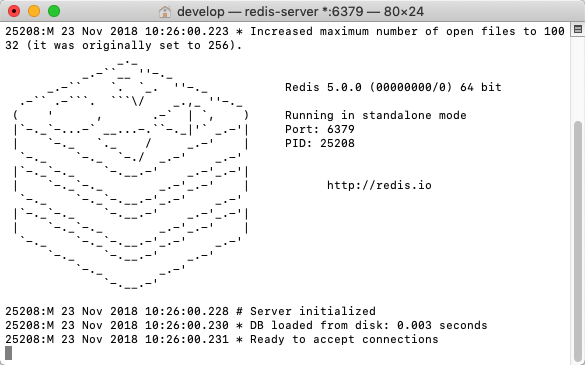
2.在开发中要使用redis,首先要启动本地redis服务,启动后页面如下:
3.在spring boot项目pom.xml文件中添加Redis需要的依赖包,可在生成springboot项目选择自动引入:
<dependency>

            <groupId>org.springframework.boot</groupId>

            <artifactId>spring-boot-starter-data-redis</artifactId>

        </dependency>
4.在application-dev.yml(spring cloud)/application.properties(spring boot)配置文件中加入Redis的配置信息:
#此为spring cloud配置文件格式
spring:
  redis:

        database: 0

        host: 127.0.0.1

        port: 6379

        password:

        timeout: 500

        pool:

           max-active: 20 # 连接池最大连接数(使用负值表示没有限制

           max-wait: -1   # 连接池最大阻塞等待时间(使用负值表示没有限制

           max-idle: 8      # 连接池中的最大空闲连接

           min-idle: 0       # 连接池中的最小空闲连接
##此为spring boot格式配置文件

# Redis数据库索引(默认为0)

spring.redis.database=0

# Redis服务器地址

spring.redis.host=127.0.0.1

# Redis服务器连接端口

spring.redis.port=6379

# Redis服务器连接密码(默认为空)

spring.redis.password=

# 连接池最大连接数(使用负值表示没有限制)

spring.redis.pool.max-active=20

# 连接池最大阻塞等待时间(使用负值表示没有限制)

spring.redis.pool.max-wait=-1

# 连接池中的最大空闲连接

spring.redis.pool.max-idle=8

# 连接池中的最小空闲连接

spring.redis.pool.min-idle=0

# 连接超时时间(毫秒)

spring.redis.timeout=500
5.创建Redis的配置类,定义序列方式;配置了配置文件,spring boot会自动加载redis
package com.yf.microservice.config;

import org.springframework.context.annotation.Bean;

import org.springframework.context.annotation.Configuration;

import org.springframework.data.redis.connection.RedisConnectionFactory;

import org.springframework.data.redis.core.RedisTemplate;

import org.springframework.data.redis.serializer.Jackson2JsonRedisSerializer;

import org.springframework.data.redis.serializer.StringRedisSerializer;

import com.fasterxml.jackson.annotation.PropertyAccessor;

import com.fasterxml.jackson.databind.ObjectMapper;

import com.fasterxml.jackson.annotation.JsonAutoDetect;

/**

* @Description: Redis配置类

*/

@Configuration

public class RedisConfiguration {

        @Bean

        @SuppressWarnings("all")

        public RedisTemplate<String, Object> redisTemplate(RedisConnectionFactory factory) {

            RedisTemplate<String, Object> template = new RedisTemplate<String, Object>();

            template.setConnectionFactory(factory);

            Jackson2JsonRedisSerializer jackson2JsonRedisSerializer = new Jackson2JsonRedisSerializer(Object.class);

            ObjectMapper om = new ObjectMapper();

            om.setVisibility(PropertyAccessor.ALL, JsonAutoDetect.Visibility.ANY);

            om.enableDefaultTyping(ObjectMapper.DefaultTyping.NON_FINAL);

            jackson2JsonRedisSerializer.setObjectMapper(om);

            StringRedisSerializer stringRedisSerializer = new StringRedisSerializer();

            template.setKeySerializer(stringRedisSerializer);

            template.setHashKeySerializer(stringRedisSerializer);

            template.setValueSerializer(jackson2JsonRedisSerializer);

            template.setHashValueSerializer(jackson2JsonRedisSerializer);

            template.afterPropertiesSet();

            return template;

        }

}
6.定义一个简单的redis工具类,这里只给到简单的存取方法,Redis封装了很多方法可使用redisTemplate调用,具体哪些方法查看Redis文档
package com.yf.microservice.web.rest.util;

import java.util.List;

import java.util.Map;

import java.util.Set;

import java.util.concurrent.TimeUnit;

import org.springframework.beans.factory.annotation.Autowired;

import org.springframework.data.redis.core.RedisTemplate;

import org.springframework.stereotype.Component;

import org.springframework.util.CollectionUtils;

/**

* Redis工具类

*/

@Component

public class RedisUtils {

    @Autowired

    private  RedisTemplate<String, Object> redisTemplate;

        /**

         * 判断key是否存在

         * @param key 键

         * @return true 存在 false不存在

         */

        public boolean hasKey(String key) {

            try {

                return redisTemplate.hasKey(key);

            } catch (Exception e) {

                e.printStackTrace();

                return false;

            }

        }

        /**

         * 普通缓存获取

         * @param key 键

         * @return 值

         */

        public Object get(String key) {

            return key == null ? null : redisTemplate.opsForValue().get(key);

        }

        /**

         * 普通缓存放入

         * @param key 键

         * @param value 值

         * @return true成功 false失败

         */

        public boolean set(String key, Object value) {

            try {

                redisTemplate.opsForValue().set(key, value);

                return true;

            } catch (Exception e) {

                e.printStackTrace();

                return false;

            }

        }

 }
7.前面使用@Component注解把RedisUtils类实例化放到spring容器中了,直接使用@Autowired获取对象使用,也可以直接使用RedisTemplate进行调用其他redis封装方法,参考上面写法
 @Autowired

 private RedisUtils redisUtil;

 @Autowired

 private  RedisTemplate<String, Object> redisTemplate;

 public String test() {

        redisUtil.set("myName", "学不会丶");//存入key -value

        redisTemplate.opsForHash().putAll("map1", new

         HashMap<String, Object>());//存入map的方法,set,list等方法查看redis文档

        return redisUtil.get("myName").toString();//通过key取值

    }
Java 在spring cloud中使用Redis,spring boot同样适用的更多相关文章
- 译自如何将Spring Cloud应用程序从Spring Boot 1.2迁移到1.3
前言 笔者第三个Spring Cloud(版本为Spring Boot 1.2)类项目升级最新版本时遇到不少问题,本文内容是作者翻译Spring Cloud官网一位国外友人文章产生. 原文地址: Mi ...
- Spring Cloud中负载均衡器概览
在上篇文章中(RestTemplate的逆袭之路,从发送请求到负载均衡)我们完整的分析了RestTemplate的工作过程,在分析的过程中,我们遇到过一个ILoadBalancer接口,这个接口中有一 ...
- Spring Cloud中服务的发现与消费
之前没注意,微信公众号的图片不能引用到其他地方,本文图片显示不正常,原图在写完博客后已经删了,,,,,,所以本文小伙伴可以移步这里https://mp.weixin.qq.com/s/GoIZdwt5 ...
- 服务注册发现consul之二:在Spring Cloud中使用Consul实现服务的注册和发现
首先安装consul环境,参照之前的文章:<服务注册发现consul之一:consul介绍及安装>中的第一节介绍. Spring Cloud使用Consul的服务与发现 1.导入依赖pri ...
- Spring Cloud中Hystrix、Ribbon及Feign的熔断关系是什么?
导读 今天和大家聊一聊在Spring Cloud微服务框架实践中,比较核心但是又很容易把人搞得稀里糊涂的一个问题,那就是在Spring Cloud中Hystrix.Ribbon以及Feign它们三者之 ...
- Spring Cloud中五大神兽总结(Eureka/Ribbon/Feign/Hystrix/zuul)
Spring Cloud中五大神兽总结(Eureka/Ribbon/Feign/Hystrix/zuul) 1.Eureka Eureka是Netflix的一个子模块,也是核心模块之一.Eureka是 ...
- 解决Spring Cloud中Feign第一次请求失败的问题
在Spring Cloud中,Feign和Ribbon在整合了Hystrix后,可能会出现首次调用失败的问题 com.netflix.hystrix.exception.HystrixTimeoutE ...
- 详解Spring Cloud中Hystrix 线程隔离导致ThreadLocal数据丢失
在Spring Cloud中我们用Hystrix来实现断路器,Zuul中默认是用信号量(Hystrix默认是线程)来进行隔离的,我们可以通过配置使用线程方式隔离. 在使用线程隔离的时候,有个问题是必须 ...
- Spring Cloud中Feign如何统一设置验证token
代码地址:https://github.com/hbbliyong/springcloud.git 原理是通过每个微服务请求之前都从认证服务获取认证之后的token,然后将token放入到请求头中带过 ...
随机推荐
- 剑指offer第二版-9.用两个栈实现队列
描述:使用两个栈实现一个队列.队列中实现尾部插入和头部删除函数. 思路:stack1负责插入,stack2负责弹出,如果stack2为空了,将stack1的元素依次弹出并存放到stack2中,之后对s ...
- ASP.NET--Repeater控件分页功能实现
这两天由于‘销售渠道’系统需要实现新功能,开发了三个页面,三个界面功能大致相同. 功能:分页显示特定sql查询结果,点击上一页下一页均可显示.单击某记录可以选定修改某特定字段<DropDownL ...
- bulk更新mongodb的脚本
bulk批处理mongodb,比普通的js脚本来的更快一些. 官方网址:https://docs.mongodb.com/manual/reference/method/Bulk/ bulk支持的方法 ...
- Excel催化剂图表系列之一整套IBCS图表大放送,一秒变图表专家
不知不觉,从2019年1月初开始打算来一波图表系列的功能,首选IBCS标准化图表,结果入坑后,一路跌至谷底,和预想的完全不是一个量级的工作量,为了追求一键式.通用化及细节的严谨性,过程中好几次文件报错 ...
- CF392BTower of Hanoi(记忆化搜索)
CF392B 记搜好题 预处理 题目给出了将一个盘从x移到y的代价(代码中为a[][]),当我们知道这并不是最优的 就像最短路floyd一样松弛操作预处理得到两柱之间最优值b[][] for(int ...
- cesium 学习(五) 加载场景模型
cesium 学习(五) 加载场景模型 一.前言 现在开始实际的看看效果,目前我所接触到基本上都是使用Cesium加载模型这个内容,以及在模型上进行操作.So,现在进行一些加载模型的学习,数据的话可以 ...
- MySql(Linux)
百度云:链接:http://pan.baidu.com/s/1jHQtPau 密码:elr8 官方下载网址:http://dev.mysql.com/downloads/mysql/
- PHP -- 数据库访问
一.过时方法(PHP5以前的版本用的):用函数链接数据库,相当于面向过程的方式 //设置页面编码格式 header("content-type:text/html;charset=utf-8 ...
- 《CSS3知识点》
一.引入样式 1.行内样式表 <h1 style="color: red;font-size: 18px;">10-30</h1> 2.内部样式表(在hea ...
- 15. Java异常处理
*:first-child { margin-top: 0 !important; } body>*:last-child { margin-bottom: 0 !important; } /* ...