
Ubuntu16.04连接SSH出现 Server responded “Algorithm negotiation failed” 的解决方法
今天安装了Ubuntu16.04虚拟机,与SSH连接时出现了如下问题

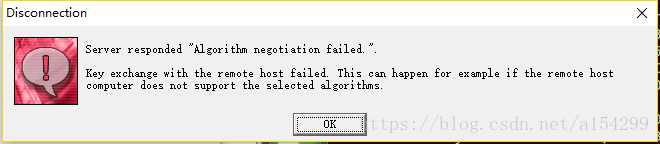
解决方法如下:
(写在前面:请先确保自己已经给Ubuntu安装了SSH服务。安装方法是在root模式下,终端输入命令apt-getinstall vim ssh)
1. 在Ubuntu终端中输入如下命令,进入配置文件
vim /etc/ssh/sshd_config
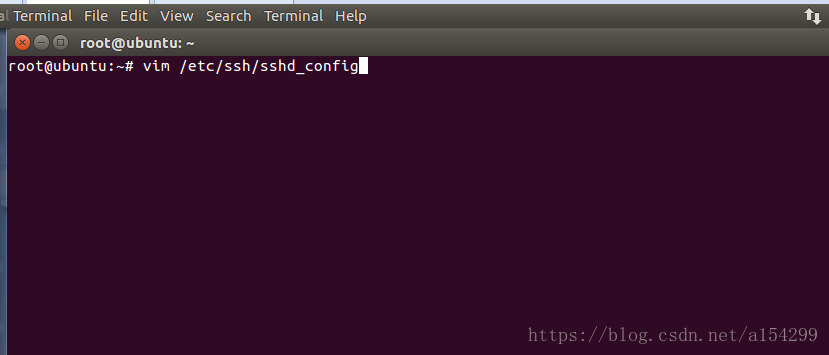
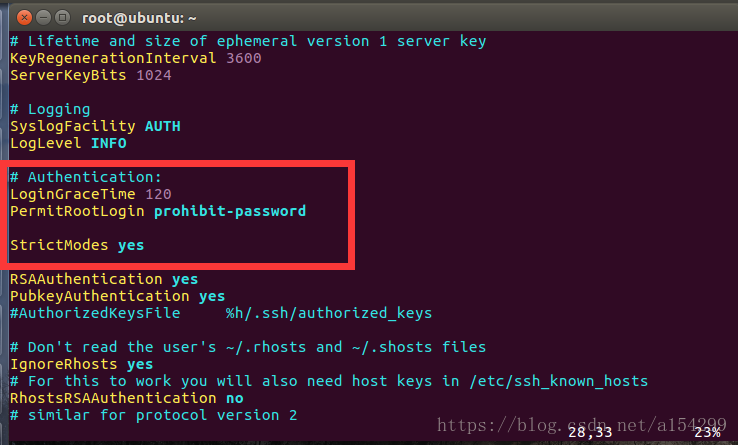
2. 找到如图的文本
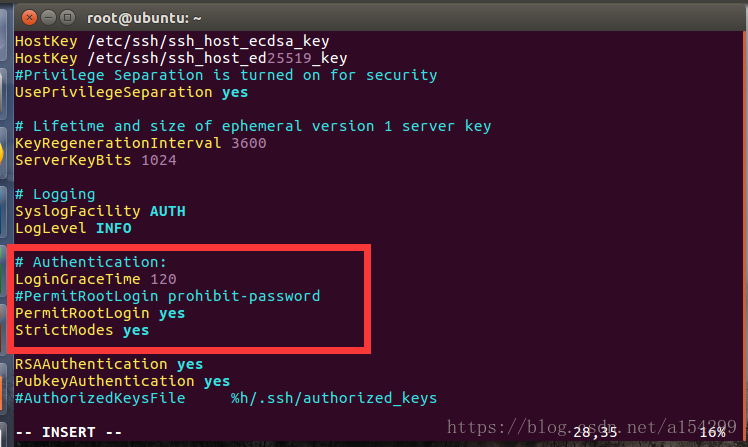
将此处文本修改为下图所示(注释掉“PermitRootLogin prohibit-password”,另起一行添加“PermitRootLogin yes”)
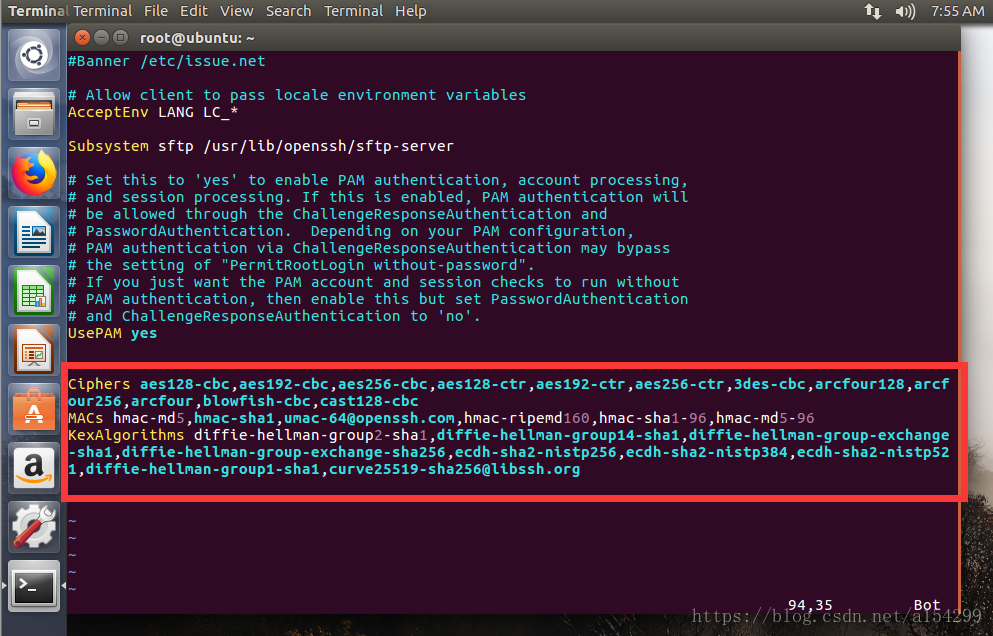
3. 将光标移动到文档末尾,在文档末尾添加如下文本
Ciphers aes128-cbc,aes192-cbc,aes256-cbc,aes128-ctr,aes192-ctr,aes256-ctr,3des-cbc,arcfour128,arcfour256,arcfour,blowfish-cbc,cast128-cbc
MACs hmac-md5,hmac-sha1,umac-64@openssh.com,hmac-ripemd160,hmac-sha1-96,hmac-md5-96
KexAlgorithms diffie-hellman-group1-sha1,diffie-hellman-group14-sha1,diffie-hellman-group-exchange-sha1,diffie-hellman-group-exchange-sha256,ecdh-sha2-nistp256,ecdh-sha2-nistp384,ecdh-sha2-nistp521,diffie-hellman-group1-sha1,curve25519-sha256@libssh.org
如图所示:
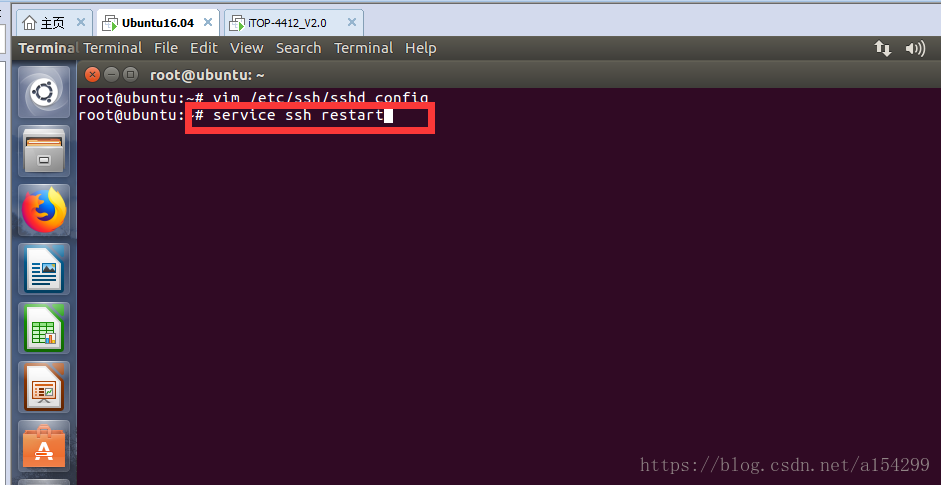
4. 使用命令“ESC + : + x”退出文本编辑。然后在命令行输入命令 service ssh restart
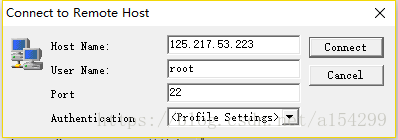
5. 回到PC机,打开SSH软件,点击Quick Connect按钮,输入Ubuntu虚拟机的ip地址以及用户名(用户名一定要输入root,否则可能会导致SSH中某些操作权限不够)
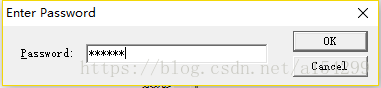
6. 点击连接,输入密码,点击OK
7. 大功告成
本文摘自我的CSDN博客,原文链接https://blog.csdn.net/a154299/article/details/79904620
Ubuntu16.04连接SSH出现 Server responded “Algorithm negotiation failed” 的解决方法的更多相关文章
- Debian 8 jessie, OpenSSH ssh connection server responded Algorithm negotiation failed
安装了debian 8.5 就出问题了. root@debian8:~# lsb_release -aNo LSB modules are available.Distributor ID: Debi ...
- Server responded "Algorithm negotiation failed" SSH Secure链接服务器错误
Ubuntu 16.04安装openssh-server后,使用ssh客户端连接时可能报此错误,情况如下图所示: server responded "algorithm negotiatio ...
- [异常解决] windows用SSH和linux同步文件&linux开启SSH&ssh client 报 algorithm negotiation failed的解决方法之一
1.安装.配置与启动 SSH分客户端openssh-client和openssh-server 如果你只是想登陆别的机器的SSH只需要安装openssh-client(ubuntu有默认安装,如果没有 ...
- ssh连接报错server responded”algorithm negotiation failed”
ssh工具版本太低,OpenSSL版本升的比较高,有些算法不支持. 解决方法: 1.修改ssh的配置文件 /etc/ssh/sshd_config cd /etc/sshvi /etc/ssh/ssh ...
- SSH Secure Shell 无法登录:server responded "algorithm negotiation failed”
SSH Secure Shell Client 连接 ubuntu系统报错 修改ssh的配置文件 /etc/ssh/sshd_config在配置文件中添加: Ciphers aes128-cbc,ae ...
- SSH Secure Shell链接Ubuntu报错Server responded "Algorithm negotiation failed"
vim /etc/ssh/sshd_config Ciphers aes128-cbc,aes192-cbc,aes256-cbc,aes128-ctr,aes192-ctr,aes256-ctr,3 ...
- SSH Secure File Transfer Client连接远程设备报“algorithm negotiation failed”错的解决方法
SSH Secure File Transfer Client连接远程设备报"algorithm negotiation failed"错的解决方法 ssh client 报 al ...
- 树莓派VNC搭建相关教程+Ubuntu16.04连接vncserver灰屏问题!
树莓派VNC搭建相关教程: 为了节省money,于是我决定用VNC界面来代替显示器,为后面做C++ Qt以及Python Qt开发打下基础,我别无选择!下面开始进入正题: 1-- 下载VNC-View ...
- SSH Secure :Algorithm negotiation failed,反复提示输入password对话框
在嵌入式开发中,SSH Secure File Transfer Client 软件使用,方便了windows和linux之间文件拷贝,尤其是多台主机状况下. 最近装了Ubuntu 16.0.4,在V ...
随机推荐
- linux ctrl 快捷键
ctrl+a: 光标跳到行首. ctrl+b: 光标左移一个字母. ctrl+c: 杀死当前进程. ctrl+d: 删除光标后一个字符或exit.logout. ctrl+e: 光标移到行尾. ctr ...
- 微信JSAPI支付接口,支付完成后关闭当前窗口
一.把demo里的这一段: success: function (res) { // 支付成功后的回调函数 if (res.err_msg == "get_brand_wcpay_reque ...
- Oracle - 函数及多表关联
函数一般是在数据上执行的,它给数据的转换和处理提供了方便.只是将取出的数据进行处理,不会改变数据库中的值.函数根据处理的数据分为单行函数和聚合函数(组函数),组函数又被称作聚合函数,用于对多行数据进行 ...
- 前缀和&二维前缀和
我们知道,数组上的前缀和S[i]=S[i-1]+a[i] 那么,怎样求二维前缀和呢? 二维前缀和: 绿色点的前缀和就是黄色.红色.灰色和绿色的点权和 怎样计算? s[i][j]=s[i-1][j]+s ...
- markdown中使用缩进
在markdown中直接敲空格是不生效的. 使用html标签来实现 一个空格大小的表示: 两个空格的大小表示: 不换行空格: 别忘记分号 参考了大神的文章: markdown空格缩进以及HTML ...
- 使用python连接mysql数据库——pymysql模块的使用
安装pymysql pip install pymysql 使用pymysql 使用数据查询语句 查询一条数据fetchone() from pymysql import * conn = conne ...
- mysql内存优化
一.环境说明: 操作系统:CentOS 6.5 x86_64 数据库:Mysql 5.6.22 服务器:阿里云VPS,32G Mem,0 swap 二.问题情况: 1.某日发现公司线上系统的Mysql ...
- Codeforces 1238G. Adilbek and the Watering System
传送门 最关键的想法就是每个位置一定用的是当前能用的最便宜的水,因为到后面可能有更便宜的 然后其他还没用上的水我们也留着,假装此时已经买了,但是如果发现后面有更优的再反悔也不迟 每相邻两个朋友之间我们 ...
- 在Global.asax中 注册Application_Error事件 捕获全局异常
参考于:https://shiyousan.com/post/635813858052755170 在ASP.NET MVC中,通过应用程序生命周期中的Application_Error事件可以捕获到 ...
- 【原创】Linux基础之重定向stdout/stderr
启动进程后查看日志(stdout和stderr) 1 nohup+tail # nohup $cmd > /path/to/file 2>&1 & # tail -f /p ...