
springMVC_注解方式搭建基础环境
---恢复内容开始---
一、jar包环境,web配置文件和Spring-MVC配置文件的,相关的modelAndview
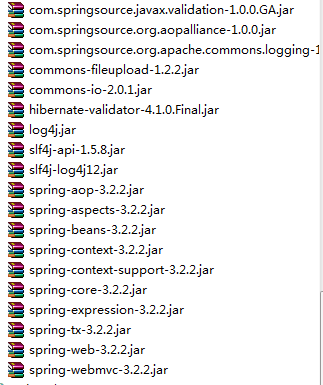
1.配置DispatcherServlet
<servlet>
<servlet-name>action</servlet-name>
<servlet-class>org.springframework.web.servlet.DispatcherServlet</servlet-class>
<init-param>
<param-name>contextConfigLocation</param-name>
<param-value>classpath:spring-mvc.xml</param-value>
</init-param>
<load-on-startup>1</load-on-startup>
</servlet>
<servlet-mapping>
<servlet-name>action</servlet-name>
<url-pattern>/</url-pattern>
</servlet-mapping>
2.配置bean.xml文件的监听器
<context-param>
<param-name>contextConfigLocation</param-name>
<param-value>classpath:beans.xml</param-value>
</context-param>
<listener>
<listener-class>org.springframework.web.context.ContextLoaderListener</listener-class>
</listener>
3.配置Spring-MVC.xml文件
3.1配置扫描控制器Cotroller包路径和注解驱动
xsi:schemaLocation="http://www.springframework.org/schema/beans
http://www.springframework.org/schema/beans/spring-beans-3.2.xsd
http://www.springframework.org/schema/mvc
http://www.springframework.org/schema/mvc/spring-mvc-3.2.xsd
http://www.springframework.org/schema/context
http://www.springframework.org/schema/context/spring-context-3.2.xsd ">
<!-- 自动扫描 -->
<context:component-scan base-package="springmvcpractice\web\controller">
</context:component-scan>
<mvc:resources location="/resources/" mapping="/images/**"/>
<!-- 注解驱动 -->
<mvc:annotation-driven>
</mvc:annotation-driven>
3.2配置文件上传解析器
<!-- 文件上传解析器 id 必须为multipartResolver -->
<bean id="multipartResolver" class="org.springframework.web.multipart.commons.CommonsMultipartResolver">
<property name="maxUploadSize" value="10485760">
</property>
</bean>
3.3配置内部资源解析器和静态视图资源路径
<!-- 映射静态资源 -->
<mvc:resources location="/images/" mapping="/images/**"/>
<mvc:resources location="/upload/" mapping="/upload/**"/>
<!-- 内部资源视图解析器 prefix + logicName + suffix /WEB-INF/jsps/ + index + .jsp-->
<bean id="internalResourceViewResolver" class="org.springframework.web.servlet.view.InternalResourceViewResolver">
<!-- 前缀 -->
<property name="prefix" value="/WEB-INF/jsps/"/>
<!-- 后缀 -->
<property name="suffix" value=".jsp"/>
</bean>
3.4配置beans.xml文件的Service包路径的自动扫描
<?xml version="1.0" encoding="UTF-8"?>
<beans xmlns="http://www.springframework.org/schema/beans"
xmlns:xsi="http://www.w3.org/2001/XMLSchema-instance"
xmlns:mvc="http://www.springframework.org/schema/mvc"
xmlns:context="http://www.springframework.org/schema/context"
xsi:schemaLocation="http://www.springframework.org/schema/beans
http://www.springframework.org/schema/beans/spring-beans-3.2.xsd
http://www.springframework.org/schema/mvc
http://www.springframework.org/schema/mvc/spring-mvc-3.2.xsd
http://www.springframework.org/schema/context
http://www.springframework.org/schema/context/spring-context-3.2.xsd ">
<!-- 自动扫描 -->
<context:component-scan base-package="springmvcpractice\service"/>
</beans>
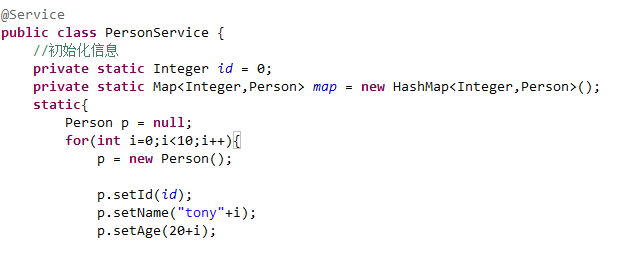
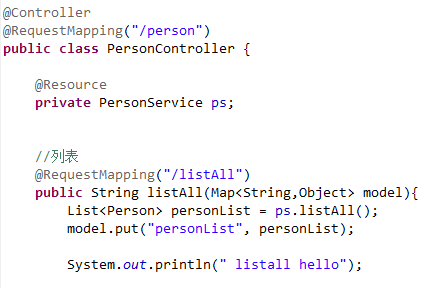
二、配置编写,person bean,personService和contorller的实体类

三、
---恢复内容结束---
springMVC_注解方式搭建基础环境的更多相关文章
- JAVA配置&注解方式搭建简单的SpringMVC前后台交互系统
前面两篇文章介绍了 基于XML方式搭建SpringMVC前后台交互系统的方法,博文链接如下: http://www.cnblogs.com/hunterCecil/p/8252060.html htt ...
- 使用注解方式搭建SpringMVC
1.以前搭建Spring MVC 框架一般都使用配置文件的方式进行,相对比较繁琐.spring 提供了使用注解方式搭建Spring MVC 框架的方式,方便简洁.使用Spring IOC 作为根容器管 ...
- ubuntu通过apt-get方式搭建lnmp环境以及php扩展安装
v 一直是在用的lnmp的集成安装包搭建lnmp环境,因为工作需要需要安装ldap扩展,在网上怎么都找不到源码安装包,只能卸载掉原来的lnmp环境,用ubuntu的php5-ldap扩展, 在安装中遇 ...
- springMVC_配置文件搭建基础环境
SpringMVC与Struts的区别. 一.基础jar包 二.①DispatcherServlet,handelMapping,webAction(colltroller),ModelAndView ...
- EF6 在原有数据库中使用 CodeFirst 总复习(一、搭建基础环境)
本来以为已经会了,可动手时发现许多问题还是模糊不清,正所谓眼高手低.只能重新查资料,再复习一遍. vs.net2013 ef6 mvc5 sqlserver2008 一.建立数据库 Bloggi ...
- CDH5.2+CM5.2+impala2+Spark1.1 集群搭建基础环境准备
測试集群简单介绍:一共同拥有4台机器:10.10.244.136.10.10.244.137.10.10.244.138.10.10.244.139. 10.10.244.136是管理节点.另外3台是 ...
- (一)OpenStack---M版---双节点搭建---基础环境配置
↓↓↓↓↓↓↓↓视频已上线B站↓↓↓↓↓↓↓↓ >>>>>>传送门 配置如下 本次搭建采用2台4核4G的虚拟机,也可以用2台2核4G 主机名 配置 网络 Contr ...
- django 学习笔记(一)搭建基础环境
1.安装django 下载地址 https://github.com/django/django 解压后进入文件夹运行指令 >> python setup.py install 2.创建工 ...
- ASP.NET MVC4 微信公众号开发之网页授权(一):搭建基础环境
首先你得注册并认证一个个人或企业的微信公众号===服务号从而确保获得以下接口权限: 然后打开公众号设置里的功能设置里找到业务域名和网页授权域名分别填上你的域名(注:已备案的域名),如下图所示: 到这里 ...
随机推荐
- H5之拖拽
步骤: 1.为将要拖拽的元素设置允许拖拽,并赋予dragstart事件将其id转换成数据保存: 2.为容器添加dragover属性添加事件阻止浏览器默认事件,允许元素放置,并赋予drop事件进行元素的 ...
- 回忆一下Node(随时更改,想到什么写什么)
什么是Node? Node.js 是一个基于Chrome V8 引擎的JavaScript运行环境 Node.js使用了一个事件驱动.非阻塞式I/O的模型,使其轻量又高效 事件驱动: 任务执行,发布者 ...
- Python实现YOLO目标检测
作者:R语言和Python学堂 链接:https://www.jianshu.com/p/35cfc959b37c 1. 什么是目标检测? YOLO目标检测的一个示例 啥是目标检测? 拿上图 (用YO ...
- Android NDK 学习之在C中调用Java的变量和静态变量
本博客主要是在Ubuntu 下开发,且默认你已经安装了Eclipse,Android SDK, Android NDK, CDT插件. 在Eclipse中添加配置NDK,路径如下Eclipse-> ...
- Windows环境下实现Jenkins自动化部署
详见:https://blog.csdn.net/Try_harder_every_day/article/details/79170065 Jenkins自动化部署: 几条具体的思路:1.开发人员将 ...
- HTML5 使用localstorage 本地存储
HTML 本地存储介绍 最早的 Cookies 自然是大家都知道,问题主要就是太小,大概也就 4KB 的样子,而且 IE6 只支持每个域名20个cookies,太少了.优势就是大家都支持,而且支持得还 ...
- Hive调优笔记
Hive调优 先记录了这么多,日后如果有遇到,再补充. fetch模式 <property> <name>hive.fetch.task.conversion</name ...
- linux alsa音频中采样率fs、比特率BCLK 、主时钟MCLK关系
转:https://blog.csdn.net/lugandong/article/details/72468831 一.拿512fs说话: 看图知道采样的位深是32bit(位),左右声道各占了8*3 ...
- 使用Ultra Librarian工具生成Altium封装和原理图符号的方法
最近在项目中用到了TI的单通道SPDT 模拟开关TS5A3160芯片,Altium官方的库中没有该元件的封装库,所以需要自己画.Ti在官网的产品介绍中提供了生成原理图符号和 PCB 布局封装的方法. ...
- Class文件中的常量
常量池计数器 常量池是class文件中非常重要的结构,它描述着整个class文件的字面量信息. 常量池是由一组constant_pool结构体数组组成的,而数组的大小则由常量池计数器指定. 常量池计数 ...