
Linux系统管理——用户、组
单用户OS和多用户OS?
Linux是多用户OS,Windows是单用户OS。很多人会疑惑? Windows7也可以创建多个用户啊,怎么能说是单用户OS呢?
这里的多用户指的是OS同时可以被多个人访问,单用户指的是OS一次只能被一个用户的访问。
Windows里面,win7、winxp都是单用户OS;Windows server 2008,2003等是多用户OS。
Linux环境下使用who命令可以知道当前有多少用户
[root@51cto ~]# who

root     tty1         -- :

root     pts/        -- : (192.168.80.1)
whoami可以知道当前登陆用户是谁
[root@51cto ~]# whoami

root
无论单用户OS还是多用户OS都可以再系统上创建多个账户。
用户类别
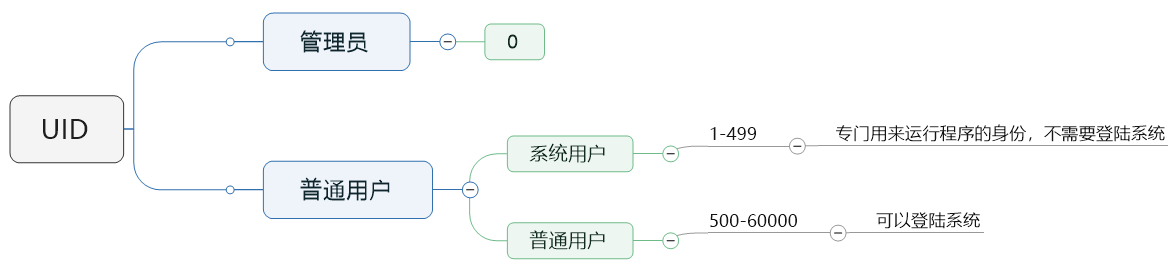
UID的取值范围再配置文件/etc/login.defs里面定义了
[root@51cto ~]# cat /etc/login.defs | grep -v '^#'

MAIL_DIR    /var/spool/mail

PASS_MAX_DAYS

PASS_MIN_DAYS

PASS_MIN_LEN

PASS_WARN_AGE

UID_MIN

UID_MAX

GID_MIN

GID_MAX

CREATE_HOME    yes

UMASK

USERGROUPS_ENAB yes

ENCRYPT_METHOD SHA512
组类别
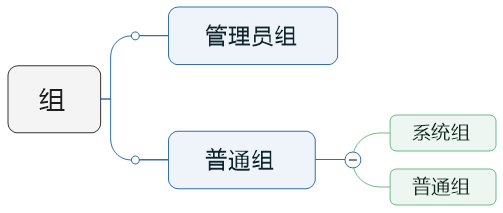
使用组简化授权
基本组:优先使用基本组,用户只能属于一个基本组。基本组也叫默认组。
附加组:基本组不能满足授权要求时,创建附加组。用户可以属于多个附加组。
私有组:创建用户是如果没有指定所属的组 系统会自动为其创建一个同名的组
Linux环境下用户信息保存在/etc/passwd,每一行代表一个用户。
[root@51cto ~]# cat /etc/passwd

root:x:::root:/root:/bin/bash

bin:x:::bin:/bin:/sbin/nologin

daemon:x:::daemon:/sbin:/sbin/nologin

adm:x:::adm:/var/adm:/sbin/nologin

lp:x:::lp:/var/spool/lpd:/sbin/nologin

sync:x:::sync:/sbin:/bin/sync

shutdown:x:::shutdown:/sbin:/sbin/shutdown

halt:x:::halt:/sbin:/sbin/halt

mail:x:::mail:/var/spool/mail:/sbin/nologin

uucp:x:::uucp:/var/spool/uucp:/sbin/nologin

operator:x:::operator:/root:/sbin/nologin

games:x:::games:/usr/games:/sbin/nologin

gopher:x:::gopher:/var/gopher:/sbin/nologin

ftp:x:::FTP User:/var/ftp:/sbin/nologin

nobody:x:::Nobody:/:/sbin/nologin

vcsa:x:::virtual console memory owner:/dev:/sbin/nologin

saslauth:x:::"Saslauthd user":/var/empty/saslauth:/sbin/nologin

postfix:x::::/var/spool/postfix:/sbin/nologin

sshd:x:::Privilege-separated SSH:/var/empty/sshd:/sbin/nologin

wangyan:x::::/home/wangyan:/bin/bash

- Username field: This field denotes the User (or User Account) Name. According to the man page of
useraddcommand, "Usernames may only be up to 32 characters long". This username must be used at the time of logging in to the system. - Password field: Second field is the Password field, not denoting the actual password though. A 'x' in this field denotes the password is encrypted and saved in the
/etc/shadowfile. - UID field: Whenever a new user account is created, it is assigned with a user id or UID (UID for the user '
mandar' is 500, in this case) and this field specifies the same. - GID field: Similar to the UID field, this field specifies which group the user belongs to, the group details being present in
/etc/groupfile. - Comment/Description/User Info field: This field is the short comment/description/information of the user account (For this example, user account '
mandar' belongs to the userMandar Shinde, hence this comment). - User Home Directory: Whenever a user logs in to the system, he is taken to his Home directory, where all his personal files reside. This field provides the absolute path to the user's home directory (
/home/mandarin this case). - Shell: This field denotes, the user has access to the shell mentioned in this field (user '
mandar' has been given access to/bin/bashor simplybashshell).
查看Linux系统中有哪些shell可以用
[root@51cto ~]# cat /etc/shells

/bin/sh

/bin/bash

/sbin/nologin

/bin/dash
用户密码在/etc/shadow文件中
[root@51cto ~]# cat /etc/shadow

root:$$5B2lQCfHQp5kBP8L$yA9etUiORX6Zxn663OARZcp/:::::::

bin:*:::::::

daemon:*:::::::

adm:*:::::::

lp:*:::::::

sync:*:::::::

shutdown:*:::::::

halt:*:::::::

mail:*:::::::

uucp:*:::::::

operator:*:::::::

games:*:::::::

gopher:*:::::::

ftp:*:::::::

nobody:*:::::::

vcsa:!!:::::::

saslauth:!!:::::::

postfix:!!:::::::

sshd:!!:::::::

wangyan:!!:::::::

[root@WebServer ~]# tail - /etc/shadow

wangyan:$$PDZ2U4mgN89wtWFfCYFB.:::::::
用户登录名
加密后的密码
从1970 年到最近一次更改密码时间之间过了多少天
密码最少使用几天
密码最长使用多少天
密码到期前几天提醒用户更改密码
密码过期时间
用户过期时间
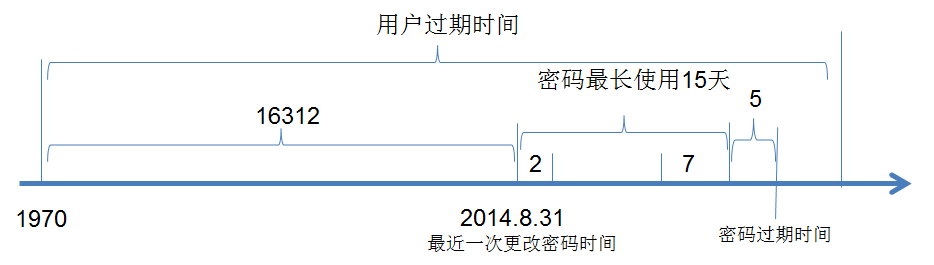
chage
更改用户密码过期信息
-d 设置最近一次更改密码时间
-E 设置账户过期时间
-I 设置密码过期时间
-l --list 列出用户账户密码信息
-m 设置用户最短密码使用时间
-M 设置用户最常密码使用时间
-W 设置密码更改警告时间
Linux系统管理——用户、组的更多相关文章
- Linux的用户(组),权限,文件精妙的三角关系,和强大的帮助系统
在linux中一切都是文件(文件夹和硬件外设是特殊的文件),如果有可能尽量使用文本文件.文本文件是人和机器能理解的文件,也成为人和机器进行 交流的最好途径.由于所有的配置文件都是文本,所以你只需要一个 ...
- Linux实际用户(组)ID,有效用户(组)ID,设置用户(组)ID
实际用户(组)ID: 标识用户是谁,这两个字段在登录时取自口令文件中的登录项. 有效用户(组)ID: 决定了对文件的访问权限,通常有效用户(组)ID等于实际用户(组)ID,谁运行有效ID就等于谁的实际 ...
- 第2章 细说Linux系统用户/组管理(1)
2.1 用户和组的基本概念 用户和组是操作系统中一种身份认证资源. 每个用户都有用户名.用户的唯一编号uid(user id).所属组及其默认的shell,可能还有密码.家目录.附属组.注释信息等. ...
- Linux下用户-组权限配置
cat /etc/group cat /etc/ashadow 一.用户管理 1.添加用户 #useradd 用户名 useradd php100;用cat /etc/passwd查看 分析:php1 ...
- Linux将用户添加到组的指令
原文:https://blog.csdn.net/youmatterhsp/article/details/80549683: https://www.cnblogs.com/cl ...
- 【转】linux 设置用户id 设置组id
linux 设置用户id 设置组id 转自 linux 设置用户id 设置组id 最近看apue,简单记录对设置用户id理解(设置组id同理). 1. 相关的id好像很多,共有哪些? 文件2个 ...
- 【转载】干货再次来袭!Linux小白最佳实践:《超容易的Linux系统管理入门书》(连载八)用命令实现批量添加用户
Windows添加用户需要至少5个界面,而Linux一条命令就搞定了,这是不是高效人士办公第一法则呢.本文不给你一堆参数和选项,不让你见识教条主义,只给你最实用的代码. 想每天能听到小妞的语音播报,想 ...
- Linux系统管理技术手册——第6章 添加新用户
6.1/etc/passwd文件 用户登录时Linux识别用户的文件/etc/passwd /etc/passwd包括7个字段: 登录名(不超过32位,使用NIS系统后不超过8位) 经过加密的口令或口 ...
- Linux修改用户所在组方法
Linux修改用户所在组方法 usermod -g 用户组 用户名强行设置某个用户所在组usermod -G 用户组 用户名把某个用户改为 group(s) usermod -a -G 用户组 用户名 ...
随机推荐
- centos6.8下配置vsftp
几个小时的调试 终于OK了 以下配置就算开了selinux 也照样能正常上传 注意 默认的上传目录 在 /home/用户名目录 如果不能下载文件 设置下文件的权限 一.安装VSFTP # yum -y ...
- [opencv] copyTo函数的使用方法
OpenCV中image.copyTo()有两种形式: 1.image.copyTo(imageROI),作用是把image的内容粘贴到imageROI: 2.image.copyTo(imageRO ...
- react——Table组件列中靠左 靠右对齐解决方案
最近项目中遇到一个需求调整:table中的文字过长居左排列,数字居右排列 然后看了一下官方文档: 先上图展示一下 左边是需要的效果: className: 'column-left', { title ...
- ELK7.4.2安装教程
ELK简介 "ELK"是三个开源项目的首字母缩写,这三个项目分别是:Elasticsearch.Logstash 和 Kibana.Elasticsearch 是一个搜索和分析引擎 ...
- mysql学习之join从句
一.join从句共有5种类型 内连接(inner join) 全外连接(full outer join) 左外连接(left outer join) 右外连接(right outer join) 交叉 ...
- opencv轮廓外接矩形
1.寻找轮廓 api void cv::findContours( InputOutputArray image, OutputArrayOfArrays contours, OutputArray ...
- 关于c++模板非类型参数中指针和引用类型必须为全局或者静态变量的问题
之前在学习c++模板的时候,一直没留意到在非类型参数中对指针和引用有着一些限制,今早在复学模板的时候才注意到书上标明,指针和引用作为模板的非类型参数传递时必须要求是全局或者静态变量.其实不难想到,模板 ...
- jenkins sonarqube 代码检测部署
install pgsql and sonarqube docker run --name postgresqldb -e POSTGRES_USER=sonar -e POSTGRES_PASSWO ...
- PAT(B) 1005 继续(3n+1)猜想(Java)
题目链接:1005 继续(3n+1)猜想 分析 找出所有的被"覆盖"的数,然后再将输入的数中不在被"覆盖"的数中的数添加到"关健数"中.输 ...
- asp.net core-4.命令行配置
先用vs2017创建一个控制台应用程序,这里不做多的介绍. 现在命名空间中添加using Microsoft.Extensions.Configuration; 如果没有,就在依赖项—>管理Nu ...