
EasyUi – 1.入门
1.页面引用.
jquery,easyui,主题easyui.css,图标ico.css,语言zh_CN.js
<script src="Scripts/jquery-easyui-1.3.2/jquery-1.8.0.min.js"></script> <script src="Scripts/jquery-easyui-1.3.2/jquery.easyui.min.js"></script> <link href="Scripts/jquery-easyui-1.3.2/themes/default/easyui.css" rel="stylesheet" /> <link href="Scripts/jquery-easyui-1.3.2/themes/icon.css" rel="stylesheet" /> <script src="Scripts/jquery-easyui-1.3.2/locale/easyui-lang-zh_CN.js"></script> |
2.parser组件panel组件
<body>
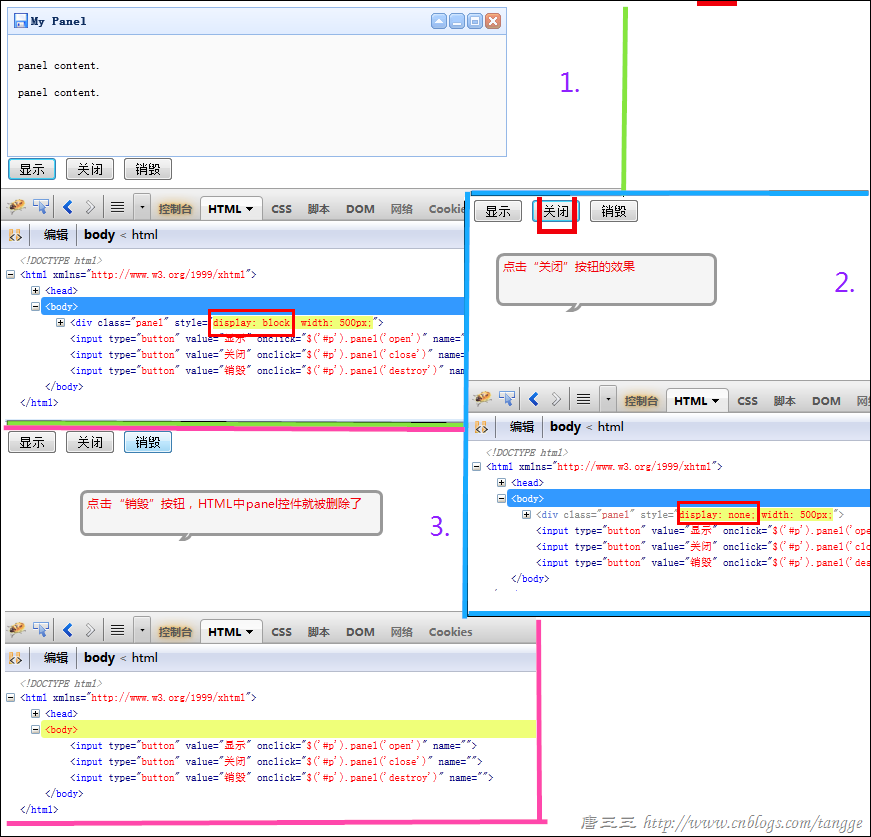
<div id="p" class="easyui-panel" title="My Panel"
style="width: 500px; height: 150px; padding: 10px; background: #fafafa;"
data-options="iconCls:'icon-save',closable:true,
collapsible:true,minimizable:true,maximizable:true">
<p>panel content.</p>
<p>panel content.</p>
</div>
<input type="button" name="" onclick="$('#p').panel('open')" value="显示" />
<input type="button" name="" onclick="$('#p').panel('close')" value="关闭" />
<input type="button" name="" onclick="$('#p').panel('destroy')" value="销毁" />
</body>
3.Form表单的验证(validate)提交
<!DOCTYPE html>
<html xmlns="http://www.w3.org/1999/xhtml">
<head>
<meta http-equiv="Content-Type" content="text/html; charset=utf-8" />
<title></title>
<script src="Scripts/jquery-easyui-1.3.2/jquery-1.8.0.min.js"></script>
<script src="Scripts/jquery-easyui-1.3.2/jquery.easyui.min.js"></script>
<link href="Scripts/jquery-easyui-1.3.2/themes/default/easyui.css" rel="stylesheet" />
<link href="Scripts/jquery-easyui-1.3.2/themes/icon.css" rel="stylesheet" />
<script src="Scripts/jquery-easyui-1.3.2/locale/easyui-lang-zh_CN.js"></script>
<script type="text/javascript">
var LoginAndRegDialog;
var LoginInputForm;
$(function () {//对话框dialog
LoginAndRegDialog = $("#LoginAndRegDialog").dialog({closable: false,
modal: true,
buttons: [{text: '登录',
iconCls: 'icon-ok',
handler: function () {//***先验证(根据自己的需求)
if (LoginInputForm.form('validate')) {//表单form提交
LoginInputForm.submit();
}
}
}, {text: '取消',
handler: function () {$('#LoginInputForm').form('clear');}
}]
});
//表单的提交要求
LoginInputForm = $('#LoginInputForm').form({url: '/Login.ashx',
onSubmit: function () {// do some check
// return false to prevent submit;
},
success: function (data) {//alert(data);
console.info(data);
$.messager.show({title: '提示',
msg: data
})
},
});
})
</script>
</head>
<body>
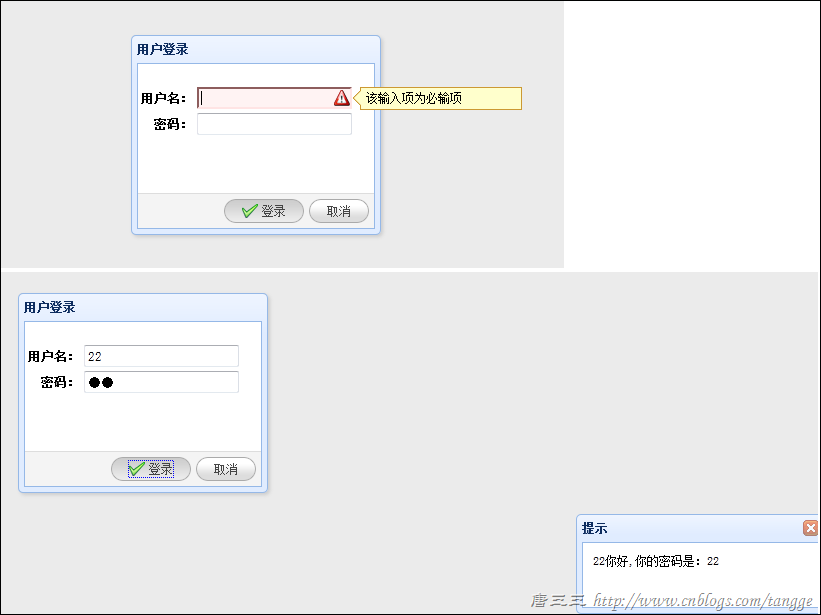
<div id="LoginAndRegDialog" title="用户登录" style="width: 250px; height: 200px;">
<form id="LoginInputForm" method="post">
<table style="margin-top: 20px">
<tr>
<th>用户名:</th>
<td>
<!--直接使用验证规则class="easyui-validatebox"-->
<input name="name" class="easyui-validatebox" data-options="required:true" />
</td>
</tr>
<tr>
<th align="right">密码:</th>
<td>
<input name="password" type="password" />
</td>
</tr>
</table>
</form>
</div>
</body>
</html>
public void ProcessRequest(HttpContext context)
{context.Response.ContentType = "text/html";
string username = context.Request["name"];
string password = context.Request["password"];
context.Response.Write(username + "你好,你的密码是:" + password);
}
jQuery EasyUI 1.3 中文帮助手册
EasyUi – 1.入门的更多相关文章
- EasyUI基础入门之Pagination(分页)
前言 对于一些企业级的应用来说(非站点),页面上最为基本的内容也就是表格和form了.对于类似于ERP这类系统来说数据记录比較大,前端表格展示的时候必需得实现分页功能了.恰巧EasyUI就提供了分页组 ...
- EasyUI基础入门之Parser(解析器)
前言 JQuery EasyUI提供的组件包含功能强大的DataGrid,TreeGrid.面板.下拉组合等.用户能够组合使用这些组件,也能够单独使用当中一个.(使用的形式是以插件的方式提供的) Ea ...
- EasyUI基础入门之Easyloader(载入器)
在了解完easyui的parser(解析器)之后,接下来就是easyloader(简单载入器)的学习了. 什么是EasyLoader 正如其名字一样easyloader的作用是为了动态的载入组件所需的 ...
- jQuery UI 之 EasyUI 快速入门
jQuery EasyUI 基础 转载自(http://www.shouce.ren/api/view/a/3350) jQuery EasyUI 是一个基于 jQuery 的框架,集成了各种用户界面 ...
- EasyUI基础入门之Resiable(可缩放)
easyui的base插件学习已经进行到Resizable(可缩放)了.照旧看看easyui官网的API. Resiable 正如其字面意思一样(可伸缩),resiable主要是将一些html元素扩展 ...
- EasyUI之Hello world(EasyUI的入门学习)
1:创建一个动态web工程: 去官网http://www.jeasyui.net/download/下载官网文档 我去官网下载的最新版本,个人根据自己的需求下载即可.2:在webConte ...
- easyUI基础入门
头部需要引人文件:<!DOCTYPE html><html><head> <meta charset="utf-8"> <ti ...
- EasyUi – 1.入门
1.页面引用. jquery,easyui,主题easyui.css,图标ico.css,语言zh_CN.js <script src="Scripts/jquery-easyui-1 ...
- EasyUI基础入门之Droppable(可投掷)
怎么说呢Droppable这个单词究竟是什么意思,准确来说easyui作者究竟要表达什么意思,还是不大好拿捏的.只是没关系,没有必要纠结与这些细枝末节的东西,依据官网的demo效果,就简单的将之定义为 ...
随机推荐
- 随机添加一个Class,Class提前写好
$("").hover(function(){ var ary = ["red","green","blue",]; v ...
- hiho一下 第一百零七周 Give My Text Back(微软笔试题)
题目1 : Give My Text Back 时间限制:10000ms 单点时限:1000ms 内存限制:256MB 描述 To prepare for the English exam Littl ...
- Codeforces 710 D. Two Arithmetic Progressions
Description \(x=a_1k+b_1=a_2l+b_2,L\leqslant x \leqslant R\) 求满足这样条件的 \(x\) 的个数. Sol 扩展欧几里得+中国剩余定理. ...
- 遍历json对象---Java
Iterator iterator = a.keys(); while(iterator.hasNext()){ String key = (String) iterator.next(); Stri ...
- JDBC的应用
JDBC的开发步骤: 1. 引入JDBC驱动架包 2. 程序中引入JDBC驱动类 3. 创建java与数据库的连接 4. 跟数据库交互:发送sql语句,接收数据库对sql语句的执行结果 ...
- linux系统下获取IP,MAC,子网掩码,网关
获取IP和子网掩码 int getLocalInfo(char IP[],char Mask[]) { int fd; int interfaceNum = 0; struct ifreq buf[1 ...
- Idea反向生成JavaBean
创建数据库
- jsp自定义标签(时间格式化包括Long转时间)
1.jsp自带标签的格式化: jstl fmt 函数大全:主要针对格式化功能 Tags fmt:requestEncoding fmt:setLocale fmt:timeZone fmt:set ...
- 《高性能MySql》阅读笔记
1.查询优化,索引优化和架构优化三者相辅相成.(数据库架构是获得高性能的必要条件,但如果查询设计得不好,即便是最好的架构页无法获得高性能.) 2.查询性能低下的最基本的原因就是访问了太多的数据. 3. ...
- ios Swift 一些注意事项
func test(one:NSString) -> NSString{ return "aaa" } func test(one:Int) -> NSString{ ...