
three.js运动
<!DOCTYPE html>

<html>

<head>

    <title>Example 01.04 - Materials, light and animation</title>

    <script type="text/javascript" src="../libs/three.js"></script>

    <script type="text/javascript" src="../libs/jquery-1.9.0.js"></script>

    <script type="text/javascript" src="../libs/stats.js"></script>

    <style>

        body{

            /* set margin to 0 and overflow to hidden, to go fullscreen */

            margin: 0;

            overflow: hidden;

        }

    </style>

</head>

<body>

<div id="Stats-output">

</div>

<!-- Div which will hold the Output -->

<div id="WebGL-output">

</div>

<!-- Javascript code that runs our Three.js examples -->

<script type="text/javascript">

    // once everything is loaded, we run our Three.js stuff.

    $(function () {

        var stats = initStats();

        // create a scene, that will hold all our elements such as objects, cameras and lights.

        var scene = new THREE.Scene();

        // create a camera, which defines where we're looking at.

        var camera = new THREE.PerspectiveCamera(45, window.innerWidth / window.innerHeight, 0.1, 1000);

        // create a render and set the size

        var renderer = new THREE.WebGLRenderer();

        renderer.setClearColorHex(0xEEEEEE, 1.0);

        renderer.setSize(window.innerWidth, window.innerHeight);

        renderer.shadowMapEnabled = true;

        // create the ground plane

        var planeGeometry = new THREE.PlaneGeometry(60,20,1,1);

        var planeMaterial =    new THREE.MeshLambertMaterial({color: 0xffffff});

        var plane = new THREE.Mesh(planeGeometry,planeMaterial);

        plane.receiveShadow  = true;

        // rotate and position the plane

        plane.rotation.x=-0.5*Math.PI;

        plane.position.x=15

        plane.position.y=0

        plane.position.z=0

        // add the plane to the scene

        scene.add(plane);

        // create a cube

        var cubeGeometry = new THREE.CubeGeometry(4,4,4);

        var cubeMaterial = new THREE.MeshLambertMaterial({color: 0xff0000});

        var cube = new THREE.Mesh(cubeGeometry, cubeMaterial);

        cube.castShadow = true;

        // position the cube

        cube.position.x=-4;

        cube.position.y=3;

        cube.position.z=0;

        // add the cube to the scene

        scene.add(cube);

        var sphereGeometry = new THREE.SphereGeometry(4,20,20);

        var sphereMaterial = new THREE.MeshLambertMaterial({color: 0x7777ff});

        var sphere = new THREE.Mesh(sphereGeometry,sphereMaterial);

        // position the sphere

        sphere.position.x=20;

        sphere.position.y=0;

        sphere.position.z=2;

        sphere.castShadow=true;

        // add the sphere to the scene

        scene.add(sphere);

        // position and point the camera to the center of the scene

        camera.position.x = -30;

        camera.position.y = 40;

        camera.position.z = 30;

        camera.lookAt(scene.position);

        // add subtle ambient lighting

        var ambientLight = new THREE.AmbientLight(0x0c0c0c);

        scene.add(ambientLight);

        // add spotlight for the shadows

        var spotLight = new THREE.SpotLight( 0xffffff );

        spotLight.position.set( -40, 60, -10 );

        spotLight.castShadow = true;

        scene.add( spotLight );

        // add the output of the renderer to the html element

        $("#WebGL-output").append(renderer.domElement);

        // call the render function

        var step=0;

        render();

        function render() {

            stats.update();//拓展render()函数

            // rotate the cube around its axes 绕坐标轴转动的红色方块

            cube.rotation.x += 0.02;

            cube.rotation.y += 0.02;

            cube.rotation.z += 0.02;

            // bounce the sphere up and down   球体弹跳

            step+=0.04;//step+=0.04定义了球体弹跳的速度

            sphere.position.x = 20+( 10*(Math.cos(step)));//Math.cos()和Math.sin()函数通过使用step变量帮我们创建了平滑的轨迹

            sphere.position.y = 2 +( 10*Math.abs(Math.sin(step)));

            // render using requestAnimationFrame

            requestAnimationFrame(render);//调用requestAnimationFrame()方法使得动画能持续进行

            renderer.render(scene, camera);//调用renderScene()来启动动画

        }

        function initStats() {

            var stats = new Stats();

            stats.setMode(0); // 0: fps, 1: ms

            // Align top-left

            stats.domElement.style.position = 'absolute';

            stats.domElement.style.left = '0px';

            stats.domElement.style.top = '0px';

            $("#Stats-output").append( stats.domElement );

            return stats;

        }

    });

</script>

</body>

</html>
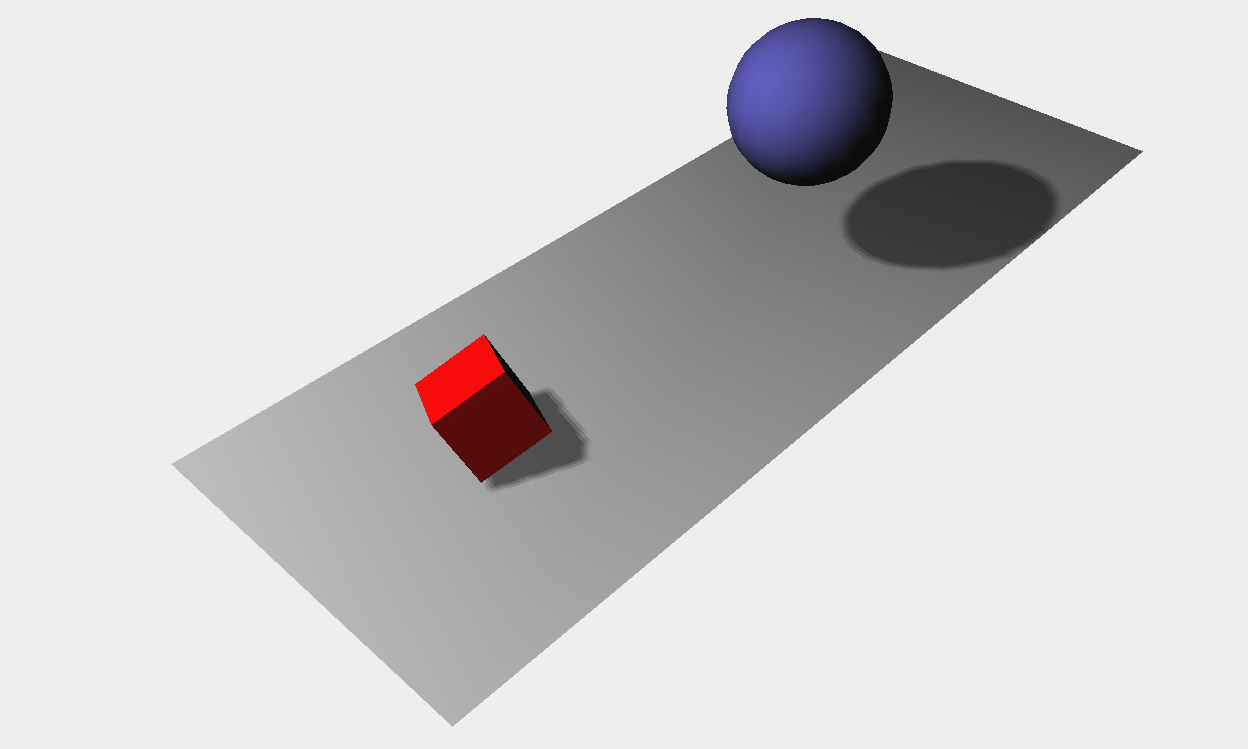
控制运动
<!DOCTYPE html>

<html>

<head>

    <title>Example 01.05 - Control gui</title>

    <script type="text/javascript" src="../libs/three.js"></script>

    <script type="text/javascript" src="../libs/jquery-1.9.0.js"></script>

    <script type="text/javascript" src="../libs/stats.js"></script><!--渲染出一个小图形来显示来自动画的每秒的帧数(FPS)-->

    <script type="text/javascript" src="../libs/dat.gui.js"></script><!--用户界面组件来修改代码中的参数-->

    <style>

        body{

            /* set margin to 0 and overflow to hidden, to go fullscreen */

            margin: 0;

            overflow: hidden;

        }

    </style>

</head>

<body>

<div id="Stats-output"><!--增加一个<div>元素用来呈现统计画面-->

</div>

<!-- Div which will hold the Output -->

<div id="WebGL-output">

</div>

<!-- Javascript code that runs our Three.js examples -->

<script type="text/javascript">

    // once everything is loaded, we run our Three.js stuff.

    $(function () {//在匿名函数的一开始调用该函数,使场景有了统计的功能

        var stats = initStats();

        // create a scene, that will hold all our elements such as objects, cameras and lights.

        var scene = new THREE.Scene();

        // create a camera, which defines where we're looking at.

        var camera = new THREE.PerspectiveCamera(45, window.innerWidth / window.innerHeight, 0.1, 1000);

        // create a render and set the size

        var renderer = new THREE.WebGLRenderer();

        renderer.setClearColorHex(0xEEEEEE, 1.0);

        renderer.setSize(window.innerWidth, window.innerHeight);

        renderer.shadowMapEnabled = true;

        // create the ground plane

        var planeGeometry = new THREE.PlaneGeometry(60,20,1,1);

        var planeMaterial =    new THREE.MeshLambertMaterial({color: 0xffffff});

        var plane = new THREE.Mesh(planeGeometry,planeMaterial);

        plane.receiveShadow  = true;

        // rotate and position the plane

        plane.rotation.x=-0.5*Math.PI;

        plane.position.x=15

        plane.position.y=0

        plane.position.z=0

        // add the plane to the scene

        scene.add(plane);

        // create a cube

        var cubeGeometry = new THREE.CubeGeometry(4,4,4);

        var cubeMaterial = new THREE.MeshLambertMaterial({color: 0xff0000});

        var cube = new THREE.Mesh(cubeGeometry, cubeMaterial);

        cube.castShadow = true;

        // position the cube

        cube.position.x=-4;

        cube.position.y=3;

        cube.position.z=0;

        // add the cube to the scene

        scene.add(cube);

        var sphereGeometry = new THREE.SphereGeometry(4,20,20);

        var sphereMaterial = new THREE.MeshLambertMaterial({color: 0x7777ff});

        var sphere = new THREE.Mesh(sphereGeometry,sphereMaterial);

        // position the sphere

        sphere.position.x=20;

        sphere.position.y=0;

        sphere.position.z=2;

        sphere.castShadow=true;

        // add the sphere to the scene

        scene.add(sphere);

        // position and point the camera to the center of the scene

        camera.position.x = -30;

        camera.position.y = 40;

        camera.position.z = 30;

        camera.lookAt(scene.position);

        // add subtle ambient lighting

        var ambientLight = new THREE.AmbientLight(0x0c0c0c);

        scene.add(ambientLight);

        // add spotlight for the shadows

        var spotLight = new THREE.SpotLight( 0xffffff );

        spotLight.position.set( -40, 60, -10 );

        spotLight.castShadow = true;

        scene.add( spotLight );

        // add the output of the renderer to the html element

        $("#WebGL-output").append(renderer.domElement);

        // call the render function

        var step=0;

        var controls = new function() {

            this.rotationSpeed = 0.02;//控制立方体的旋转

            this.bouncingSpeed = 0.03;//控制球的弹跳速度

        }

        var gui = new dat.GUI();//当我们通过dat.GUI改变变量的值,它会立即影响到我们创建的物体的旋转和弹跳速度

        gui.add(controls, 'rotationSpeed',0,0.5);//取值范围0-0.5

        gui.add(controls, 'bouncingSpeed',0,0.5);

        render();

        function render() {

            stats.update();//在render函数里调用stats.update()方法

            // rotate the cube around its axes

            cube.rotation.x += controls.rotationSpeed;

            cube.rotation.y += controls.rotationSpeed;

            cube.rotation.z += controls.rotationSpeed;

            // bounce the sphere up and down

            step+=controls.bouncingSpeed;

            sphere.position.x = 20+( 10*(Math.cos(step)));

            sphere.position.y = 2 +( 10*Math.abs(Math.sin(step)));

            // render using requestAnimationFrame

            requestAnimationFrame(render);

            renderer.render(scene, camera);

        }

        function initStats() {//初始化统计对象

            var stats = new Stats();

            stats.setMode(0); // 如果设置为0,监测fps, 设置为1监测渲染时间 ms

            // Align top-left

            stats.domElement.style.position = 'absolute';

            stats.domElement.style.left = '0px';

            stats.domElement.style.top = '0px';

            $("#Stats-output").append( stats.domElement );

            return stats;

        }

    });

</script>

</body>

</html>

three.js运动的更多相关文章
- 带无缝滚动的轮播图(含JS运动框架)
今天学习了一下轮播图的写作,想到前一阵学过的无缝滚动得思想,所以就把轮播与滚动结合了一下.不过我的代码的神逻辑我自己都不敢恭维,在没网没参照的情况下,只能硬着头皮往下写,希望跟大家共勉吧. js运动框 ...
- js运动框架之一条乱跑的虫子
克隆与运动框架的联合应用 效果:点击元素块后,元素块开始随机的向任何方向移动,并附带一堆颜色随机的"尾巴".每个方向运动3秒后改变方向,同时笑脸变哭脸. 如图所示: 朝某个方向运动 ...
- JS运动从入门到兴奋1
hello,我是沐晴,一个充满了才华,却靠了照骗走江湖的前端妹子.在这个充满PS的年代,这你们都信,哈哈,废话不多说,今天要分享的是关注JS运动的知识.楼主一直认为,不管学习什么,核心思想才是王道,掌 ...
- 关于js运动的一些总结
js运动实现,有两种.一种是速度版,另一种是时间版. 速度版是通过对速度的加减乘除,得出元素的运动数据.时间版是通过对时间进行Tween公式运算,得出元素的运动数据. 速度版运动优点:容易在运动过程中 ...
- JS运动学习笔记 -- 任意值的运动框架(高/宽度,背景颜色,文本内容,透明度等)
<!DOCTYPE html> <html lang="en"> <head> <meta charset="UTF-8&quo ...
- js运动动画
原文:js运动动画 今天简单的学了一下js运动动画,再此感谢慕课网的这位老师http://www.imooc.com/view/167,讲的很不错. 下面是我整理出来的结果. 知识点一:速度动画. 1 ...
- 第八节 JS运动基础
运动基础 让Div运动起来 速度——物体运动的快慢 运动中的Bug 不会停止 速度取某些值会无法停止 到达位置后再点击还会运动 重复点击速度加快 匀速运动(速度不变) 运动框架及应用: 运动框架: 在 ...
- JS运动 - 无缝滚动和缓动动画
JS运动 - 无缝滚动和缓动动画 无缝滚动原理:首先先复制两张图片(第一张和第二张)放到最后面;ul绝对定位,如果ul的left值大于等于4张图片的宽度,就应该快速复原为0. html <!DO ...
- 解析JS运动
解析JS运动 物体运动原理:通过改变物体的位置,而发生移动变化. 任何运动都是相对的,就像物理中的运动公式:s(要达到的)=s0(当前的样式值)+vt. 方法: 1.运动的物体使用绝对定位 ...
- move.js运动插件
move.js 运动插件是一款针对元素动画效果的插件.可以运用此插件制作出各类元素效果. 插件GitHub地址:https://github.com/visionmedia/move.js 下面整理学 ...
随机推荐
- 宠物收养所(bzoj1208)
Description 最近,阿Q开了一间宠物收养所.收养所提供两种服务:收养被主人遗弃的宠物和让新的主人领养这些宠物.每个领养者都希望领养到自己满意的宠物,阿Q根据领养者的要求通过他自己发明的一个特 ...
- 解决VS2010 C++ DLL不能断点调试的问题
问题产生的过程是这样的,向exe项目(CSharp)中添加dll工程(c++开发)的引用,并将引用工程的属性“Link Library Dependencies”的值设为true,这样,在不加入lib ...
- nyoj744(位运算)
题目:http://acm.nyist.net/JudgeOnline/problem.php?pid=744 思路:a^b可以得到a~b间任意两个数异或运算的长度的最大值,设为n,答案为:pow(2 ...
- JavaScript基础——创建函数
JavaScript的最重要的一个部分是制作其他代码可以重用的代码.要做到这一点,你可以把代码组织成执行特定任务的函数.函数是结合在一个单一的块中,并给予一个名称的一系列代码语句.然后,你就可以通过引 ...
- MVC公开课 – 2.查询,删除 (2013-3-15广州传智MVC公开课)
查询 /Controller/HomeController.cs /// <summary> /// 查询 文章 列表 /// </summary> /// <retur ...
- MySQL 主从同步
http://blog.csdn.net/z69183787/article/details/53897894
- 【转载】 Pyqt 利用QDataStream对文件进行存取
# -*- coding: utf-8 -*- from PyQt4.QtGui import * from PyQt4.QtCore import * import sys QTextCodec.s ...
- 【JAVA集合框架之工具类】
一.概述 JAVA集合框架中有两个很重要的工具类,一个是Collections,另一个是Arrays.分别封装了对集合的操作方法和对数组的操作方法,这些操作方法使得程序员的开发更加高效. public ...
- 在SSIS包中的事务处理
在处理SSIS包的数据ETL操作过程中,我们经常遇到的一个问题就是一系列步骤在运行的过程中,如果中间的一个步骤失败了,那么我们就需要清理前面已经运行过的步骤所产生的数据或者结果,这往往是一个很头疼的过 ...
- PHP不同域名cookie共享(单点登录实现原理)
PHP使用P3P完成COOKIE跨域操作实际实用中,类似的需求有,比如说我们有两个域名,我们想实现在一个域名登录后,能自动完成另一个域名的登录,也就是单点登录(SSO)功能.为了测试的方便,先编辑ho ...