
Spring boot 打成jar包问题总结
Spring boot 打成jar包问题总结
1、Unable to find a single main class from the following candidates
1.1、问题描述
maven build时出现以下错误提示日志:
[ERROR] Failed to execute goal org.springframework.boot:spring-boot-maven-plugin:1.3.5.RELEASE:repackage (default) on project information: Execution default of goal org.springframework.boot:spring-boot-maven-plugin:1.3.5.RELEASE:repackage failed: Unable to find a single main class from the following candidates [com.hhly.InformationApplication, com.hhly.test.Application] -> [Help 1]1.2、日志分析
Unable to find a single main class from the following candidates [com.hhly.InformationApplication, com.hhly.test.Application]

// 不能从下面的候选类中找到单一的main类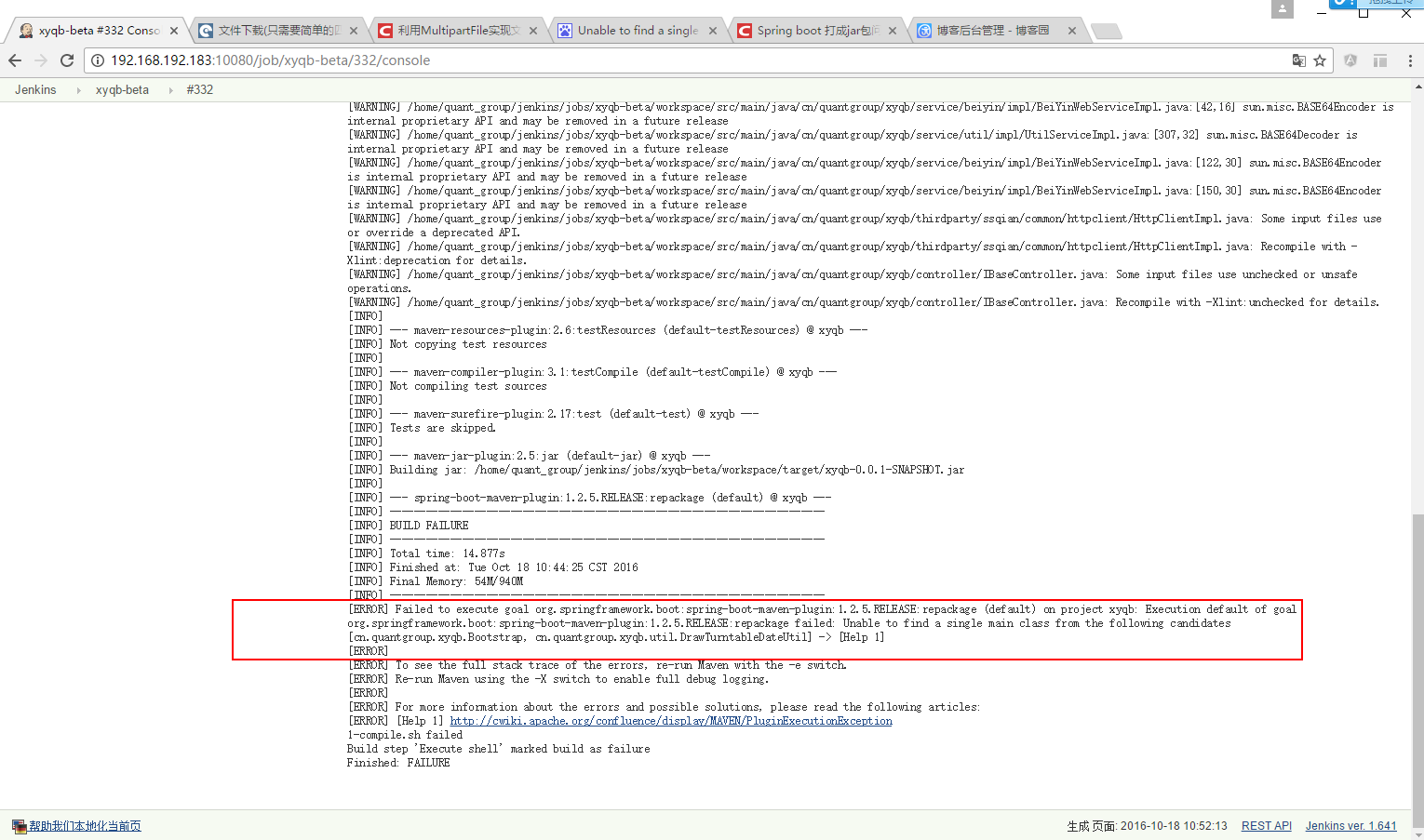
1.3、解决办法
查看着两个类,发现两个类中确实两个类中均有一个main方法,去掉一个多余的main方法,保留唯一的main方法。
2、jar中没有主清单属性
2.1、问题描述
生产对应的jar包之后,通过一下命令运行spring boot程序,
java -jar information-0.0.1-SNAPSHOT.jar- 1
- 1

2.2、问题分析
查找资料发现为最后生成的jar包中的META-INF/MANIFEST.MF文件,没有设置主函数信息。猜想是pom.xml设置的问题,比对网上的设置,发现多数配置都是如下:
    <build>

        <plugins>

            <plugin>

                <groupId>org.apache.maven.plugins</groupId>

                <artifactId>maven-compiler-plugin</artifactId>

                <configuration>

                    <source>1.8</source>

                    <target>1.8</target>

                </configuration>

            </plugin>

            <plugin>

                <groupId>org.springframework.boot</groupId>

                <artifactId>spring-boot-maven-plugin</artifactId>

                <configuration>

                    <maimClass>com.hhly.InformationApplication</maimClass>

                </configuration>

                <executions>

                    <execution>

                        <goals>

                            <goal>repackage</goal>

                        </goals>

                    </execution>

                </executions>

            </plugin>

        </plugins>

    </build>
比对自己的设置发现:自己在标签外面还包了一个 pluginManagement标签。
2.3、解决办法
去掉pluginManagement标签。
3、Property ‘sqlSessionFactory’ or ‘sqlSessionTemplate’ are required
3.1、问题描述
首先通过maven clean,然后再执行maven build,在执行main函数时会出现下面错误,详细日志如下:
2016-09-09 18:29:43.419  WARN 37076 --- [ost-startStop-1] o.s.b.f.s.DefaultListableBeanFactory : Bean creation exception on non-lazy FactoryBean type

check: org.springframework.beans.factory.BeanCreationException: Error creating bean with name 'userMapper' defined in file [D:\neon-workspace\information

\target\classes\com\hhly\dao\UserMapper.class]: Invocation of init method failed; nested exception is java.lang.IllegalArgumentException: Property

'sqlSessionFactory' or 'sqlSessionTemplate' are required
3.2、问题分析
同样的代码,在通过Alt + F5更新项目,然后maven build生成jar包,最后执行的main的时候也就不会报错。
3.3、解决办法
调整打包顺序如下:
1、Alt + F5
2、maven build
POM 文件中添加了“org.springframework.boot:spring-boot-maven-plugin”插件。在添加了该插件之后,当运行“mvn package”进行打包时,会打包成一个可以直接运行的 JAR 文件,使用“Java -jar”命令就可以直接运行。这在很大程度上简化了应用的部署,只需要安装了 JRE 就可以运行。
可以在POM中,指定生成 的是Jar还是War。
<project xmlns="http://maven.apache.org/POM/4.0.0" xmlns:xsi="http://www.w3.org/2001/XMLSchema-instance"
xsi:schemaLocation="http://maven.apache.org/POM/4.0.0 http://maven.apache.org/xsd/maven-4.0.0.xsd">
<!-- ... -->
<packaging>jar</packaging>
<!-- ... -->
</project>
你还可以指定要执行的类,如果不指定的话,Spring会找有这个【public static void main(String[] args)】方法的类,当做可执行的类。
如果你想指定的话,可以用下面两个方法:
1,如果你的POM是继承spring-boot-starter-parent的话,只需要下面的指定就行。
<properties>

    <!-- The main class to start by executing java -jar -->

    <start-class>com.mycorp.starter.HelloWorldApplication</start-class>

</properties>
2,如果你的POM不是继承spring-boot-starter-parent的话,需要下面的指定。
    <plugin>

      <groupId>org.springframework.boot</groupId>

      <artifactId>spring-boot-maven-plugin</artifactId>

      <version>1.3.5.RELEASE</version>

      <configuration>

        <mainClass>${start-class}</mainClass>

        <layout>ZIP</layout>

      </configuration>

      <executions>

        <execution>

          <goals>

            <goal>repackage</goal>

          </goals>

        </execution>

      </executions>

    </plugin>
from:
http://docs.spring.io/spring-boot/docs/current/maven-plugin/usage.html
http://stackoverflow.com/questions/23217002/how-do-i-tell-spring-boot-which-main-class-to-use-for-the-executable-jar
http://docs.spring.io/spring-boot/docs/current/maven-plugin/repackage-mojo.html
http://udn.yyuap.com/doc/Spring-Boot-Reference-Guide/III.%20Using%20Spring%20Boot/13.1.4.%20Using%20the%20Spring%20Boot%20Maven%20plugin.html
http://www.ibm.com/developerworks/cn/java/j-lo-spring-boot/#listing1
Spring boot 打成jar包问题总结的更多相关文章
- 【转】Spring boot 打成jar包问题总结
http://www.cnblogs.com/xingzc/p/5972488.html 1.Unable to find a single main class from the following ...
- spring boot将jar包转换成war包发布
spring boot将jar包转换成war包发布步骤 将<packaging>jar</packaging>修改为<packaging>war</packa ...
- Spring Boot由jar包转成war包
Spring Boot由jar包转成war包 spring boot 默认是以jar包形式启动web程序,在新建spring boot项目时候可以选择war包的启动方式. 建议在开发的时候建立以jar ...
- spring boot 打jar包,获取resource路径下的文件
前言:最近在spring boot项目静态类中获取resource路径下文件,在idea中启动都可以获取,但是打包后变成了jar包 就无法获取到. 我想到了两种方法,一种是根据http访问静态资源比如 ...
- 在Docker容器中运行Spring Boot的jar包 jar外的配置文件无法生效
Spring Boot加载配置文件,默认会从几个固定位置搜索一下看看有没有配置文件 ——application.properties或者bootstrap.properties(如果你使用了sprin ...
- Spring Boot 以 jar 包方式运行在后台
spring-boot jar 包方式启动: 首先,为了防止和常用的 Tomcat 8080 端口冲突,将 Spring-boot 项目的端口号设置为 9090. 具体方法:在 application ...
- Spring Boot导出jar包发布
一:事由 现在的项目组开发项目使用的是Spring Boot的技术,开发的时候是直接通过一个入口主函数来启动项目的.如果将项目交给客户,怎样才能正确的发布运行呢?百度了一下有关的知识,大概了解到是通过 ...
- spring boot打jar包(maven对jar和lib分离)
spring boot intellij Ide打包有两种方式: 1.maven:熟悉.方便配置灵活 2.Build artifacts:操作比较复杂,jar和lib包分离 重点讲maven如何支持j ...
- Spring Boot 发布 jar 包转为 war 包秘籍。
Spring Boot是支持发布jar包和war的,但它推荐的是使用jar形式发布.使用jar包比较方便,但如果是频繁修改更新的项目,需要打补丁包,那这么大的jar包上传都是问题.所以,jar包不一定 ...
随机推荐
- ServletContext
1.为什么需要servletContext 需求1 需求2 --------------->解决之道servletContext servletContext 1.ServletC ...
- C语言二维数组中的指针问题
#include "stdio.h" void main() { int a[5][5]; int i,j; for (i=0;i<5;i++) { for (j=0;j&l ...
- 怎样让Oracle支持中文? 语言_地域.字符集
暂时不涉及数据库业务,但是今天入库的时候中文入库报错,考虑可能是字体不支持,留待备用. 来源:Linux社区 作者:robertkun 语言_地域.字符集SIMPLIFIED CHINESE_CHI ...
- GDB 修改当前判断函数的返回值(即修改寄存器的值)的方法
工作中遇到的问题: 在GDB调试时要进入下边该判断后边的函数,而m_EtherDecode.Chk_MakeSure_IP_Pkt(pPacket,dwPacketLen)的返回值是false,所以需 ...
- 一个Struts2的实例
对Web应用程序而言,需要跨越HTTP协议的两个障碍——无状态和基于文本. 在没有使用struts的时候,你会有一个很真切的体会,就是如何把html页面上的数据提交给后台处理,以什么格式提交? 这是个 ...
- 网页JQ基础之jq-隐藏以及显示特效
简单的 隐藏以及显示的 JQ 的代码如下: <!DOCTYPE html> <html> <head> <script src="/jquery/j ...
- css使 同一行内的 文字和图片 垂直居中对齐?
设置父容器, 使 父容器 div 下的所有元素 都 垂直对齐: father-container *{ vertical-align:middle 找回密码
- Sublime Text 2 快捷键 (windows)
转自:http://istyles.blog.163.com/blog/static/1811003892011828111418654/ Lucifr翻译了 Sublime Text 2 快捷键 M ...
- CRect类
类CRect是对Windows结构RECT的封装,凡是能用RECT结构的地方都可以用CRect代替. 结构RECT表示一个矩形的位置和尺寸,其定义为: typedef struct tagRECT{ ...
- LYDSY模拟赛day9 2048
/* 大模拟题,做的时候思路还是比较清晰的 */ #include<iostream> #include<cstdio> #include<string> #inc ...