
【转】Spring boot 打成jar包问题总结
http://www.cnblogs.com/xingzc/p/5972488.html
1、Unable to find a single main class from the following candidates
1.1、问题描述
maven build时出现以下错误提示日志:
[ERROR] Failed to execute goal org.springframework.boot:spring-boot-maven-plugin:1.3.5.RELEASE:repackage (default) on project information: Execution default of goal org.springframework.boot:spring-boot-maven-plugin:1.3.5.RELEASE:repackage failed: Unable to find a single main class from the following candidates [com.hhly.InformationApplication, com.hhly.test.Application] -> [Help 1]1.2、日志分析
Unable to find a single main class from the following candidates [com.hhly.InformationApplication, com.hhly.test.Application]

// 不能从下面的候选类中找到单一的main类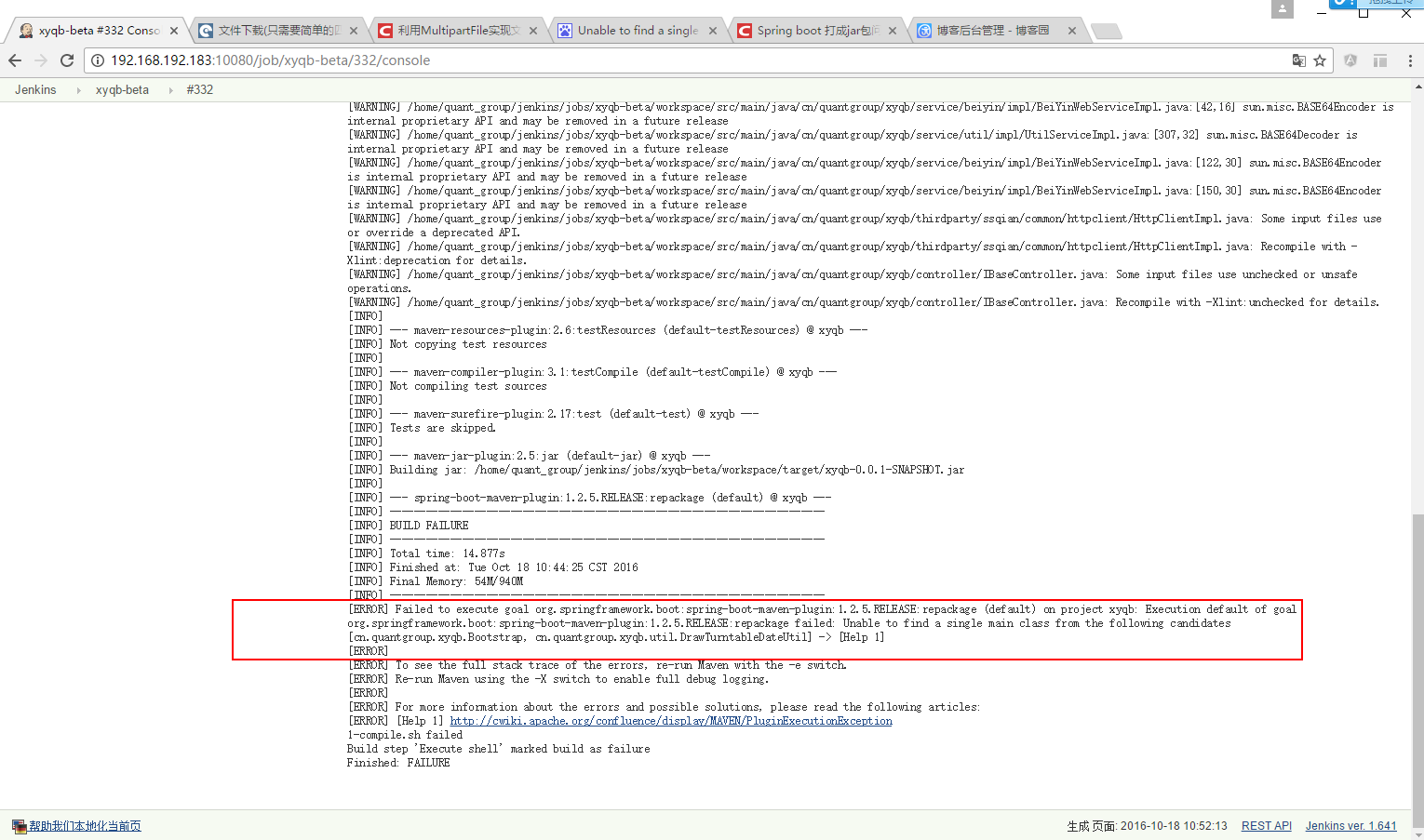
1.3、解决办法
查看着两个类,发现两个类中确实两个类中均有一个main方法,去掉一个多余的main方法,保留唯一的main方法。
2、jar中没有主清单属性
2.1、问题描述
生产对应的jar包之后,通过一下命令运行spring boot程序,
java -jar information-0.0.1-SNAPSHOT.jar- 1
- 1
2.2、问题分析
查找资料发现为最后生成的jar包中的META-INF/MANIFEST.MF文件,没有设置主函数信息。猜想是pom.xml设置的问题,比对网上的设置,发现多数配置都是如下:
    <build>

        <plugins>

            <plugin>

                <groupId>org.apache.maven.plugins</groupId>

                <artifactId>maven-compiler-plugin</artifactId>

                <configuration>

                    <source>1.8</source>

                    <target>1.8</target>

                </configuration>

            </plugin>

            <plugin>

                <groupId>org.springframework.boot</groupId>

                <artifactId>spring-boot-maven-plugin</artifactId>

                <configuration>

                    <maimClass>com.hhly.InformationApplication</maimClass>

                </configuration>

                <executions>

                    <execution>

                        <goals>

                            <goal>repackage</goal>

                        </goals>

                    </execution>

                </executions>

            </plugin>

        </plugins>

    </build>
比对自己的设置发现:自己在标签外面还包了一个 pluginManagement标签。
2.3、解决办法
去掉pluginManagement标签。
3、Property ‘sqlSessionFactory’ or ‘sqlSessionTemplate’ are required
3.1、问题描述
首先通过maven clean,然后再执行maven build,在执行main函数时会出现下面错误,详细日志如下:
2016-09-09 18:29:43.419  WARN 37076 --- [ost-startStop-1] o.s.b.f.s.DefaultListableBeanFactory : Bean creation exception on non-lazy FactoryBean type

check: org.springframework.beans.factory.BeanCreationException: Error creating bean with name 'userMapper' defined in file [D:\neon-workspace\information

\target\classes\com\hhly\dao\UserMapper.class]: Invocation of init method failed; nested exception is java.lang.IllegalArgumentException: Property

'sqlSessionFactory' or 'sqlSessionTemplate' are required
3.2、问题分析
同样的代码,在通过Alt + F5更新项目,然后maven build生成jar包,最后执行的main的时候也就不会报错。
3.3、解决办法
调整打包顺序如下:
1、Alt + F5
2、maven build
POM 文件中添加了“org.springframework.boot:spring-boot-maven-plugin”插件。在添加了该插件之后,当运行“mvn package”进行打包时,会打包成一个可以直接运行的 JAR 文件,使用“Java -jar”命令就可以直接运行。这在很大程度上简化了应用的部署,只需要安装了 JRE 就可以运行。
可以在POM中,指定生成 的是Jar还是War。
<project xmlns="http://maven.apache.org/POM/4.0.0" xmlns:xsi="http://www.w3.org/2001/XMLSchema-instance"
xsi:schemaLocation="http://maven.apache.org/POM/4.0.0 http://maven.apache.org/xsd/maven-4.0.0.xsd">
<!-- ... -->
<packaging>jar</packaging>
<!-- ... -->
</project>
你还可以指定要执行的类,如果不指定的话,Spring会找有这个【public static void main(String[] args)】方法的类,当做可执行的类。
如果你想指定的话,可以用下面两个方法:
1,如果你的POM是继承spring-boot-starter-parent的话,只需要下面的指定就行。
<properties>

    <!-- The main class to start by executing java -jar -->

    <start-class>com.mycorp.starter.HelloWorldApplication</start-class>

</properties>
2,如果你的POM不是继承spring-boot-starter-parent的话,需要下面的指定。
    <plugin>

      <groupId>org.springframework.boot</groupId>

      <artifactId>spring-boot-maven-plugin</artifactId>

      <version>1.3.5.RELEASE</version>

      <configuration>

        <mainClass>${start-class}</mainClass>

        <layout>ZIP</layout>

      </configuration>

      <executions>

        <execution>

          <goals>

            <goal>repackage</goal>

          </goals>

        </execution>

      </executions>

    </plugin>
from:
http://docs.spring.io/spring-boot/docs/current/maven-plugin/usage.html
http://stackoverflow.com/questions/23217002/how-do-i-tell-spring-boot-which-main-class-to-use-for-the-executable-jar
http://docs.spring.io/spring-boot/docs/current/maven-plugin/repackage-mojo.html
http://udn.yyuap.com/doc/Spring-Boot-Reference-Guide/III.%20Using%20Spring%20Boot/13.1.4.%20Using%20the%20Spring%20Boot%20Maven%20plugin.html
http://www.ibm.com/developerworks/cn/java/j-lo-spring-boot/#listing1
【转】Spring boot 打成jar包问题总结的更多相关文章
- Spring boot 打成jar包问题总结
Spring boot 打成jar包问题总结 1.Unable to find a single main class from the following candidates 1.1.问题描述 m ...
- spring boot将jar包转换成war包发布
spring boot将jar包转换成war包发布步骤 将<packaging>jar</packaging>修改为<packaging>war</packa ...
- Spring Boot由jar包转成war包
Spring Boot由jar包转成war包 spring boot 默认是以jar包形式启动web程序,在新建spring boot项目时候可以选择war包的启动方式. 建议在开发的时候建立以jar ...
- spring boot 打jar包,获取resource路径下的文件
前言:最近在spring boot项目静态类中获取resource路径下文件,在idea中启动都可以获取,但是打包后变成了jar包 就无法获取到. 我想到了两种方法,一种是根据http访问静态资源比如 ...
- 在Docker容器中运行Spring Boot的jar包 jar外的配置文件无法生效
Spring Boot加载配置文件,默认会从几个固定位置搜索一下看看有没有配置文件 ——application.properties或者bootstrap.properties(如果你使用了sprin ...
- Spring Boot 以 jar 包方式运行在后台
spring-boot jar 包方式启动: 首先,为了防止和常用的 Tomcat 8080 端口冲突,将 Spring-boot 项目的端口号设置为 9090. 具体方法:在 application ...
- Spring Boot导出jar包发布
一:事由 现在的项目组开发项目使用的是Spring Boot的技术,开发的时候是直接通过一个入口主函数来启动项目的.如果将项目交给客户,怎样才能正确的发布运行呢?百度了一下有关的知识,大概了解到是通过 ...
- spring boot打jar包(maven对jar和lib分离)
spring boot intellij Ide打包有两种方式: 1.maven:熟悉.方便配置灵活 2.Build artifacts:操作比较复杂,jar和lib包分离 重点讲maven如何支持j ...
- Spring Boot 发布 jar 包转为 war 包秘籍。
Spring Boot是支持发布jar包和war的,但它推荐的是使用jar形式发布.使用jar包比较方便,但如果是频繁修改更新的项目,需要打补丁包,那这么大的jar包上传都是问题.所以,jar包不一定 ...
随机推荐
- TabLayout实现顶部导航栏(1)
TabLayout是android.support.design里的一个控件,使用它可以很方便的做出顶部导航和底部导航.类似于这样的,能设置选中时字体的颜色和选中时的图片. 首先我们在 build.g ...
- (转)linux sed命令就是这么简单
sed替换命令 原文:https://www.cnblogs.com/zd520pyx1314/p/6061337.html http://www.cnblogs.com/wangqiguo/p/67 ...
- 01-struts2配置详解
1 struts.xml配置详解 <?xml version="1.0" encoding="UTF-8"?> <!DOCTYPE strut ...
- git/github 代码托管图文教程
现在都流行将代码托管到github,使用版本控制工具git,现在让我们开始一步一步的将我们本地的代码托管到github上去吧 一. git的使用 1.下载git工具 2.下载好后安装时候注意要使用vi ...
- java去掉String里面的空格、换行符等
package com.ynet.utils; import java.util.regex.Matcher; import java.util.regex.Pattern; /** * Create ...
- java版两人聊天程序
server.java import java.io.*; import java.net.*; import java.text.SimpleDateFormat; import java.util ...
- HttpClient请求工具类
package com.yangche.utils; import org.apache.http.NameValuePair; import org.apache.http.client.Clien ...
- python发送邮件(带附件)
python通过stmp发送qq邮件,带附件 import smtplib from email.mime.multipart import MIMEMultipart from email.mime ...
- mysql的引擎和锁
- 基于CSS3的3D旋转效果
自从有了html5和css3,好多以前只能想想的华丽效果都可以上手实现了.3D 转换(个人认为3D变换更贴切^)就是其中之一.关于3D转换,可以阅读CSS3 3D transform变换,不过如此,文 ...